1. Introduction
This manual provides essential information for the safe and efficient use of your Belkin UltraCharge Pro 3-in-1 Magnetic Wireless Charging Dock. This device is designed to simultaneously charge your compatible iPhone, Apple Watch, and AirPods, offering a streamlined charging experience with advanced features like fast charging and active cooling.
For optimal performance and longevity of your device, please read these instructions thoroughly before use.
2. Product Overview
2.1. Package Contents
- 1 x Belkin UltraCharge Pro 3-in-1 Wireless Charging Dock
- 1 x 45W USB-C Power Supply Unit
- 1 x 60W 5ft / 1.5M USB-C to USB-C Cable
2.2. Key Features
- Qi2.2 Certified 25W Fast Charging: Delivers up to 25W for compatible iPhones and Qi2 devices.
- 3-in-1 Charging: Simultaneously charges iPhone, Apple Watch, and AirPods.
- ChillBoost Active Cooling Technology: Integrated fan with on/off control to maintain optimal charging temperatures and prevent device overheating.
- Magnetic Alignment: Ensures secure and precise placement for efficient charging.
- Adjustable Viewing Angle: Allows for comfortable viewing of your iPhone in both portrait and landscape modes.
- Premium Design: Constructed with a weighted chrome base and soft-touch silicone for stability and aesthetic appeal.
- Case Compatibility: Works with MagSafe compatible cases up to 5mm thick.
2.3. Product Diagram

Figure 1: Belkin UltraCharge Pro 3-in-1 Magnetic Wireless Charging Dock with iPhone, Apple Watch, and AirPods charging.
The image above displays the Belkin UltraCharge Pro 3-in-1 Magnetic Wireless Charging Dock in Sand color. It shows an iPhone magnetically attached to the main charging pad, an Apple Watch charging on its dedicated puck, and AirPods placed on the base charging pad. A 45W USB-C power adapter and cable are also visible, highlighting the complete charging solution.
2.4. Product Video Overview
Video 1: An overview of the Belkin UltraCharge Pro 3-in-1 Wireless Charger by Julia Bartrom, showcasing its features and design.
This video provides a visual demonstration of the Belkin UltraCharge Pro 3-in-1 Wireless Charger, highlighting its compact design, magnetic attachment for phones, and simultaneous charging capabilities for an iPhone, Apple Watch, and AirPods. It offers a dynamic view of the product in use.
3. Setup
Follow these steps to set up your charging dock:
- Connect the Power Supply: Plug the provided 60W 5ft / 1.5M USB-C to USB-C cable into the USB-C port on the back of the charging dock.
- Connect to Power Outlet: Insert the other end of the USB-C cable into the 45W USB-C Power Supply Unit, then plug the power supply unit into a wall outlet.
- Placement: Place the charging dock on a stable, flat surface.

Figure 2: Illustration of a tidy charging area using the Belkin 3-in-1 dock compared to a cluttered setup with multiple cables.
This image visually contrasts a cluttered charging area with multiple cables and adapters against a clean, organized setup utilizing the Belkin UltraCharge Pro 3-in-1 Wireless Charging Dock. It demonstrates how the single dock can replace several individual chargers, reducing cable clutter.
4. Operating Instructions
4.1. Charging Your iPhone
- Align your MagSafe-compatible iPhone (iPhone 12 series and later) with the magnetic charging pad. The magnets will securely snap your phone into place.
- The iPhone charging pad supports up to 25W fast charging for Qi2-enabled iPhones (iOS 26 and newer). For MagSafe iPhones (Series 12-15), it provides 15W charging.
- Your iPhone can be charged in both portrait and landscape orientations, supporting StandBy mode.
- The dock is compatible with MagSafe cases up to 5mm thick. If charging issues occur with a case, try removing it or using a MagSafe-compliant case.
4.2. Charging Your Apple Watch
- Place your Apple Watch on the dedicated charging puck located on the side arm of the dock.
- Fast charging is supported for Apple Watch Series 7 and later, including all Ultra models. Standard charging applies to earlier models.
4.3. Charging Your AirPods
- Place your AirPods with a wireless charging case on the base charging pad.
- The base provides up to 5W charging for your AirPods.
4.4. ChillBoost Active Cooling
- The charging dock features a built-in smart fan with an on/off switch to regulate temperature during high-speed charging.
- The fan automatically adjusts its speed based on temperature and operates only when a device is attached. A light hum is normal during operation.
- To disable the fan for silent operation (e.g., at night), use the on/off switch located on the dock. Note that disabling the fan may affect charging speed during prolonged high-power charging.
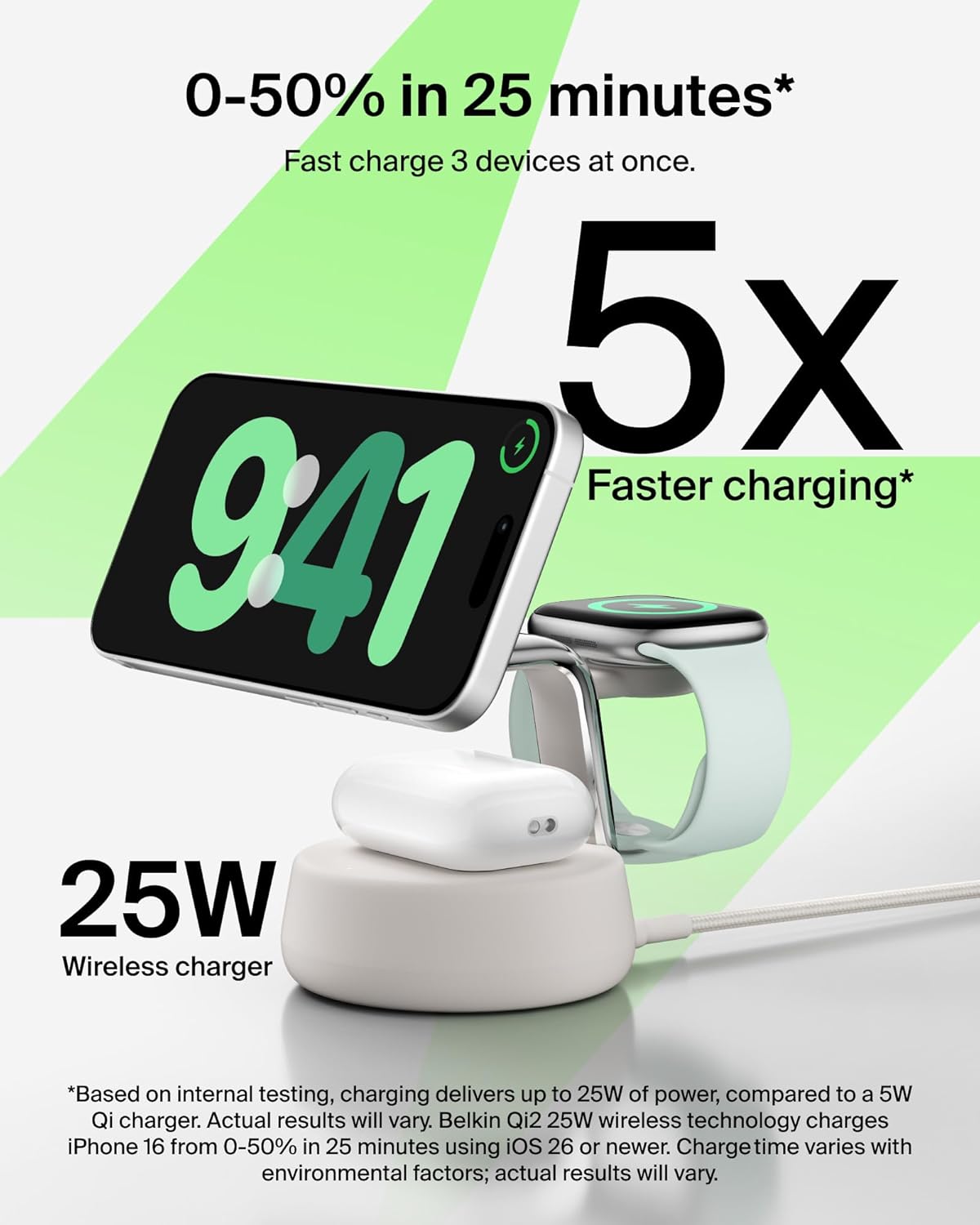
Figure 3: The Belkin UltraCharge Pro demonstrating fast charging capabilities for an iPhone, Apple Watch, and AirPods simultaneously.
This image highlights the fast charging capabilities of the Belkin UltraCharge Pro, showing an iPhone charging from 0-50% in 25 minutes and an Apple Watch Series 10 from 0-80% in 45 minutes. It emphasizes the 25W wireless charging and the ability to charge three devices concurrently.
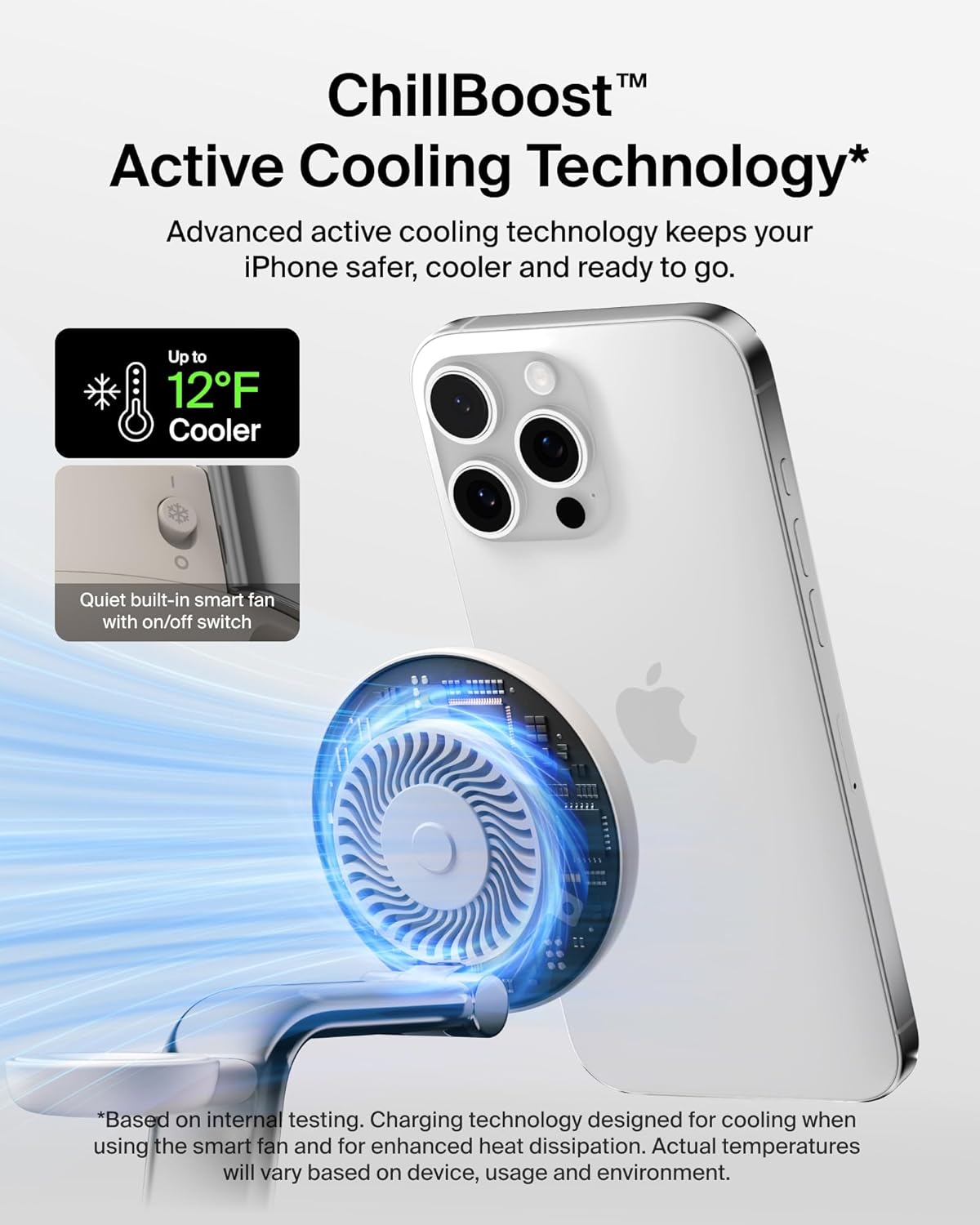
Figure 4: Visual representation of the ChillBoost Active Cooling Technology, showing a fan mechanism within the charging pad.
This image illustrates the ChillBoost Active Cooling Technology, which keeps your iPhone cooler by up to 12°F during charging. It depicts the internal smart fan with an on/off switch, designed for advanced thermal management to ensure safe and efficient fast charging.
5. Maintenance
To ensure the longevity and optimal performance of your Belkin UltraCharge Pro 3-in-1 Magnetic Wireless Charging Dock, follow these maintenance guidelines:
- Cleaning: Disconnect the power supply before cleaning. Use a soft, dry, lint-free cloth to wipe the surfaces of the charging dock. Avoid using abrasive cleaners, solvents, or aerosol sprays, as these can damage the finish or internal components.
- Avoid Liquid Contact: Do not expose the charging dock to liquids. If liquid spills on the device, immediately disconnect it from power and allow it to dry completely before re-use.
- Storage: When not in use for extended periods, store the charging dock in a cool, dry place away from direct sunlight and extreme temperatures.
- Cable Care: Handle the USB-C cable gently. Avoid bending or twisting it sharply, especially near the connectors, to prevent internal damage.
6. Troubleshooting
If you encounter issues with your charging dock, refer to the following common problems and solutions:
- Device Not Charging:
- Ensure the power supply unit is securely plugged into a working wall outlet and the USB-C cable is firmly connected to both the dock and the power supply.
- Verify that your device is correctly aligned on the charging pad(s). For magnetic charging, ensure a strong magnetic connection.
- If using a case, ensure it is MagSafe-compatible and no thicker than 5mm. Try charging without the case to rule out interference.
- Check for any foreign objects between your device and the charging pad that might obstruct charging.
- Slow Charging:
- Confirm your device supports the fast charging wattage provided by the dock (e.g., 25W for Qi2, 15W for MagSafe iPhones).
- Ensure the ChillBoost Active Cooling fan is enabled, especially during high-power charging, to prevent thermal throttling.
- Avoid using your device extensively while it is charging, as this can slow down the charging process.
- Overheating Device/Dock:
- Ensure the ChillBoost Active Cooling fan is turned on. The fan helps dissipate heat during charging.
- Remove any thick or non-MagSafe compatible cases that might trap heat.
- Ensure adequate ventilation around the charging dock. Do not place it in enclosed spaces.
- If overheating persists, discontinue use and contact customer support.
7. Specifications
| Feature | Detail |
|---|---|
| Model Number | WIZ040ttSD |
| Wireless Charging Output | Up to 25W (Qi2.2 MPP), 15W (MagSafe), 5W (AirPods), Fast Charging (Apple Watch) |
| Included Power Supply | 45W USB-C Power Supply Unit |
| Included Cable | 60W 5ft / 1.5M USB-C to USB-C Cable |
| Cooling Technology | ChillBoost Active Cooling (with on/off control) |
| Compatibility | iPhone 12 Series and later, AirPods with Wireless Charging Case, Apple Watch Series 7 and later (including Ultra models), Google Pixel 10 Pro XL, and other compatible Qi2 devices. |
| Dimensions | 6.46 x 5.47 x 4.25 inches |
| Item Weight | 1.84 pounds |
| Material | Housing made of minimum 85% post-consumer recycled plastic (excluding cable and PSU). Weighted chrome base, soft-touch silicone. |

Figure 5: A visual guide to the Belkin UltraCharge Pro's compatibility with various Apple devices.
This image details the compatibility of the charging dock with different Apple devices. It specifies that 25W fast charging is available for Qi2-enabled iPhones (Series 16 and later), 15W for MagSafe iPhones (Series 12-15), fast charging for Apple Watch Series 7 and later, and 5W for AirPods with wireless charging cases.
8. Warranty and Support
Your Belkin UltraCharge Pro 3-in-1 Magnetic Wireless Charging Dock comes with a 2-year warranty, ensuring peace of mind regarding product defects and performance.
Additionally, Belkin offers a Connected Equipment Warranty (CEW). Belkin will repair or replace electronic devices damaged by an electrical charge while properly connected to this product, up to $2500. For full details and terms of the Connected Equipment Warranty, please visit belkin.com/cew.
For further assistance, technical support, or warranty claims, please visit the official Belkin support website or contact their customer service.

Figure 6: Graphic illustrating the 2-year warranty and Connected Equipment Warranty offered by Belkin.
This image visually confirms the product's 2-year warranty and highlights the Connected Equipment Warranty, symbolized by a safe and the number '2', reinforcing Belkin's commitment to product protection and quality.


