
1. Introduction
The HOLDLAMP ZQ06201 450W LED Wall Wash Light Bar is a versatile lighting fixture designed for professional stage, event, and architectural applications. It features a combination of COB (Chip-on-Board) and RGB (Red, Green, Blue) LEDs, offering high brightness, uniform light distribution, and a wide range of color mixing capabilities. This manual provides essential information for the safe and effective operation, installation, and maintenance of your light bar.

Image 1: Multiple HOLDLAMP ZQ06201 LED Wall Wash Light Bars in a stage setting.
2. Package Contents
Please check the package carefully to ensure all items are present and undamaged. If any items are missing or damaged, contact your supplier immediately.
- Light Bar (ZQ06201)
- Power Cord
- Signal Cable (DMX)
- Mounting Hook
- Knob Gaskets (2)
- Instruction Manual

Image 2: Contents included in the product package.
3. Safety Information
- Always connect the light bar to a grounded power outlet.
- Ensure the power supply voltage matches the specified requirements (AC110-240V, 50/60Hz).
- Do not operate the unit if the power cord is damaged.
- Avoid direct eye exposure to the light source.
- Ensure proper ventilation to prevent overheating.
- Keep the unit away from water, moisture, and flammable materials.
- Only qualified personnel should perform installation, maintenance, or repairs.
4. Product Overview and Components
The HOLDLAMP ZQ06201 features a robust all-aluminum chassis for durability and efficient heat dissipation. It integrates both COB and RGB LEDs for diverse lighting effects.
Key Components:
- 6 COB LEDs: Main light sources for high brightness wall wash effects.
- 120 RGB LEDs: Auxiliary full-color light sources for dynamic color mixing and effects.
- 4-Digit Display: For menu navigation and mode selection.
- Control Buttons: MENU, UP, DOWN, ENTER for easy operation.
- DMX IN/OUT Ports: For DMX512 signal connection.
- POWER IN/OUT Ports: For power daisy-chaining.
- Cooling Fan: Ensures stable operation and longevity.
- Adjustable Brackets: Allows for 180-degree positioning.

Image 3: Detailed view of the light bar's components and features.

Image 4: Close-up of the optical lens, cooling fan, aluminum body, and control system ports.
5. Setup and Installation
5.1 Mounting
The light bar can be mounted in various positions using its adjustable brackets. Ensure the mounting surface or truss is capable of supporting the weight of the fixture(s).
- Floor Stand: Position the light bar on a stable, flat surface using the integrated brackets.
- Truss Mounting: Securely attach the light bar to a truss using appropriate clamps (not included) and the provided mounting hook. Always use a safety cable.
5.2 Power Connection
Connect the provided power cord to the POWER IN port on the light bar and then to a suitable grounded power outlet. Multiple units can be daisy-chained using the POWER OUT to POWER IN connections, ensuring the total current draw does not exceed the circuit's capacity.
5.3 DMX Connection (Optional)
For DMX control, connect a DMX cable from your DMX controller's output to the DMX IN port of the first light bar. For multiple units, connect the DMX OUT of the first unit to the DMX IN of the next, and so on. Ensure the last unit in the chain has a DMX terminator (not included) for stable signal transmission.

Image 5: Diagram illustrating DMX and Master-Slave connection setups.
6. Operating Modes
The light bar offers multiple control modes accessible via the 4-digit display and control buttons on the rear panel.
6.1 Control Panel Navigation
Use the MENU button to cycle through the main settings. Use UP/DOWN buttons to adjust values or select options. Press ENTER to confirm your selection.
6.2 DMX Mode
This mode allows external control via a DMX512 controller. The light bar supports 8-channel or 13-channel modes. Refer to the DMX chart in the specifications section for detailed channel functions. DMX512 point-by-point control allows flexible adjustment of each light source's brightness.
6.3 Auto-Run Mode
The light bar has 50 built-in auto-run lighting effects. Select this mode to cycle through pre-programmed patterns and colors. The speed of these effects can be adjusted.
6.4 Sound-Activated Mode
In this mode, the light bar reacts to ambient sound. The MIC sensitivity can be adjusted to fine-tune its response to music or other audio inputs.
6.5 Master-Slave Mode
Connect multiple units via DMX cables. Set one unit as the 'Master' and the others as 'Slave' units. The slave units will then mirror the master unit's operation, allowing synchronized lighting effects without a dedicated DMX controller.
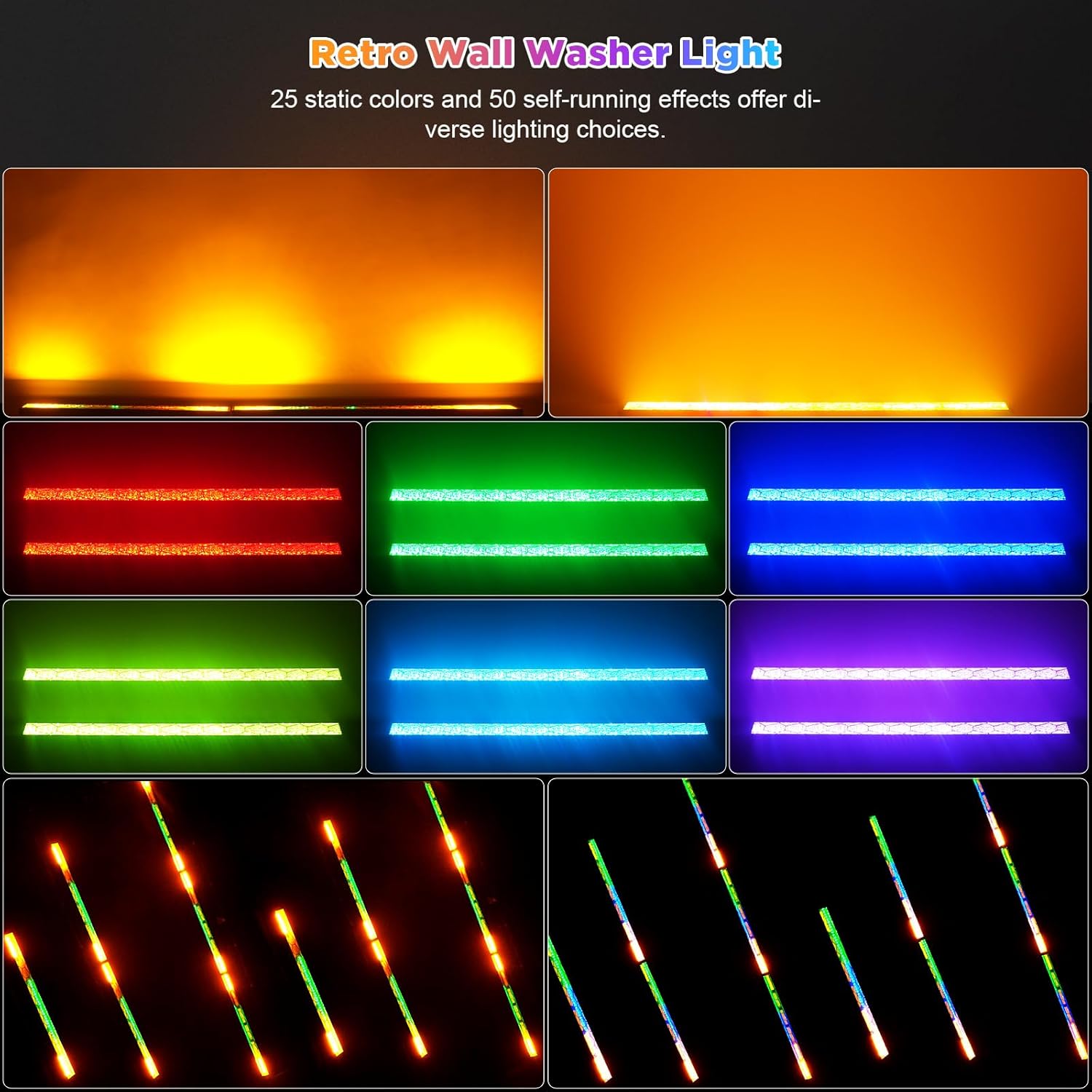
Image 6: Examples of static colors and dynamic self-running effects.
6.6 Lighting Effects
- COB Wall Wash Effects: Provides a powerful, uniform wash of light.
- RGB Lighting Effects: Offers 25 static colors and dynamic mixed-color patterns.
- Linear Dimming: Smooth 0-100% brightness adjustment.
- Strobe: Adjustable strobe rate from 1-20Hz.

Image 7: COB and RGB LED light sources with CRI ≥ 90 for superior color quality.
6.7 Video Demonstration

Video 1: This video demonstrates the various lighting effects and control modes of the HOLDLAMP ZQ06201 LED Wall Wash Light Bar, including COB LED effects, RGB lighting effects, 0-100% linear dimming, strobe functions, DMX console control, auto mode, and sound-activated mode. It also highlights the 4-digit display and control buttons, and provides a summary of technical parameters.
7. Maintenance
- Cleaning: Regularly clean the lens and housing with a soft, lint-free cloth. Do not use abrasive cleaners or solvents.
- Inspection: Periodically check power and DMX cables for any signs of damage.
- Ventilation: Ensure the cooling fan and vents are free from dust and obstructions to maintain optimal performance.
- Storage: When not in use, store the light bar in a dry, dust-free environment.
8. Troubleshooting
| Problem | Possible Cause | Solution |
|---|---|---|
| No power | Power cord disconnected, faulty outlet, blown fuse. | Check power connections, try a different outlet, inspect fuse. |
| No light output | Unit in standby, dimmer at 0%, internal fault. | Check display settings, increase dimmer level, contact support. |
| DMX control issues | Incorrect DMX address, faulty cable, missing terminator, DMX controller issue. | Verify DMX address, check cables, use a DMX terminator, test with another controller. |
| Sound activation not working | MIC sensitivity too low, no sound input. | Increase MIC sensitivity, ensure adequate sound input near the unit. |
9. Specifications
| Parameter | Value |
|---|---|
| Rated Voltage | AC110 - 240V, 50 / 60Hz |
| Lamp Beads | 6 COB LED + 120 RGB LED |
| Light Angle | 120 Degrees |
| Optimal Projection Distance | 5-10M |
| Lighting Effects | COB Wall Wash Effects + RGB Horse Running Effects |
| Dimming | 0-100% Linear Dimming |
| Strobe | 1 - 20Hz |
| Working Mode | D-M-X512 Signal / Master-Slave / Self-Propelled / Voice Control |
| Channel | 8 / 13CH |
| Surface Display | 4-digit Display |
| Protection Level | IP20 |
| Product Size (L x W x H) | 96 x 8 x 9 cm (37.8 x 3.2 x 3.5 inches) |
| Product Net Weight | 2.8 kg / 6.17 lbs |
| Material | Aluminum |

Image 8: Technical product parameters and dimensions.
10. Warranty and Support
This HOLDLAMP ZQ06201 LED Wall Wash Light Bar comes with a 90-day manufacturer's warranty from the date of purchase. This warranty covers defects in materials and workmanship under normal use.
For technical support, warranty claims, or any questions regarding your product, please contact your retailer or the manufacturer directly. Please have your purchase receipt and product model number (ZQ06201) available when contacting support.