
COMHOMA B400
COMHOMA B400 Makeup Vanity Desk with Mirror and Lights User Manual
Model: B400 | Brand: COMHOMA
1. Product Overview
The COMHOMA B400 Makeup Vanity Desk is a versatile 3-in-1 furniture piece designed for various uses, including a makeup vanity, office desk, or nightstand. It features an adjustable LED mirror, a visible glass top for organized storage, multiple drawers, and a comfortable storage stool with hidden casters.

Image 1.1: Overview of the COMHOMA B400 Makeup Vanity Desk, showcasing its compact design and various storage options.
2. Safety Information
- Assembly may require tools. Always follow safety guidelines provided in the assembly instructions.
- Always unplug the vanity desk from the power source and allow LED lights to cool before cleaning or performing any maintenance.
- Keep all electrical components, including the power cord and LED light connections, away from water or damp environments to prevent electrical hazards.
- Do not exceed the recommended weight limit of 44 pounds (20 kg) on the glass top to prevent damage or injury.
- Ensure all screws and fasteners are securely tightened after assembly and periodically check for any loosening.
3. Setup and Assembly
The COMHOMA B400 vanity desk requires assembly. It is recommended to follow the detailed assembly instructions provided in the product packaging. Ensure all components are present before beginning assembly.
3.1. Unpacking
- Carefully remove all parts from the packaging.
- Verify that all components listed in the parts list are included.
- Place components on a soft, clean surface to prevent scratches during assembly.
3.2. Assembly Steps (General Guidelines)
- Assemble the main desk frame according to the provided diagrams.
- Install the drawers into their respective slots. Ensure smooth sliding.
- Attach the mirror unit to the desk. Connect the LED light power cable as instructed.
- Assemble the storage stool, including the padded top and hidden casters.
- Secure any additional features such as the multi-purpose hook or fold-up panel.

Image 3.1: Visual representation of the vanity desk's components and features, aiding in assembly understanding.
4. Operating Instructions
4.1. LED Mirror Lights
The integrated LED mirror offers three lighting modes (cool, warm, natural) and adjustable brightness.
- Changing Lighting Mode: Short press the touch switch on the mirror to cycle through Warm Light, Natural Light, and Cold Light modes.
- Adjusting Brightness: Long press the touch switch to continuously adjust the brightness level from 0% to 100%. Release when the desired brightness is achieved.

Image 4.1: Diagram illustrating the touch control for LED mirror light modes and brightness adjustment.
4.2. Storage Features
- Visible Glass Top: The transparent glass top allows for easy viewing and access to stored items like jewelry or cosmetics.
- Flip-Top Storage: Lift the mirror panel to access additional hidden storage compartments.
- Drawers: Utilize the three sliding drawers for organized storage of various items.
- Storage Stool: The padded stool features hidden storage beneath its seat. The hidden casters allow for easy movement.
- Multi-Purpose Hook: Use the integrated hook to hang items such as handbags, headphones, or hair dryers.

Image 4.2: Detailed view of the visible glass desktop, showing organized storage for cosmetics and accessories.
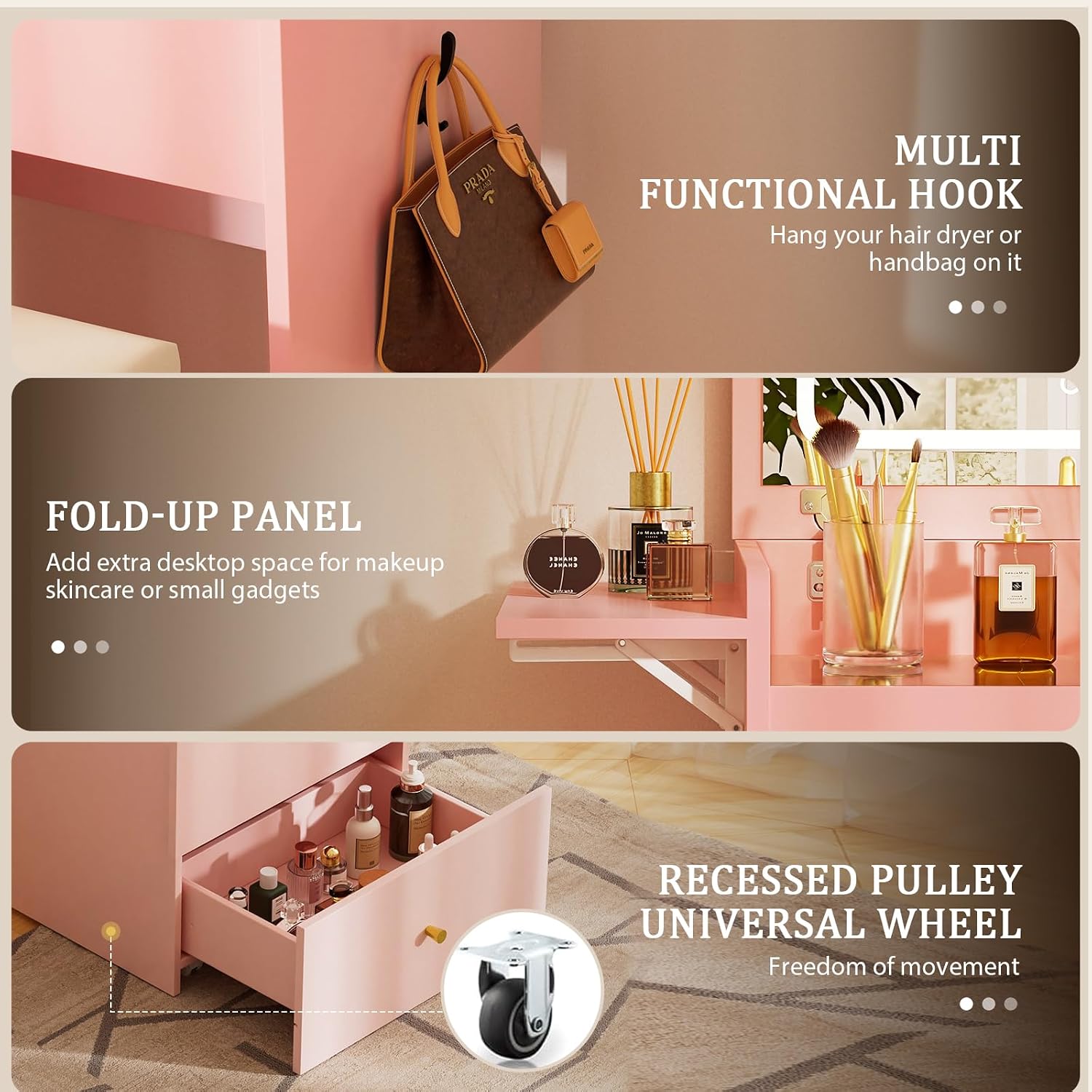
Image 4.3: Illustration of the multi-functional hook, fold-up panel, and the stool's recessed casters for mobility.
4.3. 3-in-1 Functionality
The vanity desk can be configured for three primary uses:
- Makeup Vanity: Use with the mirror upright and LED lights activated for makeup application.
- Office Desk: Fold down the mirror panel to create a flat desktop surface suitable for working or studying. The extendable panel can add extra space.
- Nightstand: Position the unit next to a bed for use as a nightstand, utilizing its storage and surface area.

Image 4.4: Visual guide demonstrating the desk's transformation into a nightstand, office desk, and vanity desk.

Image 4.5: Close-up of the extendable panel, providing additional surface area when needed.
5. Maintenance
- Cleaning Surfaces: Use a soft, damp cloth to wipe down wood and glass surfaces. Avoid abrasive cleaners or harsh chemicals that may damage the finish.
- Mirror Care: Clean the mirror with a glass cleaner and a lint-free cloth. Ensure the vanity is unplugged before cleaning the mirror or LED lights.
- Drawer Maintenance: Periodically check drawer slides for smooth operation. If sticking occurs, clean the tracks and apply a silicone-based lubricant if necessary.
- Stool Casters: Keep the stool casters free of hair and debris to ensure smooth rolling.
- Fastener Check: Regularly inspect all screws and fasteners to ensure they remain tight. Re-tighten as needed to maintain stability.
6. Troubleshooting
| Problem | Possible Cause | Solution |
|---|---|---|
| LED lights not turning on. | Power cable not connected; power outlet issue; faulty switch. | Ensure the power cable is securely plugged into the vanity and a working outlet. Check the touch switch for responsiveness. |
| Drawers are difficult to open or close. | Misalignment during assembly; obstruction in the drawer slide; worn slides. | Check drawer alignment and re-adjust if necessary. Remove any objects obstructing the slides. Clean and lubricate slides if needed. |
| Stool casters not rolling smoothly. | Debris caught in casters; casters not properly installed. | Clean any hair or debris from the caster wheels. Ensure casters are fully inserted and secure. |
| Vanity feels unstable or wobbly. | Loose fasteners; uneven floor. | Check and tighten all assembly screws. Place the vanity on a level surface or use shims if the floor is uneven. |
7. Specifications
| Feature | Detail |
|---|---|
| Brand | COMHOMA |
| Model Number | B400 |
| Product Dimensions (Desk) | 19.49"D x 9.84"W x 40.75"H (49.5 x 25 x 103.5 cm) |
| Product Dimensions (Stool) | 18"W x 14.96"D x 19.68"H (45.7 x 38 x 50 cm) |
| Item Weight | 44 pounds (20 kg) |
| Material | Wood (FSC-Certified) |
| Mirror Type | LED HD Mirror with 3 Light Modes (Warm, Natural, Cold) and Adjustable Brightness |
| Storage Features | Visible Glass Top, Flip-Top Storage, 3 Sliding Drawers, Storage Stool, Multi-Purpose Hook |
| Functionality | 3-in-1 (Vanity Desk, Office Desk, Nightstand) |
| UPC | 810170308130 |
| Max Weight on Glass Top | 44 pounds (20 kg) |

Image 7.1: Dimensional drawing of the vanity desk and accompanying stool.
8. Warranty and Support
For specific warranty information regarding your COMHOMA B400 Makeup Vanity Desk, please refer to the warranty card included in your product packaging or contact your retailer directly. Warranty terms and conditions may vary.
For technical support, missing parts, or any other inquiries, please contact COMHOMA customer service through their official website or the contact information provided with your purchase.
You can visit the official COMHOMA store for more information: COMHOMA Store
Ask a question about this manual
Ask about setup, troubleshooting, compatibility, parts, safety, or missing instructions. Manuals+ will review the question and use this page’s manual context to help answer it.