Introduction
This manual provides comprehensive instructions for the safe and effective use of your TELESIN Fun Shot Magnetic Phone Camera Grip. Designed to enhance your mobile photography and videography experience, this ergonomic grip transforms your smartphone into a more traditional camera setup. Please read this manual thoroughly before use and retain it for future reference.
Package Contents
- Phone Camera Shutter Grip ×1
- Magnetic Ring ×1
- Phone Lanyard ×1
- USB-C Cable ×1
- Instruction Manual ×1
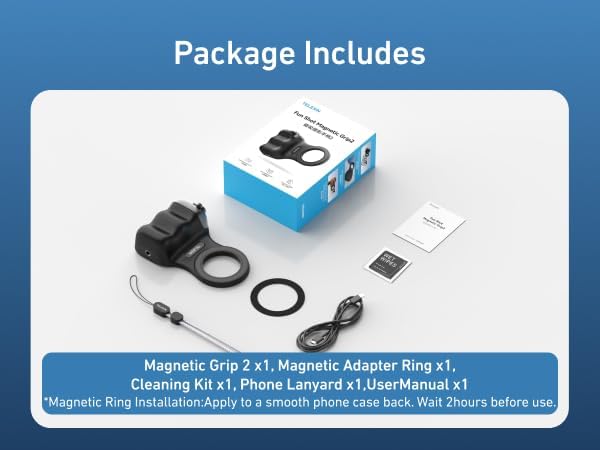
Image: All items included in the TELESIN Fun Shot Magnetic Phone Camera Grip package.
Product Overview
The TELESIN Fun Shot Magnetic Phone Camera Grip is engineered for comfort and stability, featuring a detachable wireless remote and strong magnetic attachment. It is designed to provide a DSLR-like shooting experience with your smartphone.

Image: Overview of the TELESIN Fun Shot Magnetic Phone Camera Grip, highlighting its components and usage scenarios.

Image: Dimensions and weight of the TELESIN Fun Shot Magnetic Phone Camera Grip, illustrating its compact and lightweight design.
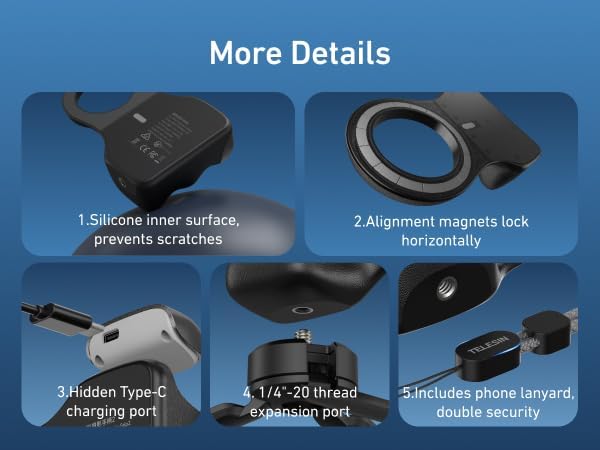
Image: Close-up view of various features such as the silicone inner surface, alignment magnets, hidden Type-C charging port, 1/4-inch tripod expansion port, and included phone lanyard.
Setup
Attaching the Grip
- For MagSafe-compatible phones (iPhone 12 and newer) or cases: Simply align the magnetic grip with the MagSafe area on your phone or case until it snaps securely into place.
- For non-MagSafe phones or cases: Apply the included Magnetic Ring to the back of your phone case. Ensure the surface is smooth and wait 2 hours before use. Then, attach the magnetic grip to the Magnetic Ring.

Image: Visual guide for attaching the grip to MagSafe and non-MagSafe compatible smartphones.
Pairing Bluetooth Remote
- Ensure the detachable wireless remote control is charged.
- Turn on Bluetooth on your smartphone.
- Press and hold the power button on the remote control until the indicator light flashes, indicating pairing mode.
- On your phone's Bluetooth settings, select 'Ulanzi' or 'TELESIN' (device name may vary) to pair.
- Once paired, the indicator light on the remote will stop flashing.
iPhone Specific Settings (for Zoom Functionality)
For iPhone users, after the first connection, please enable the Zoom function for full control. Follow these steps:
- Go to Settings.
- Navigate to Accessibility.
- Select Zoom and toggle it On.

Image: Step-by-step guide to enable iPhone Zoom accessibility settings for enhanced grip functionality.
Operating Instructions
Using the Shutter Button
- Power On/Off: Hold the shutter button for 2 seconds.
- Half-press: To focus the camera.
- Full-press: To click a photo or start/stop video recording.
Zoom Function
- Use the zoom lever on the grip to adjust the camera's zoom level.
Mode Switching
- Use the dedicated mode switch buttons to cycle between photo, video, portrait, and other available camera modes.
- Two half-presses can switch between front and rear cameras.

Image: Key controls on the grip, including the two-stage shutter, zoom lever, and mode switch buttons.
Using the Fill Light (if applicable)
The grip is compatible with TELESIN magnetic selfie light series for enhanced lighting. Attach the selfie light magnetically to the grip's MagSafe area.
Using as a Stand
The ergonomic design allows the grip to function as a stable stand for your phone, suitable for watching videos or video calls.
Official Product Videos
Video: Demonstrates the TELESIN Magnetic Phone Camera Shutter Handle Grip in action, showcasing its ergonomic design and ease of use.
Video: Highlights the features of the TELESIN Smartphone Camera Grip, including its magnetic attachment and shutter functionality.
Video: A brief overview of the TELESIN Fun Shot Magnetic Phone Camera Grip, showing its compact design and quick setup.
Video: Showcases the TELESIN Fun Shot Phone Camera Grip, emphasizing its ease of use for various shooting angles.
Video: Demonstrates the upgraded magnetic phone camera grip, highlighting its compatibility and secure attachment.
Video: A user demonstrating how to charge the TELESIN Fun Shot Magnetic Phone Camera Grip.
Compatibility
The TELESIN Fun Shot Magnetic Phone Camera Grip is widely compatible with a broad range of smartphones:
- iPhone: iPhone 17 Pro Max/ iPhone 17 Pro/16/16 Pro/16 Pro Max/16 Plus/iPhone 15/15 Pro/15 Pro Max/15 Plus/14/14 Plus/ 14 Pro/14 Pro Max/13/13 Pro Max/12/12 Pro Max/11/11 Pro/11 Pro Max/X/XS/XR/ XS Max/8 plus.
- Android: Samsung Galaxy S22/S21/S10/10+/S9/S9+/S8/S8+/S7/S6/S6 edge, HUAWEI, Xiaomi, and other compatible Android devices.
Note: For non-MagSafe devices, a magnetic ring (included) must be applied to the phone case for secure attachment.
Charging
The detachable wireless remote control is rechargeable. Use the provided USB-C cable to charge the remote. The main grip unit also has a charging port for its internal battery, which powers the magnetic attachment and any integrated features like a fill light.
Maintenance
- Keep the grip clean by wiping it with a soft, dry cloth.
- Avoid exposing the device to extreme temperatures or moisture.
- Ensure the magnetic surfaces are free from debris to maintain strong attachment.
Troubleshooting
- Remote not pairing: Ensure the remote is charged and in pairing mode (flashing indicator light). Check your phone's Bluetooth settings and try re-pairing.
- Remote losing connection: The remote may automatically disconnect after 5 minutes of inactivity to conserve battery. Reconnect via Bluetooth settings if needed.
- Magnetic attachment is weak: Ensure the magnetic surfaces on both the grip and your phone/case are clean. For non-MagSafe phones, verify the magnetic ring is correctly applied and has had sufficient time to adhere.
- Zoom function not working on iPhone: Verify that the 'Zoom' accessibility feature is enabled in your iPhone settings as described in the Setup section.
Specifications
| Feature | Detail |
|---|---|
| Model Number | P5-MP-001BK-GPL-US |
| Item Weight | 109 grams (3.53 ounces) |
| Package Dimensions | 5.87 x 4.13 x 2.01 inches |
| Connectivity | Bluetooth |
| Special Features | Detachable Wireless Shutter Button, Ergonomic Design, Lightweight, Magnetic Grip, Rechargeable Battery |
| Battery | 1 Lithium Polymer battery (included) |
| Charging Port | USB-C |
| Tripod Connector | 1/4-inch thread |
Warranty and Support
For any questions or support regarding your TELESIN Fun Shot Magnetic Phone Camera Grip, please feel free to contact us. We are committed to providing excellent service and assistance.


