
havit H670BT
havit Space S1 Hybrid Adaptive Active Noise Cancelling Headphones User Manual
Model: H670BT
1. Introduction
The havit Space S1 Hybrid Adaptive Active Noise Cancelling Headphones (Model H670BT) are designed to provide an immersive audio experience with advanced noise cancellation technology. This manual provides essential information for setup, operation, maintenance, and troubleshooting to ensure optimal performance and longevity of your headphones.
2. What's in the Box
- havit Space S1 Wireless Headphones
- Travel Case
- User Manual
- Warranty Card
- Type-C Charging Cable
- 3.5mm 4-pole Audio Cable

3. Product Overview and Features
3.1. Key Features
- Hybrid Adaptive Active Noise Cancellation (ANC): Reduces ambient noise by up to -45dB, adapting to your environment for uninterrupted listening.
- Immersive Spatial Audio: Creates a 360° soundstage for a rich audio experience, powered by 40mm dynamic drivers.
- Extended Battery Life: Up to 100 hours of playtime with ANC off, or 72 hours with ANC on (at 60% volume).
- Dual Device Connection: Seamlessly switch between two connected devices (e.g., phone and laptop).
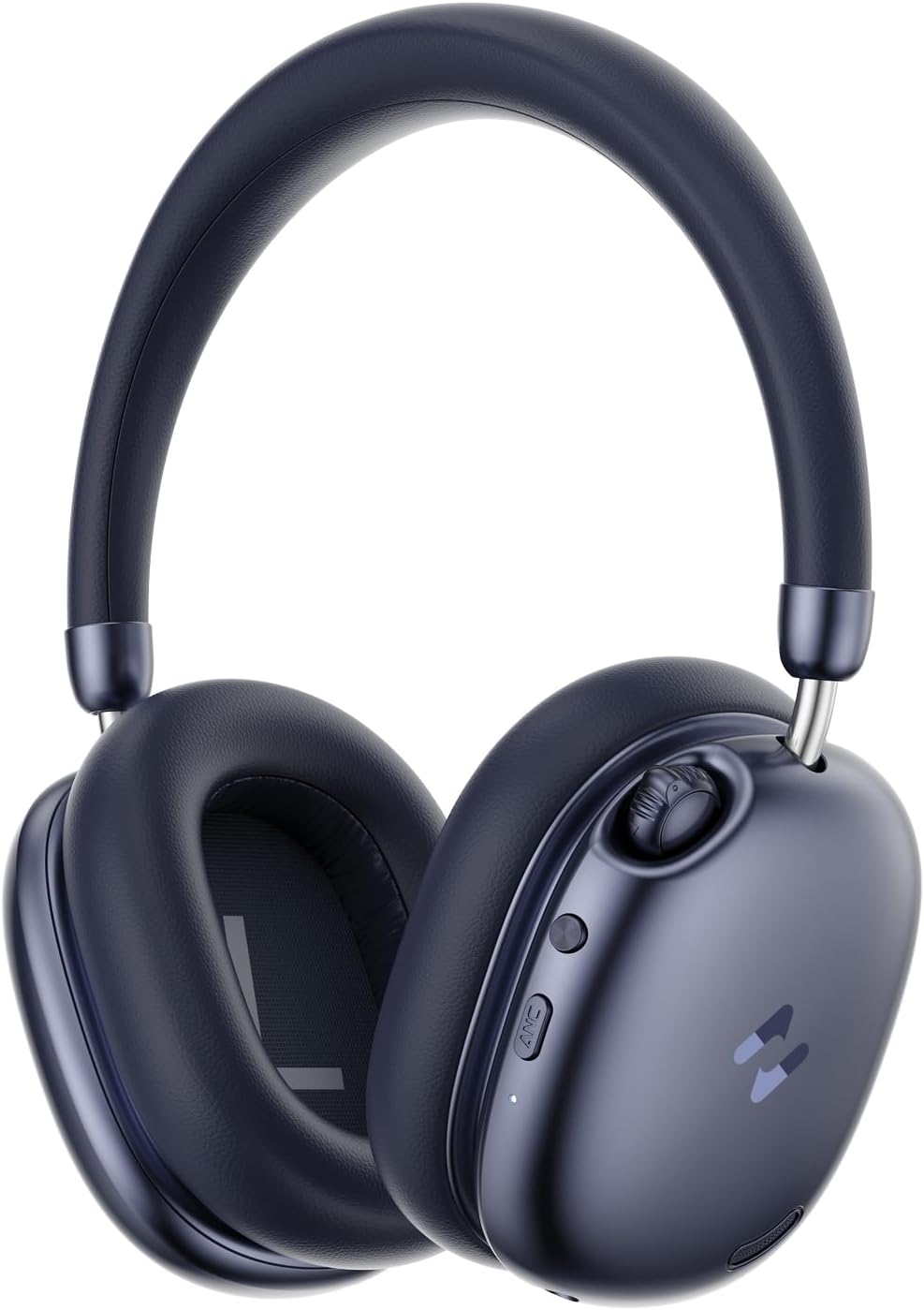
- Sleek Lever Control: Intuitive metal lever for volume adjustment and track skipping.
- Comfortable Design: Lightweight (280 grams) with soft protein earmuffs and an adjustable headband for long-lasting wear.
- Bluetooth 6.0: Ensures lower power consumption, faster data transfer, and stable dual-device connectivity.
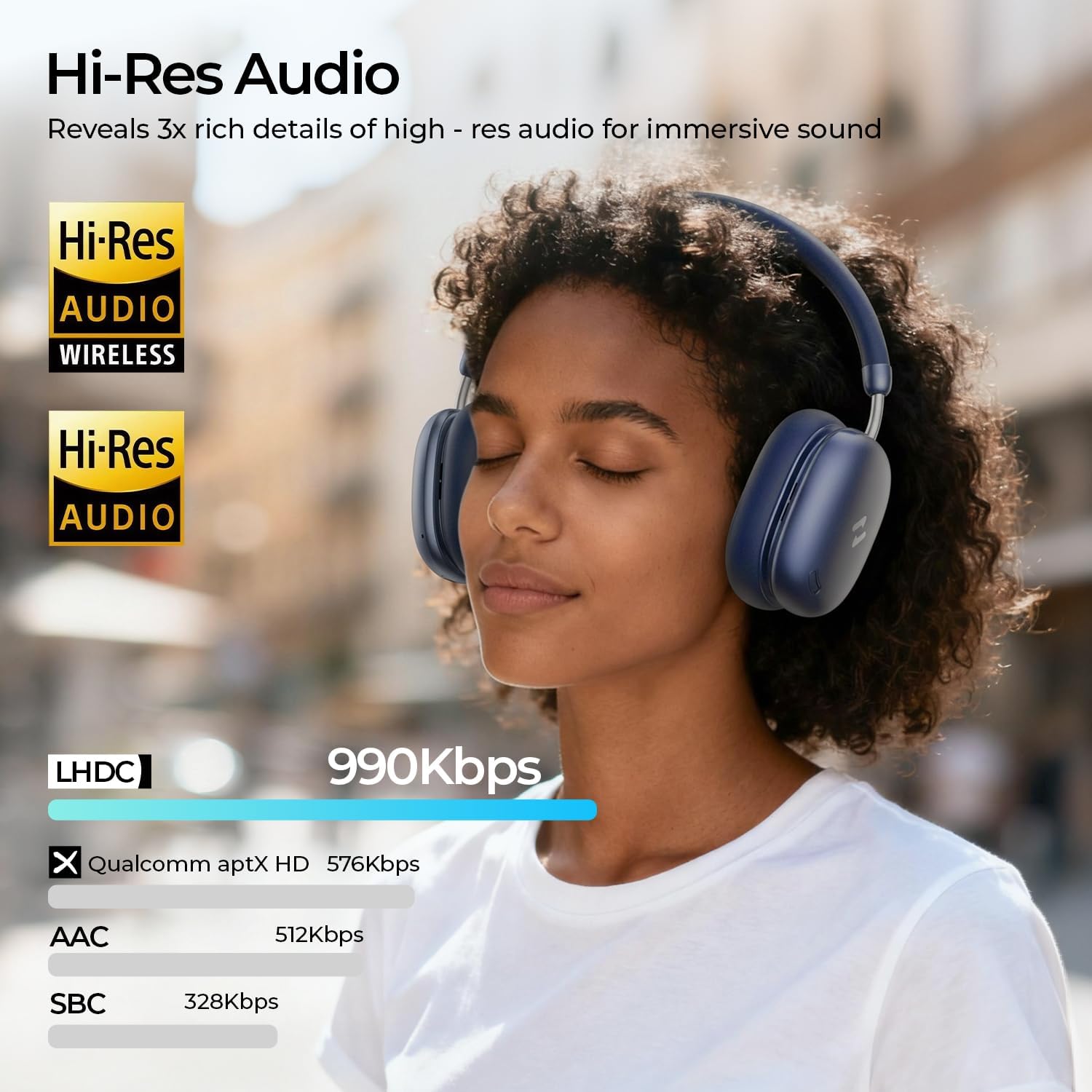
- LHDC Hi-Res Sound: Supports high-resolution audio for detailed sound reproduction.
- 5-Mic ENC: Enhances vocal clarity during calls by filtering ambient noise.
3.2. Design and Comfort
The Space S1 headphones feature a minimalist G2 curve with a matte finish and durable metal hinges. The memory foam ear cushions wrapped in protein leather provide comfort for extended listening sessions. The adjustable headband ensures a secure and comfortable fit for various head sizes.

4. Setup Instructions
4.1. Power On/Off
- To power on, press and hold the Power button until the indicator light illuminates.
- To power off, press and hold the Power button until the indicator light turns off.
4.2. Bluetooth Pairing
- Ensure the headphones are powered off.
- Press and hold the Power button for approximately 5 seconds until the indicator light flashes blue and red, indicating pairing mode.
- On your device (smartphone, tablet, computer), enable Bluetooth and search for available devices.
- Select "HAVIT SPACE S1" from the list of devices.
- Once connected, the indicator light will turn solid blue.
4.3. Dual Device Connection
The Space S1 headphones support simultaneous connection to two Bluetooth devices. After pairing with the first device, pair with the second device. The headphones will intelligently switch between devices based on audio playback or incoming calls.
4.4. Wired Connection
To use the headphones in wired mode, connect the provided 3.5mm audio cable to the headphone's 3.5mm jack and your audio source. This mode can be used even when the headphone battery is depleted.
5. Operating Instructions
5.1. Controls
- Power Button: Press and hold to power on/off.
- ANC Button: Press to cycle through ANC modes (ANC On, Transparency Mode, ANC Off).
- Sleek Lever Control:
- Flick up/down: Adjust volume.
- Press in: Play/Pause, Answer/End Call.
- Flick up and hold: Next track.
- Flick down and hold: Previous track.
5.2. ANC Modes
The headphones offer multiple noise control features:
- Active Noise Cancellation (ANC): Reduces external ambient noise.
- Adaptive Noise Cancellation: Automatically adjusts noise cancellation levels based on your environment.
- Transparency Mode: Allows you to hear your surroundings while listening to audio.
5.3. Spatial Audio
Activate Spatial Audio for an enhanced 360° sound experience, making audio feel more immersive.
5.4. Call Functionality
The integrated 5-mic ENC system ensures clear voice pickup during calls by filtering out ambient noise.

6. App Integration
Download the havit LIFE APP to customize your audio experience. The app allows you to:
- Adjust EQ settings with 7EQ Modes.
- Control ANC modes.
- Manage key settings for controls.
- Access game mode.
7. Charging
The headphones offer an impressive battery life of up to 100 hours with ANC off, and 72 hours with ANC on (at 60% volume). A full charge takes approximately 2 hours via the Type-C charging port.

8. Maintenance
- Clean the headphones regularly with a soft, dry cloth.
- Avoid exposing the headphones to extreme temperatures, moisture, or corrosive substances.
- Store the headphones in the provided travel case when not in use to protect them from damage.
9. Troubleshooting
9.1. No Power
- Ensure the headphones are fully charged.
- Press and hold the Power button for a few seconds to confirm it's not just in standby.
9.2. Pairing Issues
- Make sure the headphones are in pairing mode (flashing blue and red indicator).
- Ensure Bluetooth is enabled on your device and it's within range (up to 10 meters).
- Forget the device from your Bluetooth list and try pairing again.
9.3. Poor Sound Quality
- Check the audio source and ensure the volume is appropriately set.
- Ensure the headphones are fully charged.
- Move closer to your device to avoid interference.
- If using wired mode, ensure the 3.5mm cable is securely connected.
9.4. ANC Not Working Effectively
- Ensure ANC mode is activated via the ANC button or the havit LIFE APP.
- Adjust the fit of the headphones to ensure a good seal around your ears.
10. Specifications
| Feature | Detail |
|---|---|
| Model Name | H670BT |
| Connectivity Technology | Wireless (Bluetooth 6.0) |
| Bluetooth Range | 10 Meters |
| Noise Control | Active Noise Cancellation, Adaptive Noise Cancellation, Hybrid Noise Cancellation |
| Noise Control Features | Adjustable Levels, Transparency Mode |
| Audio Driver Type | Dynamic Driver (40mm) |
| Sensitivity | 120 dB |
| Impedance | 32 Ohms |
| Battery Life | 100 Hours (ANC off), 72 Hours (ANC on) |
| Charging Time | 2 Hours |
| Charging Port | Type-C |
| Headphones Jack | 3.5 mm Jack |
| Item Weight | 280 Grams (9.9 ounces) |
| Material | Polyurethane (PU) |
| Included Components | Travel Case, User Manual, Wireless Headphones |
11. Warranty and Support
Your havit Space S1 headphones come with a product warranty. Please refer to the included Warranty Card for detailed terms and conditions, including contact information for customer support.
Related documentsH670BT


Ask a question about this manual
Ask about setup, troubleshooting, compatibility, parts, safety, or missing instructions. Manuals+ will review the question and use this page’s manual context to help answer it.