
1. Product Overview
The Hupoaf Bluetooth 5.4 Speaker (Model V119) is a portable wireless speaker designed for high-quality audio experiences. It features 20W stereo deep bass, HD call functionality, colorful RGB lights, TF-Card and USB playback options, TWS pairing, and IP-X7 waterproofing.

Figure 1: Hupoaf Bluetooth 5.4 Speaker (Model V119) - Front View. This image displays the speaker's main body, power button, and input ports.
2. Package Contents
Please verify that all items are present in your package:
- 1 x Hupoaf Bluetooth Speaker (Model V119)
- 1 x USB-C Charging Cable (charging plug not included)
- 1 x User Manual
3. Setup Instructions
3.1 Charging the Speaker
- Connect the provided USB-C charging cable to the speaker's Type-C port.
- Connect the other end of the cable to a compatible USB power adapter (5V/2A recommended, not included).
- The charging indicator light will illuminate during charging and turn off when fully charged.
3.2 Power On/Off
- To power on, press and hold the power button for 2 seconds.
- To power off, press and hold the power button for 2 seconds.
3.3 Bluetooth Pairing
- Ensure the speaker is powered on and in Bluetooth pairing mode (indicated by a flashing blue light).
- On your device (smartphone, tablet, laptop), enable Bluetooth and search for available devices.
- Select "Hupoaf V119" from the list of devices.
- Once connected, the speaker will emit an audible confirmation, and the blue light will become solid.
3.4 True Wireless Stereo (TWS) Pairing
For an enhanced stereo experience, you can pair two Hupoaf V119 speakers together:
- Ensure both speakers are powered on and not connected to any other Bluetooth device.
- On one speaker, double-click the TWS button (often integrated with the power button or a dedicated button).
- The speakers will automatically search for and pair with each other. A confirmation tone will sound once connected.
- Once TWS paired, connect your device to one of the speakers via Bluetooth as described in section 3.3.
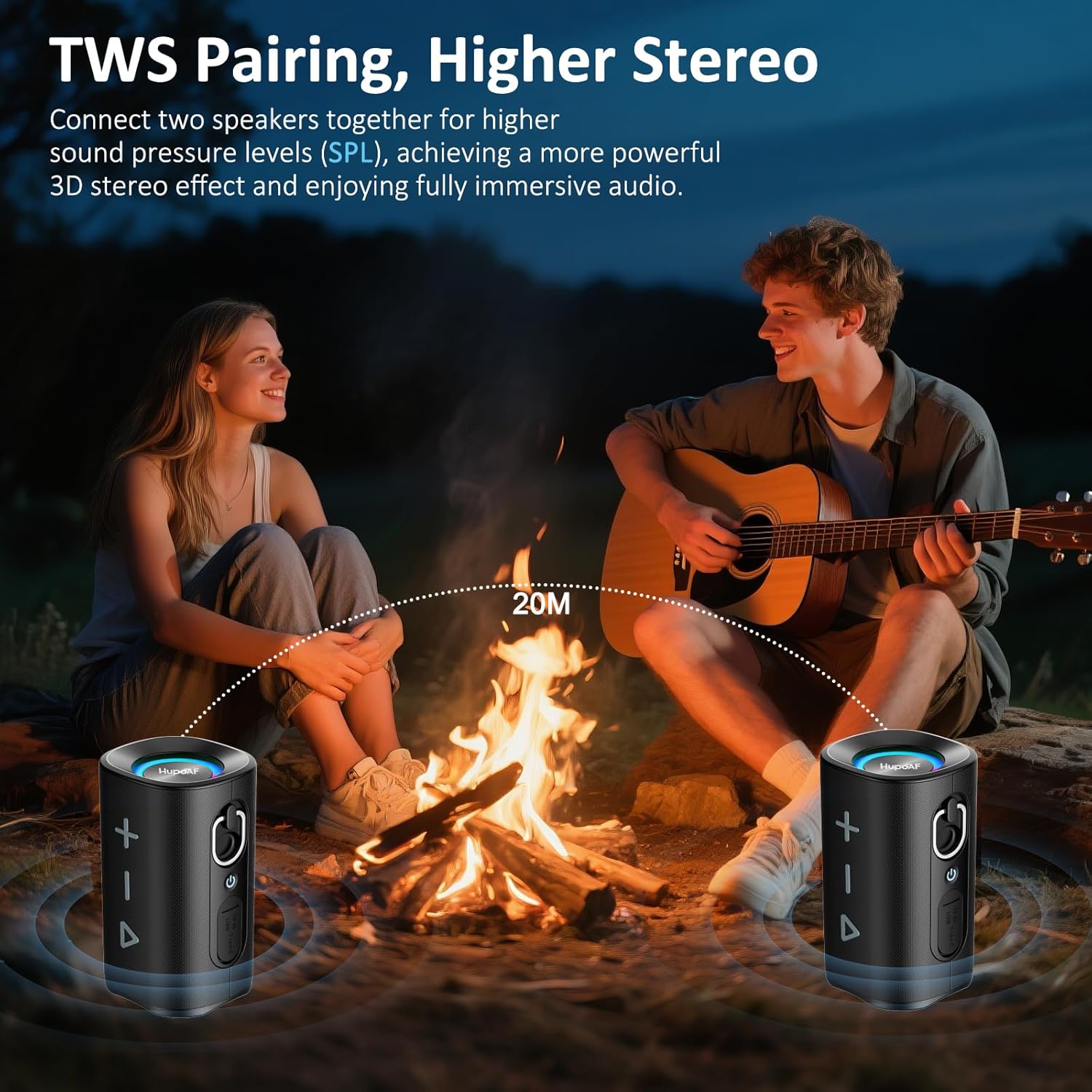
Figure 2: TWS Pairing Illustration. This image shows two Hupoaf speakers wirelessly connected, providing a stereo sound experience.
Video 1: 3D-Stereo Deep Bass Wireless Bluetooth Speaker. This video demonstrates the speaker's sound quality and features, including its deep bass capabilities.
4. Operating Instructions
4.1 Button Functions

Figure 3: Speaker Control Panel. This image illustrates the various buttons on the speaker and their corresponding functions for playback, volume, and calls.
- Power Button: Press and hold for 2 seconds to power on/off. Double-click for TWS pairing.
- Play/Pause Button: Press once to play/pause music. Press once to answer/end calls. Double-click to reject calls.
- Volume Up (+): Press once to increase volume. Press and hold for 3 seconds for next song.
- Volume Down (-): Press once to decrease volume. Press and hold for 3 seconds for previous song.
- RGB Light Button: Press to cycle through 5 distinct lighting effects. Press and hold to turn lights on/off.
4.2 Music Playback
After successful Bluetooth pairing, music from your connected device will play through the speaker. Use the speaker's control buttons or your device to manage playback.
4.3 Colorful RGB Light Show
The speaker features 5 distinct RGB lighting effects that synchronize with the music. Press the dedicated light button to switch between modes or turn the lights off.

Figure 4: Colorful RGB Light Show. This image highlights the speaker's dynamic RGB lighting feature, showcasing various color options.
4.4 HD Call Function
The built-in HD microphone allows for hands-free calling when connected via Bluetooth. Use the Play/Pause button to answer or end calls.
4.5 TF Card and USB Playback
Insert a TF card or USB flash drive into the designated port to play music directly from the storage device. The speaker will automatically detect and play audio files.
Video 2: Bluetooth 5.4 Speaker, 3D-Stereo Deep Bass, Colorful RGB. This video provides a detailed look at the speaker's Bluetooth 5.4 connectivity, 3D stereo sound, and vibrant RGB lighting effects.
5. Maintenance
5.1 IP-X7 Waterproofing
The Hupoaf V119 speaker is IP-X7 waterproof, meaning it can withstand immersion in water up to 1 meter for 30 minutes. Ensure the charging port cover is securely closed before exposure to water.

Figure 5: IPX7 Waterproof Feature. This image shows the speaker being splashed with water, demonstrating its water-resistant design.
5.2 Cleaning and Storage
- Clean the speaker with a soft, damp cloth. Do not use harsh chemicals or abrasive cleaners.
- Store the speaker in a cool, dry place away from direct sunlight and extreme temperatures.
6. Troubleshooting
- Speaker does not power on: Ensure the speaker is fully charged. Connect it to a power source and try again.
- Cannot pair via Bluetooth:
- Ensure the speaker is in pairing mode (flashing blue light).
- Turn off and on your device's Bluetooth.
- Move the speaker closer to your device.
- Forget the device from your Bluetooth list and try pairing again.
- No sound: Check the volume levels on both the speaker and your connected device. Ensure the speaker is properly paired.
- TWS pairing fails: Ensure both speakers are not connected to any other Bluetooth device before initiating TWS pairing. Try powering both speakers off and on, then re-attempt TWS pairing.
7. Specifications
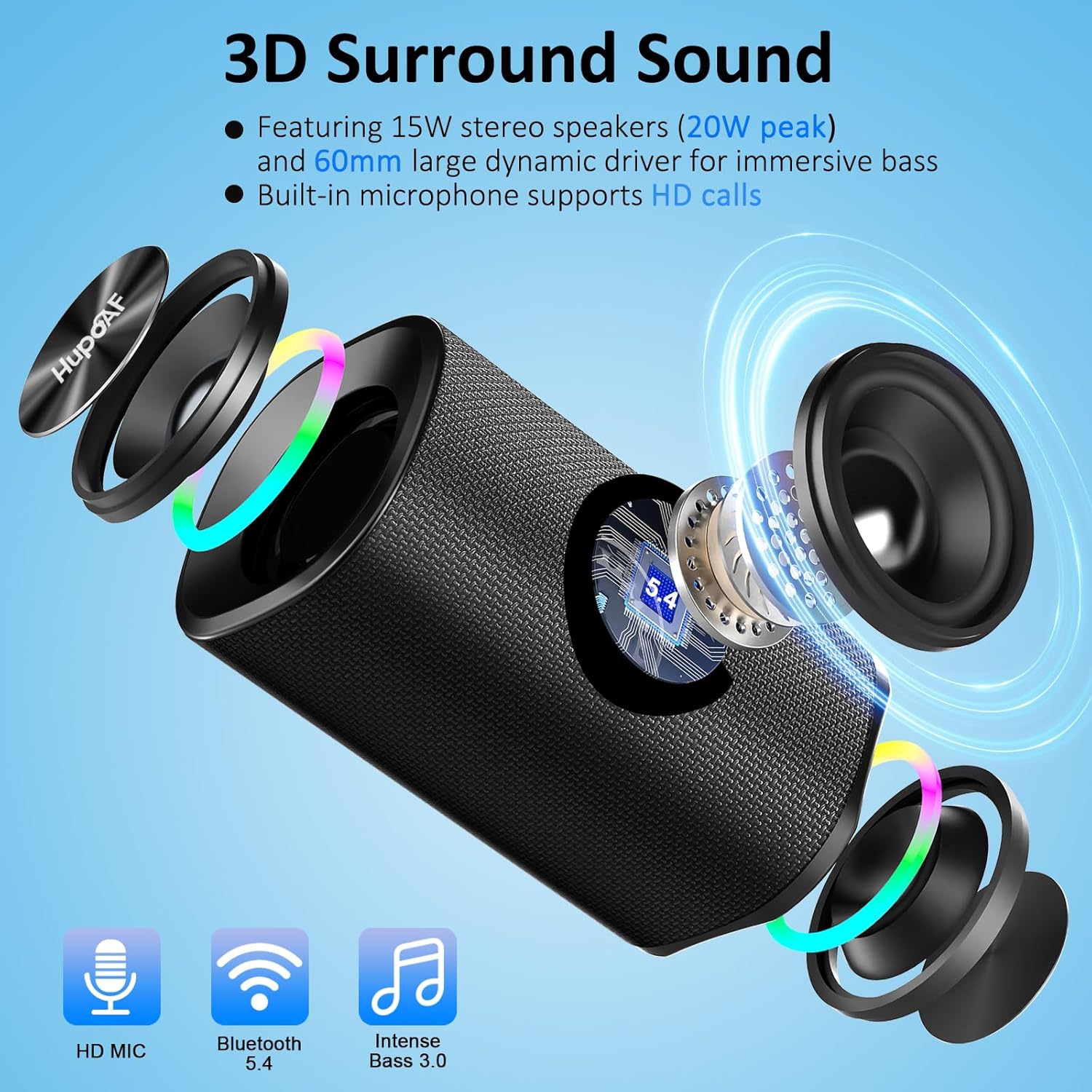
Figure 6: Internal Components for 3D Surround Sound. This image provides an exploded view of the speaker, highlighting its internal drivers and components responsible for 3D surround sound and deep bass.
| Feature | Detail |
|---|---|
| Brand | Hupoaf |
| Model Name | V119 |
| Bluetooth Version | 5.4 |
| Speaker Maximum Output Power | 20 Watts |
| Audio Output Mode | Stereo |
| Frequency Response | 20 KHz |
| Water Resistance Level | IP-X7 Waterproof |
| Playtime | Up to 20 hours |
| Connectivity Technology | Bluetooth, TF Card, USB Audio, Wireless |
| Special Features | Bass Boost, Hi-Res Audio, Bass Mode, HD MIC, Dual Passive Radiators, Hands-free, True Wireless Stereo Pairing, Shockproof, RGB Lights |
| Product Dimensions | 3"D x 5"W x 3"H |
| Item Weight | 450 Grams (15.9 ounces) |
| Material | Acrylonitrile Butadiene Styrene (ABS), Aluminum, Silicone |
| Battery | 1 A battery required (included) |
8. Warranty and Support
This Hupoaf product comes with a limited warranty. For specific warranty details, please refer to the warranty card included in your package or contact Hupoaf customer support.
If you encounter any issues or have questions not covered in this manual, please contact Hupoaf customer support for assistance. Contact information can typically be found on the product packaging or the official Hupoaf website.