
1. Introduction
Thank you for choosing the Aokia WEED 5 Cordless String Trimmer & Edger. This 2-in-1 tool is designed for efficient and convenient lawn maintenance, offering both trimming and edging capabilities. Powered by a 40V 2.0Ah battery, it provides cordless freedom for your gardening tasks. Please read this manual carefully before operation to ensure safe and effective use of your new tool.
2. Safety Information
Always prioritize safety when operating power tools. Failure to follow these instructions may result in serious injury or property damage.
- Read the Manual: Understand all instructions and warnings before use.
- Wear Protective Gear: Always wear safety glasses, long pants, sturdy footwear, and hearing protection.
- Keep Area Clear: Ensure no bystanders, children, or pets are within the operating area. Clear the work area of debris, rocks, or other objects that could be thrown by the cutting line/blade.
- Inspect Before Use: Check the tool for any damaged parts, loose fasteners, or worn cutting lines/blades. Do not operate if damaged.
- Battery Safety: Use only the specified battery and charger. Do not expose the battery to water, heat, or direct sunlight.
- Double-Switch Safety Lock: The trimmer is equipped with a double-switch safety lock. You must press the safety lock button before engaging the trigger to start the tool.
- Maintain Control: Always hold the trimmer firmly with both hands during operation.
- Avoid Wet Conditions: Do not operate the trimmer in wet grass or rain.
- Disconnect Battery: Always remove the battery pack before making any adjustments, changing accessories, cleaning, or storing the tool.
3. Package Contents
Verify that all items are present in the package:
- Aokia Cordless String Trimmer/Edger Unit
- 40V 2.0Ah Lithium-ion Battery
- Battery Charger
- Adjustable Auxiliary Handle
- Extension Poles (2 detachable)
- Plastic Blades (2 included)
- Replacement Trimmer Lines (6 included)
- Safety Guard
- Assembly Hardware (screws, wrench)
- User Manual
4. Setup and Assembly
Follow these steps to assemble your Aokia String Trimmer & Edger. Ensure the battery is removed before assembly.
- Attach the Safety Guard: Secure the safety guard to the trimmer head using the provided screws. This guard protects against thrown debris.
- Assemble Extension Poles: Connect the two detachable extension poles to achieve your desired length (32, 48, or 65 inches). Securely tighten all connections with the included screws to ensure stable performance.
- Install the Auxiliary Handle: Slide the auxiliary handle onto the main shaft and adjust it to a comfortable position for optimal balance and control. Tighten the handle securely.
- Install Cutting Attachment: Choose between the plastic blade or trimmer line spool. For plastic blades, align and snap them into place on the cutting head. For the trimmer line spool, ensure it is properly seated and the line extends appropriately.
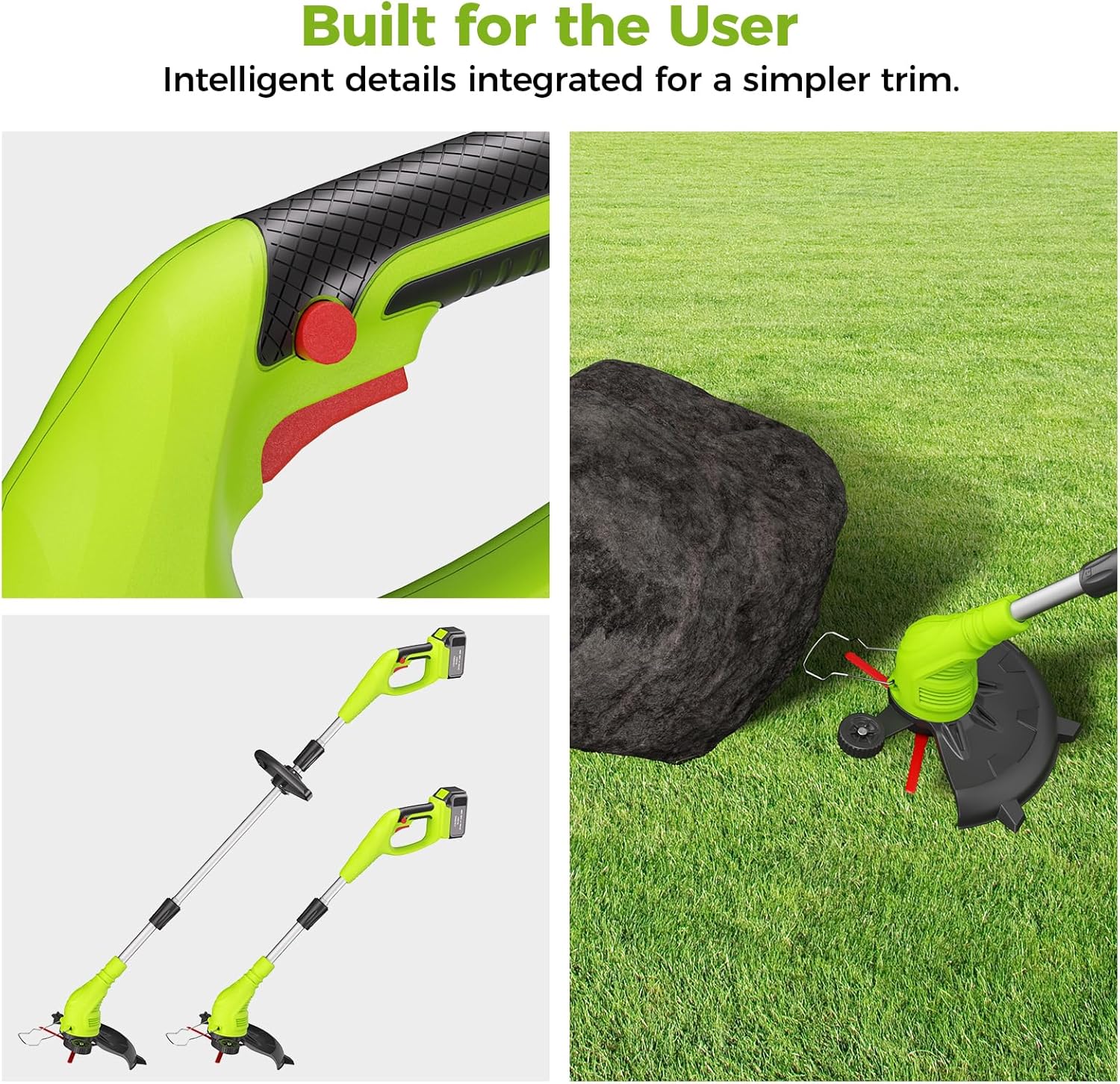
Figure 4.1: Adjustable handle and anti-collision bar for user comfort and protection.
Video 4.1: Detailed installation guide for the Aokia 2-in-1 Trimmer & Edger. This video demonstrates how to assemble the various components of the tool, including attaching the handle and cutting head.
5. Operating Instructions
Once assembled, follow these steps for safe and effective operation.
5.1 Battery Charging and Installation
- Charge Battery: Connect the charger to a power outlet and insert the 40V 2.0Ah battery. Allow 1-2 hours for a full charge. The battery provides 20-30 minutes of continuous run time.
- Install Battery: Slide the fully charged battery into the battery compartment on the trimmer until it clicks securely into place.

Figure 5.1: The 40V 2.0Ah Li-ion battery features multiple protection mechanisms for safety and longevity.
5.2 Starting and Stopping the Trimmer
- To Start: Press and hold the safety lock button (usually red) with one hand, then squeeze the trigger switch with the other hand. The motor will start.
- To Stop: Release the trigger switch. The motor will stop.
5.3 Trimming and Edging Modes
The Aokia WEED 5 easily converts between trimming and edging modes:
- Trimming: Hold the tool with the cutting head parallel to the ground. Move the trimmer in a sweeping motion to cut grass and weeds.
- Edging: Rotate the shaft 90 degrees to position the cutting head vertically. The integrated wheel assists in guiding the trimmer along edges for clean, precise lines. Detach the wheel for lightweight trimming after edging.
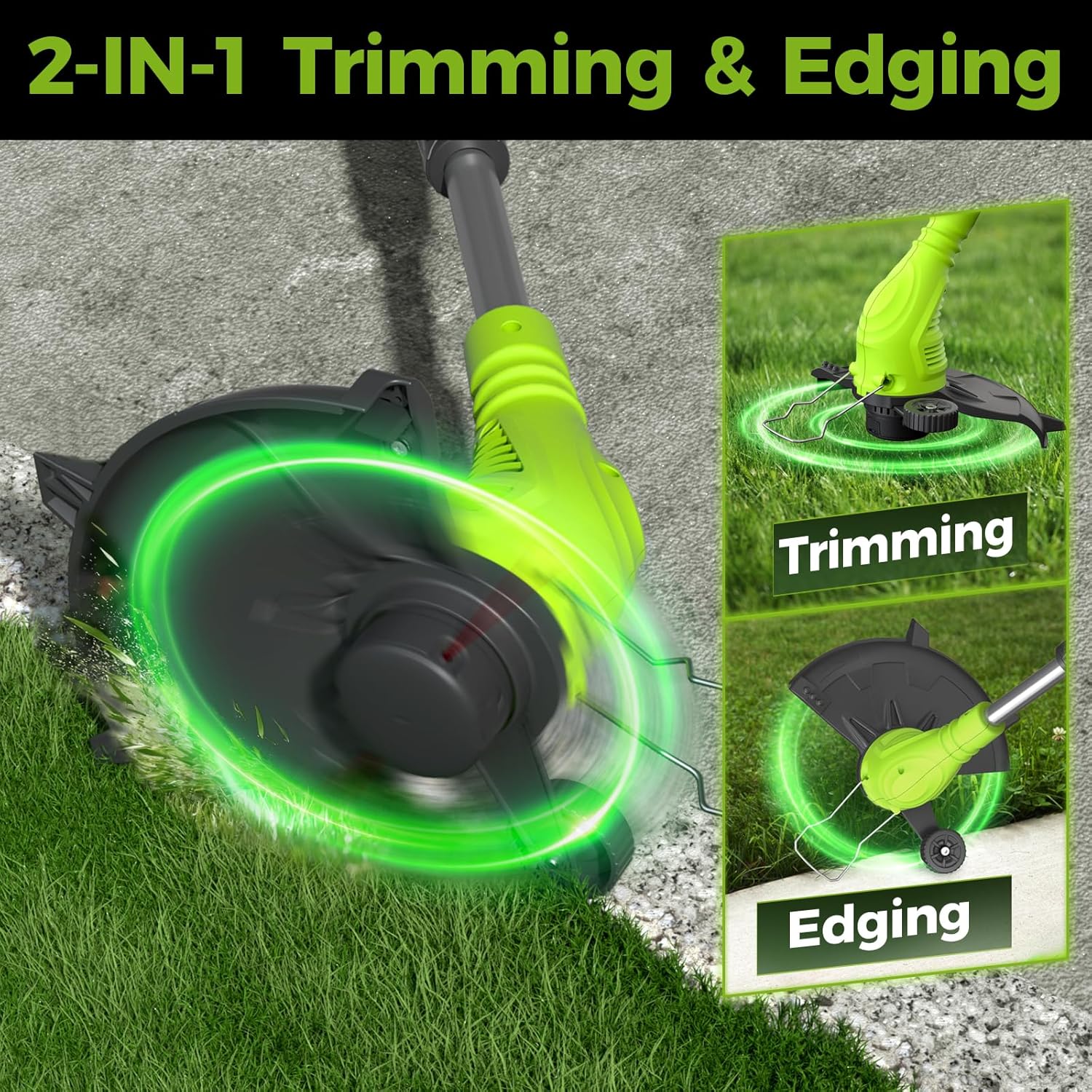
Figure 5.2: The Aokia trimmer transitions between trimming and edging modes by rotating the shaft 90 degrees.
Video 5.1: This video demonstrates the general operation of the Aokia String Trimmer, including battery installation and basic trimming functions.
Video 5.2: An overview of the Aokia Cordless Weed Wacker in action, showcasing its versatility for various lawn care tasks.
6. Maintenance
Regular maintenance ensures optimal performance and extends the life of your Aokia String Trimmer.
- Disconnect Power: Always remove the battery before performing any maintenance.
- Clean the Tool: After each use, wipe down the trimmer with a damp cloth. Remove any grass clippings, dirt, or debris from the cutting head, guard, and ventilation slots.
- Inspect Cutting Line/Blades: Regularly check the plastic blades or trimmer line for wear or damage. Replace them as needed. The product includes two durable plastic blades and six replacement trimmer lines.
- Battery Care: Store the battery in a cool, dry place away from direct sunlight. Do not store fully discharged. Charge the battery periodically if not used for extended periods.
- Storage: Store the trimmer in a dry, secure location out of reach of children.

Figure 6.1: The trimmer supports both plastic blades for everyday trimming and durable trimmer lines for clean cuts.
7. Troubleshooting
If you encounter issues with your Aokia String Trimmer, refer to the following common problems and solutions:
| Problem | Possible Cause | Solution |
|---|---|---|
| Trimmer does not start | Battery not charged or improperly installed; Safety lock not engaged; Damaged switch. | Ensure battery is fully charged and correctly inserted. Press the safety lock button before squeezing the trigger. If issues persist, contact customer support. |
| Reduced cutting performance | Worn or dull plastic blades/trimmer line; Excessive grass/weeds; Low battery charge. | Replace worn blades or trimmer line. Avoid overloading the trimmer. Recharge the battery. |
| Short battery run time | Battery not fully charged; Old or degraded battery; Operating in very dense vegetation. | Ensure battery is fully charged before use. Consider replacing an old battery. Avoid continuous operation in extremely thick areas. |
| Excessive vibration | Damaged or unbalanced cutting head/blade; Loose components. | Inspect the cutting head and blades for damage. Ensure all assembly components are securely tightened. |
8. Specifications
- Brand: Aokia
- Model: WEED 5
- Power Source: Battery Powered
- Battery: 40V 2.0Ah Lithium-ion (included)
- Motor Speed: Up to 10000 rpm
- Continuous Run Time: 20-30 minutes (approx.)
- Cutting Width: 17 Inches
- Item Weight: 4 Pounds
- Adjustable Lengths: 32 inches, 48 inches, 65 inches (with extension poles)
- Features: 2-in-1 Trimmer & Edger, Double-Switch Safety Lock, Adjustable Handle

Figure 8.1: The high-efficiency motor provides consistent power for effective trimming.
9. Warranty and Support
Aokia provides a one-year warranty service for this product. If you have any questions or require assistance with your Aokia String Trimmer, please do not hesitate to contact our customer service team. We are committed to providing support and will respond to your inquiries within 24 hours to resolve any issues you may have.