
Introduction
This manual provides detailed instructions for the setup, operation, and maintenance of your Uvital Corded Landline Phone. Please read this manual thoroughly before using the device to ensure proper functionality and longevity.
Package Contents
Verify that all items listed below are included in your package:
- 1 x Basic Telephone Unit
- 1 x Handset
- 1 x Telephone Stand
- 1 x Handset Cord
- 1 x Phone Line Cord
- 1 x User Manual (this document)

Image: Components included in the Uvital Corded Phone package, showing the phone base, handset, handset cord, phone line, user manual, and base stand.
Setup Instructions
- Connect the Handset: Plug one end of the coiled handset cord into the handset and the other end into the designated port on the telephone base.
-
Connect the Phone Line: Plug one end of the phone line cord into the "LINE" port on the telephone base and the other end into your wall telephone jack.

Image: The Uvital Corded Phone connected to a phone line, illustrating that no external power supply or batteries are required for operation.
-
Install the Telephone Stand (Optional): The included stand allows for tilting the phone for easier use or for wall mounting.
- For desktop use, attach the stand to the bottom of the phone base to create an angled position.
- For wall mounting, use the stand as a bracket. Secure the stand to the wall using appropriate hardware (not included), then slide the phone onto the stand. Ensure the handset hook is reversed to securely hold the handset when wall-mounted.

Image: Visual guide demonstrating how to correctly attach the telephone stand for both desktop placement and wall mounting configurations.
- Check for Dial Tone: Lift the handset. You should hear a dial tone, indicating the phone is ready for use.
Operating Instructions
Basic Functions
- Making a Call: Lift the handset, wait for a dial tone, then dial the desired phone number.
- Answering a Call: When the phone rings, lift the handset to answer.
- Ending a Call: Place the handset back onto the phone base.
Special Features
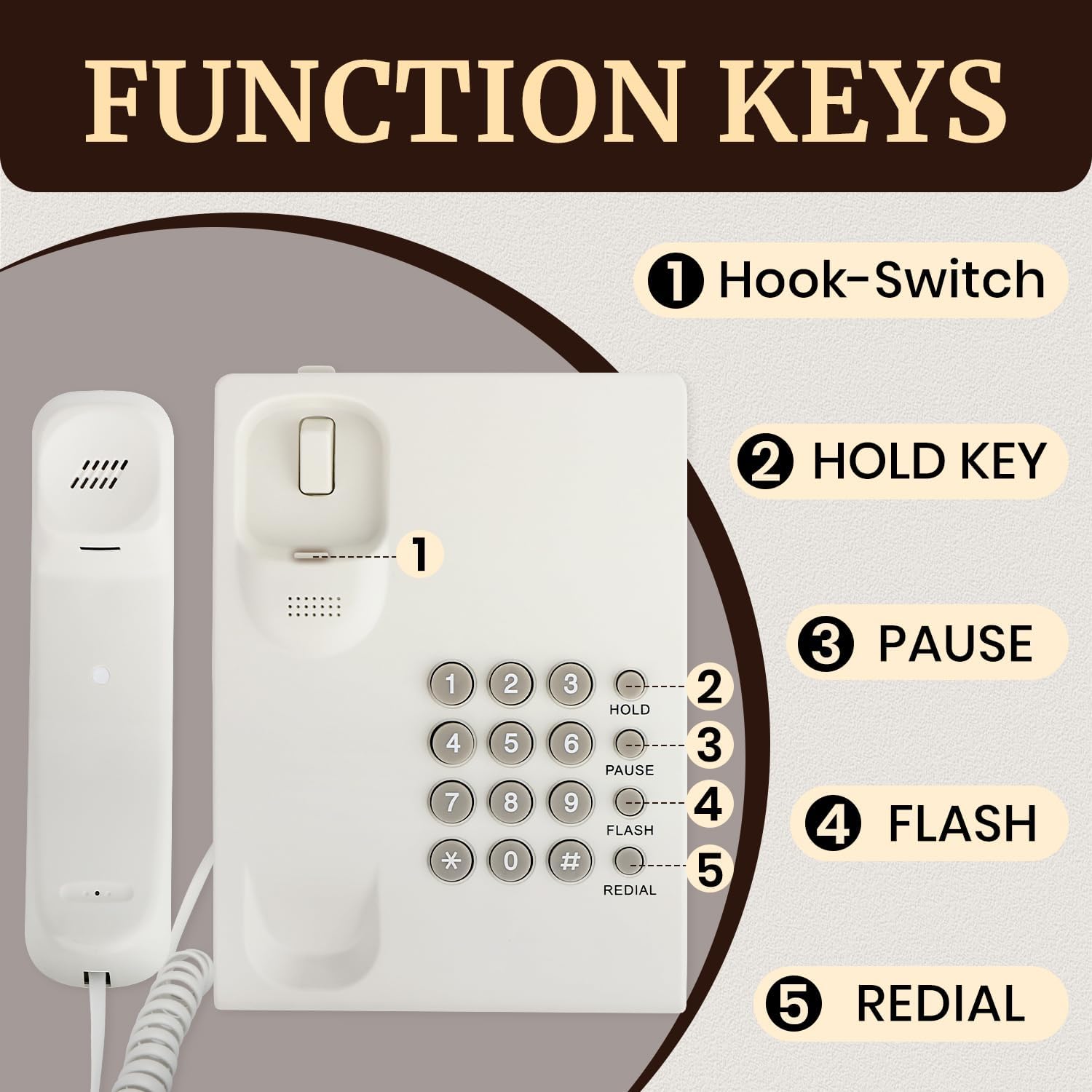
Image: An overview of the Uvital Corded Phone's function keys, including the Hook-Switch, Hold, Pause, Flash, and Redial buttons.
- Hook-Switch (1): Used to hang up or pick up a call without physically lifting the handset (e.g., for headset use, if supported, or to quickly end a call).
- HOLD Key (2): Press this button during a call to place the current call on hold. Press again to resume the call.
- PAUSE Key (3): Used when dialing a sequence of numbers that requires a pause, such as accessing an extension or voicemail system. Press this key to insert a brief pause in the dialing sequence.
- FLASH Key (4): Used to access network services such as call waiting or three-way calling. Press this key to momentarily disconnect and reconnect to the line.
- REDIAL Key (5): Press this button to automatically redial the last number called.
- Ringer Volume: Adjust the ringer volume using the switch located on the side or back of the phone. Options typically include High (HI) and Low (LOW).
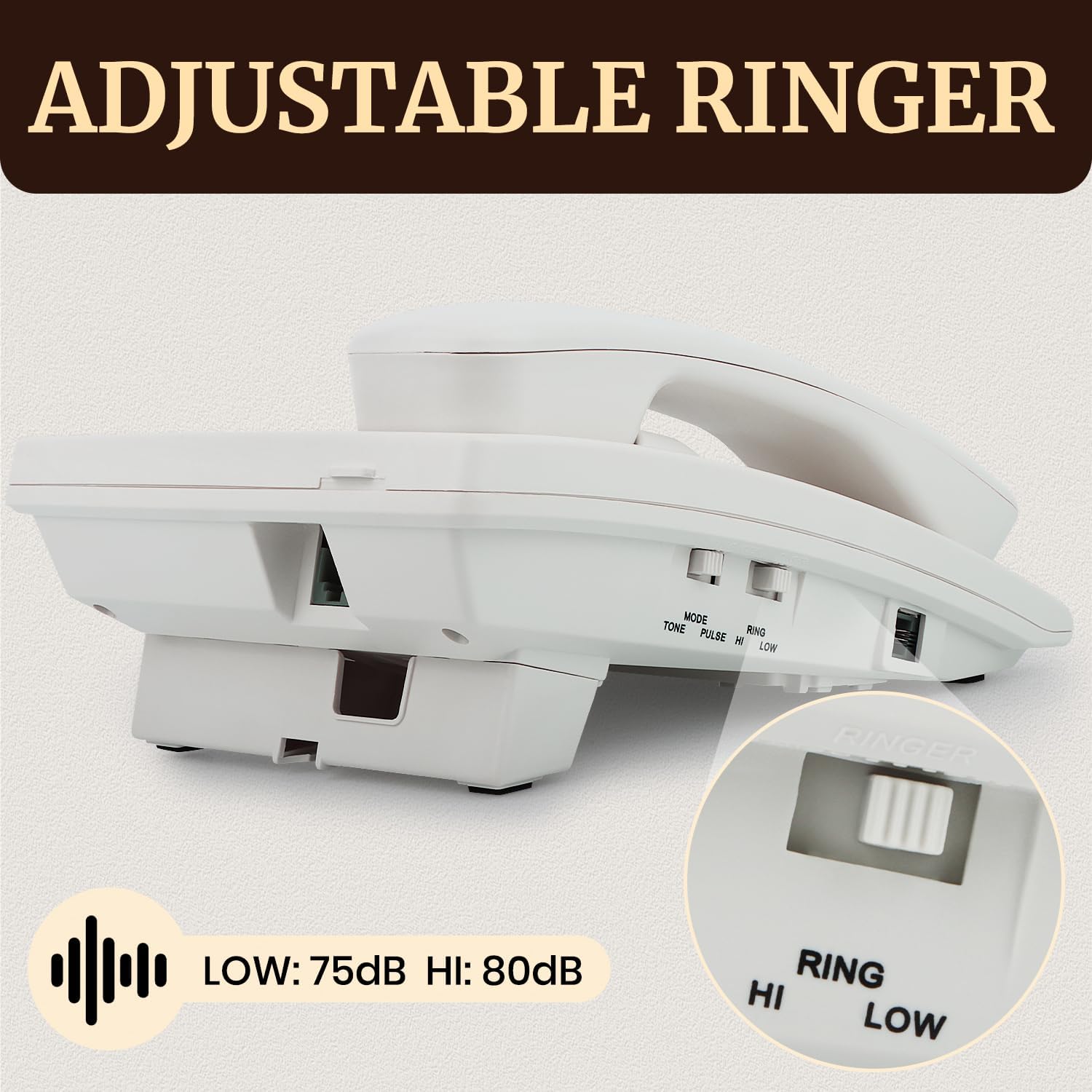
Image: Close-up view of the adjustable ringer switch on the Uvital Corded Phone, showing the "HI" and "LOW" settings for ringer volume.
- P/T Dual Mode: This phone supports both Pulse and Tone dialing modes. A switch on the phone base allows you to select the appropriate mode for your telephone line. Tone (DTMF) is the standard for most modern systems.
Maintenance
To ensure the longevity and proper functioning of your Uvital Corded Phone, follow these maintenance guidelines:
- Cleaning: Wipe the phone's surface with a soft, damp cloth. Avoid using harsh chemicals or abrasive cleaners, as these can damage the finish and internal components.
- Environment: Keep the phone in a dry place, away from direct sunlight, excessive heat, and moisture.
- Cord Care: Avoid tangling or excessive pulling of the handset and line cords to prevent damage.
- Button Durability: The phone features durable silicone buttons designed for longevity and quiet operation.

Image: Detailed view of the Uvital Corded Phone's silicone buttons, emphasizing their high durability, waterproof design, and quiet keypress functionality.
Troubleshooting
| Problem | Possible Cause | Solution |
|---|---|---|
| No dial tone | Phone line not connected properly or line issue. | Ensure the phone line cord is securely plugged into both the phone base and the wall jack. Test with another phone if available to check the line. |
| Cannot hear caller / Caller cannot hear you | Handset cord loose or faulty. Volume too low. | Check that the handset cord is firmly connected. Adjust the ringer volume switch. |
| Phone does not ring | Ringer volume set to low or off. | Adjust the ringer volume switch to "HI". |
| Buttons unresponsive | Temporary malfunction. | Disconnect the phone line for a few minutes, then reconnect. |
Specifications
- Model: Corded Phone
- Dimensions (L x W x H): 0.39 x 0.39 x 0.39 inches (Note: These dimensions appear to be placeholder data. Please refer to the physical product for accurate measurements.)
- Item Weight: 1.19 pounds
- Material: Acrylonitrile Butadiene Styrene (ABS)
- Telephone Type: Corded
- Power Source: Corded Electric (powered by phone line)
- Dialer Type: Single Keypad
- Answering System Type: Digital (Note: This phone does not have an integrated answering machine. This specification likely refers to compatibility with external digital answering systems.)
- Multiline Operation: Single-Line Operation
- Caller Identification: No
- Ringer Volume: Adjustable (High/Low)
- Dialing Mode: P/T Dual Mode (Pulse/Tone)
Support
For further assistance or inquiries regarding your Uvital Corded Phone, please contact Uvital customer support:
- Technical Support: Available for product assistance.
- Customer Service: Expect quick replies to your questions.
- Returns & Replacements: Information available upon request or through your purchase platform.
Please refer to the contact information provided with your purchase or visit the official Uvital website for the most up-to-date support details.