
1. Introduction
The Qubo X-247 4G is a user-friendly mobile phone designed for ease of use, particularly suitable for seniors. It features a dual-screen design, large buttons, and essential functions like an SOS button and quick dial keys. This manual provides detailed instructions for setting up, operating, and maintaining your device.
2. Package Contents
Please check the box for the following items:
- Qubo X-247 4G Mobile Phone
- Instruction Manual
- Charging Cable (USB-C)
3. Device Layout
Familiarize yourself with the key components and buttons of your Qubo X-247 4G phone.

Image 3.1: Front View of Qubo X-247 4G. This image displays the phone in its open position, revealing the internal display and the large, clearly labeled keypad. Key features include the call and end call buttons, navigation keys, and dedicated M1, M2, M3 quick dial buttons.
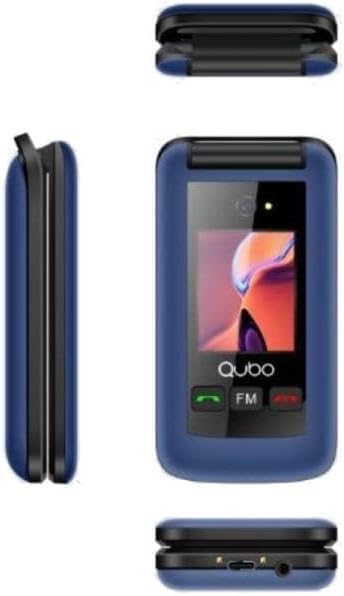
Image 3.2: Multi-angle View of Qubo X-247 4G. This composite image shows the phone from various angles. The top-left shows the phone closed, highlighting the external screen. The middle-left shows the side profile, while the bottom-right provides a view of the phone's base, indicating the USB-C charging port and the 3.5mm audio jack.
Key Components:
- Internal Display: Main screen for menus, contacts, and messages.
- External Display: Shows time, date, and incoming call information when the phone is closed.
- Keypad: Large, backlit buttons for dialing and navigation.
- M1, M2, M3 Buttons: Dedicated quick dial keys for important contacts.
- SOS Button: Located on the back, for emergency calls.
- USB-C Port: For charging the device.
- 3.5mm Audio Jack: For connecting headphones.
4. Setup
4.1. Installing SIM Card(s) and Battery
- Carefully open the back cover of the phone.
- If present, remove the battery.
- Insert your SIM card(s) into the designated slot(s). The Qubo X-247 4G supports Dual SIM. Ensure the gold contacts face downwards and the card is correctly oriented.
- Insert the battery, ensuring the contacts align correctly.
- Replace the back cover until it clicks securely into place.
4.2. Charging the Phone
- Connect the USB-C charging cable to the port at the bottom of the phone.
- Plug the other end of the cable into a compatible USB power adapter (not included) or a computer's USB port.
- The phone will indicate that it is charging. A full charge typically takes approximately 3 hours.
5. Operating Instructions
5.1. Power On/Off
- To Power On: Press and hold the red 'End Call' button until the screen lights up.
- To Power Off: Press and hold the red 'End Call' button until the 'Power Off' option appears on the screen, then confirm.
5.2. Making and Receiving Calls
- To Make a Call: Dial the number using the keypad and press the green 'Call' button.
- To Receive a Call: When the phone rings, press the green 'Call' button to answer.
- To End a Call: Press the red 'End Call' button.
5.3. Using the SOS Button
The dedicated SOS button on the back of the phone is for emergencies. When pressed and held, it will automatically dial pre-set emergency contacts and can send emergency messages.
- Setting up SOS Contacts: Navigate to the 'SOS Settings' in the phone's menu to add up to 5 emergency numbers.
- Activating SOS: Press and hold the SOS button for a few seconds. The phone will initiate calls to the emergency contacts in sequence until one answers.
5.4. Quick Dial Keys (M1, M2)
The M1 and M2 buttons allow for quick dialing of frequently used contacts.
- Setting up Quick Dial: Go to 'Contacts' or 'Settings' and assign a number to M1 and M2.
- Using Quick Dial: Simply press and hold the M1 or M2 button to dial the assigned contact.
6. Features
- Dual Screen: Enjoy a 2.4-inch internal display for detailed viewing and a 1.77-inch external display for quick information at a glance.
- Camera: Capture moments with the integrated 0.3MP digital camera.
- Bluetooth: Connect wirelessly to compatible headsets or other devices.
- FM Radio: Listen to your favorite radio stations on the go.
- Flashlight: A convenient built-in flashlight for illumination.
- Organizer Tools: Includes a calendar, calculator, and alarm functions for daily utility.
7. Maintenance
To ensure the longevity and optimal performance of your Qubo X-247 4G phone, follow these maintenance guidelines:
- Keep Dry: Avoid exposing the phone to moisture or liquids. Although it has some water resistance, it is not fully waterproof.
- Clean Gently: Use a soft, dry cloth to clean the screen and body. Avoid harsh chemicals.
- Avoid Extreme Temperatures: Do not expose the phone to very high or very low temperatures, as this can affect battery life and internal components.
- Protect from Drops: Handle the phone with care to prevent physical damage from drops or impacts.
8. Troubleshooting
If you encounter issues with your phone, refer to the following common problems and solutions:
| Problem | Solution |
|---|---|
| Phone does not power on | Ensure the battery is correctly installed and fully charged. Try charging the phone for at least 30 minutes. |
| Cannot make or receive calls | Check if the SIM card is properly inserted and activated. Ensure you have network coverage. |
| Poor signal reception | Move to an area with better network coverage. Avoid areas with thick walls or underground locations. |
| Battery drains quickly | Reduce screen brightness. Close unused applications. Ensure the phone is not in an area with very weak signal, which can cause it to consume more power searching for a network. |
9. Specifications
| Feature | Detail |
|---|---|
| Model | X-247 4G |
| Processor | MTK6261DA |
| Internal Display | 2.4 inches |
| External Display | 1.77 inches |
| Camera | 0.3 MP Digital Camera |
| Memory | 32MB RAM + 32MB ROM |
| Network Bands | GSM: 850/900/1800/1900 MHz, 4G |
| SIM Card Support | Dual SIM |
| Battery | 1000 mAh Li-Ion |
| Talk Time | Up to 4 hours |
| Standby Time | Up to 180 hours |
| Charging Port | USB-C |
| Audio Jack | 3.5 mm |
| Connectivity | Bluetooth, USB |
| Special Features | SOS Button, Quick Dial Keys (M1, M2), FM Radio, Flashlight, Calendar, Calculator, Alarm |
| Dimensions | 10 x 150 x 15 mm (approximate) |
| Weight | 210 g (approximate) |
| Water Resistance | Resistant to water (not fully waterproof) |
10. Warranty and Support
Your Qubo X-247 4G mobile phone comes with a three-year warranty against manufacturing defects from the date of purchase. Please retain your proof of purchase for warranty claims.
For technical support or warranty inquiries, please refer to the contact information provided with your purchase documentation or visit the official Qubo website.


