
Introduction
The XINFUTE A-TV18+ is a universal learning TV remote control designed for ease of use and versatility. It features large, color-coded buttons for improved visibility and a durable, waterproof design. This remote is capable of learning commands from multiple devices, allowing seamless switching between up to two different devices for a unified control solution. It requires 2 AAA batteries (not included) and is made from ABS material.
Setup
1. Battery Installation
To install batteries, slide open the battery compartment cover located on the back of the remote control. Insert two AAA batteries, ensuring correct polarity (+/-). Close the battery compartment cover securely.
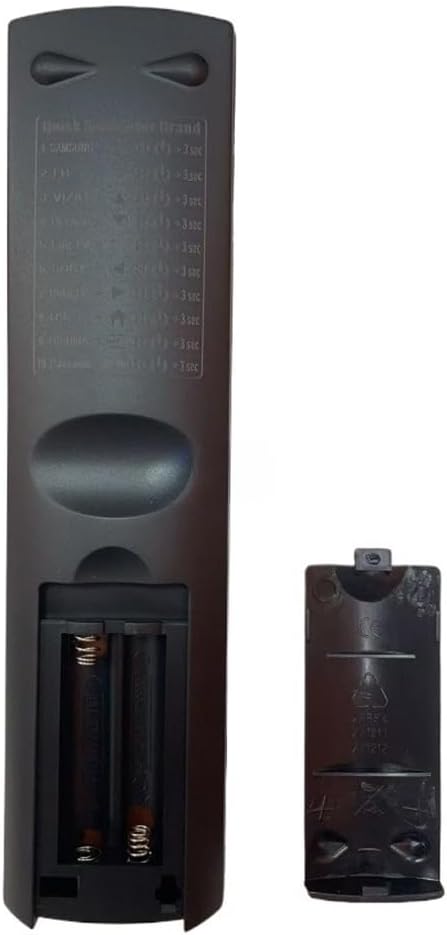
Image: Back of the remote control with the battery compartment open, revealing the slots for two AAA batteries.
2. Remote Control Brand Switching (Quick Search)
This remote features a quick search function to switch between various TV brands. Press and hold both buttons together for 2 seconds to switch to the desired brand. The LED indicator will flash to confirm.
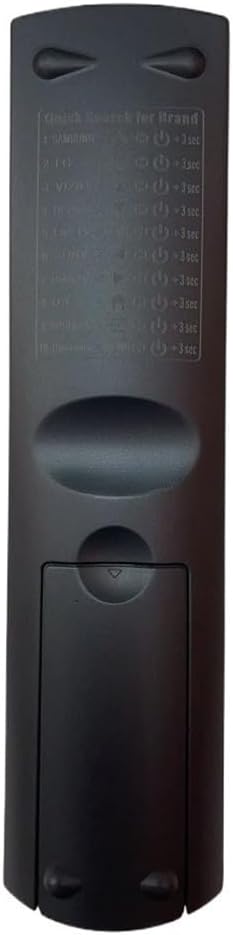
Image: The back of the remote control, displaying a label with instructions for quick brand search, listing various TV brands and their respective button combinations.
To switch brands, press and hold the Power button + the Switching button for your brand (refer to the list below) at the same time until the LED flashes and turns off, about 2 seconds.
Brand Switching Buttons:
- SAMSUNG: Power + CH- (hold for 3 seconds)
- LG: Power + CH+ (hold for 3 seconds)
- SONY: Power + VOL- (hold for 3 seconds)
- PHILIPS: Power + VOL+ (hold for 3 seconds)
- SHARP: Power + MUTE (hold for 3 seconds)
- TOSHIBA: Power + 0 (hold for 3 seconds)
- PANASONIC: Power + 1 (hold for 3 seconds)
- HITACHI: Power + 2 (hold for 3 seconds)
- SANYO: Power + 3 (hold for 3 seconds)
- RCA: Power + 4 (hold for 3 seconds)
- WESTINGHOUSE: Power + 5 (hold for 3 seconds)
- ELEMENT: Power + 6 (hold for 3 seconds)
- MAGNAVOX: Power + 7 (hold for 3 seconds)
If you switch to HISENSE or TOSHIBA and the main buttons on the remote don't work properly with your TV:
- Press and hold the Brand Switching Buttons again for 2 seconds (until the LED light blinks twice and turns off).
- Each time you do this, the remote switches to the next TV model. Test the button function after switching.
- Try this up to 5 times. If you try 5 times and the buttons still don't work, the remote might not support your exact TV model.
3. Manual Code Search Setup
This method allows you to manually search for the correct code for your TV.
- Enter Setup Mode: Press and hold the [SET] + [POWER] buttons simultaneously for 3 seconds until the LED indicator remains steadily lit. Release the buttons.
- Code Search: Aim the remote at the TV and press the [CH+] button one time per code group. Stop pressing when the TV screen displays volume indicators.
- Verification and Save: Press [VOL+] or [VOL-] to verify the code. If the TV responds correctly, press [SET] to save the code and exit. If not, repeat step [2] to search for the next code group.
4. Automatic Code Search Setup
This method automatically searches for the correct code for your TV.
- Preparation: Point the remote control's IR emitter toward the TV.
- Initiate Search: Press and hold the [SET] + [VOL+] buttons simultaneously for 3 seconds. Release the buttons once the LED indicator lights up. The remote will begin automatically searching for compatible TV codes.
- Save and Exit: When the TV screen displays volume adjustment indicators, immediately press the [SET] button to save the current code and exit search mode.

Image: Detailed paper instruction manual showing various setup and learning functions for the A-TV18+ universal remote.
Operating Instructions (Learning Function)
The A-TV18+ remote control supports a learning function, allowing it to mimic commands from your original remote. It can store data for up to 14 buttons.
- Enter Learning Mode: Press and hold the [SET] + [MUTE] buttons for 3 seconds until the LED indicator stays lit.
- Align IR Emitters: Position the original remote's IR emitter 3-5 cm away from the A-TV18+'s emitter.
- Teach a Button: Press the desired button on the original remote (e.g., Power). The A-TV18+'s LED will blink. Immediately, press the corresponding button on the A-TV18+ remote. The LED will steadily light up, indicating successful learning.
- Save and Exit: After programming all buttons, press [SET] + [MUTE] simultaneously to save and exit learning mode.
- Re-Learn Buttons: If some buttons fail, repeat steps 1-3 for individual buttons without reprogramming all.
Maintenance
The XINFUTE A-TV18+ remote is designed for durability. Its waterproof design helps protect against accidental spills. To ensure optimal performance and longevity:
- Cleaning: Wipe the remote with a soft, dry cloth. Avoid using abrasive cleaners or solvents.
- Battery Replacement: Replace batteries when the remote's performance degrades or the LED indicator does not light up. Always use two new AAA alkaline batteries.
- Storage: Store the remote in a cool, dry place away from direct sunlight and extreme temperatures.
Troubleshooting
- Remote not responding: Ensure batteries are correctly installed and have sufficient charge. Replace with new AAA batteries if necessary.
- Some functions do not work after setup: If some functions do not work properly after initial setup, repeat the manual or automatic code search steps. Continue searching for the correct code until all functions are operational.
- Learning function issues: If specific buttons fail to learn or operate correctly after using the learning function, repeat the learning steps (1-3) for those individual buttons without reprogramming the entire remote. Ensure proper alignment (3-5 cm) between the remotes during the learning process.
- TV not responding to brand switching: If the main buttons do not work after switching brands (especially for HISENSE or TOSHIBA), repeat the brand switching process up to 5 times, testing after each attempt. If it still doesn't work, your TV model might not be fully supported.
Specifications
| Brand | XINFUTE |
| Model Number | A-TV18+ |
| Type | Universal Learning Remote Control |
| Material | ABS Material |
| Color | As Shown |
| Special Feature | Ergonomic, Waterproof Design |
| Compatible Devices | Television |
| Max Supported Devices (Switching) | Up to 2 devices |
| Learning Capacity | Up to 14 buttons |
| Connectivity Technology | Infrared |
| Maximum Range | 5 Meters |
| Batteries Required | 2 x AAA batteries (not included) |
| Battery Type | Alkaline |
| Item Weight | 0.08 Kilograms |
| Item Dimensions (L x W x H) | 6"L x 3"W x 1"H |
Warranty
The XINFUTE A-TV18+ Universal TV Remote Control comes with a one-year warranty on all purchases. Please retain your proof of purchase for warranty claims.
Support
For further assistance, technical support, or inquiries regarding your XINFUTE A-TV18+ remote control, please contact the manufacturer or your retailer. Refer to your purchase documentation for specific contact details.