Product Overview
The Merax Luggage Set provides a versatile and durable solution for your travel needs. This 2-piece set includes a 20-inch carry-on suitcase with a front-opening compartment and USB charging port, a 24-inch medium checked suitcase, and a duffel bag. All pieces feature a hardside design, spinner wheels, and TSA-approved locks for security and convenience.

Image: The Merax 2-piece luggage set, featuring the 20-inch carry-on with its front-opening laptop compartment and USB charging capability, alongside the 24-inch checked suitcase and a matching duffel bag.
Key Features:
- 2-Piece Set: Includes a 20" carry-on and a 24" checked suitcase, plus a duffel bag.
- Front-Opening Compartment (20" Carry-on): Designed for easy access to laptops, tablets, and travel documents.
- Built-in USB Port (20" Carry-on): Allows for convenient charging of devices on the go (power bank not included).
- Durable Hardside Construction: Protects contents from impacts.
- Spinner Wheels: 360-degree multi-directional wheels for smooth maneuverability.
- TSA Combination Lock: Integrated lock for enhanced security.
- Expandable Design (24" Suitcase): Provides up to 20% more packing space.
- Duffel Bag: Versatile bag with a sleeve to attach to luggage handles.
Setup
Unpacking Your Luggage:
Carefully remove all luggage pieces from their packaging. Inspect each item for any signs of damage. The smaller pieces are nested inside the larger ones for shipping efficiency.
Setting the TSA Combination Lock:
Your Merax luggage comes with a built-in TSA-approved 3-digit combination lock. The initial combination is set to 0-0-0.
- Ensure the lock is set to the original combination (0-0-0).
- Locate the reset button (a small, recessed button, usually on the side or bottom of the lock). Use a pen or a pointed tool to press and hold this button until you hear a "click" sound.
- While holding the reset button, set your desired 3-digit combination by turning the dials. Choose a memorable combination.
- Release the reset button. Press the main button or slide the latch in the direction of the arrow until you hear another "click" sound. This confirms your new combination is set.
- Test your new combination by scrambling the dials and then entering your new code to open the lock.

Image: Detailed steps for resetting the TSA combination lock on the 20-inch front-opening suitcase.

Image: Detailed steps for resetting the TSA combination lock on the 24-inch suitcase.
Operating Instructions
Using the Front-Opening Compartment (20" Carry-on):
The 20-inch carry-on features a convenient front-opening lid, ideal for quick access to electronics and documents without fully opening the main compartment.
- To open, unlock the dedicated zipper for the front compartment.
- The compartment includes padded pockets for laptops/iPads (up to 11.4"x13.4"), a passport/power bank pocket (7.5"x6.7"), a hidden pocket (6.7"x11.4"), and a zipper pocket (6.1"x11.4").
- This design allows for easy separation of electronic devices from clothing, streamlining security checks.
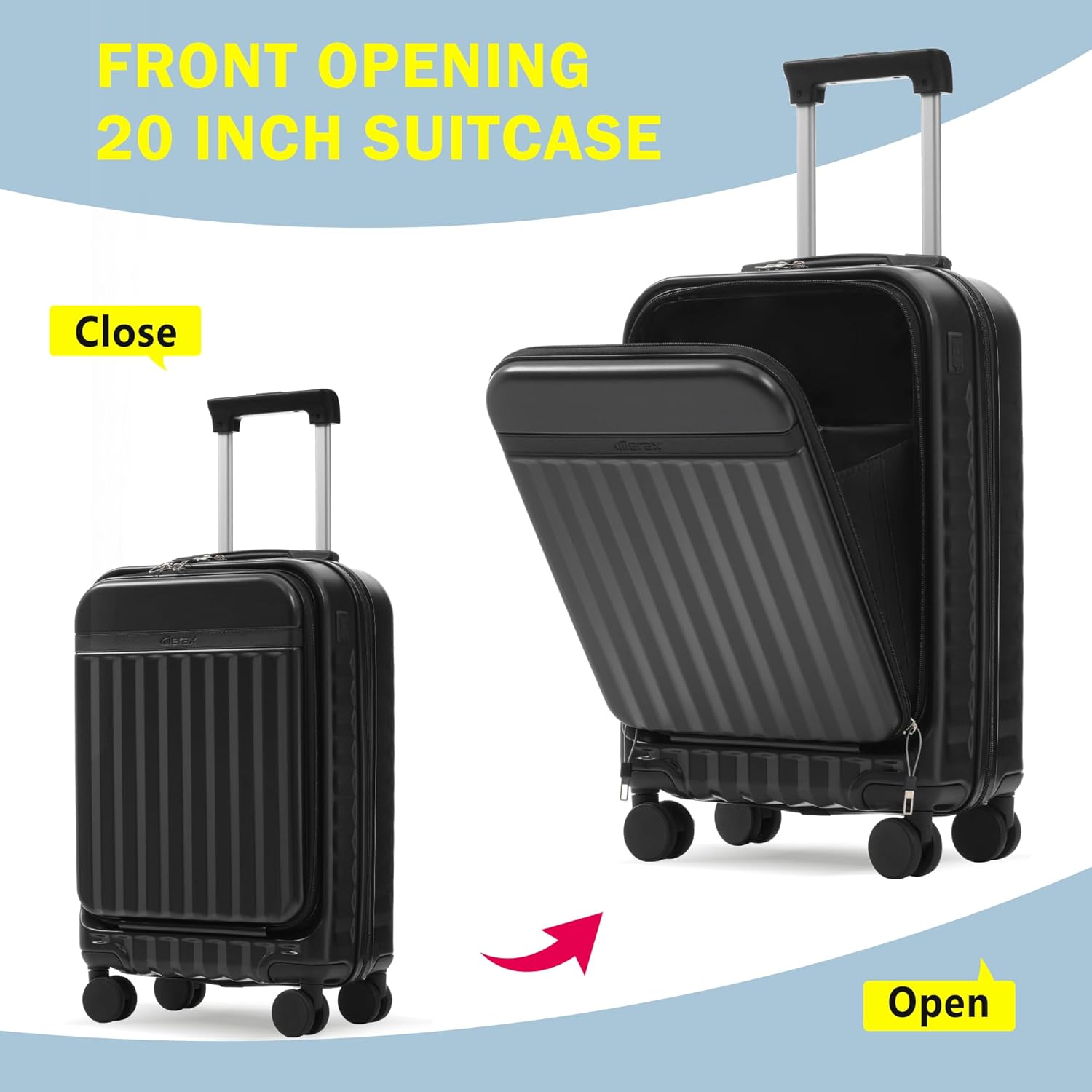
Image: The 20-inch carry-on suitcase demonstrating its front-opening feature.

Image: Internal organization of the 20-inch suitcase's front compartment, including various pockets.
USB Charging Port (20" Carry-on):
The 20-inch carry-on is equipped with a built-in USB port for convenient charging of your electronic devices.
- Locate the USB port on the side of the suitcase.
- Inside the suitcase, connect your own power bank (not included) to the internal USB cable.
- Plug your device's charging cable into the external USB port to charge.
Maneuvering with Spinner Wheels:
All suitcases in this set feature 360-degree spinner wheels for effortless movement in any direction.
- Push or pull the luggage upright on all four wheels for smooth gliding.
- The wheels are designed for silent and durable performance.
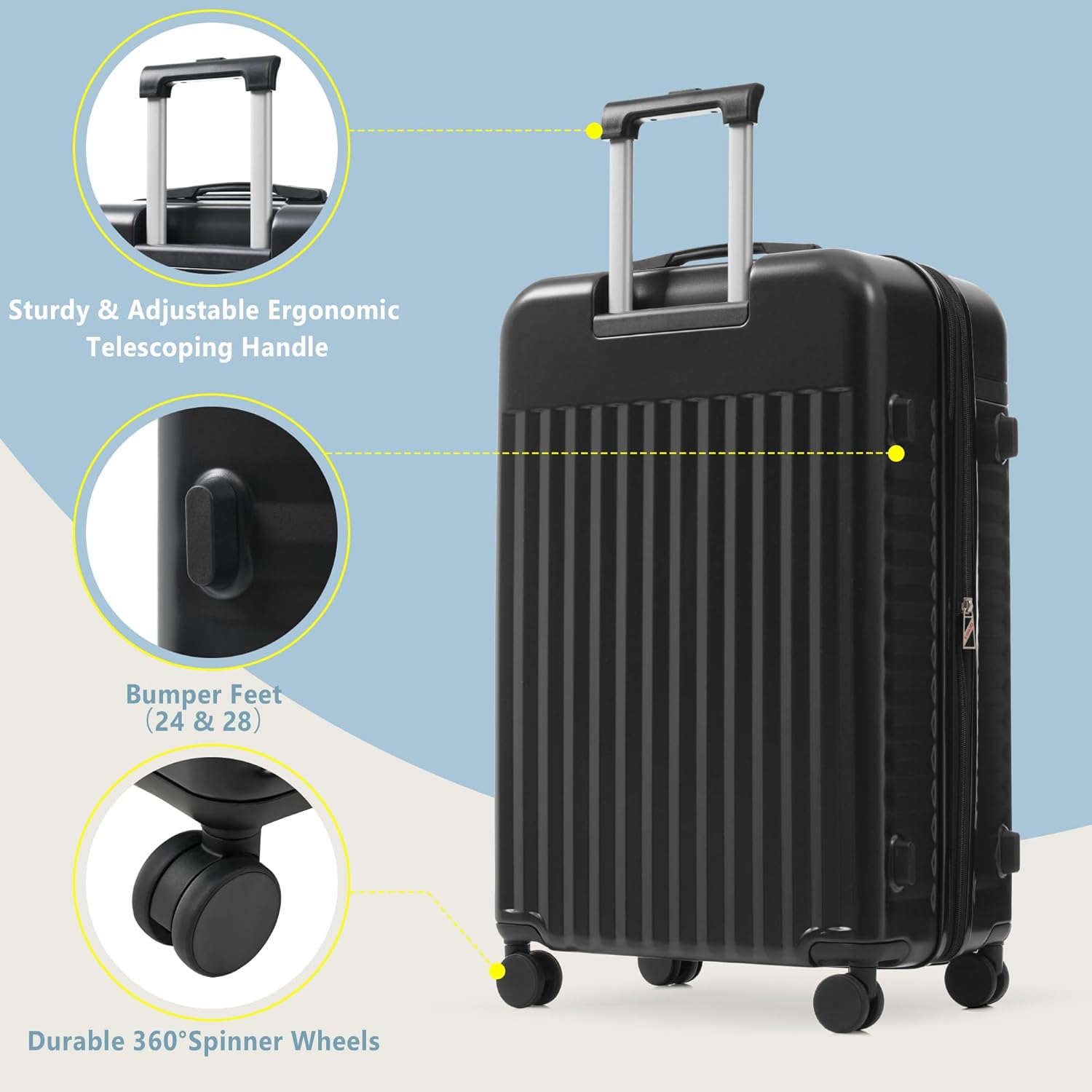
Image: Details of the sturdy telescoping handle, bumper feet, and durable 360° spinner wheels.
Expanding the Luggage (24" Suitcase):
The 24-inch suitcase is equipped with an expansion zipper to provide additional packing capacity when needed.
- Locate the secondary zipper around the perimeter of the suitcase.
- Unzip this section to expand the suitcase, increasing its depth by approximately 20%.
- Zip it back up to return to its original size.

Image: The 24-inch suitcase showcasing its expandable feature, providing more space.
Using the Duffel Bag:
The included duffel bag is designed for versatility and ease of transport.
- Use it as a standalone carry-on or personal item.
- The duffel bag features a sleeve on the back that allows it to slide over the telescoping handle of your suitcase, securing it in place during transit.

Image: Size reference for all three pieces, including dimensions and suggested travel days.
Maintenance
Cleaning Your Luggage:
To keep your hardside luggage looking its best:
- Wipe the exterior with a soft cloth dampened with mild soap and water.
- Avoid abrasive cleaners or solvents, as they can damage the surface.
- For interior cleaning, vacuum or wipe with a damp cloth. Ensure the interior is completely dry before closing and storing.
Storage:
When not in use, store your luggage in a cool, dry place away from direct sunlight. Nesting the smaller pieces inside the larger ones can save storage space.
Troubleshooting
TSA Lock Issues:
- Cannot open lock: Ensure you are using the correct 3-digit combination. If forgotten, you may need to try combinations or contact support.
- Lock feels stuck: Ensure the zippers are fully inserted into the lock mechanism. Apply gentle pressure while entering the combination.
- Reset button not working: Ensure the lock is set to the current combination before attempting to reset. Press the reset button firmly until you hear a click.
Wheel Issues:
- Wheels not spinning smoothly: Check for debris (hair, lint, dirt) caught in the wheel mechanism. Clean as necessary.
- Wobbly or damaged wheels: Avoid dragging luggage over rough surfaces or curbs. If a wheel is damaged, contact customer support for assistance.
Zipper Issues:
- Zipper stuck: Do not force the zipper. Gently pull the fabric away from the zipper teeth and try to move the slider. Lubricate with a small amount of wax or zipper lubricant if needed.
- Zipper teeth misaligned: Try to realign the teeth by moving the slider back and forth gently. Avoid overpacking, which can strain zippers.
Specifications
| Feature | Detail |
|---|---|
| Product Dimensions | 15.7 x 10 x 25.39 inches (Overall for 24" suitcase) |
| Item Weight | 14.5 pounds (Total for set) |
| Department | Unisex Adult |
| Model Number | 01 |
| Material | Hardside |
| Wheels | 360° Spinner Wheels |
| Lock Type | 3-Digit TSA Combination Lock |
| USB Port | Yes (20" Carry-on only) |
| Expandable | Yes (24" Suitcase only) |
Warranty and Support
Merax stands behind the quality of its products. For specific warranty information, including coverage details and duration, please refer to the warranty card included with your purchase or visit the official Merax website. Keep your proof of purchase for any warranty claims.
Customer Support:
If you encounter any issues or have questions regarding your Merax Luggage Set, please contact Merax customer support through their official website or the retailer where the product was purchased. Provide your model number and a detailed description of the issue for efficient assistance.


