
1. Introduction
The UGREEN ClipBuds Pro are wireless open-ear Bluetooth earbuds designed for comfort and high-fidelity audio. They feature Adaptive Hybrid Active Noise Cancellation (ANC), Hi-Res Audio support with LDAC codec, multipoint connection, and a long-lasting battery. This manual provides instructions for setup, operation, maintenance, and troubleshooting to ensure optimal use of your device.
2. Package Contents

Image: UGREEN ClipBuds Pro package contents.
Please check that all items are present in the package:
- UGREEN ClipBuds Pro Wireless Open-Ear Earbuds (Left and Right)
- Charging Case
- USB-C Charging Cable
- User Manual
3. Product Overview
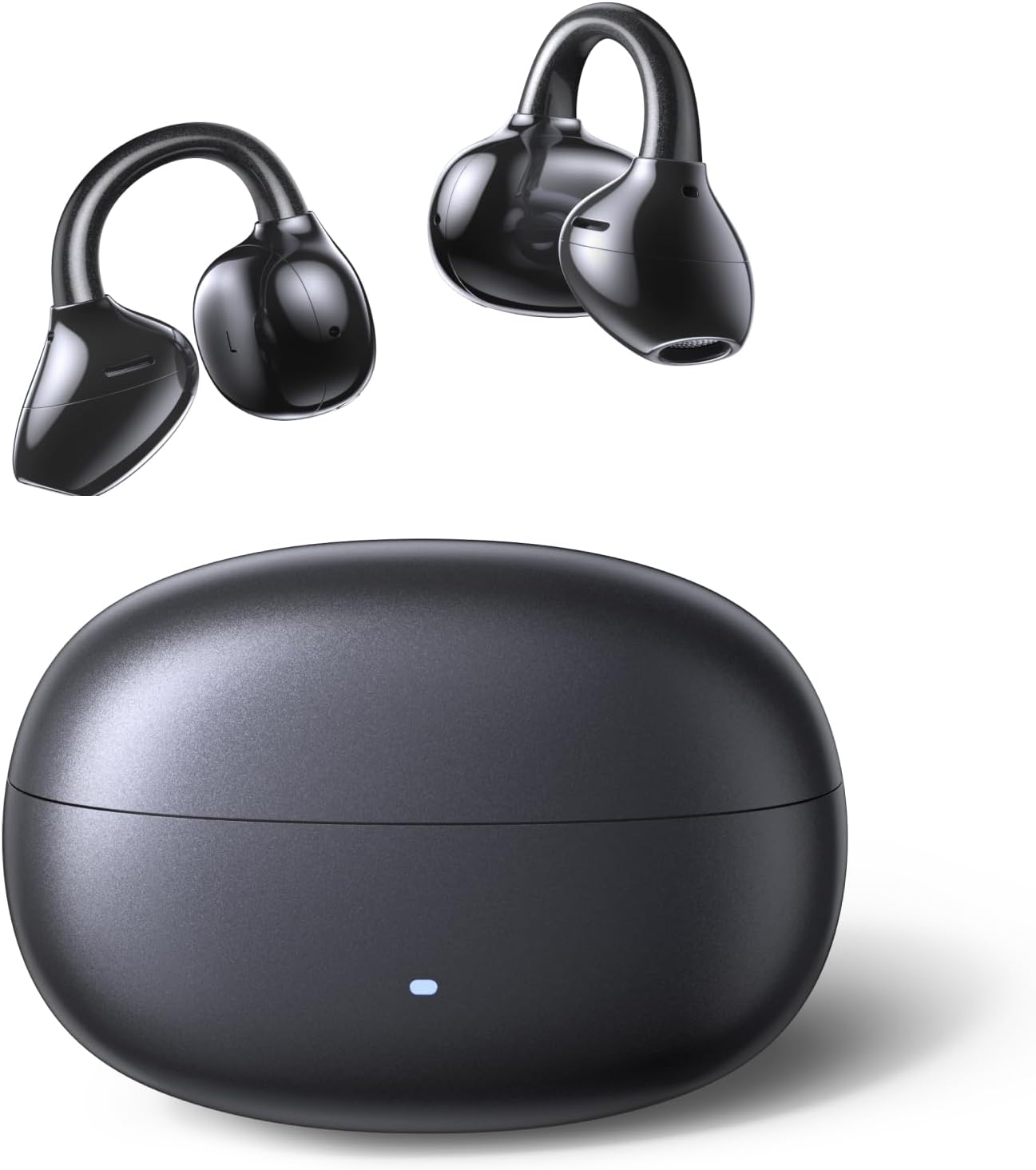
Image: UGREEN ClipBuds Pro earbuds and charging case.
The ClipBuds Pro feature a unique open-ear design that rests comfortably on your ear without entering the ear canal. The compact charging case provides additional battery life and protects the earbuds when not in use. Each earbud is equipped with touch controls for easy management of audio playback, calls, and noise cancellation modes.
4. Wearing the Earbuds
For optimal sound quality and comfort, ensure the earbuds are worn correctly.

Image: Step-by-step guide for wearing the ClipBuds Pro.
- Position: Place the earbud above your earlobe.
- Secure: Gently slide the ear clip into the outer part of your ear canal.
- Adjust: Make slight adjustments to find a comfortable and secure fit. The flexible nickel-titanium alloy ensures a snug fit without discomfort.

Image: Ergonomic design features for comfortable wear.
5. Charging
The ClipBuds Pro and their charging case are equipped with rechargeable batteries.

Image: Battery life and fast charging capabilities.
5.1 Charging the Earbuds
- Place the earbuds into the charging case. The LED indicator on the case will show the charging status.
- A full charge provides up to 7.5 hours of continuous listening.
5.2 Charging the Case
- Connect the charging case to a USB power source using the provided USB-C cable.
- The LED indicator on the case will illuminate to show charging progress.
- The charging case provides multiple recharges for the earbuds, extending the total listening time to approximately 32 hours.
- A 10-minute fast charge of the case can provide up to 2 hours of music playback for the earbuds.
6. Pairing and Connectivity

Image: Connectivity features including Bluetooth 6.0 and Multipoint Connection.
6.1 Initial Pairing
- Open the charging case. The earbuds will automatically enter pairing mode.
- On your device (smartphone, tablet, laptop), enable Bluetooth and search for available devices.
- Select "UGREEN ClipBuds Pro" from the list to connect.
- Once connected, a voice prompt will confirm successful pairing.
6.2 Multipoint Connection
The ClipBuds Pro support simultaneous connection to two devices.
- Connect the earbuds to your first device as described in "Initial Pairing."
- Disable Bluetooth on the first device or manually disconnect the earbuds.
- Connect the earbuds to your second device.
- Re-enable Bluetooth on the first device. The earbuds should now be connected to both devices, allowing seamless switching between audio sources.
6.3 Bluetooth 6.0
Equipped with Bluetooth 6.0, the ClipBuds Pro offer stable connectivity and ultra-low latency (as low as 80ms), ensuring synchronized audio for gaming and video playback.
7. Controls
The ClipBuds Pro feature intuitive touch controls on each earbud. Specific functions can be customized via the UGREEN Home app.
7.1 Default Touch Controls (Customizable via App)
| Action | Function |
|---|---|
| Single Tap | Play/Pause, Answer/End Call |
| Double Tap (Left Earbud) | Previous Track |
| Double Tap (Right Earbud) | Next Track |
| Triple Tap (Left Earbud) | Volume Down |
| Triple Tap (Right Earbud) | Volume Up |
| Long Press (Left Earbud) | Toggle ANC/Transparency Mode |
| Long Press (Right Earbud) | Activate Voice Assistant |
8. UGREEN Home App
Enhance your listening experience by downloading the UGREEN Home app. The app allows for personalized settings and access to advanced features.

Image: UGREEN Home app interface for customization.
8.1 App Features
- Equalizer Settings: Choose from preset EQ modes (e.g., Classic, Jazz, Electronic, Pop, Rock) or customize your own.
- Noise Control: Toggle between Adaptive Hybrid ANC, Transparency Mode, and Normal Mode.
- Game Mode: Activate low-latency mode for gaming.
- Spatial Sound Effects: Enable or disable spatial audio.
- Touch Control Customization: Reassign touch functions for each earbud.
- Firmware Updates: Receive and install updates for improved performance.
9. Audio Features
9.1 Hi-Res Audio & LDAC

Image: Hi-Res Audio and LDAC support for superior sound.
The ClipBuds Pro are Hi-Res Audio certified and support the LDAC codec, enabling high-fidelity audio transmission up to 48 kHz/24 bits. The 11mm dual-magnet speaker with a biocomposite diaphragm delivers powerful bass and clear treble. An adaptive compensation algorithm ensures balanced audio quality.
9.2 Adaptive Hybrid ANC & Wind Noise Suppression

Image: Adaptive Hybrid ANC technology.
Experience effective noise reduction with Adaptive Hybrid ANC technology. Dual microphones automatically adjust to your ear shape and ambient noise. The 6 microphones and AI algorithms, combined with an ENC chip, intelligently filter background noise. Wind Noise Suppression technology further reduces wind interference for clearer audio.
9.3 Clear Calls

Image: Clear call quality in various environments.
The ClipBuds Pro utilize 6 microphones and AI algorithms for Environmental Noise Cancellation (ENC), ensuring your voice is clear and crisp during calls, even in noisy surroundings.
9.4 Spatial Audio
Immerse yourself in a three-dimensional sound experience with Spatial Audio, available through the UGREEN Home app.
10. Water Resistance (IPX5)

Image: IPX5 water resistance for sports use.
The ClipBuds Pro are rated IPX5 water-resistant, meaning they can withstand splashes of water and sweat. This makes them suitable for workouts and outdoor activities. Note: The charging case is not water-resistant.
11. Specifications
| Feature | Detail |
|---|---|
| Model Name | UGREEN ClipBuds Pro |
| Model Number | 85185 |
| Connectivity | Wireless (Bluetooth 6.0) |
| Ear Placement | Open-Ear |
| Form Factor | True Wireless |
| Noise Cancellation | Adaptive Hybrid Active Noise Suppression |
| Audio Certification | Hi-Res Audio, LDAC Codec |
| Driver Size | 11mm Dual-Magnet Speaker |
| Microphones | 6 Microphones with AI Algorithms (ENC) |
| Battery Life (Earbuds) | Up to 7.5 hours (single charge) |
| Total Battery Life (with Case) | Up to 32 hours |
| Fast Charging | 10 minutes charge for 2 hours playback |
| Charging Port | USB-C |
| Water Resistance | IPX5 (Earbuds only) |
| Control Method | Touch |
| Compatible Devices | Phones, Laptops, Desktops (iPhone/iPad/MacBook) |
| Special Features | Customizable App, Multipoint Connection, Spatial Audio, Wind Noise Reduction |
| Material | Metallic Alloy (Nickel-Titanium shape-memory alloy) |
| Color | Black |
| Country of Origin | China |
| ASIN | B0FM46BRB2 |
12. Troubleshooting
If you encounter issues with your ClipBuds Pro, refer to the following common solutions:
- No Sound: Ensure earbuds are charged, connected to your device, and volume is not muted.
- Cannot Pair: Make sure Bluetooth is enabled on your device and the earbuds are in pairing mode. Try resetting the earbuds (refer to app or UGREEN support for specific instructions).
- Intermittent Connection: Ensure no obstacles are between the earbuds and your device. Move closer to your device. Avoid strong electromagnetic interference.
- Poor Call Quality: Check earbud placement. Ensure microphones are not obstructed. Disable Wind Noise Suppression if not needed.
- ANC Not Working: Ensure ANC mode is activated via touch control or the UGREEN Home app.
For further assistance, please contact UGREEN customer support.
13. Maintenance
- Cleaning: Gently wipe the earbuds and charging case with a soft, dry, lint-free cloth. Do not use harsh chemicals or abrasive materials.
- Storage: Store the earbuds in their charging case when not in use to protect them and maintain battery charge.
- Avoid Extreme Conditions: Do not expose the earbuds or case to extreme temperatures, humidity, or direct sunlight.
- Water Exposure: While IPX5 rated, avoid submerging the earbuds in water. Dry them thoroughly if they get wet. The charging case is not water-resistant.
14. Warranty and Support
14.1 Manufacturer Warranty
The UGREEN ClipBuds Pro come with a 24-month manufacturer's warranty from UGREEN. Please retain your proof of purchase for warranty claims.
14.2 Customer Support
For product support, technical assistance, or warranty inquiries, please visit the official UGREEN website or contact their customer service directly. Contact information can typically be found on the UGREEN website or in the product packaging.
15. Safety Information
- Do not disassemble, repair, or modify the product.
- Keep the product away from children and pets.
- Avoid using the earbuds at excessively high volumes for prolonged periods to prevent hearing damage.
- Be aware of your surroundings when using open-ear earbuds, especially in traffic or other potentially hazardous situations.
- Dispose of the product and its batteries responsibly according to local regulations.