
1. Introduction
This manual provides detailed instructions for the assembly, operation, and maintenance of your CaDA C51076W Racing Car Building Block Model. This 1:20 scale Classic GT Sports Car model features movable suspension, openable doors, and a detailed mechanical design, comprising 266 precision components.
The model is designed for adult building block enthusiasts and offers a rewarding assembly experience, resulting in a collectible display piece with interactive features.
2. Safety Information
- Choking Hazard: This product contains small parts and is not suitable for children under 3 years old.
- Assembly: Ensure all connections are secure to prevent parts from detaching during play or display.
- Material: All parts are made of environmentally friendly ABS plastic.
3. Package Contents
Upon opening the product packaging, verify that all components are present:
- CaDA C51076W Building Blocks (266 pieces, typically sorted into numbered bags)
- Full-color Instruction Manual
- Sticker Sheet for authentic detailing
- Remote Control (if included in your specific kit version)
If any parts are missing or damaged, please contact CaDA customer support.
4. Assembly Instructions
Follow the step-by-step instructions provided in the included full-color instruction manual. The manual is designed for clarity and ease of use, guiding you through the construction process.
- Preparation: Organize the building blocks by type or numbered bags as indicated in the manual.
- Step-by-Step: Assemble the model by carefully following each step in the manual. Pay close attention to the diagrams.
- Secure Connections: Ensure all blocks are firmly pressed together to create a stable structure.
- Stickers: Apply the provided stickers according to the manual for accurate detailing.

Figure 1: Hands assembling the CaDA C51076W Racing Car model. The image shows the intricate process of connecting various building blocks to form the car's chassis and body panels.
5. Product Features
The CaDA C51076W model incorporates several realistic and interactive features:
- Movable Suspension: The four-wheel independent suspension system allows the front and rear wheels to move independently, simulating realistic shock absorption.
- Openable Doors and Hood: The car features doors and a hood that can be opened to reveal the detailed interior cockpit layout and rear-mounted engine.
- Steering: Steering-linked front wheel steering allows for control of the front wheels by turning the steering wheel.
- Aerodynamic Design: The streamlined, low-slung design, wide wheel arches, and large rear wing replicate the aerodynamics of a classic endurance racer.
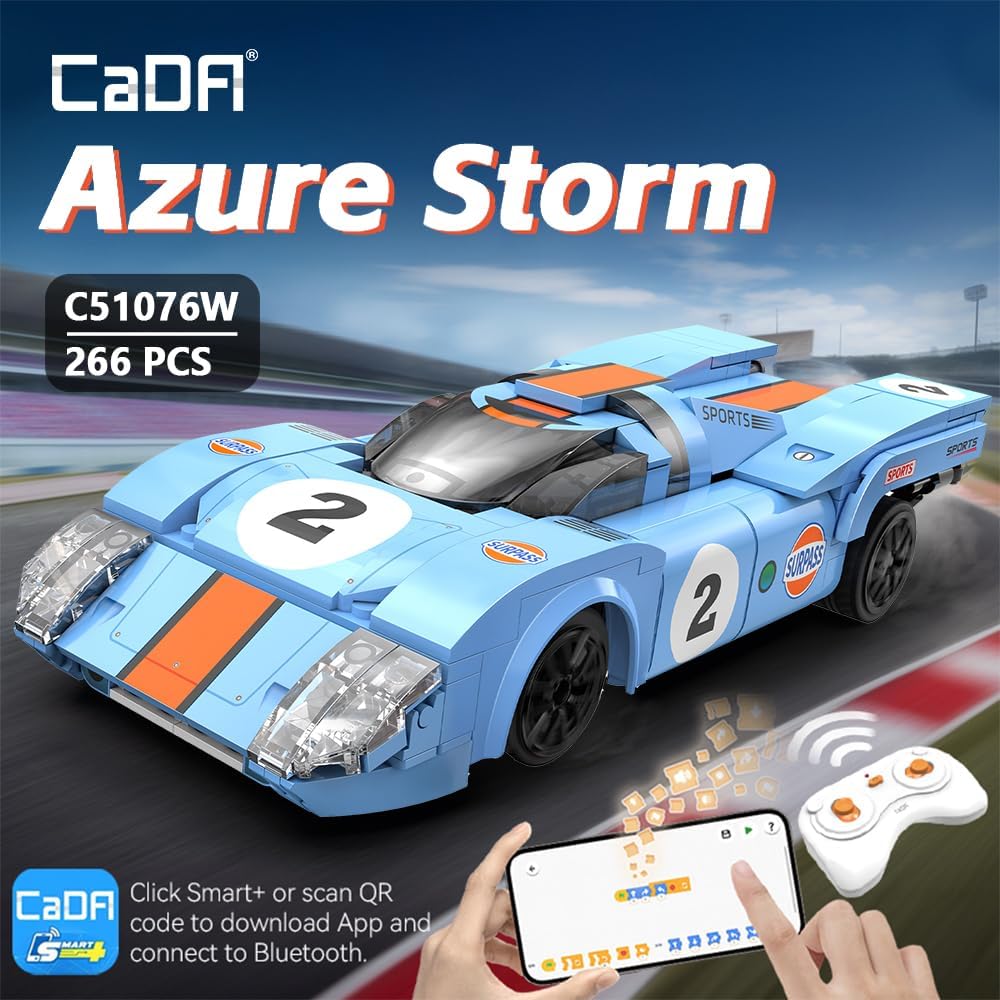
Figure 2: Front and rear views of the assembled CaDA C51076W Racing Car model, highlighting its highly restored details and classic GT sports car design.

Figure 3: The CaDA C51076W Racing Car model showcasing its aerodynamic body restoration with illustrative airflow lines, emphasizing its sleek design.
6. Operating the Dual Control System
Your CaDA C51076W model may include a dual control system, allowing operation via a physical remote control or a smartphone application.
- Remote Control: Insert the required batteries (AA for the car, AAA for the remote, as per product specifications) into the respective compartments. Use the remote for basic forward/reverse and left/right steering.
- Smartphone App: Download the 'CaDA Smart+' application by scanning the QR code on the product packaging or searching in your device's app store. Connect the model to your smartphone via Bluetooth. The app offers various control modes, including:
- Remote Control Mode: Virtual joystick control.
- Gyroscope Mode: Control by tilting your smartphone.
- Path Mode: Draw a path on the screen for the car to follow.
- Programming Mode: No programming skills needed, use block-based coding to create custom movements.

Figure 4: A smartphone screen showing the different control modes available through the CaDA Smart+ app, including programming, remote, gyroscope, and path modes.
7. Specifications
| Attribute | Detail |
|---|---|
| Product Dimensions | 8.54 x 3.5 x 1.97 inches (21.7 x 8.9 x 5 cm) |
| Item Weight | 1.26 pounds |
| Model Number | C51076W (CaDA-BT250812) |
| Number of Pieces | 266 |
| Recommended Age | 14 years and up |
| Material | Environmentally friendly ABS |

Figure 5: A visual representation of the CaDA C51076W Racing Car model's dimensions, indicating its length, width, and height in centimeters.
8. Maintenance
To ensure the longevity and appearance of your CaDA C51076W model, follow these maintenance guidelines:
- Cleaning: Use a soft, dry cloth to gently wipe away dust. For stubborn dirt, a slightly damp cloth can be used, but avoid excessive moisture.
- Storage: Store the model in a cool, dry place away from direct sunlight to prevent discoloration or material degradation.
- Handling: Handle the model with care to avoid accidental disassembly or damage to delicate parts.
9. Troubleshooting
If you encounter any issues during assembly or operation, consider the following common troubleshooting steps:
- Missing Pieces: Double-check all packaging and bags. If a piece is genuinely missing, contact CaDA customer support.
- Loose Connections: Re-examine the affected section of the model and ensure all blocks are fully pressed together.
- Functionality Issues (RC/App): Ensure batteries are correctly installed and charged. Verify Bluetooth connection for app control. Refer to the specific remote control or app instructions for pairing and operation.
- Difficulty Assembling: Review the instruction manual carefully, paying attention to the orientation of pieces. Sometimes a small error early on can affect later steps.
10. Warranty and Support
CaDA products are manufactured to high-quality standards. For specific warranty information, product support, or to order replacement parts, please refer to the official CaDA website or contact their customer service directly. Contact details are typically found on the product packaging or the manufacturer's website.


