
1. Introduction
Welcome to the DOOGEE Note 56 user manual. This guide provides essential information to help you set up, operate, and maintain your new smartphone. The DOOGEE Note 56 is an unlocked Android 16 smartphone featuring a powerful Octa-Core processor, a large 6150mAh battery, and a vibrant 6.56-inch 90Hz HD+ display. It is designed for efficient daily use, photography, and connectivity.
2. What's in the Box
Your DOOGEE Note 56 package includes the following items:
- 1 x DOOGEE Note 56 Cell Phone
- 1 x Packing Box
- 1 x User Manual
- 1 x Protective Film (Pre-applied)
- 1 x SIM Card Pin
- 1 x Type-C Port Cable
- 1 x Charger
- 1 x Warranty Card
- 1 x TPU Protective Case
3. Device Overview
Familiarize yourself with the physical components and design of your DOOGEE Note 56.
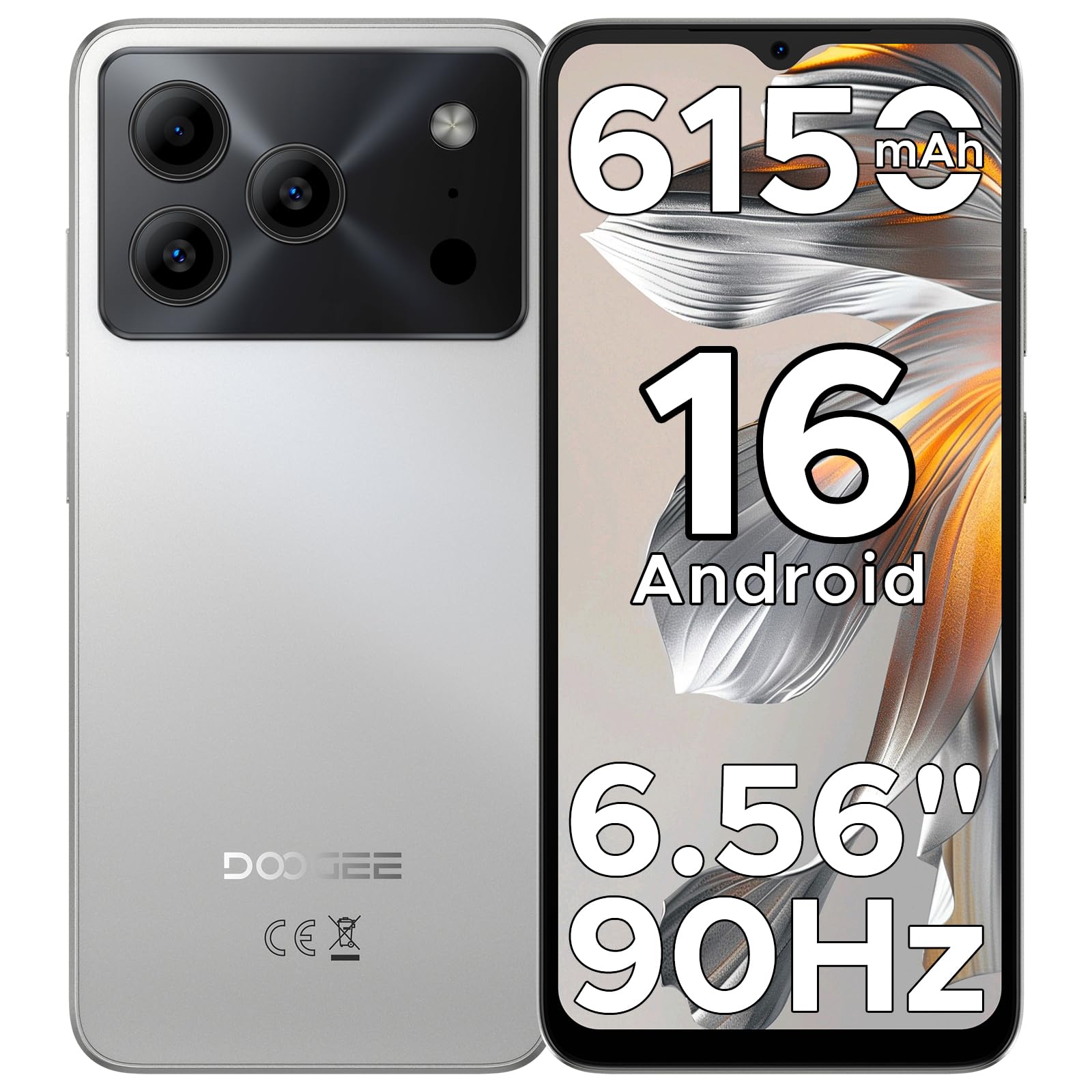
Image: The DOOGEE Note 56 smartphone, showcasing its slim design and key features such as the 8.45mm ultra-slim body, 6150mAh Silicon-Carbon Battery, Up-To-Date Android 16, 6.56" 90Hz Display, AI Scene Recognition, Instant Face Unlock, and 3.5mm Headphone Jack.

Image: A close-up view of the DOOGEE Note 56 highlighting its ultra-slim 8.45mm profile and lightweight 195g design, emphasizing its pocket-friendly and refined appearance.
Physical Buttons and Ports:
- Power Button: Located on the side, used to turn the device on/off or wake/sleep the screen.
- Volume Buttons: Located on the side, used to adjust media and call volume.
- USB Type-C Port: Located at the bottom, used for charging and data transfer.
- 3.5mm Headphone Jack: Located at the top, for connecting wired headphones.
- SIM/TF Card Slot: Located on the side, for inserting SIM cards and a TF (microSD) card.
4. Setup
4.1. Inserting SIM and TF Cards
- Locate the SIM/TF card slot on the side of your phone.
- Insert the provided SIM eject tool into the small hole next to the slot to open the tray.
- Place your Nano-SIM card(s) and/or TF card into the tray according to the diagram on the tray.
- Carefully push the tray back into the slot until it is flush with the phone's body.
4.2. Initial Power On and Setup
- Press and hold the Power button until the DOOGEE logo appears.
- Follow the on-screen prompts to select your language, connect to Wi-Fi, and set up your Google account.
- Configure security settings, including Face Unlock, for quick and secure access.
5. Operating Instructions
5.1. Android 16 Operating System
Your DOOGEE Note 56 runs on the latest Android 16 OS, offering an intuitive and secure user experience. Navigate through apps, customize your home screen, and access various features with ease.

Image: A visual representation of the Android 16 operating system interface on the DOOGEE Note 56, showing various app icons and system settings.
5.2. Face Unlock
For convenient and secure unlocking, your device supports Face Unlock. To set it up:
- Go to Settings > Security > Face Unlock.
- Follow the on-screen instructions to register your face.
- Ensure good lighting conditions during registration for optimal performance.

Image: A user demonstrating the Instant Face Unlock feature on the DOOGEE Note 56, highlighting its quick and secure access capabilities.
5.3. Gemini AI Integration
The DOOGEE Note 56 integrates Gemini AI features, enhancing your device's intelligence and responsiveness. This includes smart body sensing, dual system mode, super clipboard, memory expansion, screen optimization, and customizable screen colors.
Video: This video demonstrates how to utilize and upgrade Gemini AI features on a DOOGEE smartphone, showcasing its capabilities within the Android 16 operating system.
6. Camera Features
Capture memorable moments with the DOOGEE Note 56's advanced camera system.
6.1. Rear Camera (8MP)
The 8MP main camera delivers clear, natural photos. Features include:
- HDR: Enhances dynamic range for balanced exposure in challenging lighting.
- Pro Mode: Offers manual control over camera settings.
- Night Mode: Improves photo quality in low-light conditions.
- AI Scene Recognition: Automatically detects 12 scenes and optimizes settings for stunning shots.
- Portrait Mode: Creates a depth-of-field effect for professional-looking portraits.
- Smile Capture: Automatically takes a photo when a smile is detected.
- Panoramas: Capture wide-angle scenic views.
- Burst Shots: Take multiple photos in quick succession.
- Fun Filters: Apply creative filters to your photos.

Image: An illustration of the DOOGEE Note 56's camera capabilities, including AI Scene Recognition icons and various sample photos taken with the 8MP main camera and 5MP front camera.
6.2. Front Camera (5MP)
The 5MP front camera is perfect for selfies and video calls, featuring Beauty Mode and Portrait Effect for bright and natural results.
7. Connectivity
Stay connected with a range of network and wireless options.
- 4G Dual SIM: Supports two SIM cards for flexible network usage.
- Wi-Fi: Connect to wireless networks for internet access.
- Bluetooth 4.2: For connecting to wireless accessories.
- GPS: For navigation and location services.
- FM Radio: Enjoy your favorite radio stations.
7.1. Supported Network Bands:
- GSM: B2/3/5/8
- WCDMA: B1/2/4/5/8
- TDD: B38/40/41
- FDD: B1/2/3/4/5/7/8/18/19/20/25/26/28A/28B/66
- Support: EDGE/GPRS
8. Battery Management
The DOOGEE Note 56 is equipped with a large 6150mAh Silicon-Carbon battery for extended usage.

Image: An internal view of the DOOGEE Note 56 highlighting its 6150mAh Silicon-Carbon Battery, emphasizing its longer lifespan, unmatched durability, 1000 charge cycles, 4 years durable battery, 20% smaller size, and 5W reverse charging capability.
Video: This video highlights the 6150mAh Silicon-Carbon Battery of the DOOGEE Note 56, showcasing its capacity and efficiency.
8.1. OTG Reverse Charging
The device supports OTG (On-The-Go) reverse charging, allowing you to use your Note 56 to charge other compatible devices.
8.2. Tips for Extending Battery Life:
- Adjust screen brightness to a lower level.
- Disable Wi-Fi, Bluetooth, and GPS when not in use.
- Close background applications.
- Enable battery saver mode in settings.

Image: This image illustrates various usage scenarios for the DOOGEE Note 56, demonstrating its extended battery life for web browsing (7 hours), music playing (49.5 hours), video watching (14 hours), and calling (28 hours).
9. Storage and Performance
The DOOGEE Note 56 is powered by a UNISOC SC9863A Octa-Core processor, ensuring smooth performance for applications and daily tasks.
- RAM: 24GB (virtual RAM expansion, 8GB physical RAM).
- Internal Storage: 64GB.
- Expandable Storage: Supports up to 2TB via TF (microSD) card (TF card needs to be purchased separately).

Image: A visual representation of the DOOGEE Note 56's internal memory and storage, showing 64GB ROM and 24GB RAM (3GB+21GB virtual expansion), emphasizing smooth multitasking and ample space.
10. Display
Experience immersive visuals on the 6.56-inch HD+ 90Hz IPS waterdrop screen.
- Size: 6.56 inches
- Resolution: 720 x 1612 pixels
- Refresh Rate: 90Hz
- Aspect Ratio: 20:9
- PPI: 269

Image: The DOOGEE Note 56 display showcasing its 6.56-inch HD+ screen with a 90Hz refresh rate, designed for smooth viewing and social media interaction.
11. Maintenance and Care
To ensure the longevity and optimal performance of your DOOGEE Note 56, follow these care guidelines:
- Avoid exposing the phone to extreme temperatures, direct sunlight, or excessive moisture.
- Use only approved chargers and cables.
- Clean the screen and body with a soft, lint-free cloth.
- Utilize the provided TPU protective case and pre-applied protective film to guard against scratches and minor impacts.
12. Troubleshooting
If you encounter issues with your DOOGEE Note 56, try the following basic troubleshooting steps:
- Device not turning on: Ensure the battery is charged. Connect the charger and wait a few minutes before attempting to power on again.
- Screen unresponsive: Restart the device by pressing and holding the Power button for about 10-15 seconds.
- Network issues: Check if your SIM card is properly inserted. Verify network settings and ensure you have an active plan with your carrier.
- App crashes: Clear the cache of the problematic app or reinstall it. Ensure your device's software is up to date.
For more complex issues, refer to the official DOOGEE support website or contact customer service.
13. Specifications
| Feature | Detail |
|---|---|
| Model Name | NOTE56 |
| Operating System | Android 16 |
| Processor | UNISOC SC9863A Octa-Core (1.6 GHz CPU Speed) |
| RAM | 24 GB (8GB physical + 16GB virtual) |
| Internal Storage | 64 GB |
| Expandable Storage | Up to 2 TB via TF card |
| Display Size | 6.56 Inches |
| Display Resolution | 720 x 1612 (HD+) |
| Refresh Rate | 90 Hz |
| Rear Camera | 8 MP |
| Front Camera | 5 MP |
| Battery Capacity | 6150 Milliamp Hours (Li-Po) |
| Connectivity | 4G Dual SIM, Wi-Fi, Bluetooth 4.2, GPS, FM Radio, USB Type-C |
| Audio Jack | 3.5 mm |
| Dimensions | 6.45 x 2.98 x 0.33 inches |
| Item Weight | 6.9 ounces (195 Grams) |
| Special Features | Dual SIM, Expandable Memory, Supports USB OTG, Face Unlock |
14. Warranty and Support
Your DOOGEE Note 56 comes with a warranty. Please refer to the included Warranty Card in your product package for detailed information on warranty terms, conditions, and duration.
For technical support, service, or further inquiries, please visit the official DOOGEE website or contact their customer service channels. Keep your purchase receipt and warranty card handy for any claims.