
VILTROX AF 56/1.2 E
VILTROX 56mm F1.2 Pro E Autofocus Lens User Manual
Model: AF 56/1.2 E
1. Introduction
This manual provides detailed instructions for the proper use and maintenance of your VILTROX 56mm F1.2 Pro E autofocus lens. Designed for Sony E-Mount cameras, this lens offers a large F1.2 aperture, ideal for portrait photography and low-light conditions. Please read this manual thoroughly before using the product to ensure optimal performance and longevity.

Figure 1.1: VILTROX 56mm F1.2 Pro E Lens with Lens Hood
2. Product Overview
The VILTROX 56mm F1.2 Pro E lens is engineered to deliver high-quality imaging with advanced features:
- F1.2 Large Aperture: Produces smooth, creamy bokeh, enhancing subject isolation and creating a three-dimensional feel in portraits.
- 85mm Portrait Focal Length: Offers a classic full-frame equivalent focal length, providing natural perspective suitable for professional portrait photography.
- Superior Optical Performance: Features an advanced 8-group, 13-element optical system, including 1 ED (Extra-low Dispersion), 1 UA (Ultra-Achromatic), and 3 HR (High Refractive) elements to improve image contrast and resolution.
- Quiet and Fast Autofocus HyperVCM: Ensures sharp focus with real-time subject tracking, suitable for both photography and videography, even with moving subjects.
- Durable Build and Reliability: Constructed from a magnesium-aluminum alloy for a lightweight yet robust body, offering high impact resistance and advanced dust and splash protection.

Figure 2.1: Optical Structure Diagram

Figure 2.2: MTF Chart (F1.2 & F1.8)
3. What's in the Box
Verify that all the following items are included in your package:
- VILTROX 56mm F1.2 Pro E Lens
- Front Lens Cap
- Rear Lens Cap
- Lens Pouch
- Lens Hood
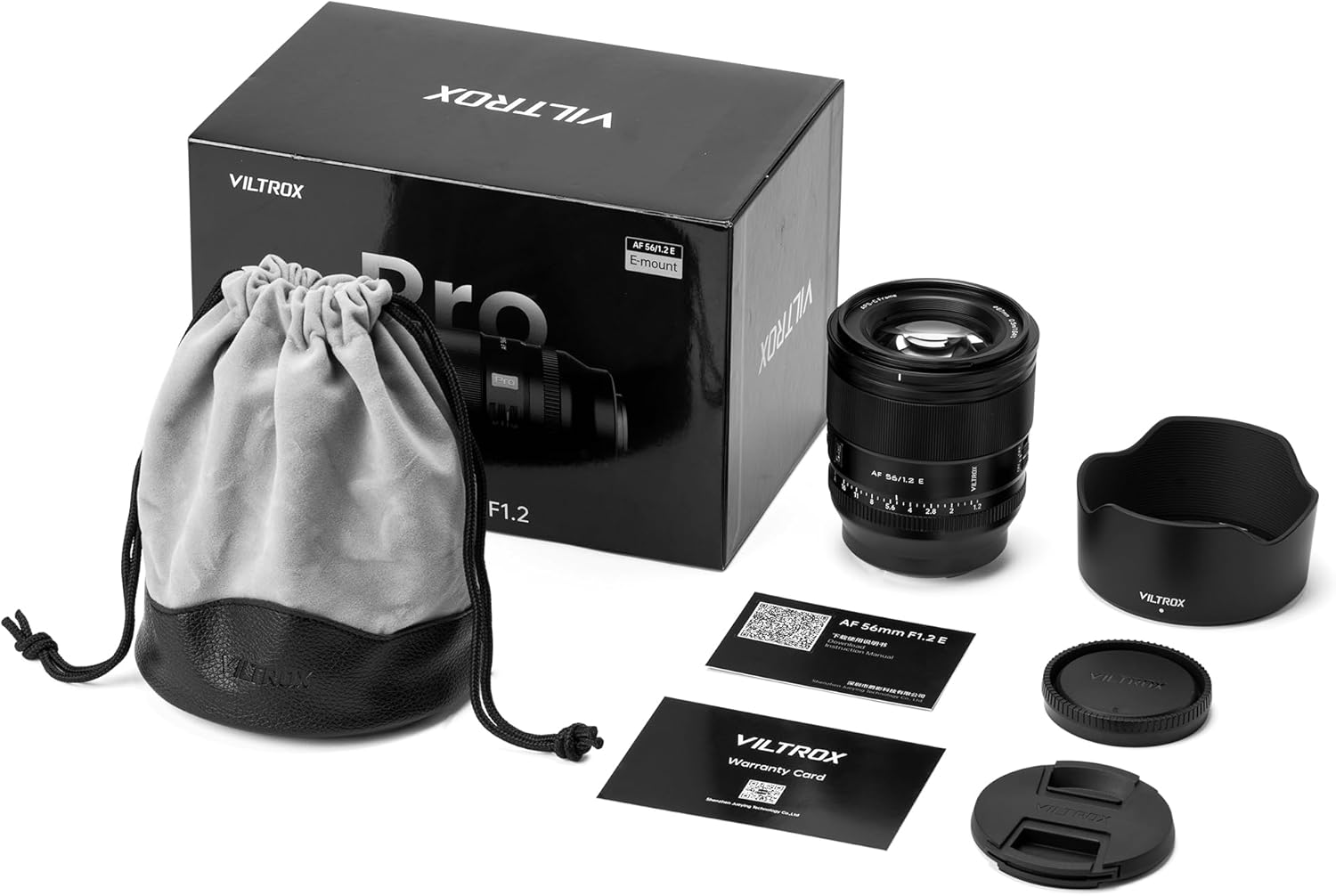
Figure 3.1: Package Contents
Unboxing Video
Video 3.1: An immersive unboxing of the VILTROX AF 56mm F1.2 Pro E lens, showing the lens, lens hood, and accessories being removed from the packaging.
4. Setup
4.1 Attaching the Lens
- Align the mounting index on the lens with the mounting index on your Sony E-Mount camera body.
- Rotate the lens clockwise until it clicks into place. Ensure it is securely locked.

Figure 4.1: Attaching the Lens to a Camera
4.2 Focus Mode Switch (AF/MF)
Locate the AF/MF switch on the side of the lens barrel. Slide the switch to select between Autofocus (AF) and Manual Focus (MF) modes. For optimal performance, ensure your camera's focus mode also matches the lens setting.

Figure 4.2: AF/MF Switch
4.3 Aperture Ring (Click ON/OFF)
The lens features an aperture ring with a 'Click' switch. When the switch is set to 'ON', the aperture ring provides tactile clicks at each f-stop, useful for photography. When set to 'OFF', the aperture ring moves smoothly without clicks, which is beneficial for video recording to avoid audible clicks during adjustments.

Figure 4.3: Aperture Ring and Click Switch
5. Operating the Lens
5.1 Autofocus Operation
In AF mode, the lens utilizes its HyperVCM motor for fast and precise autofocus. Ensure your camera's autofocus settings are configured as desired (e.g., single-shot AF, continuous AF, eye AF). The lens supports advanced tracking capabilities for moving subjects.

Figure 5.1: Eye Autofocus in Use
5.2 Manual Focus Operation
In MF mode, rotate the focus ring to adjust focus manually. Your camera's focus peaking and magnification assist features can aid in achieving precise manual focus.
5.3 Aperture Control
The F1.2 large aperture allows for significant control over depth of field. Use wider apertures (smaller f-numbers like F1.2, F1.4) for shallow depth of field and pronounced background blur (bokeh). Use narrower apertures (larger f-numbers like F8, F11) for greater depth of field, keeping more of the scene in focus.
Aperture Comparison Video
Video 5.2: A comparison demonstrating the difference in background blur (bokeh) when shooting with wide (F1.2) versus narrow (F5.6) apertures using the VILTROX 56mm F1.2 Pro E lens.
Blur Effect Changes Video
Video 5.3: This video illustrates how the blur effect changes as the aperture is adjusted from small to large on the VILTROX 56mm F1.2 E lens.
5.4 Using the Lens Hood
Attach the included lens hood to reduce flare and ghosting caused by stray light, and to provide physical protection for the front element.
6. Maintenance
Proper care ensures the longevity and performance of your lens:
- Cleaning: Use a soft, lint-free cloth to clean the lens barrel. For lens elements, use a lens brush to remove dust, then gently wipe with a lens cleaning solution and a microfiber cloth. Avoid touching the glass directly with your fingers.
- Storage: When not in use, attach both front and rear lens caps. Store the lens in a dry, cool place, preferably in the provided lens pouch, away from direct sunlight and extreme temperatures.
- Moisture: Avoid exposing the lens to excessive moisture or rain. If it gets wet, wipe it dry immediately.
7. Troubleshooting
If you encounter issues with your lens, refer to the following common solutions:
- Lens Not Attaching Securely: Ensure the mounting index marks are aligned correctly and rotate until a click is heard. Check for any obstructions on the lens mount or camera body.
- Autofocus Not Working: Verify that the AF/MF switch on the lens is set to AF. Check your camera's focus mode settings. Ensure the lens contacts on both the lens and camera are clean.
- Rattling Sound When Shaking Lens: A slight rattling sound when the lens is off the camera and shaken is a normal characteristic of the VCM (Voice Coil Motor) autofocus system. This sound typically disappears once the lens is powered on and mounted to the camera. This is not a defect.
- Image Quality Issues: Ensure lens elements are clean. Check camera settings (ISO, shutter speed, aperture). If using a protective filter, ensure it is clean and of high quality.
8. Specifications
| Feature | Specification |
|---|---|
| Brand | VILTROX |
| Model Number | AF 56/1.2 E |
| Focal Length | 56mm Fixed Focal Length |
| Maximum Aperture | F1.2 |
| Lens Type | Standard Portrait Lens |
| Compatible Mountings | Sony E |
| Optical Design | 13 elements in 8 groups (including 1 ED, 1 UA, 3 HR) |
| Autofocus Motor | HyperVCM |
| Product Dimensions | 3.61 x 3.09 x 3.09 inches |
| Item Weight | 1.26 pounds |
| Manufacturer | Shenzhen Jueying Technology Co., Ltd. |
9. Warranty and Support
VILTROX products are designed for reliability and performance. For warranty information, technical support, or service inquiries, please refer to the official VILTROX website or contact your local distributor.
You can also visit the official VILTROX store on Amazon for more product information and support: VILTROX Official Store
Ask a question about this manual
Ask about setup, troubleshooting, compatibility, parts, safety, or missing instructions. Manuals+ will review the question and use this page’s manual context to help answer it.