
1. Introduction
This manual provides essential information for the safe and effective use of your Lifepro Hovert 3D Heavy Duty Vibration Plate Machine. Please read all instructions carefully before operation and retain this manual for future reference.
The Lifepro Hovert 3D Vibration Plate Machine is designed to provide a full-body workout experience through multi-directional vibrations, aiding in muscle activation, circulation improvement, and overall wellness. It features dual motors for lateral and 3D motion, offering versatile exercise options.
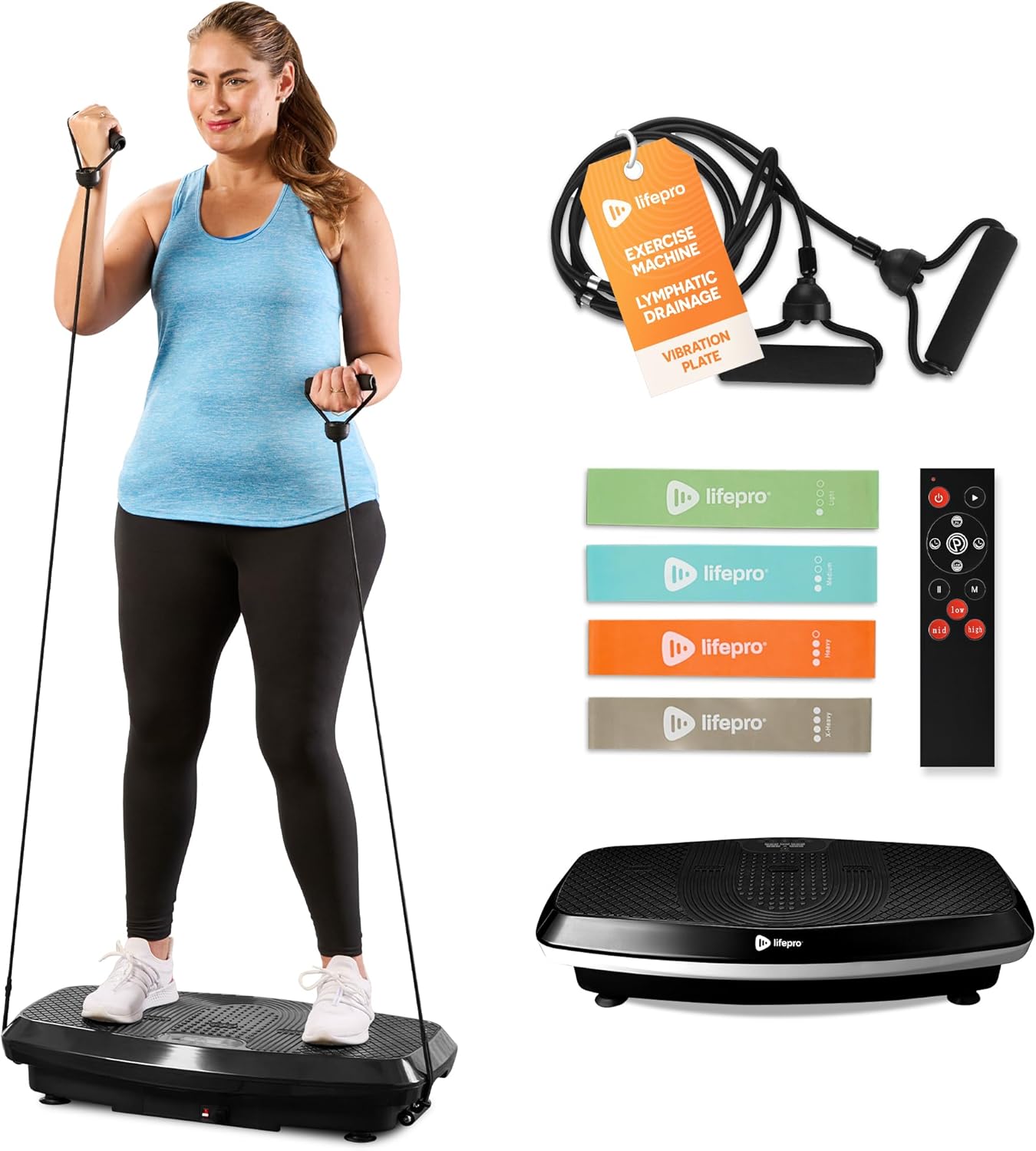
Image: The Lifepro Hovert 3D Vibration Plate Machine, showcasing the main unit, included resistance bands, and remote control.

Image: A woman demonstrating a squat exercise on the Hovert 3D machine, utilizing a resistance band for added benefit, illustrating whole-body benefits like improved balance and lymphatic drainage.

Image: A woman performing crunches while seated on the Hovert 3D machine, highlighting benefits such as increased bone density, improved circulation, boosted calorie burn, and muscle recovery.
2. Safety Precautions
To reduce the risk of serious injury, always read and follow all warnings and instructions before using the Lifepro Hovert 3D Vibration Plate Machine.
- Consult your physician before starting any new exercise program, especially if you have pre-existing medical conditions.
- Keep children and pets away from the machine during operation.
- Ensure the machine is placed on a flat, stable surface.
- Do not use the machine if you are pregnant, have a pacemaker, or have any metal implants.
- Do not exceed the maximum weight capacity of 330 pounds (150 kg).
- Always ensure the power cord is fully inserted and not damaged.
- Unplug the machine when not in use or before cleaning.
- Do not insert any objects into the machine's openings.
- Use the machine only for its intended purpose as described in this manual.
- If you experience pain, dizziness, or discomfort, stop exercising immediately.
3. Product Components
The Lifepro Hovert 3D Vibration Plate Machine typically includes the following components:
- Lifepro Hovert 3D Vibration Plate
- Remote Control
- Resistance Bands (with handles)
- Power Cord
- User Manual (this document)

Image: A close-up view of the Lifepro Hovert 3D's control panel and the remote control, illustrating features such as 99 speed levels, 8 preset programs, an LED display, and remote operation.
4. Setup
- Unpacking: Carefully remove all components from the packaging. Retain packaging for storage or future transport.
- Placement: Place the vibration plate on a firm, level surface. Ensure there is adequate space around the machine for safe operation and movement.
- Power Connection: Insert the power cord into the machine's power input port and then into a grounded electrical outlet.
- Initial Check: Before first use, ensure all parts are securely in place and there are no visible damages.

Image: A man demonstrating the portability of the Lifepro Hovert 3D machine, highlighting its built-in roller for easy transport and storage.
5. Operation
Powering On/Off
- To power on, press the power button on the machine or the remote control.
- To power off, press the power button again.
Understanding Vibration Modes
The Hovert 3D features dual motors allowing for three distinct motion types:
- Oscillation: Mimics a seesaw motion, primarily targeting lower body and core.
- Lateral: Moves side-to-side, engaging different muscle groups and improving balance.
- 3D (Combination): Combines oscillation and lateral movements for a comprehensive full-body vibration.

Image: Demonstrations of the Hovert 3D's various motion types: oscillation (man squatting), combination (woman doing crunches), and lateral (man doing bicep curls). Also shows a woman in a plank position on the machine.
Adjusting Settings
- Speed Levels: Use the speed adjustment buttons on the remote or control panel to select from 99 available speed levels.
- Preset Programs: The machine includes 8 preset programs designed for various fitness goals. Select a program using the corresponding button on the remote.
- Time: Adjust the workout duration as needed.
Exercise Guide
The Lifepro Hovert 3D can be used for a variety of exercises. Here are some examples:
- Split Squats: Stand with one foot on the plate and the other behind, perform a squat.
- Planks and Push-Ups: Place hands or forearms on the plate and hold a plank position, or perform push-ups.
- Lateral Raises: Stand on the plate, hold resistance band handles, and raise arms laterally.
- Biceps Curls: Stand on the plate, hold resistance band handles, and perform bicep curls.

Image: A collage of four images demonstrating various exercises that can be performed on the Lifepro Hovert 3D: split squats, planks and push-ups, lateral raises, and biceps curls, all utilizing the vibration platform.
6. Maintenance and Storage
Cleaning
- Always unplug the machine before cleaning.
- Wipe the surface of the vibration plate with a soft, damp cloth.
- Do not use abrasive cleaners or solvents.
- Ensure no liquid enters the internal components.
Storage
- Store the machine in a cool, dry place away from direct sunlight and moisture.
- Avoid placing heavy objects on top of the machine.
- The built-in roller allows for easy movement and storage.
7. Troubleshooting
| Problem | Possible Cause | Solution |
|---|---|---|
| Machine does not power on. | Power cord not properly connected; Power outlet not working; Machine fault. | Check power cord connection; Try a different outlet; Contact customer support. |
| Vibrations are weak or inconsistent. | Incorrect mode selected; Machine overloaded; Internal issue. | Ensure correct mode is selected; Do not exceed max weight; Contact customer support. |
| Remote control not working. | Batteries are low or dead; Obstruction between remote and machine; Remote sensor issue. | Replace remote batteries; Ensure clear line of sight; Contact customer support. |
| Unusual noise during operation. | Machine not on a level surface; Loose components; Internal motor issue. | Place on a level surface; Check for loose parts; Discontinue use and contact customer support. |
8. Specifications
| Feature | Detail |
|---|---|
| Model Name | Hovert Vibration Platform Black |
| ASIN | B07ZN7PLK6 |
| UPC | 068888006811 |
| Dimensions (LxWxH) | 31"D x 18"W x 7"H |
| Item Weight | 35 Pounds (15.88 kg) |
| Maximum Weight Recommendation | 330 Pounds (150 kg) |
| Controls Type | Remote |
| Display Type | Digital |
| Number of Resistance Levels | 99 |
| Operation Mode | Automatic |
| Power Source | Corded Electric |
| Material | Rubber |

Image: A detailed view of the Lifepro Hovert 3D machine, illustrating its dimensions (31" length, 18" width, 7" height) and maximum weight capacity of 330 lbs.
9. Warranty and Support
LifePro offers a built-in lifetime warranty for the Hovert 3D Vibration Plate Machine, ensuring long-term support and peace of mind. This warranty covers defects in materials and workmanship under normal use.
For customer support, technical assistance, or warranty claims, please refer to the contact information provided with your product packaging or visit the official LifePro website. LifePro also provides access to a comprehensive library of training videos and live support.
Additional resources, including user manuals and guides, can be found online: