1. Introduction
This manual provides instructions for the CHUNGHOP YBE1F Replacement Air Conditioner Remote Control. This remote is designed to be a direct replacement for original GREE and TOSOT air conditioner remote controls, specifically compatible with the YBE1F model. It offers essential functions for controlling your air conditioning unit.
Package Contents:
- 1 x CHUNGHOP YBE1F Replacement Air Conditioner Remote Control
2. Setup
2.1 Battery Installation
The remote control requires two (2) AAA 1.5V batteries (not included). Follow these steps to install the batteries:
- Locate the battery compartment cover on the back of the remote control.
- Slide the cover downwards to open the compartment.
- Insert two AAA batteries, ensuring the positive (+) and negative (-) terminals match the diagrams inside the compartment.
- Slide the cover back into place until it clicks securely.
No programming or setup is required. The remote is ready for use immediately after battery installation.

Figure 1: Back of the remote control with the battery compartment open, showing where to insert AAA batteries.
3. Operating Instructions
The CHUNGHOP YBE1F remote control provides various functions for your air conditioner. Below is a guide to its buttons and special functions.
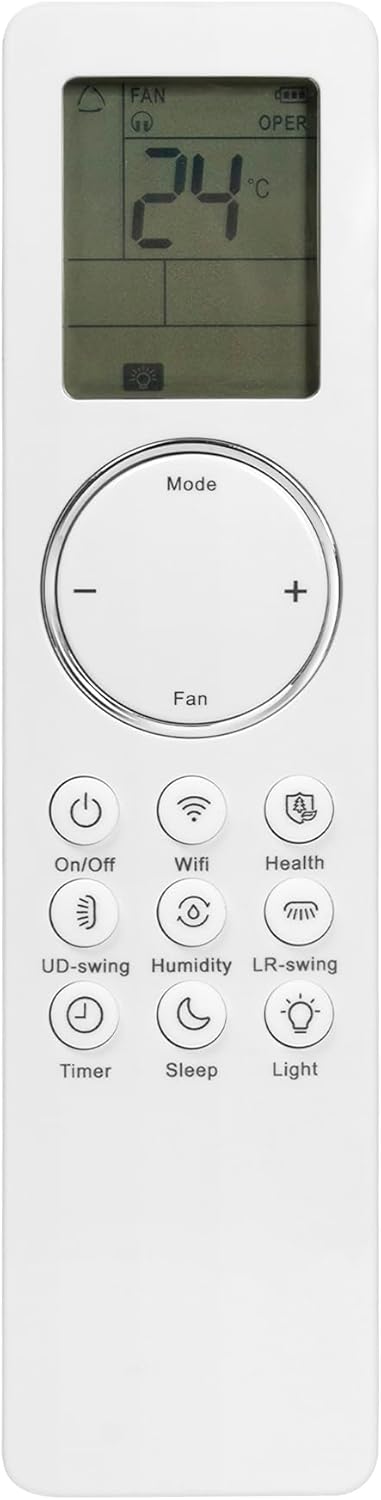
Figure 2: Front view of the CHUNGHOP YBE1F remote control, displaying its buttons and LCD screen.
3.1 Basic Functions
- On/Off Button: Powers the air conditioner on or off.
- Mode Button: Cycles through operating modes (e.g., Cool, Heat, Fan, Dry, Auto).
- Temperature Adjustment (+/-): Increases or decreases the set temperature.
- Fan Button: Adjusts fan speed.
3.2 Special Functions
The remote control includes several advanced functions, some of which require specific button combinations. These combinations are also printed on the back of the remote for quick reference.

Figure 3: Front and back views of the remote control, highlighting the printed instructions for special functions on the rear.
- Auto Clean Function: Press and hold the "Mode" and "UD-swing" buttons simultaneously for 5 seconds to activate the Auto Clean function.
- I FEEL Function: Press and hold the "Health" and "+" (temperature up) buttons simultaneously to turn on the I FEEL function.
- Power Down Function: Press and hold the "Mode" and "Sleep" buttons simultaneously to activate the Power Down function.
- Soft Sound Function: Press and hold the "Mode" and "LR-swing" buttons simultaneously to activate the Soft Sound function.
- Fast Cool Function: Press and hold the "On/Off" and "+" (temperature up) buttons simultaneously to activate the Fast Cool function.
- Temperature Unit Shift (°C / °F): Press and hold the "Mode" and "-" (temperature down) buttons simultaneously for 3 seconds to switch the temperature display between Celsius (°C) and Fahrenheit (°F).
3.3 Other Buttons
- Wifi Button: For air conditioners with Wi-Fi connectivity. Refer to your air conditioner's manual for specific Wi-Fi setup instructions.
- Health Button: Activates health-related functions, if supported by your air conditioner.
- UD-swing Button: Controls the vertical (Up/Down) swing of the air conditioner's louvers.
- Humidity Button: Activates humidity control functions, if supported by your air conditioner.
- LR-swing Button: Controls the horizontal (Left/Right) swing of the air conditioner's louvers.
- Timer Button: Sets the timer for automatic on/off operations.
- Sleep Button: Activates the sleep mode, which adjusts temperature and fan speed for comfortable sleep.
- Light Button: Controls the display light on the air conditioner unit.
4. Maintenance
To ensure optimal performance and longevity of your remote control:
- Clean the remote control regularly with a soft, dry cloth. Do not use liquid cleaners or abrasive materials.
- Avoid exposing the remote to direct sunlight, high temperatures, or high humidity.
- If the remote will not be used for an extended period, remove the batteries to prevent leakage.
- Replace batteries when the remote's response becomes sluggish or the display dims.
5. Troubleshooting
If you encounter issues with your remote control, try the following solutions:
- Remote not responding:
- Check if the batteries are inserted correctly with the correct polarity.
- Replace old batteries with new AAA batteries.
- Ensure there are no obstructions between the remote control and the air conditioner's receiver.
- Make sure you are within the effective operating range of the air conditioner.
- Air conditioner not responding to specific functions:
- Verify that your air conditioner model supports the specific function (e.g., Wi-Fi, Health, Humidity). Refer to your air conditioner's original manual.
- Ensure you are pressing the correct button combination for special functions as described in Section 3.2.
- Temperature display is incorrect (°C/°F):
- Press and hold the "Mode" and "-" (temperature down) buttons simultaneously for 3 seconds to switch the temperature unit.
6. Specifications
| Model Number | YBE1F |
| Brand | CHUNGHOP |
| Compatible Devices | GREE, TOSOT Air Conditioners (YBE1F model) |
| Connectivity Technology | Infrared |
| Power Source | 2 x AAA 1.5V Batteries (not included) |
| Color | White |
| Special Feature | No Programming Required |
| Dimensions | 7.7 x 1.9 x 0.7 inches (approx.) |
| Weight | 1.76 ounces (without batteries) |
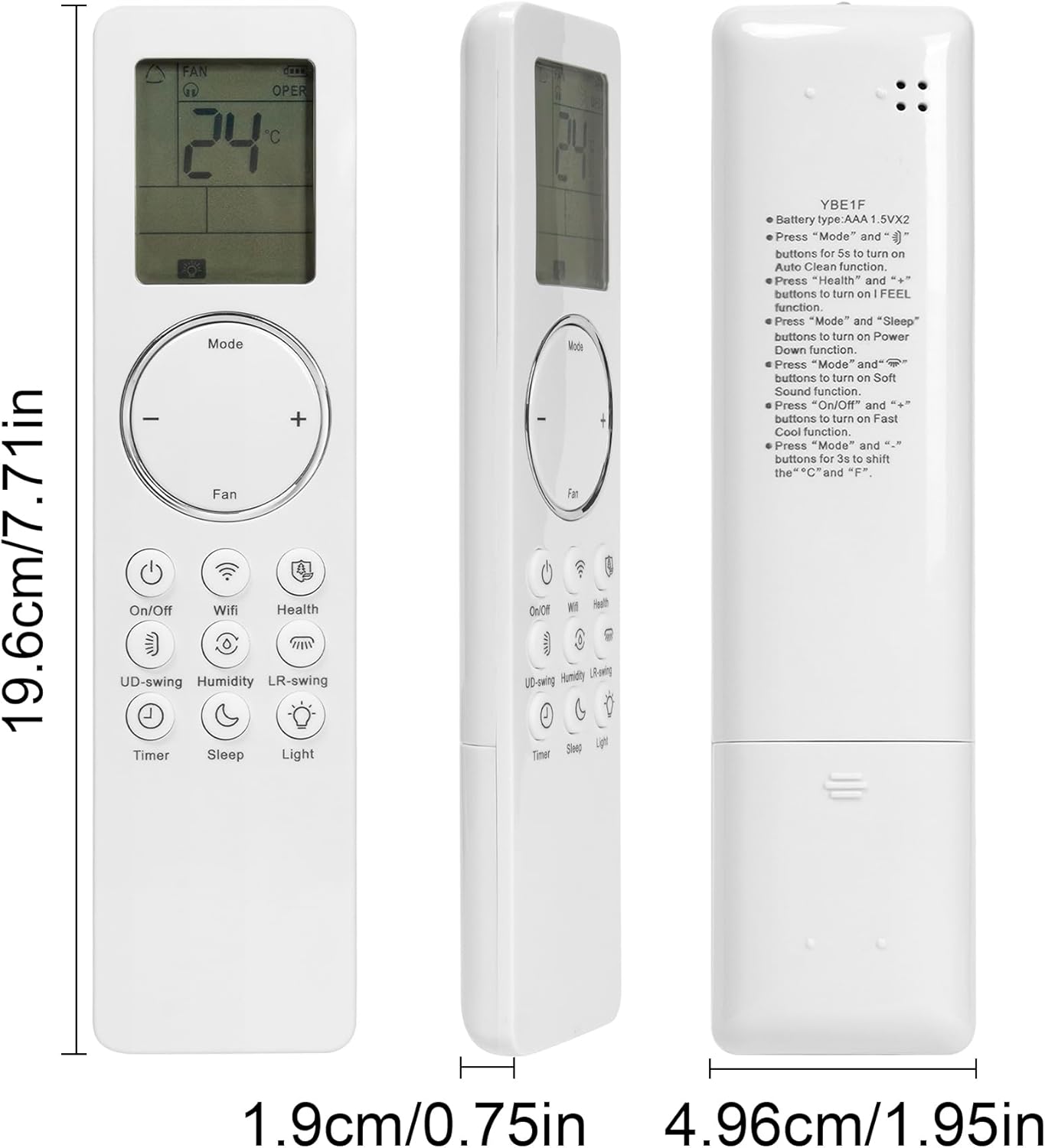
Figure 4: Remote control with approximate dimensions: 19.6cm/7.71in length, 1.9cm/0.75in width, 4.96cm/1.95in depth.
7. Warranty and Support
For any questions or assistance regarding your CHUNGHOP YBE1F Replacement Air Conditioner Remote Control, please contact the seller or manufacturer directly. Refer to your purchase documentation for specific warranty details and contact information.
The product is designed for durability and ease of use, offering a reliable replacement solution.