1. Introduction
This manual provides detailed instructions for the operation and maintenance of your AQItech Professional Indoor Air Quality Monitor. This device is designed to detect various air quality parameters in real-time, helping you maintain a healthy indoor environment.
The monitor features comprehensive detection capabilities for 9 key air quality parameters, including PM1.0, PM2.5, PM10, CO2, TVOC, HCHO, Temperature, and Humidity. It also incorporates 7 types of AQI alert buzzers to notify you of significant changes in air quality.
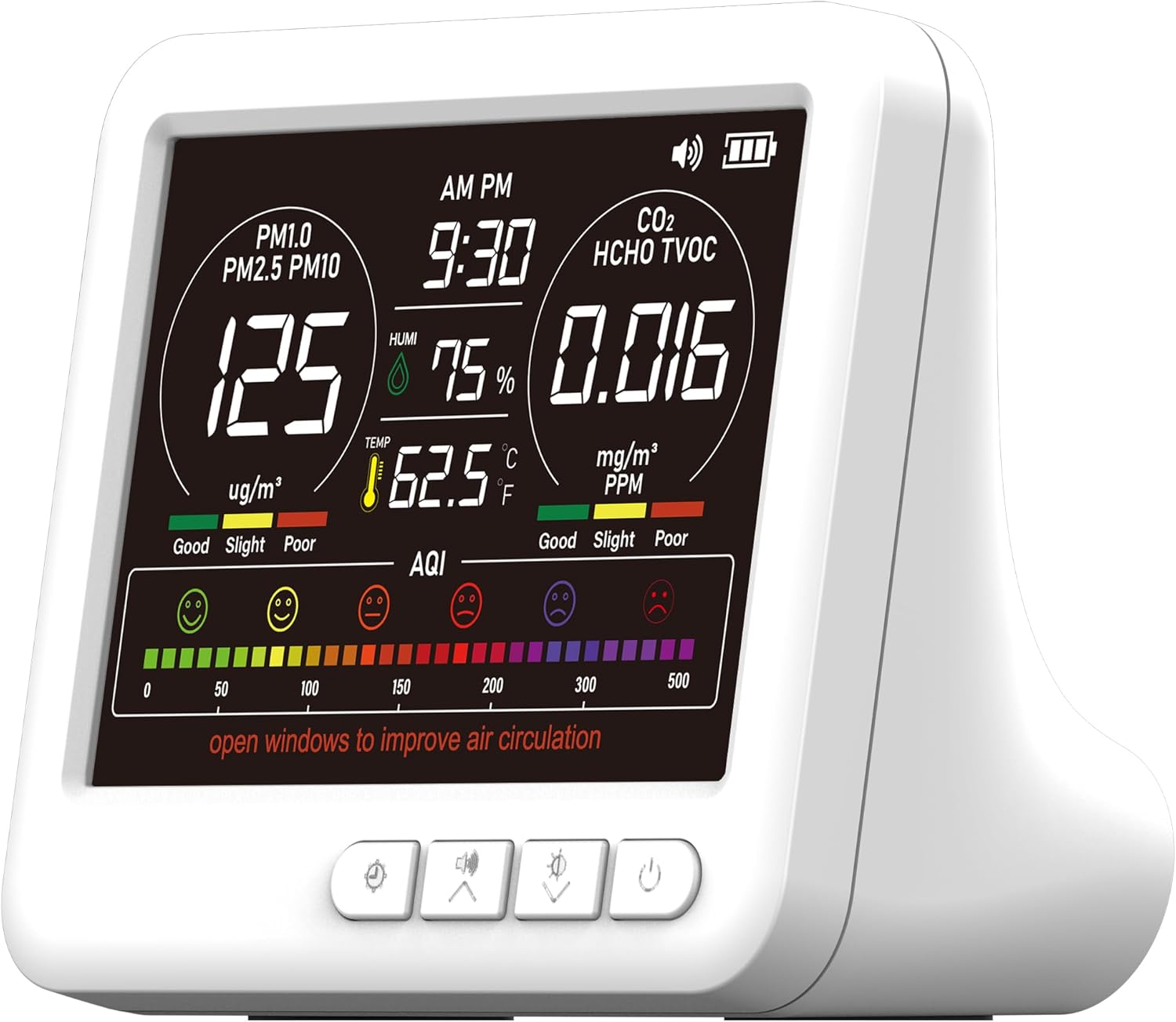
Image 1.1: Front view of the AQItech Air Quality Monitor displaying real-time data for PM1.0, PM2.5, PM10, CO2, HCHO, TVOC, humidity, and temperature.
2. Product Overview
2.1 Key Features
- 9-Parameter Real-time Detection: Monitors PM1.0, PM2.5, PM10, CO2, TVOC, HCHO, Temperature, and Humidity, plus overall AQI.
- 7X AQI Alarms: Provides audible alerts for various air quality index levels.
- High-Precision Sensor System: Continuously collects and analyzes air data every 3 seconds for accurate readings.
- HD Large Color Display: Clear and advanced display for enhanced readability, showing data in an intuitive color-coded format (Green for Good, Yellow for OK, Red for Poor).
- User-Friendly Controls: Simple one-button operation for power, unit switching, and alarm silencing.
- Long Battery Life & Fast Charging: Up to 4-5 hours of continuous operation on a single charge with Type-C charging.
- Versatile Placement: Suitable for various environments including homes, offices, cars, nurseries, and plant cultivation rooms.
2.2 Package Contents
Ensure all items are present upon unboxing:
- 1 x AQItech Air Quality Monitor
- 1 x USB-C Charging Cable
- 1 x User Manual (this document)
3. Setup
3.1 Initial Charging
- Connect the provided USB-C charging cable to the monitor's Type-C interface.
- Plug the other end of the cable into a compatible USB power adapter (not included) or a powered USB port.
- Allow the device to charge fully before first use. A full charge typically provides 4-5 hours of continuous operation.
3.2 Powering On/Off
- To Power On: Long press the power button (usually located on the device) until the display illuminates.
- To Power Off: Long press the power button until the display turns off.
3.3 Initial Calibration (Automatic)
Upon powering on, the device will automatically begin its initial calibration process. During this time, it will start collecting and analyzing air data. Ensure the device is placed in a stable environment for accurate initial readings.
4. Operating Instructions
4.1 Display Overview

Image 4.1: Close-up of the monitor's HD color screen, illustrating the display of PM values, CO2, HCHO, TVOC, temperature, humidity, and the color-coded AQI bar.
The monitor features a high-definition color LCD screen that displays various air quality parameters simultaneously. Readings are updated every 3 seconds. The display uses a color-coded system for quick interpretation:
- Green: Indicates good air quality.
- Yellow: Indicates acceptable or "OK" air quality, suggesting attention may be needed.
- Red: Indicates poor air quality, requiring immediate action.
4.2 Button Functions
The device typically has several buttons for control:
- Power Button:
- Long press: Turn the device on or off.
- Long press for 5 seconds: Resets all values to factory defaults.
- Time/Unit Switch Button:
- Short press: Switch between 12-hour and 24-hour time formats.
- Long press (approx. 5 seconds): Adjust the time settings.
- Short press: Switch between Celsius (°C) and Fahrenheit (°F) for temperature display.
- Sound/Buzzer Button:
- Short press: Turn the audible buzzer alarm on or off.
- Double-click: Silence active alerts.
- Light/Brightness Button:
- Short press: Cycle through 3 levels of display brightness.
4.3 Understanding AQI Alarms
The monitor is equipped with 7 types of AQI alert buzzers. When air quality parameters exceed predefined thresholds, the device will emit an audible alert. For example, if air quality is "POOR" (beyond normal range), the device may emit two longer "BBB, BBB" sounds.
Refer to the table below for specific thresholds and corresponding alert behaviors:

Image 4.2: Detailed table outlining the thresholds for various air quality parameters (PM1.0, PM2.5, PM10, CO2, TVOC, HCHO, AQI) and their corresponding "Good," "OK," and "Poor" classifications, including buzzer alert information.
| Parameter | GOOD | OK | POOR |
|---|---|---|---|
| PM1.0 | ≤50 ug/m³ | 50-150 ug/m³ | >150 ug/m³ |
| PM2.5 | ≤50 ug/m³ | 50-150 ug/m³ | >150 ug/m³ |
| PM10 | ≤50 ug/m³ | 50-150 ug/m³ | >150 ug/m³ |
| CO2 | <800 ppm | 800-1500 ppm | >1500 ppm |
| TVOC | <0.6 mg/m³ | 0.6-1.5 mg/m³ | >1.5 mg/m³ |
| HCHO | <0.08 mg/m³ | 0.08-0.1 mg/m³ | >0.1 mg/m³ |
| AQI | 0-50 | 51-150 | 151-500 |
| Alert Buzzers | None | None | BB...BB... |
5. Placement and Application
The AQItech Air Quality Monitor is designed for versatile placement and can be used in various indoor environments:

Image 5.1: Examples of suitable environments for the air quality monitor, including offices, baby rooms, greenhouses, living rooms, pet areas, and vehicles, highlighting its portability and adaptability.
- Home: Bedrooms, living rooms, kitchens, nurseries.
- Work: Offices, meeting rooms.
- Specialized Environments: Plant cultivation rooms, greenhouses.
- Vehicles: Cars and other enclosed transport spaces.
The monitor can be placed on a flat surface, mounted on a wall, or carried with you due to its portable design.
6. Maintenance
To ensure optimal performance and longevity of your AQItech Air Quality Monitor, follow these maintenance guidelines:
- Cleaning: Use a soft, dry cloth to clean the exterior of the device. Do not use liquid cleaners, aerosols, or solvents, as these may damage the sensors or casing.
- Sensor Care: Avoid obstructing the air intake and exhaust vents. Do not insert any objects into these openings.
- Storage: When not in use for extended periods, store the device in a cool, dry place away from direct sunlight and extreme temperatures.
- Battery: Recharge the battery regularly, even if the device is not in constant use, to maintain battery health. Avoid fully discharging the battery frequently.
7. Troubleshooting
If you encounter issues with your AQItech Air Quality Monitor, refer to the following common problems and solutions:
| Problem | Possible Cause | Solution |
|---|---|---|
| Device does not power on. | Low battery or no charge. | Connect the device to a power source using the USB-C cable and allow it to charge for at least 30 minutes before attempting to power on again. |
| Inaccurate or fluctuating readings. | Device is in a dusty environment, near strong air currents, or recently moved. | Place the device in a stable, calm environment away from direct drafts or strong odors. Allow several minutes for readings to stabilize. Perform a factory reset if issues persist (long press power button for 5 seconds). |
| Buzzer alarm sounds continuously. | Air quality parameters exceed "POOR" thresholds. | Check the display for specific parameter readings. Improve ventilation (e.g., open windows). Double-click the sound button to temporarily silence the alarm. |
| Display is dim or unresponsive. | Brightness setting is low or device is in power-saving mode. | Short press the Light/Brightness button to cycle through brightness levels. Ensure the device is charged. |
| Cannot switch temperature units or adjust time. | Incorrect button press duration. | Ensure you are using a short press for unit switching and a long press (approx. 5 seconds) for time adjustment on the designated button. |
If the problem persists after attempting these solutions, please contact AQItech customer support for further assistance.
8. Specifications
| Feature | Detail |
|---|---|
| Brand | AQItech |
| Model Number | 9AQI+7 AQI Alert Buzzers+Time |
| Detection Indicators | AQI, CO2, PM1.0, PM2.5, PM10, Temp, HUM, Formaldehyde (HCHO), VOC (TVOC) |
| Detection Method for PM | Laser scattering |
| Warning Device | Buzzer alarm |
| Display Method | Colored LCD screen display |
| Sampling Time | 1.5 seconds (data updated every 3 seconds) |
| Battery Capacity | 2000 mAh Lithium Ion |
| Charging Interface | TYPE-C interface |
| Continuous Operation Time | Up to 4-5 hours (fully charged) |
| Product Dimensions | 120x93x24 mm (4.72x3.66x0.94 inches) |
| Product Weight | 249g (8 ounces) |
| Power Source | Battery Powered |
| Color | Light Beige |
| UPC | 717710605974 |
9. Warranty and Support
The AQItech Professional Indoor Air Quality Monitor comes with a 12-month warranty from the date of purchase. This warranty covers manufacturing defects and malfunctions under normal use.
For warranty claims, technical support, or any inquiries regarding your product, please contact AQItech customer service through the retailer where the product was purchased or visit the official AQItech website for contact information.
Please retain your proof of purchase for warranty validation.


