
1. Introduction
This manual provides essential information for the proper setup, operation, and maintenance of your RETROSUN replacement remote control. This remote is specifically designed for use with Bifanuo Walking Pad treadmill models TM006, TM008, and TM009.
Important Note: Please ensure your original remote control has the same button layout and functions as depicted in this manual for full compatibility.

Image: Comparison of the RETROSUN replacement remote with an original remote, highlighting a 100% similarity in function and form factor. The image also shows close-ups of the remote's side profile and button details, emphasizing a perfect fit and design consistency.
2. Package Contents
- 1 x RETROSUN Replacement Remote Control
Note: CR2032 batteries and additional instructions are not included in the package. Please refer to this manual for all operational guidance.
3. Setup
3.1 Battery Installation
The remote control requires one CR2032 Lithium Coin Cell battery (not included). To install the battery:
- Locate the battery compartment on the back of the remote control.
- Open the battery compartment cover.
- Insert one CR2032 battery with the positive (+) side facing upwards.
- Close the battery compartment cover securely.

Image: The image displays the RETROSUN remote control alongside a CR2032 lithium battery, indicating that the remote requires this type of button battery and that batteries are not included. It also highlights the ABS material used in the remote's construction.
3.2 Remote Matching Method (Pairing)
To pair the remote control with your Bifanuo Walking Pad, follow these steps:
- When using the treadmill for the first time, ensure the treadmill's power is turned ON.
- Wait for the power-on display sequence on the treadmill to complete (this usually takes within 20 seconds).
- Long press the "—" (minus) key on the remote control.
- Release the key when the treadmill's display panel begins to blink.
- The display panel will blink twice, and the treadmill will emit two beeps, indicating successful pairing.
Note: If the remote control is unresponsive or invalid after initial setup, please repeat this pairing operation once.

Image: A visual guide illustrating the three steps for pairing the remote control with a walking pad. It shows the remote control being held near the treadmill's display, with green signals indicating successful communication during the pairing process.
Troubleshooting Pairing: Since button configurations may vary across different treadmill models, if pairing fails with the standard method, you may need to try different combinations of key presses. Refer to the diagram below for potential alternative pairing methods.
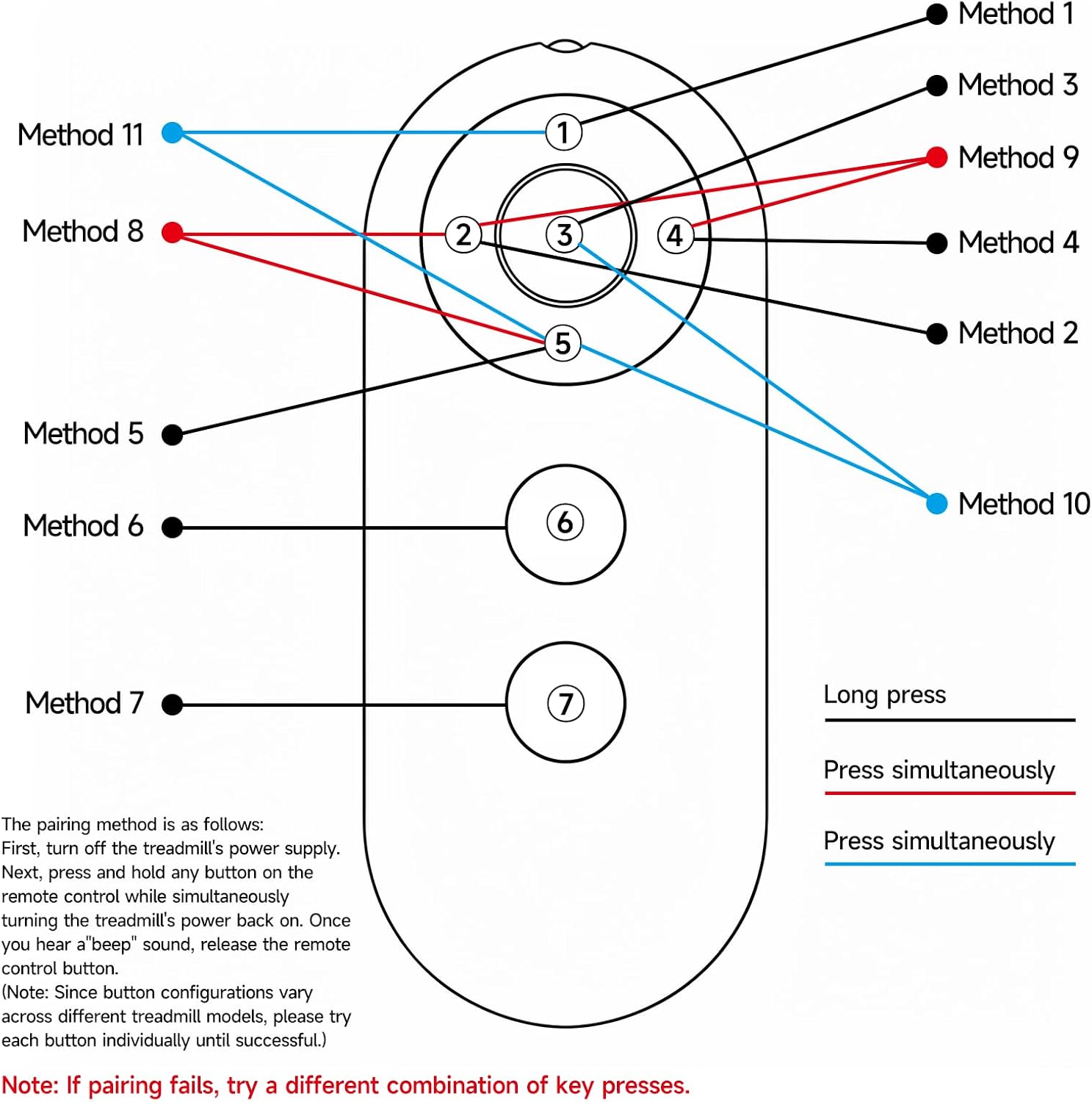
Image: A detailed diagram of the remote control's buttons, indicating various 'Method' numbers (1-11) and lines (long press, press simultaneously) to suggest alternative pairing procedures. The text below the diagram advises trying each button individually until successful if pairing fails, due to potential variations in treadmill models.
4. Operating Instructions
The RETROSUN replacement remote control offers intuitive button control for your Bifanuo Walking Pad. Its ergonomic design ensures comfortable use during your exercise sessions.

Image: A person using the RETROSUN remote control while walking on a Bifanuo Walking Pad treadmill. The image highlights the remote's compatibility with TM006, TM008, and TM009 models, showing the remote's buttons clearly visible in the foreground.
4.1 Key Features
- Fast Response: Engineered with a new-generation smart chip for instant button response.
- Wide Range: Provides reliable 8m (26ft) range coverage.
- Wide-Angle Design: 120-degree wide-angle infrared signal eliminates strict positioning constraints.
- Ergonomic Comfort: Curved shape designed for comfortable, fatigue-free control during extended use.
- Durable Material: Constructed from high-quality ABS material.

Image: A collage showcasing the key features of the RETROSUN remote control. It highlights the fast button response, the use of environmentally friendly ABS material, and the comfortable grip, with supporting visuals of the remote, raw ABS pellets, and a person holding the remote.
5. Maintenance
To ensure the longevity and optimal performance of your remote control, follow these simple maintenance guidelines:
- Cleaning: Wipe the remote control with a soft, dry cloth. Avoid using abrasive cleaners or solvents, which can damage the surface.
- Battery Replacement: Replace the CR2032 battery when the remote's response becomes sluggish or it stops functioning. Always dispose of used batteries responsibly.
- Storage: Store the remote in a cool, dry place away from direct sunlight and extreme temperatures.
- Avoid Drops: While durable, repeated drops can damage internal components. Handle with care.
6. Troubleshooting
- Remote Not Responding:
- Check if the battery is correctly installed and has sufficient charge. Replace the CR2032 battery if necessary.
- Ensure there are no obstructions between the remote control and the treadmill's receiver.
- Re-attempt the pairing process as described in Section 3.2.
- Pairing Failure:
- Ensure the treadmill is powered on and has completed its startup sequence before attempting to pair.
- Try the alternative pairing methods suggested in Section 3.2, as treadmill models may have slight variations.
- Short Operating Range:
- Replace the battery with a fresh CR2032 battery.
- Ensure you are within the 8-meter (26ft) operating range and have a clear line of sight to the treadmill.
7. Specifications
| Brand | RETROSUN |
| Model Name/Number | YW384 |
| Compatible Devices | Bifanuo Walking Pad (TM006, TM008, TM009) |
| Connectivity Technology | Infrared |
| Controller Type | Button Control |
| Maximum Range | 8 meters (26 feet) |
| Battery Type | CR2032 Lithium Coin Cell (not included) |
| Item Weight | 0.03 kg |
| Special Feature | Ergonomic Design |
| Color | Gray |
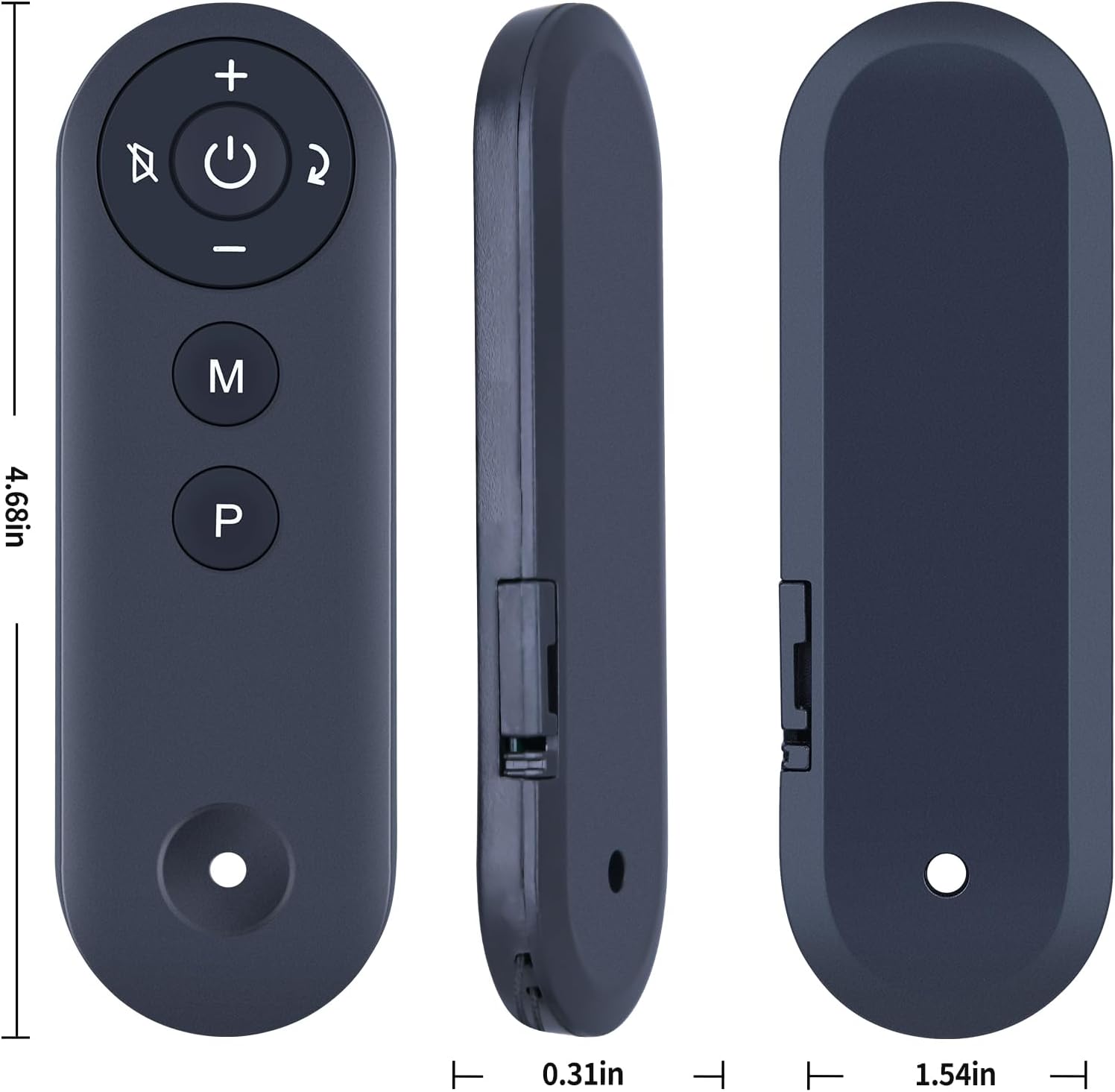
Image: A multi-view image of the RETROSUN remote control, displaying its front, side, and top profiles with precise dimensions: 4.68 inches in length, 0.31 inches in thickness (side view), and 1.54 inches in width (top view).
8. Warranty Information
This RETROSUN remote control comes with a 90-day warranty from the date of purchase. This warranty covers manufacturing defects under normal use. It does not cover damage caused by misuse, accidents, unauthorized modifications, or improper battery installation.
Please retain your proof of purchase for warranty claims.
9. Customer Support
If you encounter any issues with your RETROSUN replacement remote control or have questions not addressed in this manual, please do not hesitate to contact us through Amazon's customer service platform. Our support team is available to assist you.