
Introduction
This manual provides detailed instructions for the installation, operation, and maintenance of your LUMOBELL 2-Wired Keypad Video Intercom Doorbell system. This system includes a 1080P HD keypad video doorbell and a 7-inch touch monitor, designed to enhance your home security and communication. Please read this manual thoroughly before installation and use to ensure proper function and safety.

Image: The LUMOBELL 2-Wired Keypad Video Intercom Doorbell system, showing the outdoor doorbell unit with keypad and camera, and the indoor 7-inch touch monitor.
Package Contents
- 1 x Video Doorbell (Outdoor Unit)
- 1 x 7-inch Touch Monitor (Indoor Unit)
- Wiring Cables
- Mounting Hardware
- RFID Keycards (5 tags)
- User Manual
Setup
1. Wiring Diagram
The system uses a 2-wire digital BUS system for connection between the intercom panel and the monitor. Ensure correct polarity during connection. Refer to the diagram below for detailed wiring instructions for connecting the lock, gate, and door exit button.

Image: A comprehensive wiring diagram illustrating connections for the outdoor doorbell unit, indoor monitor, electric lock, gate, and door exit button. It also shows wire rod distance recommendations.
Warning: To avoid interference and malfunction, do not pass the video doorphone wire through the same sheath as electrical wires. Do not double wires to increase wire size.
2. Power Connection
The system requires a 24V 1A power supply. You can connect it using either a wall-mounted power supply or a 24V DIN rail power supply.

Image: Two illustrations demonstrating how to connect the 24V 1A power supply: one with a wall-mounted adapter and another with a DIN rail power supply.
3. Doorbell Unit Installation
Follow these steps to mount the outdoor doorbell unit. If replacing an old doorbell, you may be able to use existing wiring.
- Drill a hole (diameter > 1.5cm) for wiring.
- Pass wires through the mounting bracket.
- Connect wires to the doorbell unit.
- Secure the doorbell unit to the mounting bracket.
- Attach the rain cover (if applicable).

Image: A visual guide detailing the steps for installing the outdoor doorbell unit, including drilling, wiring, and mounting.
4. Indoor Monitor Installation
Mount the indoor monitor in a convenient location within your home.
- Drill holes for the monitor mounting bracket.
- Secure the mounting bracket to the wall.
- Connect the wiring from the doorbell unit to the monitor.
- Attach the monitor to the mounting bracket.

Image: A visual guide detailing the steps for installing the indoor monitor unit, including drilling, wiring, and mounting.
5. Wi-Fi Connection
Connect your indoor monitor to your home's Wi-Fi network. The system supports dual-band Wi-Fi 6 (2.4GHz and 5GHz).
- Access the WLAN settings on your monitor.
- Select your preferred Wi-Fi network (2.4GHz or 5GHz).
- Enter the Wi-Fi password to connect.

Image: A display of the indoor monitor showing WLAN settings, allowing selection of 2.4GHz or 5GHz Wi-Fi networks.
6. App Download and Setup
Download the Tuya Smart App or Smart Life App from your smartphone's app store (available on Android and iOS). Follow the in-app instructions to pair your device and configure settings.

Image: Various individuals interacting with the Tuya Smart or Smart Life application on their mobile devices, illustrating family sharing capabilities.
Operating Instructions
1. Answering Calls and Two-Way Communication
When a visitor presses the doorbell, the indoor monitor will ring and display the live video feed. You can answer the call directly from the monitor or via the Tuya Smart App on your smartphone. The system supports two-way audio, allowing you to speak with your visitor.
Video: Demonstration of the 2-wired video intercom system, showing how to answer calls and engage in two-way communication from the indoor monitor.
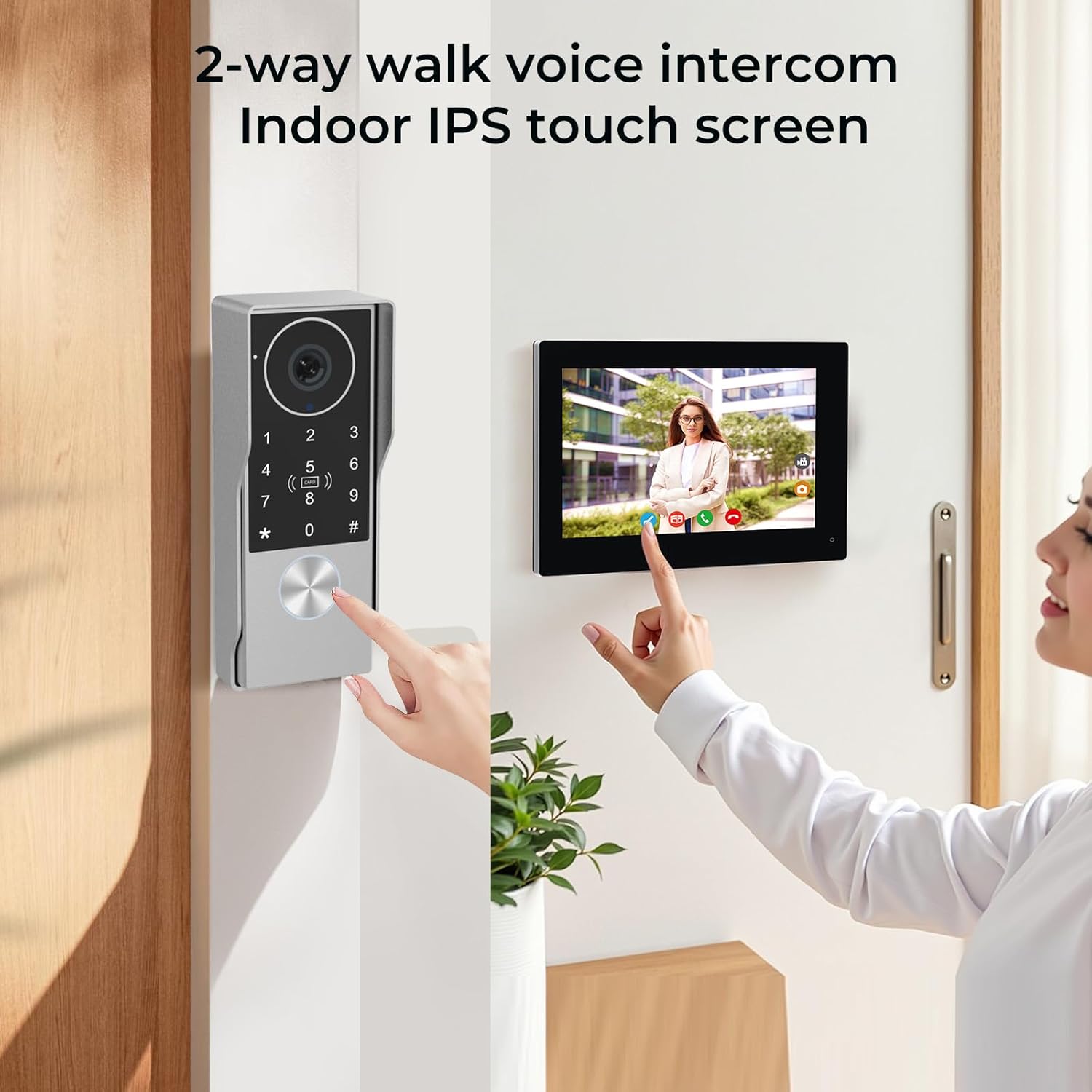
Image: A person interacting with the indoor IPS touch screen monitor, which displays a live feed from the outdoor doorbell unit, demonstrating two-way voice intercom functionality.
2. Unlocking Doors and Gates
The system offers multiple methods to unlock your door or gate:
- Indoor Monitor: Press the unlock button on the 7-inch touch monitor.
- RFID Keycard: Swipe a registered 13.56MHz RFID keycard on the outdoor doorbell unit.
- Keypad Password: Enter a pre-set password on the outdoor doorbell unit's keypad.
- Tuya Smart App: Remotely unlock the door or gate using the app on your smartphone from anywhere.
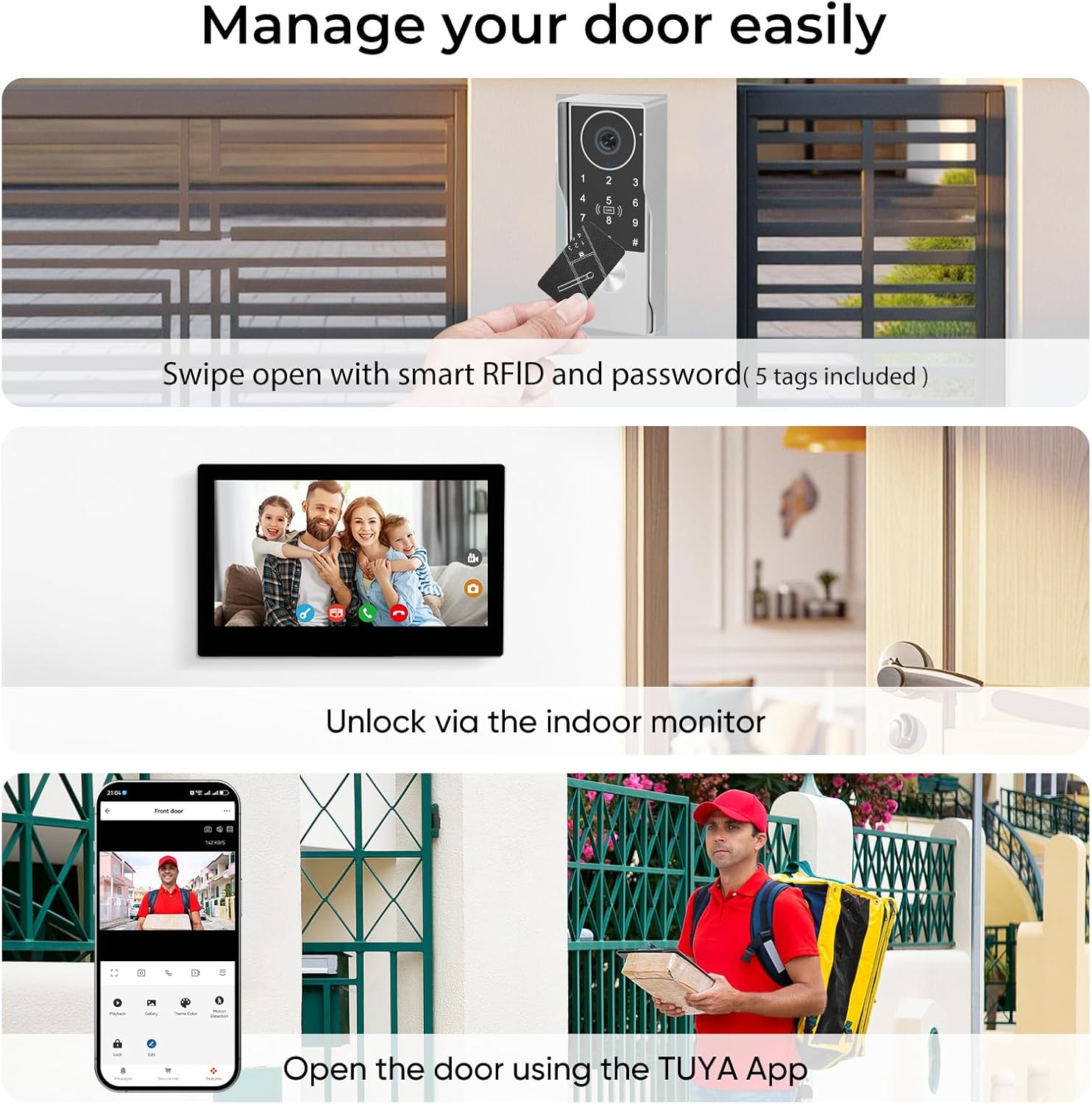
Image: A composite image illustrating various door management options, including swiping an RFID card, unlocking via the indoor monitor, and opening the door using the Tuya App.
3. Motion Detection and Recording
The doorbell features a 2MP camera with a 130° wide-angle view and motion detection. When motion is detected, the system can automatically capture photos or record videos and save them to a MicroSD card (up to 512GB, 32GB included). You can customize detection zones and sensitivity settings to reduce false alarms.
- Customizable Detection Zones: Define specific areas for motion detection to focus on critical zones.
- Auto Snapshot & Recording: Automatically captures events when motion is detected or the doorbell is pressed.
- Local Storage: Recordings are saved to the MicroSD card in the indoor monitor.

Image: An illustration showing the 130-degree detection range of the doorbell and a smartphone screen displaying motion detection alerts and customizable detection zones.

Image: The indoor monitor displaying recorded footage and a smartphone showing alarm messages and notifications, highlighting the local storage feature with a 32 GB MicroSD card.
4. Night Vision
The doorbell is equipped with infrared night vision, providing clear footage even in low-light conditions or complete darkness, with a night vision range of up to 32 feet.

Image: A side-by-side comparison of a scene during the day and the same scene at night, demonstrating the doorbell's night vision capabilities.
5. Privacy Features
- Do Not Disturb Mode: Set specific time periods for the monitor to mute its ringtone, ensuring peaceful sleep.
- Voice Changer: Activate the voice changer feature when speaking to strangers for added privacy.

Image: A person sleeping peacefully while the indoor monitor displays a 'Do Not Disturb' icon, indicating the ringtone is muted during set hours.
6. Connecting Additional Cameras
Once the monitor is connected to Wi-Fi, you can search for and add ONVIF or RTSP cameras on the same local network by entering their username and password. This allows you to view additional camera feeds directly from your monitor.

Image: The indoor monitor displaying a live feed from an additional security camera, demonstrating the ability to integrate ONVIF cameras into the system.
Maintenance
1. Weatherproof Design
The outdoor doorbell unit features an IP65-rated weatherproof design with a silicone-sealed rain cover, protecting it against rain, snow, and cold temperatures. This ensures reliable operation in various outdoor conditions.

Image: A close-up of the outdoor doorbell unit, highlighting its robust and weatherproof construction, designed to withstand various environmental conditions.

Image: The outdoor doorbell unit mounted on a brick wall during rainfall, demonstrating its waterproof design and durability in wet weather.
2. Cleaning
- Outdoor Unit: Wipe the camera lens and keypad with a soft, damp cloth to remove dust and dirt. Avoid abrasive cleaners.
- Indoor Monitor: Clean the touch screen with a soft, lint-free cloth. Do not spray cleaning solutions directly onto the screen.
Troubleshooting
- No Power to Monitor/Doorbell:
- Check all wiring connections to ensure they are secure and correctly polarized.
- Verify the 24V power supply is properly connected and functioning.
- No Image or Sound:
- Inspect the 2-wire connection between the doorbell and monitor for any breaks or loose contacts.
- Ensure the monitor is powered on and not in 'Do Not Disturb' mode.
- Night Vision Issues:
- Ensure the camera lens is clean and free from obstructions.
- Verify that the infrared LEDs are activating in low light.
- Check monitor settings for night vision configuration.
- Wi-Fi Connectivity Problems:
- Confirm the correct Wi-Fi network (2.4GHz or 5GHz) is selected and the password is accurate.
- Ensure the monitor is within range of your Wi-Fi router and the signal strength is adequate.
- Restart your router and the monitor.
- App Not Receiving Notifications/Calls:
- Check your smartphone's internet connection.
- Ensure app permissions (notifications, microphone, camera) are granted in your phone settings.
- Log out and log back into the Tuya Smart/Smart Life App.
- Indoor Monitor Unresponsive:
- Attempt a soft reset by disconnecting and reconnecting power.
- If the issue persists, contact customer support for assistance.
Specifications
| Feature | Specification |
|---|---|
| Brand | LUMOBELL |
| Model Name | 1 Monitor (LMIP7_07C_1V1) |
| Recommended Uses | Home Security |
| Connectivity Technology | Wi-Fi (2.4GHz & 5GHz IEEE 802.11 b/g/n/ac) |
| Special Feature | 2-Way Audio, Motion Detection, Night Vision, Keypad, RFID |
| Indoor/Outdoor Usage | Outdoor (Doorbell), Indoor (Monitor) |
| Compatible Devices | Smartphone (Android/iOS via Tuya Smart or Smart Life app) |
| Mount Type | Wall Mount |
| Color | Silver |
| Enclosure Material | Aluminum |
| Water Resistance Level | IP65 (Weatherproof) |
| Alert Type | Audio And Visual |
| Photo Sensor Resolution | 2 MP (CMOS Sensor) |
| Control Method | App, Keypad, RFID, Monitor |
| Power Source | Corded Electric (24V) |
| Video Capture Resolution | 1080p HD |
| Viewing Angle | 130° / Diagonal 165° |
| Night Vision Range | 32 feet |
| Flash Memory Supported Size Maximum | 512 GB (Micro SD) |
| Flash Memory Installed Size | 32 GB (Micro SD) |
| Monitor Dimensions | 119(H) x 188(W) x 18.5(D) mm |
| Intercom Panel Dimensions | 152(H) x 60(W) x 37(D) mm (with rain cover) |
| Certification | FCC |
Warranty
Warranty information for the LUMOBELL 2-Wired Keypad Video Intercom Doorbell system is typically provided at the point of purchase or included with the product packaging. Please refer to your purchase documentation, the manufacturer's official website, or contact your retailer for specific warranty terms and conditions.
Support
For technical assistance, troubleshooting beyond this manual, or inquiries regarding your LUMOBELL 2-Wired Keypad Video Intercom Doorbell system, please contact LUMOBELL customer support or the seller from whom you purchased the product. Have your model number (LMIP7_07C_1V1) and purchase details ready when contacting support.