1. Introduction
The Neideso N900 Ultra-5CH AI Dash Cam is an advanced vehicle recording system designed to provide comprehensive surveillance for your vehicle. Featuring five cameras, STARVIS 2 IMX675 sensor, AI Driver Monitoring System (DMS), built-in GPS, and 5G WiFi, this device offers 360-degree coverage and enhanced safety features. This manual provides detailed instructions for installation, operation, and maintenance to ensure optimal performance.
2. Safety Information
- Do not install the dash cam in a location that obstructs the driver's view or interferes with airbag deployment.
- Ensure all cables are securely routed and do not interfere with vehicle operation.
- Operating temperature range: -20°F to 140°F (-30°C to 60°C). Avoid prolonged exposure to extreme temperatures.
- Use only the provided power adapter and accessories to prevent damage.
- Regularly check the dash cam's mounting to ensure it remains secure.
3. Package Contents
Verify that all items are present in the package:
- 1x Neideso N900 Smart Driving DMS Dash Cam
- 1x Rear Camera
- 1x Suction Cup Mount
- 1x 3M Adhesive Mount
- 1x Car Charger with Type C USB Cable
- 1x Car Wiring Tool
- 1x User Manual
- 1x Electrostatic Film for 3M Mount
- 1x 128GB SD Memory Card (pre-inserted)
- 1x GPS Module
- 1x 19.6ft Rear Camera Cable
4. Setup & Installation
4.1 Pre-Installation Checklist
- Ensure the included 128GB SD card is inserted into the dash cam.
- Format the SD card within the dash cam settings before first use.
- Test the dash cam's functionality before finalizing installation.
4.2 Mounting the Dash Cam
- Clean Windshield: Wipe the chosen location on the windshield with a clean cloth. For optimal DMS performance, install the main unit in the center of the windshield.
- Apply Electrostatic Film: Transfer the electrostatic sticker to the cleaned area. Ensure there are no air bubbles. Allow 12 hours for adhesion before attaching the dash cam.
- Attach Mount: Secure the 3M adhesive mount or suction cup mount to the electrostatic film. The dash cam slides onto this mount.

Image: Step-by-step guide for mounting the dash cam on the windshield.
4.3 Connecting Cameras & Power
- Front Camera Power: Route the front camera's power cable along the windshield edge and A-pillar using the provided trim tool to conceal it and avoid obstructing visibility. Connect it to the car charger.
- Rear Camera Installation: Mount the rear camera on the rear windshield. Conceal its power cord through gaps (e.g., front windshield to roof, passenger-side ceiling, rear seat to ceiling). Note that one channel (CH1) is for the camera without infrared lamps (for outside view), and the other (CH2) is for the camera with infrared lamps (for inside view). Ensure the cable is connected to the correct socket.
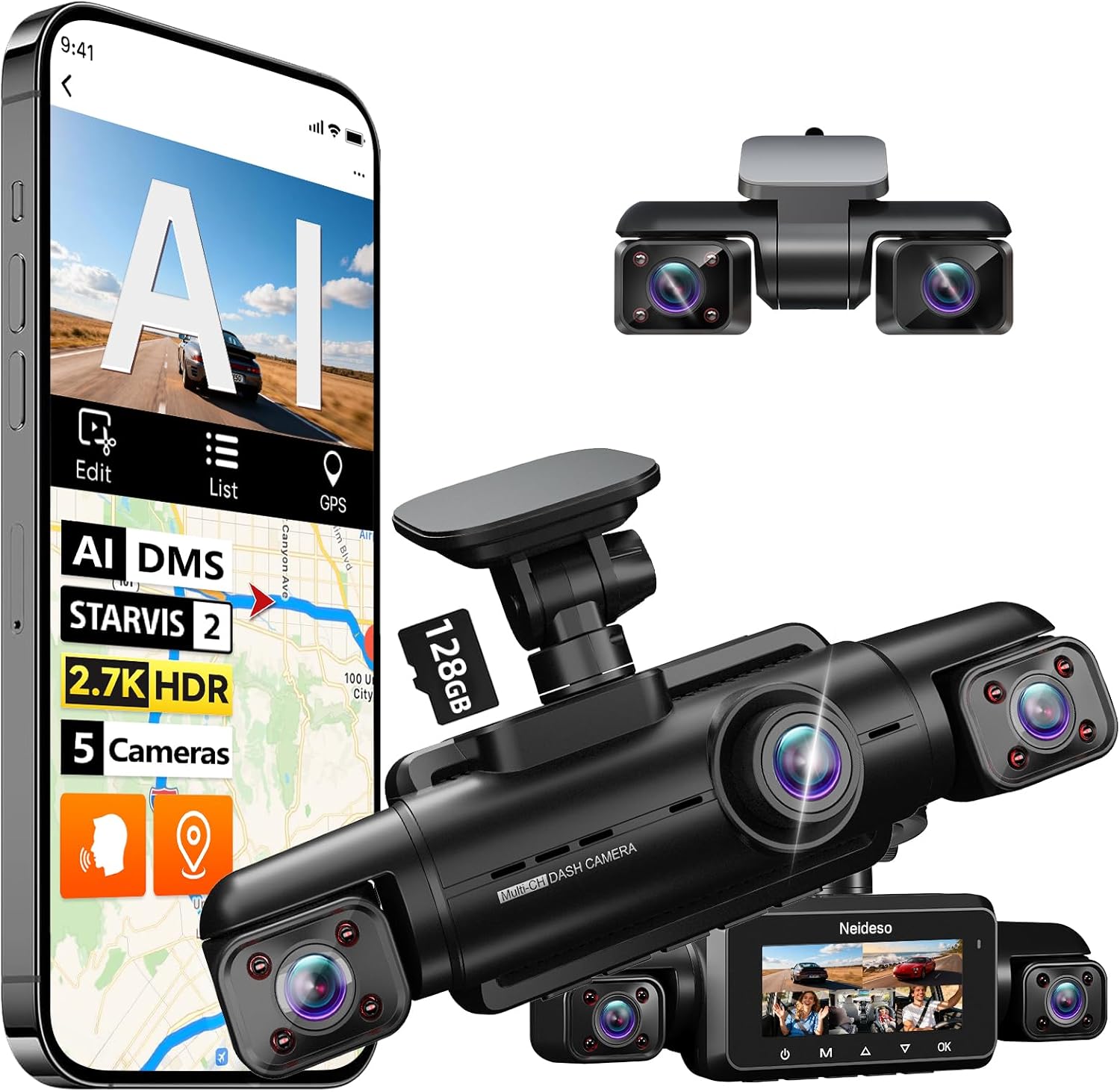
Image: Overview of the Neideso N900 Ultra-5CH dash cam and its various camera modules.
5. Operating Instructions
5.1 Basic Operation
- Power On/Off: The dash cam automatically powers on and begins recording when the vehicle starts. It powers off when the vehicle is turned off.
- Recording: Continuous loop recording is enabled by default. The oldest files are overwritten when the SD card is full, except for locked event files.
5.2 Display Modes & 5-Channel View
The N900 Ultra-5CH provides a comprehensive 360-degree view by simultaneously monitoring the front, cab, rear cabin, sides, and rear of the vehicle. The display can show multiple camera feeds at once.
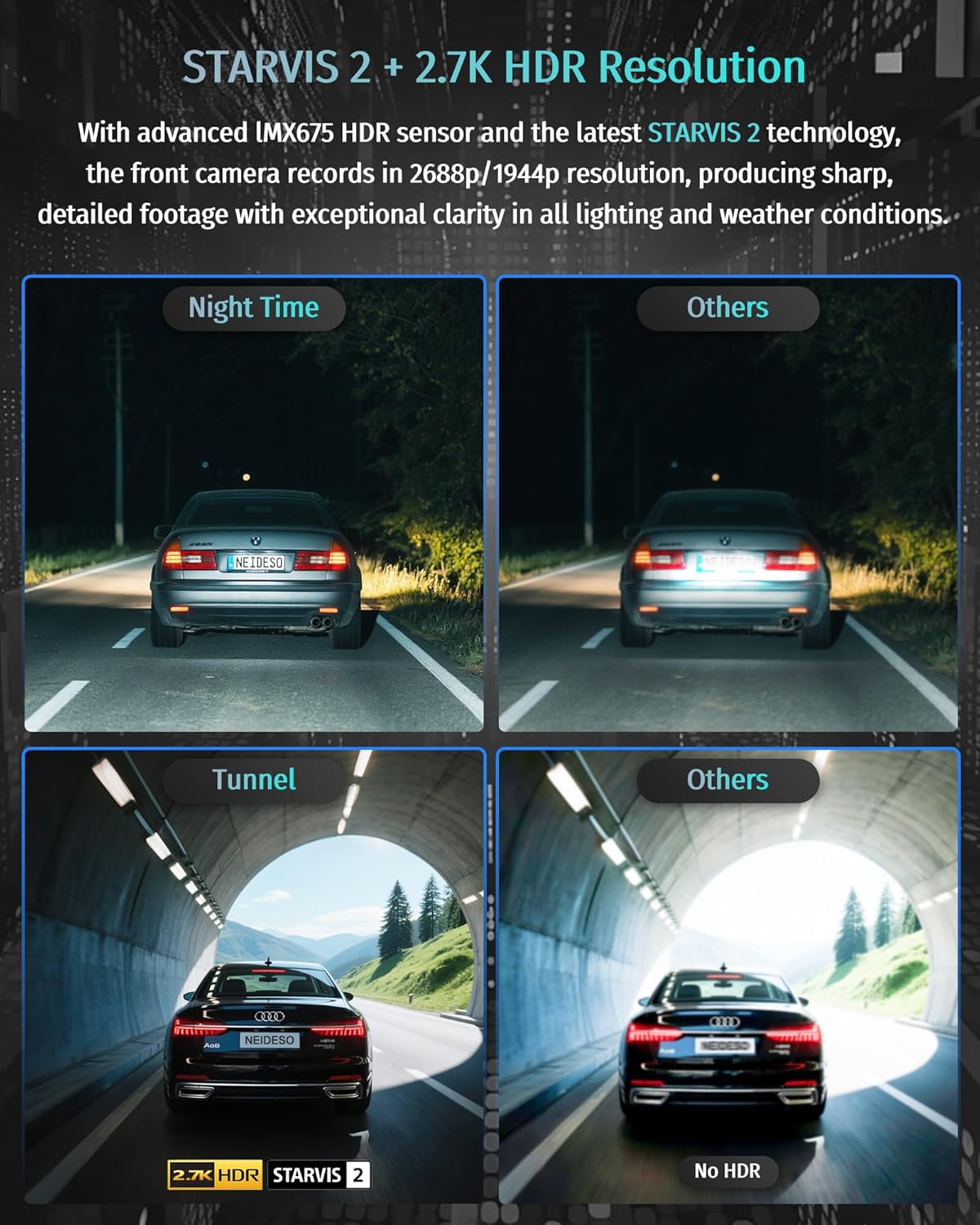
Image: Visual representation of the 5-channel coverage, including front, left, right, rear, and rear cabin views.
Video: Demonstrates the multi-channel display on the dash cam screen, showing simultaneous views from all five cameras.
5.3 Smart Voice Control
Operate the dash cam using English voice commands for hands-free control. Supported commands include:
- "Take Photo"
- "Video Start"
- "Turn On/Off Audio"
- "Turn On/Off WiFi"
- "Turn On/Off Screen"

Image: A driver interacting with the dash cam using voice commands, highlighting the hands-free operation.
5.4 AI Driver Monitoring System (DMS)
The N900 Ultra features an AI-powered Driver Monitoring System (DMS) to enhance driving safety. It detects and alerts the driver to behaviors such as:
- Distracted driving
- Yawning
- Driver absence
- Making phone calls
- Smoking
Note: DMS functions require the vehicle's speed to reach a set value to operate. The camera must face the driver for accurate detection.

Image: Visual explanation of the DMS detecting various driver behaviors like drowsiness, inattention, phone calls, yawning, smoking, and distraction.
5.5 Built-in GPS & 5G WiFi APP Control
The built-in GPS module provides accurate tracking of your vehicle's location, speed, and routes. With 5G WiFi, you can connect the dash cam to your smartphone via the dedicated app to download recorded videos at speeds up to 8MB/s and share them. The WiFi range is approximately 6-7 meters from the dash cam. Cloud storage and remote monitoring are not included.

Image: Screenshot of the mobile application showing GPS tracking and WiFi connectivity for video management.
5.6 24-Hour Parking Mode
When the vehicle is parked, the dash cam automatically switches to parking mode for 24-hour surveillance. It offers three detection options:
- 360° Motion Detection
- 180° Motion Detection
- Collision Detection Only
Note: 24-hour parking mode requires a separate hardwire kit (sold separately) for continuous power.

Image: Explanation of the 24/7 Parking Monitor's three optional modes, requiring a separate hardwire kit.
5.7 G-Sensor & Loop Recording
The G-sensor detects sudden shakes or collisions and automatically locks the current footage to prevent it from being overwritten during loop recording. Loop recording ensures continuous recording by overwriting the oldest files when the SD card is full (except for locked event files). The included 128GB SD card supports up to 24 hours of recording in 3-minute loops, and the system supports up to 512GB cards.

Image: Illustration of the G-Sensor detecting a collision and locking video files for evidence.
6. Features Overview
6.1 STARVIS 2 Super Night Vision
Equipped with the front camera IMX675 HDR sensor and STARVIS 2 technology, the dash cam provides superior night vision. It prevents overexposure from headlights and bright environments, while 12 LED infrareds on the left, right, and rear cameras offer clear recording inside the car at night. The F/1.6 aperture enhances light-gathering capacity by 26.5% compared to F/1.8, and Wide Dynamic Range (WDR) automatically adjusts balance for clear recording in low light or high exposure conditions, ensuring clear display of license plates and pedestrians.

Image: Comparison of video clarity with and without STARVIS 2 and HDR in night, tunnel, and low-light conditions.
6.2 Upgraded Dual Rear Camera with Rear Cabin Monitoring
The advanced dual rear-camera system provides extensive coverage of your trunk, back seats, and side windows. This allows for monitoring of children, pets, or luggage while driving, and records collisions, hit-and-runs, and side-window break-ins, enhancing overall vehicle security.

Image: Illustration of the dual rear camera's adjustable wide vision and IR night vision for monitoring the cabin and external rear view.
7. Maintenance
- Regularly format the SD card to ensure optimal recording performance and prevent data corruption.
- Keep the camera lenses clean to maintain clear video quality. Use a soft, dry cloth.
- Ensure all cable connections are secure and free from damage.
- Check for firmware updates periodically on the Neideso website or app to ensure the latest features and improvements.
8. Troubleshooting
- Dash Cam Not Powering On: Check the power cable connection to the car charger and ensure the vehicle's ignition is on.
- Recording Issues: Format the SD card. If issues persist, try a different compatible SD card. Ensure the card is not full.
- WiFi Connection Problems: Ensure 5G WiFi is enabled on the dash cam and your smartphone. The WiFi range is limited to 6-7 meters. Try restarting both devices.
- DMS Alerts Not Functioning: Ensure DMS is enabled in the settings and the camera is properly positioned to face the driver. Check that the vehicle speed meets the activation threshold.
- Poor Video Quality: Clean the camera lenses. Ensure the electrostatic film is applied correctly without bubbles.
9. Specifications
| Feature | Detail |
|---|---|
| Product Dimensions | 2.1 x 2.1 x 7.34 inches |
| Item Weight | 7.2 ounces |
| Item Model Number | N900 Ultra-5CH |
| Connectivity Technology | 5GHz Wi-Fi |
| Special Features | 5 Channel 2.7K + 1080PX4 360° All Sides Dash Camera, Built-in GPS + Wi-Fi + APP Control + 3.18" Display; F1.6 Aperture + 8 IR LEDs + 6-Layer Optics + WDR; Parking Monitor (hardware kit sold separately), Front Camera IMX675 HDR Sensor, Dual Rear Camera with IR Night Vision, Smart AI Tech Dash Cam with Driver Fatigue Monitoring System (DMS), Voice Control, Loop Recording with Free 128GB Card, G-Sensor; Operating Temperature: -30°C to 60°C |
| Video Capture Resolution | 4k (Front), 1080P (Other cameras) |
| Mounting Type | Windshield Mount |
| Field Of View | 150 Degrees (per camera) |
10. Warranty & Support
The Neideso N900 Ultra-5CH AI Dash Cam is backed by an 18-month assurance period. For any questions, technical support, or warranty claims, please contact Neideso customer service:
- Email: support@neideso.cn


