
Introduction
This manual provides comprehensive instructions for the Anweller YL-P15 Fingerprint Padlock. Please read this manual carefully before using the product to ensure proper operation and to maximize its features and security capabilities. Keep this manual for future reference.
Product Overview and Package Contents
The Anweller YL-P15 is a smart, weatherproof padlock offering multiple unlocking methods for secure and convenient access control. Its robust design and advanced features make it suitable for various applications.
Package Contents:
- 1 x Anweller YL-P15 Smart Padlock
- 1 x Instruction Manual (this document)
- 2 x Mechanical Backup Keys
- 1 x USB Type-C Charging Cable
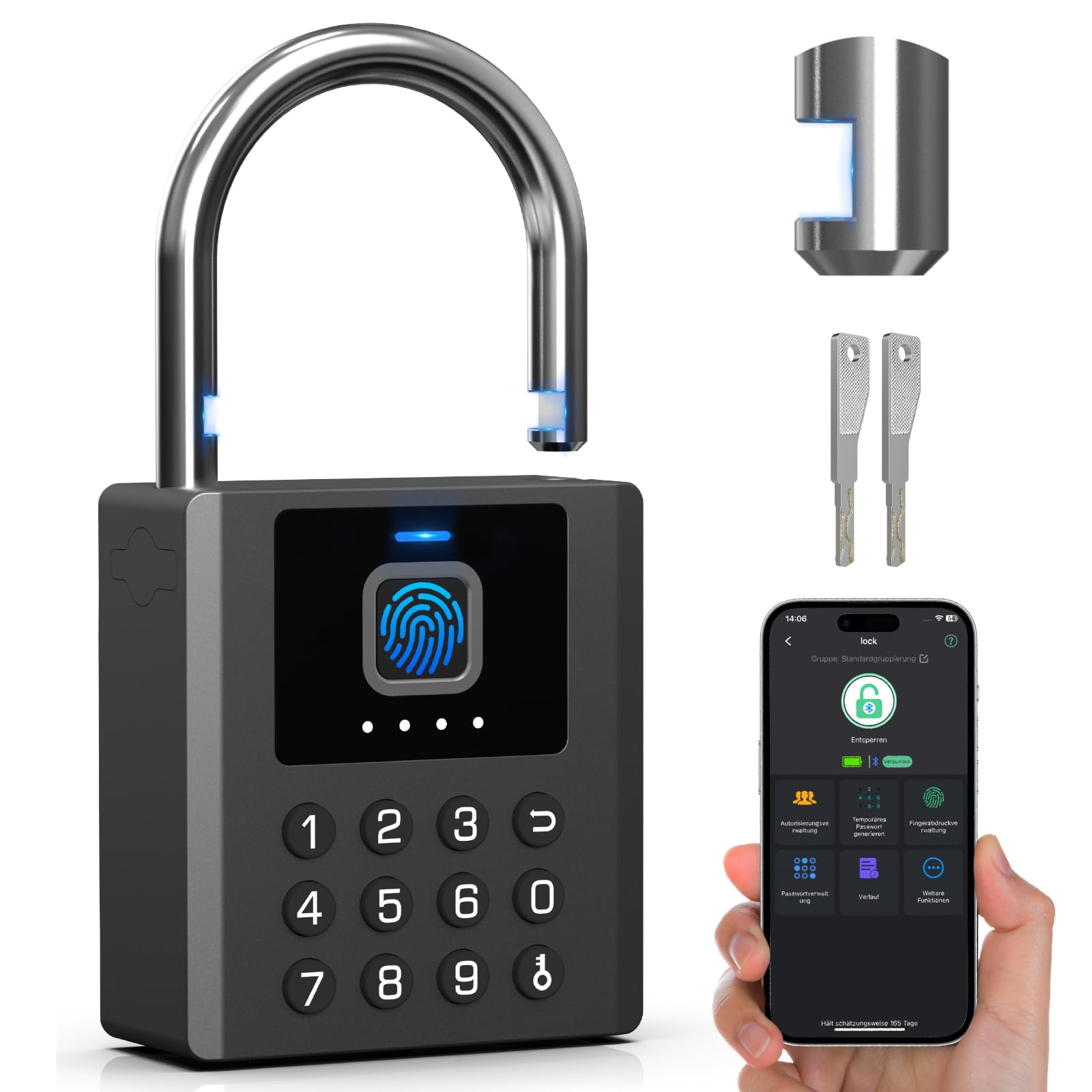
Image: The Anweller YL-P15 Fingerprint Padlock, illustrating its five different unlocking methods: fingerprint, passcode, app, iWatch, and mechanical key.
Key Features
- 5-in-1 Unlocking Methods: Unlock using fingerprint, eSmartLock app, iWatch, numeric passcode, or mechanical backup keys.
- Rapid Unlocking: Fingerprint recognition in 0.2 seconds.
- Advanced Security: 8mm thick shackle with a unique groove design, resistant to cutting, drilling, sawing, and prying. Features AES256 encryption and a self-learning AI fingerprint sensor for Security Level 9 protection.
- Weatherproof Design: IP67 waterproof rating, operating reliably in temperatures from -20°C to 45°C. Resistant to rust and abrasion.
- Long Battery Life: Equipped with a 500mAh high-capacity battery, providing up to 365 days of standby time on a single charge. Supports USB-C fast charging.
- Smart App Control: The eSmartLock app allows for temporary access grants, sharing unlock permissions, creating one-time passcodes, viewing unlock history, and managing up to 100 fingerprints.
- Versatile Application: Ideal for securing doors, fences, sheds, garages, gardens, lockers, and storage containers.

Image: Illustration of the Anweller YL-P15 padlock's high-security features, including its 8mm shackle and resistance to cutting, drilling, and prying.

Image: The Anweller YL-P15 padlock shown in various applications, such as on gates, sheds, fences, and storage rooms, demonstrating its versatile use.

Image: The Anweller YL-P15 padlock in a snowy environment, highlighting its IP67 waterproof rating and operational temperature range, along with its dimensions.
Setup Guide
1. Initial Charging:
Before first use, fully charge the padlock using the provided USB Type-C cable. Connect the cable to the charging port on the padlock and a standard USB power adapter (not included). The LED indicator will show charging status.
2. App Installation and Pairing:
- Download the eSmartLock app from your smartphone's app store (available for Android and iOS).
- Open the app and create an account or log in.
- Ensure your phone's Bluetooth is enabled.
- In the app, follow the instructions to add a new device. The app will search for nearby Anweller YL-P15 padlocks.
- Select your padlock from the list to pair it. You may need to press a button on the padlock to activate pairing mode (refer to in-app instructions).
3. Fingerprint Registration:
- Once paired with the app, navigate to the "Fingerprint Management" section.
- Follow the on-screen prompts to register your fingerprints. You will typically be asked to place your finger on the sensor multiple times from different angles to ensure accurate recognition.
- The padlock can store up to 100 fingerprints.

Image: Close-up of the Anweller YL-P15 padlock's AI fingerprint sensor, illustrating the process of fingerprint recognition.
4. Passcode Setup:
- In the eSmartLock app, go to "Passcode Management".
- Create new passcodes as desired. You can set up standard passcodes, anti-spy passcodes (where you can enter random digits before or after the actual code), and one-time passcodes for temporary access.
- The padlock supports up to 20 customizable passcodes.
Operating Instructions
Unlocking Methods:
- Fingerprint: Place your registered finger firmly on the fingerprint sensor. The padlock will unlock if the fingerprint is recognized.
- Passcode: Enter your registered numeric passcode on the keypad. Press the unlock button (usually a checkmark or similar symbol) to confirm.
- eSmartLock App: Open the eSmartLock app on your smartphone, ensure Bluetooth is connected, and tap the "Unlock" button within the app interface.
- iWatch: If configured, use the eSmartLock app on your iWatch to unlock the padlock.
- Mechanical Key: Insert one of the provided mechanical backup keys into the keyhole and turn it to unlock the padlock. This method is for emergency use or when other electronic methods are unavailable.

Image: Demonstration of the Anweller YL-P15 padlock's multi-functional passcode feature, including anti-spy and one-time passcodes.
Locking the Padlock:
To lock the padlock, simply push the shackle down firmly until it clicks into place. The padlock will automatically lock.
Using the eSmartLock App:
- User Management: Add or remove authorized users.
- Temporary Access: Grant temporary access to guests or service providers by generating time-limited passcodes.
- Unlock History: View a log of all unlock events, including method and time.
- Battery Status: Check the current battery level of the padlock.

Image: Screenshot of the eSmartLock app interface, showing various functions like user management, temporary passwords, unlock history, and unlock permissions.
Maintenance
Charging the Battery:
When the battery level is low, the padlock will indicate this (e.g., via an LED indicator or app notification). Connect the padlock to a USB Type-C power source using the provided cable. A full charge can last up to 365 days in standby mode.

Image: Internal view of the Anweller YL-P15 padlock showing the 500mAh battery and USB-C charging port, emphasizing its long standby time.
Cleaning:
Wipe the padlock with a soft, damp cloth to remove dirt and debris. Do not use abrasive cleaners or solvents, as these can damage the finish or electronic components. Ensure the fingerprint sensor and keypad are clean for optimal performance.
Storage:
If storing the padlock for an extended period, ensure it is fully charged and stored in a cool, dry place. Periodically charge the battery to maintain its health.
Troubleshooting
| Problem | Possible Cause | Solution |
|---|---|---|
| Padlock does not unlock with fingerprint. | Finger not placed correctly; unregistered fingerprint; dirty sensor. | Ensure your finger covers the sensor completely. Try different angles. Verify the fingerprint is registered in the app. Clean the sensor with a soft cloth. |
| Padlock does not respond to app commands. | Bluetooth disconnected; low padlock battery; app not updated. | Ensure Bluetooth is enabled on your phone and the padlock is within range. Check padlock battery level and charge if necessary. Update the eSmartLock app to the latest version. |
| Padlock battery drains quickly. | Frequent unlocking; extreme temperatures. | While designed for long life, very frequent use will reduce battery life. Ensure the padlock is not exposed to extreme temperatures for prolonged periods. |
| Cannot enter passcode. | Incorrect passcode; keypad unresponsive. | Double-check the passcode. Ensure the keypad is clean and free of obstructions. If unresponsive, try unlocking via app or mechanical key and then check keypad functionality. |
| Padlock is completely unresponsive. | Battery completely depleted; internal malfunction. | Attempt to charge the padlock for at least 30 minutes. If still unresponsive, use the mechanical backup keys. Contact customer support if the issue persists. |
Specifications
| Brand | Anweller |
| Model Number | YL-P15 |
| Lock Type | Fingerprint, Numeric Combination, Mechanical Key |
| Unlocking Methods | Fingerprint, eSmartLock App, iWatch, Passcode, Mechanical Key |
| Fingerprint Capacity | Up to 100 |
| Passcode Capacity | Up to 20 customizable codes |
| Shackle Diameter | 8 mm |
| Material | Zinc Alloy |
| Dimensions (L x W x H) | 6.7 x 2.2 x 11.8 cm (approximately 2.64 x 0.87 x 4.65 inches) |
| Color | Black |
| Battery | 500 mAh (rechargeable via USB Type-C) |
| Standby Time | Up to 365 days |
| Waterproof Rating | IP67 |
| Operating Temperature | -20°C to 45°C (-4°F to 113°F) |
| Connectivity | Bluetooth |
| Controller Type | Android (via eSmartLock app) |
Warranty and Support
Anweller provides a 6-month warranty for this product, covering manufacturing defects. Additionally, free lifetime technical support is available.
For any quality issues, replacements, or refunds, please contact our customer support team.
Contact Email: esmartlock@outlook.com

