
Introduction
This manual provides detailed instructions for the KGUSS Topping DX1 DAC Headphone Amplifier and the Topping PA3s Power Amplifier. The DX1 is a high-performance Digital-to-Analog Converter (DAC) and headphone amplifier, while the PA3s is a powerful Class D stereo power amplifier. Together, these units form a versatile audio system for various applications.
The DX1 features the newest AK4493S DAC chip, supporting up to 32-bit/384kHz PCM and DSD256, offering a dynamic range of 120dB. It provides powerful output for both In-Ear Monitors (IEMs) and full-size headphones with high/low gain options. The PA3s utilizes two MA12070 Class D amplifier chips, delivering 80W x2 at 4 ohms (10% THD+N) or 65W x2 at 4 ohms (1% THD+N), suitable for driving bookshelf and some floor speakers.

Image: Front and rear views of the Topping DX1 DAC Headphone Amp and Topping PA3s Power Amp. The DX1 shows headphone outputs, volume knob, and input/gain switches. The PA3s shows input selectors, volume knob, and various audio inputs and power connection.
Setup Instructions
Topping DX1 DAC Headphone Amplifier Setup
- Unpack Components: Carefully remove the DX1 unit, USB cable, and any other accessories from the packaging.
- Connect to Power and Data: Connect the supplied USB cable from the DX1's USB input to your computer (Windows, Mac, Linux) or compatible mobile device (iOS, Android). The DX1 does not require an external power adapter; the USB connection provides both power and data transmission.
- Driver Installation (Windows ASIO only): For most operating systems (Windows 10/11, Mac, Linux, iOS, Android), the DX1 is plug-and-play and does not require driver installation. However, for Windows ASIO applications, a specific driver may be required. Refer to the official Topping website for driver downloads if needed.
- Connect Headphones: Plug your headphones into either the 6.35mm or 3.5mm headphone output jack on the front panel of the DX1.
- Connect to PA3s (Optional): If using with the PA3s, connect the RCA line outputs (Rch, Lch) on the rear of the DX1 to an input on the PA3s using appropriate RCA cables. Note that the line output volume of the DX1 is fixed at maximum and cannot be adjusted. Both headphone and line outputs operate simultaneously.

Image: Close-up of the Topping DX1's internal components highlighting the AK4493S DAC chip and a diagram illustrating its plug-and-play compatibility with various operating systems.
Topping PA3s Power Amplifier Setup
- Unpack Components: Carefully remove the PA3s unit and power adapter from the packaging.
- Connect Speakers: Connect your passive speakers to the speaker terminals on the rear of the PA3s. Ensure correct polarity (+ to + and - to -) for both left and right channels.
- Connect Audio Source: Connect your audio source (e.g., DX1, preamplifier, or other audio device) to either the RCA (SE) inputs or the TRS (BAL) inputs on the rear of the PA3s.
- Connect Power: Connect the supplied DC26V power adapter to the power input on the rear of the PA3s, then plug the adapter into a wall outlet.

Image: Front and rear views of the Topping PA3s Power Amplifier. The front panel shows the power/input select button and volume knob. The rear panel displays balanced (TRS) and single-ended (RCA) inputs, speaker terminals, and the DC power input.
Operating Instructions
Topping DX1 DAC Headphone Amplifier Operation
- Power On: The DX1 powers on automatically when connected via USB to a powered device.
- Select Input: The DX1 typically auto-detects the USB input. Ensure your computer or device is configured to output audio to the DX1.
- Adjust Headphone Volume: Use the large knob on the front panel to adjust the volume for your headphones.
- Select Gain: On the rear panel, locate the 'GAIN' switch. Select 'H' for high gain (for harder-to-drive headphones) or 'L' for low gain (for sensitive IEMs or easier-to-drive headphones).
- Line Out Behavior: Remember that the RCA line outputs on the rear have a fixed maximum volume and operate simultaneously with the headphone outputs. Adjust volume on the connected amplifier (e.g., PA3s) when using the line out.
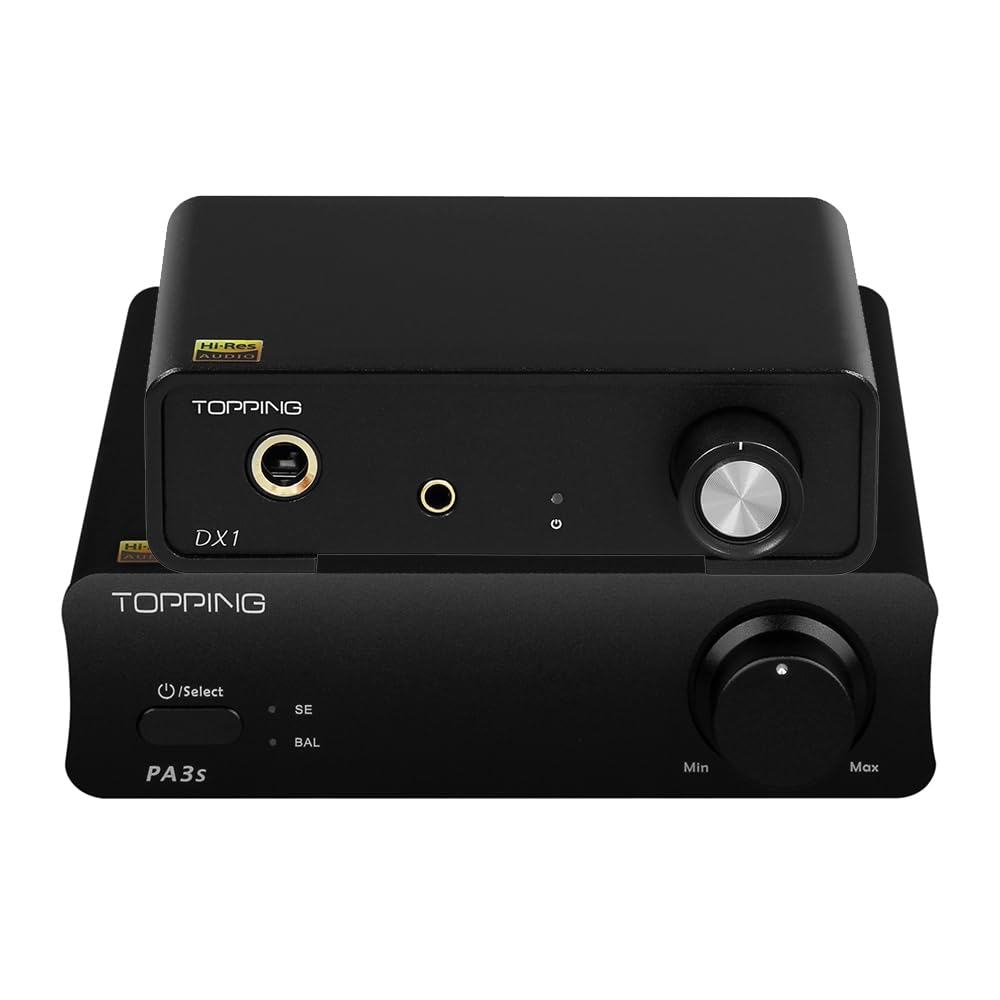
Image: Top-down view of the Topping DX1 showing the front panel with 6.35mm and 3.5mm headphone jacks, volume knob, and input/gain indicators. Below it, the rear panel shows RCA line outputs, a gain switch, and a USB input.
Topping PA3s Power Amplifier Operation
- Power On: Press the power/select button on the front panel to turn on the PA3s.
- Select Input: Press the power/select button repeatedly to cycle between the 'SE' (Single-Ended RCA) and 'BAL' (Balanced TRS) inputs. The corresponding indicator light will illuminate.
- Adjust Volume: Use the large knob on the front panel to adjust the output volume to your speakers.

Image: The Topping PA3s Power Amplifier positioned on a cabinet, connected to a pair of bookshelf speakers, demonstrating its use in a home audio setup.
Maintenance
- Cleaning: Use a soft, dry cloth to clean the exterior of the units. Avoid using abrasive cleaners, solvents, or chemical sprays, as these can damage the finish or internal components.
- Placement: Place the units in a well-ventilated area, away from direct sunlight, heat sources, and excessive moisture. Ensure there is adequate space around the units for proper airflow.
- Handling: Handle the units with care. Avoid dropping them or subjecting them to strong impacts.
- Cable Management: Ensure all cables are securely connected and not under undue strain. Avoid bending cables sharply.
Troubleshooting
No Sound Output
- Check Power: Ensure both DX1 (via USB) and PA3s (via DC adapter) are powered on.
- Check Connections: Verify all audio cables (USB, RCA, TRS, speaker wires) are securely connected to the correct inputs and outputs.
- Source Selection: For PA3s, ensure the correct input (SE or BAL) is selected. For DX1, ensure your computer/device is outputting audio to the DX1.
- Volume Levels: Confirm that the volume knobs on both DX1 (for headphones) and PA3s (for speakers) are turned up.
- Headphone/Speaker Functionality: Test with different headphones or speakers to rule out issues with the output devices.
Distorted or Poor Sound Quality
- Source Quality: Ensure the audio source material is of good quality.
- Cable Integrity: Check for damaged or faulty audio cables.
- Gain Setting (DX1): Adjust the gain switch on the DX1. If the sound is distorted, try the 'L' (low) gain setting. If too quiet, try 'H' (high) gain.
- Speaker Impedance (PA3s): Ensure your speakers' impedance is within the recommended range for the PA3s (4-8 ohms).
- Ground Loop Noise: If you experience humming or buzzing, it might be a ground loop issue. Try connecting devices to the same power strip or using a ground loop isolator if necessary. The DX1 features a Discrete LNRD circuit designed to reduce noise from USB power.
DX1 Not Recognized by Computer
- USB Port: Try connecting the DX1 to a different USB port on your computer.
- USB Cable: Test with a different USB cable.
- Drivers (Windows ASIO): If using Windows ASIO applications, ensure the correct driver is installed.
Specifications
Topping DX1 DAC Headphone Amplifier

Image: A detailed table outlining the technical specifications for the Topping DX1 DAC and Headphone Amplifier, including DAC parameters and headphone amplifier performance metrics.
| Parameter | Value |
|---|---|
| THD+N @1kHz (A-wt) | <0.0002% |
| THD @20-20kHz 90kBw | <0.0006% |
| SNR @1kHz (A-wt) | 120dB |
| Dynamic range @1kHz (A-wt) | 120dB |
| Frequency Response | 20Hz-40kHz (±0.3dB) |
| 20Hz-40kHz (±0.7dB) | |
| Output Level | 2.0Vrms @0dBFS |
| Noise (A-wt) | <2.0uVrms |
| Channel Crosstalk @1kHz | -112dB |
| Channel Balance | 0.3dB |
| Output Impedance | 220 |
| Parameter | Value |
|---|---|
| THD+N @1kHz (A-wt) | <0.0003% @Output=200mW (32Ω) |
| <0.0002% @Output=45mW (300Ω) | |
| THD @20-20kHz 90kBw | <0.003% @Output=200mW (32Ω) |
| <0.001% @Output=45mW (300Ω) | |
| SNR @MAX OUT 1kHz (A-wt) | 118dB |
| Dynamic Range @1kHz (A-wt) | 118dB |
| Frequency Response | 20Hz-20kHz (±0.3dB) |
| 20Hz-40kHz (±0.7dB) | |
| Output Level | 2.2Vpp @G=L |
| 11Vpp @G=H | |
| Noise (A-wt) | <1.0uVrms |
| Channel Crosstalk @1kHz | -86dB |
| Gain | -2dB (Vrms/FS) @G=L |
| 12dB (Vrms/FS) @G=H | |
| Output Impedance | < 0.7Ω |
| Output Power | 280mW x 2 @32Ω THD+N<0.1% |
| 190mW x 2 @64Ω THD+N<0.1% | |
| 51mW x 2 @300Ω THD+N<0.1% | |
| Load Impedance | 8Ω |
Topping PA3s Power Amplifier

Image: A detailed table outlining the technical specifications for the Topping PA3s Power Amplifier, including performance metrics for both single-ended (SE) and balanced (BAL) inputs.
| Parameter | SE IN | BAL IN |
|---|---|---|
| THD+N @1kHz (A-wt) | <0.0050% @4Ω 5W | <0.0045% @4Ω 5W |
| <0.0040% @8Ω 5W | <0.0040% @8Ω 5W | |
| THD @20-10kHz (20kBw) | <0.0080% @4Ω 5W | <0.0070% @4Ω 5W |
| <0.0070% @8Ω 5W | <0.0060% @8Ω 5W | |
| SNR @MAX OUT 1kHz (A-wt) | 107dB | 112dB |
| Dynamic Range @1kHz (A-wt) | 107dB | 112dB |
| Frequency Response | 20Hz-40kHz (±0.1dB) | 20Hz-40kHz (±0.1dB) |
| Output Level | 46Vpp @4Ω | 46Vpp @4Ω |
| 48Vpp @8Ω | 48Vpp @8Ω | |
| Noise (A-wt) | <70uVrms | <70uVrms |
| Input Sensitivity | 0.92Vrms | 1.75Vrms |
| Gain | 25.2dB | 19.5dB |
| Channel Balance | 0.5dB | 0.5dB |
| Output Power | 80W x 2 @4Ω THD+N<10% | 80W x 2 @4Ω THD+N<10% |
| 45W x 2 @8Ω THD+N<10% | 45W x 2 @8Ω THD+N<10% | |
| 65W x 2 @4Ω THD+N<1% | 65W x 2 @4Ω THD+N<1% | |
| 37W x 2 @8Ω THD+N<1% | 37W x 2 @8Ω THD+N<1% | |
| Adapter Impedance | 4-8Ω | 4-8Ω |
Warranty and Support
This product comes with a warranty. Please refer to the warranty card included in your product packaging for specific terms, conditions, and duration of the warranty. The warranty card will provide details on how to obtain service if required.
For technical support or further inquiries, please contact the retailer where you purchased the product or visit the official KGUSS/Topping website for support resources.


