
1. Introduction
Thank you for choosing the Facmogu ST-839 2.1CH Stereo Amplifier. This compact yet powerful amplifier is designed to enhance your audio experience, providing clear sound for various applications including home audio, car systems, and portable setups. It features multiple input options and adjustable audio controls for personalized listening.
2. Safety Information
- Power Supply: This amplifier requires a DC 12V power adapter (not included). Ensure the power adapter meets the specified voltage and current requirements to prevent damage.
- Ventilation: Do not block ventilation openings. Ensure adequate airflow around the unit to prevent overheating.
- Moisture: Keep the amplifier away from water, moisture, and high humidity environments.
- Placement: Place the unit on a stable, flat surface. Avoid placing it in direct sunlight or near heat sources.
- Cleaning: Disconnect power before cleaning. Use a soft, dry cloth. Do not use liquid cleaners or aerosols.
3. Package Contents
Verify that all items are present in your package:
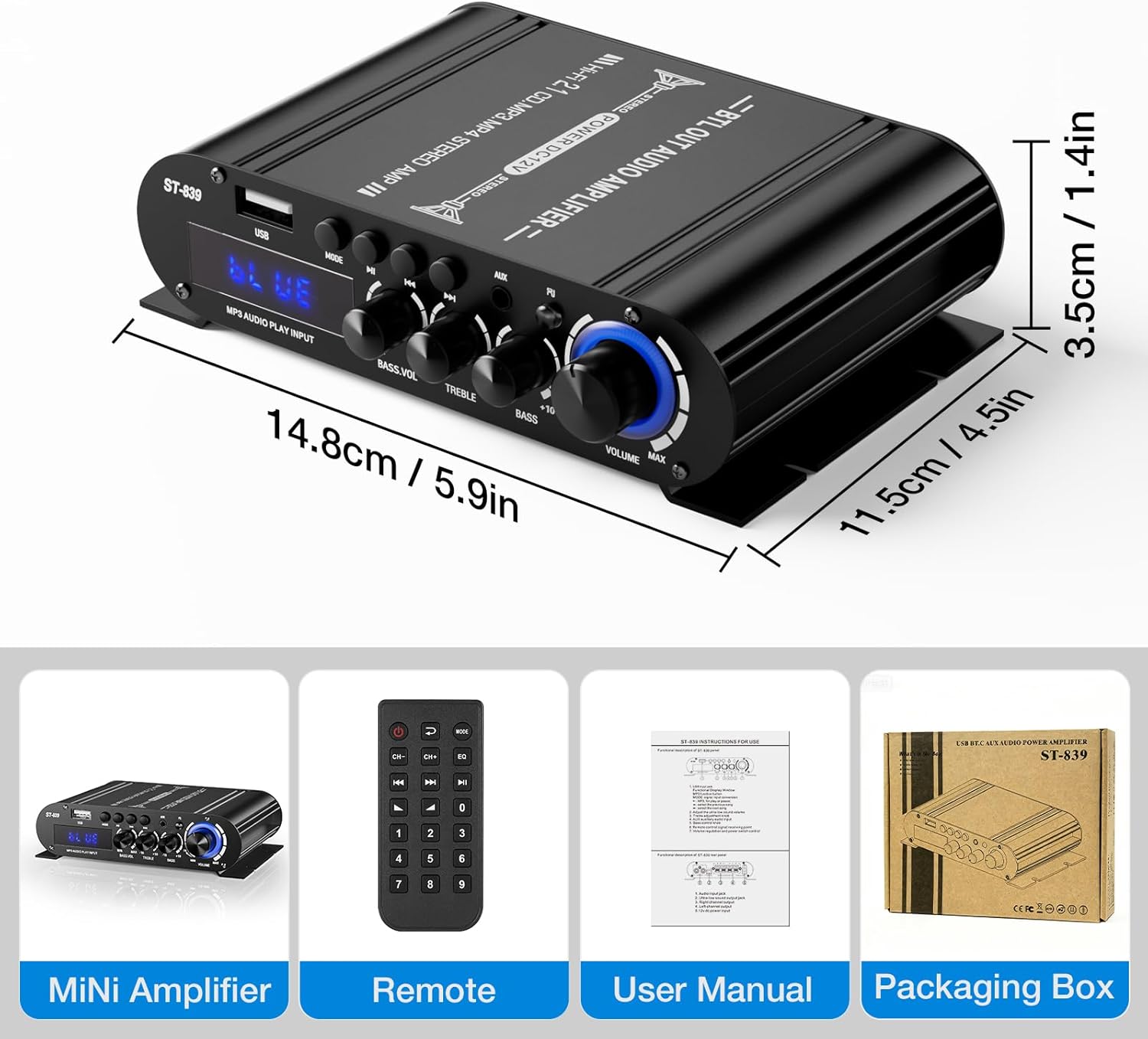
- ST-839 Audio Amplifier
- Remote Control
- User Manual (this document)

4. Product Features
- Compact Yet Powerful Performance: Delivers RMS 25W×2 (stereo) + 40W (passive subwoofer) output, suitable for bookshelf, car, marine, or outdoor passive speakers.
- Flexible Audio Controls: Features adjustable master volume, bass, treble, and dedicated subwoofer volume knobs for sound customization.
- Multiple Input Options: Supports Bluetooth for wireless streaming, USB for media playback, and auxiliary (AUX) and RCA inputs for wired connections.
- Sleek & Space-Saving Design: Compact size with a durable matte black finish, suitable for various environments.
- Easy Operation: Bright digital LED display and remote control for convenient setting adjustments.
5. Product Overview
5.1 Front Panel

- USB Input: For connecting USB flash drives for audio playback.
- MODE Button: Switches between input modes (Bluetooth, USB, AUX).
- Play/Pause Button: Controls playback for USB and Bluetooth modes.
- Previous/Next Song Buttons: Navigates tracks for USB and Bluetooth modes.
- AUX Input: 3.5mm stereo input for external audio devices.
- Indicator Light: Displays current status or mode.
- BASS.VOL Knob: Adjusts the volume level of the passive subwoofer output.
- TREBLE Knob: Adjusts the high-frequency response.
- BASS Knob: Adjusts the low-frequency response for main speakers.
- VOLUME Knob: Master volume control for all outputs.
5.2 Rear Panel

- AUDIO INPUT (RCA): Stereo RCA inputs for connecting audio sources like DVD players or TVs.
- SUPER BASS (Passive Subwoofer Output): Connects to a passive subwoofer.
- SPEAKER IMPEDANCE 4-8Ω (Left/Right Channel Output): Connects to passive stereo speakers.
- DC 12V 3A Power Input: Connects to a DC 12V power adapter (not included).
6. Setup Instructions
6.1 Connecting Speakers
- Ensure the amplifier is powered off.
- Connect your passive stereo speakers to the SPEAKER IMPEDANCE 4-8Ω terminals on the rear panel. Match the positive (+) and negative (-) terminals correctly for each speaker (Left and Right).
- If using a passive subwoofer, connect it to the SUPER BASS terminals.
6.2 Connecting Audio Sources
Choose one of the following methods to connect your audio source:
- RCA Input: Connect your audio device (e.g., TV, DVD player) to the AUDIO INPUT (RCA) jacks on the rear panel using an RCA cable.
- AUX Input: Connect your audio device (e.g., smartphone, laptop) to the AUX Input (3.5mm) jack on the front panel using a 3.5mm audio cable.
- USB Input: Insert a USB flash drive containing audio files into the USB Input port on the front panel.

6.3 Connecting Power
- Connect a DC 12V power adapter (not included) to the DC 12V 3A Power Input on the rear panel.
- Plug the power adapter into a suitable wall outlet.
7. Operating Instructions
7.1 Power On/Off
Turn the VOLUME knob clockwise until it clicks to power on the amplifier. Turn it counter-clockwise until it clicks to power off.
7.2 Input Selection
Press the MODE button on the front panel or the remote control to cycle through available input sources: Bluetooth, USB, and AUX/RCA.
7.3 Bluetooth Pairing
- Switch the amplifier to Bluetooth mode using the MODE button. The display will show "BLUE".
- On your smartphone or Bluetooth-enabled device, search for "ST-839" in the Bluetooth settings.
- Select "ST-839" to pair. Once connected, the amplifier will indicate a successful connection.
7.4 USB Playback
- Insert a USB flash drive into the USB Input port.
- Switch the amplifier to USB mode using the MODE button. The amplifier will automatically begin playing audio files from the USB drive.
- Use the Play/Pause, Previous Song, and Next Song buttons on the front panel or remote control to manage playback.
7.5 Audio Adjustment
- VOLUME: Rotate the master VOLUME knob to adjust the overall sound level.
- BASS: Rotate the BASS knob to increase or decrease low frequencies for your main speakers.
- TREBLE: Rotate the TREBLE knob to increase or decrease high frequencies.
- BASS.VOL: Rotate the BASS.VOL knob to adjust the output level of the passive subwoofer.

8. Maintenance
- Cleaning: Use a soft, dry cloth to wipe the surface of the amplifier. Avoid abrasive cleaners or solvents.
- Storage: When not in use for extended periods, disconnect the power adapter and store the unit in a cool, dry place.
- Ventilation: Regularly check that the ventilation slots are free from dust and obstructions.
9. Troubleshooting
- No Sound:
- Ensure the amplifier is powered on and the volume is turned up.
- Check all cable connections (speakers, audio source, power).
- Verify the correct input source is selected (Bluetooth, USB, AUX/RCA).
- Test with a different audio source or speakers to isolate the issue.
- Distorted Sound:
- Reduce the volume on both the amplifier and the audio source.
- Check speaker impedance compatibility (4-8Ω).
- Ensure speaker wires are correctly connected and not short-circuited.
- Adjust Bass and Treble controls to a neutral position.
- Bluetooth Connection Issues:
- Ensure the amplifier is in Bluetooth pairing mode ("BLUE" displayed).
- Make sure your device's Bluetooth is enabled and within range.
- Forget "ST-839" from your device's Bluetooth list and try pairing again.
- USB Playback Not Working:
- Ensure the USB drive is formatted correctly and contains compatible audio files.
- Try a different USB drive.
10. Specifications
| Feature | Specification |
|---|---|
| Model Number | ST-839 (A50801-MG-US) |
| Output Power | RMS 25W x 2 (Stereo) + 40W (Passive Subwoofer) |
| Number of Channels | 2.1 |
| Input Voltage | DC 12V (Minimum 12V, Maximum 12V) |
| Speaker Impedance | 4-8 Ohms |
| Material | Aluminum Alloy |
| Mounting Type | Freestanding |
| Item Weight | 3.2 ounces |
| Package Dimensions | 3 x 2 x 1 inches |
11. Warranty and Support
Facmogu products are designed for reliability and performance. For any questions, technical support, or warranty inquiries, please refer to the contact information provided with your purchase or visit the official Facmogu website. Please retain your proof of purchase for warranty claims.