
1. Introduction
This manual provides detailed instructions for the proper setup, operation, and maintenance of your Facmogu AK-50 Bluetooth Stereo Audio Amplifier. Please read this manual thoroughly before using the device to ensure optimal performance and safety. The AK-50 is designed to deliver clear, powerful stereo sound with versatile connectivity options for various audio sources.
2. Safety Instructions
- Ensure the power supply voltage matches the requirements specified on the unit.
- Do not expose the unit to rain, moisture, or extreme temperatures.
- Avoid placing the unit near heat sources or in direct sunlight.
- Do not open the casing; refer all servicing to qualified personnel.
- Keep the unit away from children.
- Disconnect power during lightning storms or when unused for long periods.
3. Package Contents
Verify that all items are present in the package:
- AK50 Audio Amplifier x1
- Remote Control x1
- FM Antenna x1
- User Manual x1
- Power Cord (1 Meter) x1
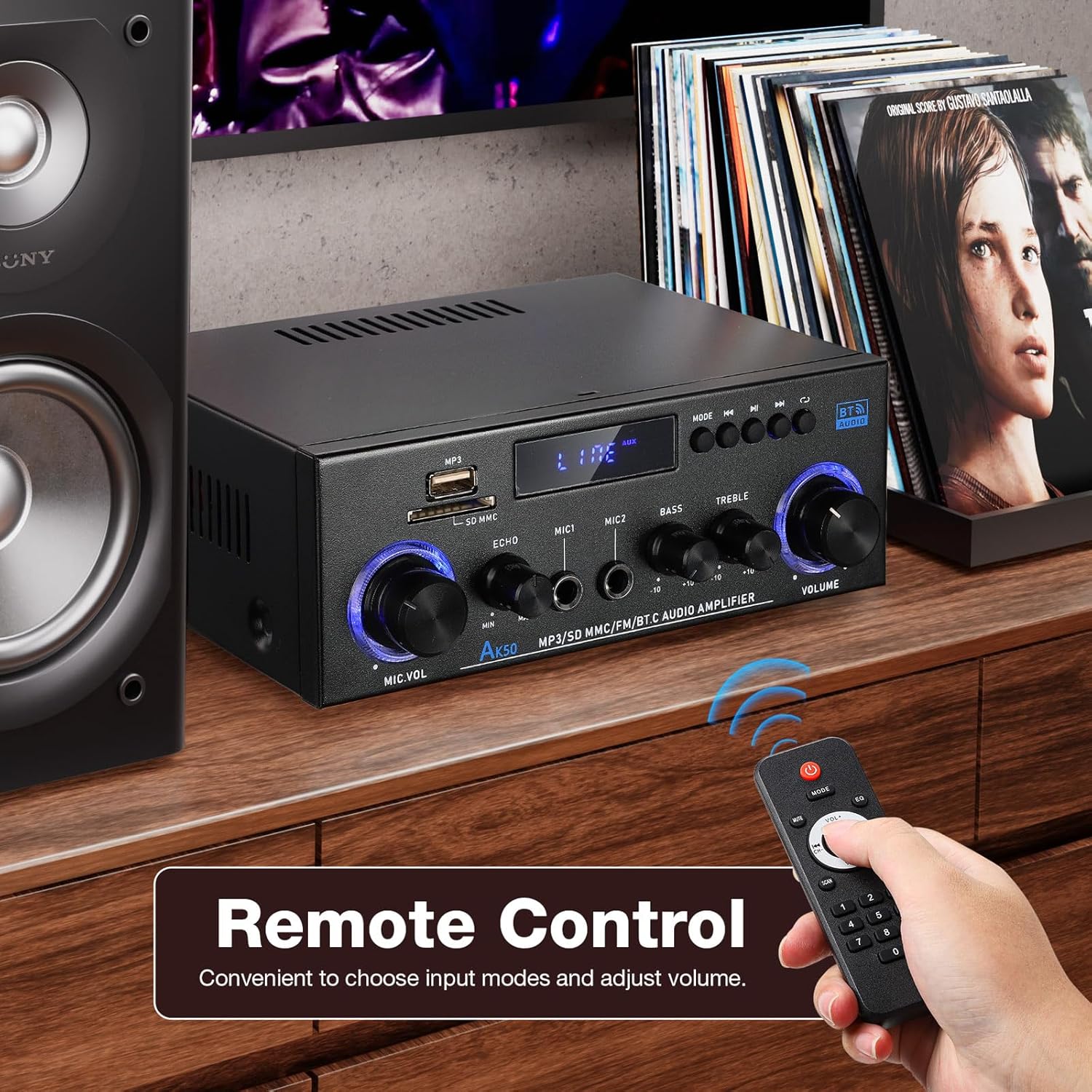
Figure 3.1: Package contents of the AK-50 amplifier.
4. Product Overview
4.1 Front Panel

Figure 4.1: Front Panel Controls and Inputs.
- USB Port: For USB drive playback.
- SD/MMC Card Slot: For SD/MMC card playback.
- Function Display Window: Shows current mode and settings.
- MP3/FM Control Buttons: Play/Pause, Next/Previous Track, Mode selection.
- MIC VOL (Microphone Volume): Adjusts the volume of connected microphones.
- ECHO: Adjusts the echo effect for microphones.
- MIC1/MIC2 Input: 6.35mm jack inputs for microphones.
- BASS: Adjusts the low-frequency audio output.
- TREBLE: Adjusts the high-frequency audio output.
- VOLUME: Main volume control for all audio output.
4.2 Rear Panel

Figure 4.2: Rear Panel Connections.
- AUX Audio Input (RCA L/R): Connect external audio devices via RCA cables.
- Line Audio Signal Output (RCA L/R): Output audio signal to another amplifier or recording device.
- FM ANT: Connection for the FM antenna.
- Speaker System 4Ω-16Ω (Left/Right Channel Output): Connect passive speakers using speaker wire. Observe polarity.
- DC Input 12V/5A: Power input for 12V DC power supply.
- AC Power Input: Connect the AC power cord (90-240V, 50-60Hz).
- Power Switch: Turns the amplifier ON/OFF.
5. Setup
5.1 Speaker Connection
- Ensure the amplifier is powered off.
- Connect your passive speakers to the "Speaker System 4Ω-16Ω" terminals on the rear panel.
- Match the positive (+) terminal of the amplifier to the positive (+) terminal of the speaker, and the negative (-) to the negative (-). Use appropriate speaker wire.
5.2 Power Connection
- Connect the supplied AC power cord to the "AC Power Input" on the rear panel.
- Plug the other end of the power cord into a suitable wall outlet.
5.3 FM Antenna Connection
- Connect the FM antenna to the "FM ANT" port on the rear panel.
- Extend the antenna for better reception.
5.4 Audio Source Connection (AUX)
- To connect an external audio device (e.g., CD player, TV, computer) via RCA, use an RCA cable.
- Connect one end of the RCA cable to the audio output of your device and the other end to the "AUX Audio Input" (L/R) on the amplifier's rear panel.
6. Operating Instructions
6.1 Powering On/Off
Flip the "POWER ON/I" switch on the rear panel to turn the amplifier on or off. The front display will illuminate when powered on.
6.2 Volume, Bass, and Treble Control
- VOLUME: Rotate the large knob on the right of the front panel to adjust the master volume.
- BASS: Rotate the "BASS" knob to increase or decrease low-frequency sounds.
- TREBLE: Rotate the "TREBLE" knob to increase or decrease high-frequency sounds.
6.3 Input Selection
Press the "MODE" button on the front panel or the remote control to cycle through available input sources: Bluetooth (BT), USB, SD, FM, and AUX.
7. Connectivity
7.1 Bluetooth Connection
- Switch the amplifier to Bluetooth mode using the "MODE" button. The display will show "BT".
- On your mobile device, enable Bluetooth and search for available devices.
- Select "AK-50" from the list of devices to pair.
- Once paired, you can stream audio from your device to the amplifier.

Figure 7.1: Bluetooth connectivity with a smartphone. Maintain a distance of 16.4ft/5m without obstructions for optimal connection.
Video 7.1: A demonstration of the Facmogu AK-50 Bluetooth Stereo Audio Amplifier, showcasing its design and features.
7.2 USB/SD Card Playback
- Insert a USB drive or SD/MMC card into the respective slot on the front panel.
- Switch the amplifier to USB or SD mode using the "MODE" button. The amplifier will automatically detect and play audio files.
- Use the MP3/FM control buttons to navigate tracks (Next/Previous) and Play/Pause.
7.3 AUX Input
After connecting an external audio source to the rear AUX input (as described in Section 5.4), switch the amplifier to AUX mode using the "MODE" button. Play audio from your connected device.
7.4 FM Radio
- Ensure the FM antenna is properly connected.
- Switch the amplifier to FM mode using the "MODE" button.
- Use the MP3/FM control buttons to scan for and select radio stations.
8. Karaoke Function
The AK-50 amplifier features two microphone inputs for karaoke use.
- Connect up to two microphones to the MIC1 and MIC2 inputs on the front panel.
- Adjust the microphone volume using the "MIC VOL" knob.
- Use the "ECHO" knob to add a reverberation effect to the microphone audio.

Figure 8.1: Using the amplifier for karaoke with dual microphone inputs.
9. Remote Control
The included remote control allows for convenient operation of the amplifier from a distance.
- Power: Turns the amplifier on/off.
- Mode: Cycles through input sources (BT, USB, SD, FM, AUX).
- Volume +/-: Adjusts the master volume.
- Play/Pause, Next/Previous: Controls media playback in USB/SD/Bluetooth modes.
- EQ: Selects equalizer presets (if available).
- Number Pad: Direct track selection for USB/SD.

Figure 9.1: Remote control for the AK-50 amplifier.
10. Troubleshooting
| Problem | Possible Cause | Solution |
|---|---|---|
| No power | Power cord not connected; Power switch off; Outlet malfunction. | Check power cord connection; Turn power switch ON; Test outlet with another device. |
| No sound output | Incorrect input selected; Volume too low; Speaker wires loose/incorrectly connected; Faulty audio source. | Select correct input mode; Increase volume; Check speaker wire connections and polarity; Test with a different audio source. |
| Bluetooth not connecting | Amplifier not in BT mode; Device Bluetooth off; Device too far; Interference. | Switch amplifier to BT mode; Enable Bluetooth on your device; Move device closer to amplifier (within 5m); Reduce interference. |
| USB/SD card not playing | Incorrect mode; Unsupported file format; Corrupted media; Card/drive not inserted correctly. | Switch to USB/SD mode; Ensure files are MP3 or supported format; Try a different USB/SD card; Reinsert media. |
| Poor FM reception | Antenna not connected or extended; Weak signal. | Connect and extend FM antenna; Reposition antenna for better signal. |
11. Specifications
| Feature | Specification |
|---|---|
| Model Number | A50803-MG-US |
| Brand | Facmogu |
| Connectivity Technology | Bluetooth |
| Wireless Communication | Bluetooth |
| Audio Output Mode | Stereo |
| Speaker Impedance | 4-16Ω |
| Power Input | AC 90-240V, 50-60Hz / DC 12V/5A |
| Material | Metal |
| Item Weight | 1.98 pounds (0.9 kg) |
| Package Dimensions | 8.5 x 8.11 x 3.82 inches (21.6 x 20.6 x 9.7 cm) |
| Included Components | AK50 Audio Amplifier |
| Mounting Type | Tabletop Mount |
12. Maintenance
- Cleaning: Use a soft, dry cloth to clean the exterior of the amplifier. Do not use liquid cleaners or aerosols.
- Storage: When not in use for extended periods, store the amplifier in a cool, dry place, away from direct sunlight and moisture.
- Ventilation: Ensure proper ventilation around the unit to prevent overheating. Do not block the ventilation openings.
13. Warranty and Support
For warranty information or technical support, please refer to the contact details provided with your purchase or visit the official Facmogu website. Keep your purchase receipt as proof of purchase for any warranty claims.