
1. Product Overview
The 2NLF 8-Channel NVR Outdoor Surveillance Camera Kit provides comprehensive security monitoring for various environments. This system includes an 8-channel Network Video Recorder (NVR) with a pre-installed 500GB HDD and four dual-lens cameras. Each camera offers 2MP HD resolution, 360° Pan & Tilt capabilities, and supports dual-band 2.4G/5GHz WiFi for stable connectivity. Advanced features like color night vision, 24/7 recording, motion detection, and two-way audio ensure reliable surveillance day and night.

Image 1.1: Overview of the 2NLF Surveillance Camera Kit, showing the NVR and four dual-lens cameras.
2. What's in the Box
Please check the package contents upon receipt to ensure all items are present:
- 1 x 8-Channel NVR with 500GB HDD (pre-installed)
- 4 x Dual-Lens Security Cameras
- 1 x Mouse
- 1 x Power Adapter for NVR
- 4 x Power Adapters for Cameras
- 1 x HDMI Cable
- 1 x Ethernet Cable
- 4 x Screw Packs for mounting
- 1 x User Manual (this document)

Image 2.1: Visual representation of all components included in the package.
3. Setup Instructions
3.1 Initial Connection (Plug & Play)
- Connect NVR: Connect the NVR to your router using the provided Ethernet cable.
- Power On NVR: Connect the NVR power adapter to the NVR and plug it into a power outlet.
- Connect Cameras: Connect each camera to its respective power adapter and plug them into power outlets.
- Automatic Pairing: The NVR and cameras will automatically pair upon power-on. No complex configuration is required for initial setup.
- Connect to Display: Use the HDMI cable to connect the NVR to a monitor or TV to view the camera feeds.

Image 3.1: Simple operation and quick pairing diagram, illustrating automatic connection between NVR and cameras within a home environment.
3.2 Network Configuration (Optional)
The system supports dual-band WiFi (2.4 GHz and 5 GHz) for stable connectivity. While cameras pair automatically, you can configure network settings via the NVR interface or mobile app for remote access.

Image 3.2: Remote access anytime, showing camera compatibility with dual-band 2.4GHz and 5GHz WiFi for higher transmission speed and greater coverage.
4. Operating Instructions
4.1 Live View and Dual-Lens Monitoring
The system allows monitoring of two distinct zones simultaneously per camera, effectively providing 8 views from 4 cameras. The dual-lens design combines a fixed bullet camera view and a PTZ (Pan & Tilt & Zoom) dome camera view.

Image 4.1: Dual screen, flexible control. Control the camera direction via the application for a complete and unblinded view.
4.2 Pan & Tilt Control
The PTZ camera offers 360° horizontal pan (355°) and 90° vertical tilt. You can control the camera's direction remotely using the mobile application.

Image 4.2: PTZ control, everything under control. Remotely control the dome camera from the app with 330° Pan and 90° Tilt.
4.3 Recording and Storage
The NVR supports 24/7 continuous recording. The pre-installed 500GB HDD, combined with H.265+ compression technology, allows for extended storage of high-definition video. The NVR is expandable up to 8 channels and supports hard drives up to 6TB.

Image 4.3: 24/7 uninterrupted recording, ensuring your and your family's security. Features an integrated 500GB hard drive and an NVR expandable up to 8 channels.
4.4 Smart Detection and Alerts
The system features intelligent motion detection that triggers focused recording and sends instant notifications to your mobile device. An audible alarm can be configured to deter intruders.

Image 4.4: Danger alert, immediate response. Push alerts on the mobile app and simultaneous acoustic and visual alarms notify you immediately of potential threats. Features motion tracking, audible alarm, and app push notifications.
4.5 Night Vision Modes
The cameras offer three night vision modes: color, smart, and infrared, ensuring clear visibility in low-light conditions.
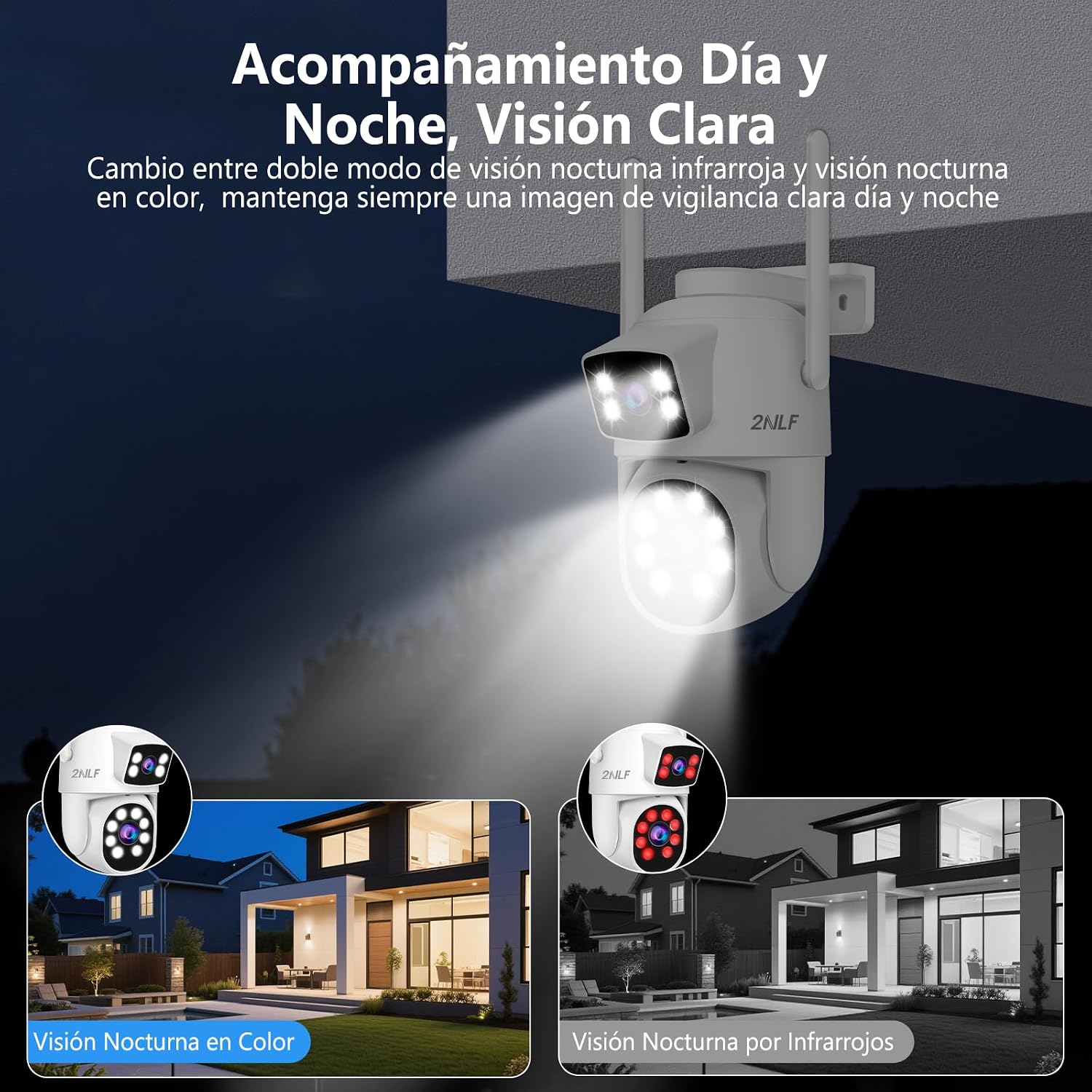
Image 4.5: Day and night monitoring, clear vision. Switch between dual infrared night vision and color night vision modes for clear surveillance images.
4.6 Two-Way Audio
The remote two-way audio function allows real-time communication with the surveillance area from your mobile device, enabling you to speak to visitors or deter unwanted individuals.

Image 4.6: Two-way audio, real-time communication. Speak in real-time with the surveillance location from anywhere.
4.7 Multi-User Sharing
The system supports multi-user sharing, allowing up to 4 simultaneous users to monitor your home at any time through the mobile application.

Image 4.7: Multi-user sharing, allowing up to 4 simultaneous users to monitor your home anytime.
5. Maintenance
5.1 Camera Durability
The outdoor cameras are rated IP66 waterproof, making them resistant to rain, dust, and extreme temperatures ranging from -25°C to 50°C. This ensures reliable operation in various weather conditions.

Image 5.1: IP66 water resistant, applicable to all types of scenarios including residential, office, store, and warehouse.
5.2 General Care
- Regularly check camera lenses for dirt or obstructions and clean gently with a soft cloth.
- Ensure all power connections are secure and free from damage.
- Periodically check NVR ventilation to prevent overheating.
- Keep firmware updated for optimal performance and security.
6. Troubleshooting
6.1 No Image on Display
- Check if the NVR and cameras are powered on.
- Verify the HDMI cable connection between the NVR and the monitor.
- Ensure the correct input source is selected on your monitor/TV.
6.2 Cameras Not Connecting
- Confirm cameras are within range of the NVR's WiFi signal.
- Restart both the NVR and the cameras.
- If issues persist, refer to the detailed pairing instructions in the full manual or contact support.
6.3 Remote Access Issues
- Ensure the NVR is connected to the internet via the router.
- Check your mobile device's internet connection.
- Verify that the mobile application is updated to the latest version.
7. Specifications
| Feature | Detail |
|---|---|
| Brand | 2NLF |
| Model Number | GAD3036WT1 |
| Connectivity Technology | 2.4/5 GHz WiFi, Wireless |
| Video Capture Resolution | 1080p (2MP HD) |
| Special Features | Two-way audio, Motion detector, HD Resolution, PTZ Technology, Night Vision |
| Number of Channels | 8 |
| Storage Capacity | 500 GB (pre-installed HDD), expandable up to 6 TB |
| Power Source | Corded Electric |
| Compatible Devices | Monitor, Smartphone |
| Camera Description | Dual-lens cameras with 360° Pan & Tilt |
| Night Vision Range | 15 Meters |
| Recording Mode | Continuous, Motion Detection |
| Hardware Interface | 802.11 ac/b/g/n, 802.11 b/g/n |
| Lens Type | Varifocal |
| Video Input Type | IP |
| Viewing Angle | 360 Degrees |
| Signal Format | Digital |
| Optical Sensor Technology | CMOS |
| Recommended Uses | Outdoor, Indoor |
| Color | White |
| Item Dimensions | 29 x 29 x 16.8 centimeters |
8. Warranty and Support
8.1 Product Warranty
This product includes a 365-day warranty from the date of purchase. During this period, if any defect arises that is not caused by improper use, you may contact our official customer service team for assistance.
8.2 Customer Support
Our dedicated customer support team is available to help you with any questions or issues you may encounter. Please refer to the contact information provided with your purchase or visit the official 2NLF website for support options.

Image 8.1: Professional customer support ready to assist with any product inquiries or issues.