1. Important Safety Instructions
Please read all instructions carefully before using the appliance. Keep this manual for future reference.
- Ensure the voltage indicated on the appliance corresponds to your local mains voltage before connecting.
- Do not touch hot surfaces. Use oven mitts or gloves when handling hot items.
- To protect against electrical shock, do not immerse the cord, plug, or oven in water or other liquid.
- Close supervision is necessary when any appliance is used by or near children.
- Unplug from outlet when not in use and before cleaning. Allow to cool before putting on or taking off parts.
- Do not operate any appliance with a damaged cord or plug, or after the appliance malfunctions or has been damaged in any manner.
- Do not use outdoors.
- Do not let the cord hang over the edge of a table or counter, or touch hot surfaces.
- Do not place on or near a hot gas or electric burner, or in a heated oven.
- Extreme caution must be used when moving an appliance containing hot oil or other hot liquids.
- Do not use the appliance for other than intended household use.
- Oversize foods or metal utensils must not be inserted in a toaster oven as they may create a fire or risk of electric shock.
- A fire may occur if the oven is covered or touching flammable material, including curtains, drapes, walls, and the like, when in operation.
- Do not place any materials other than manufacturer's recommended accessories in this oven.
- Do not place cardboard, plastic, paper, or similar materials in the oven.
- Do not store any materials, other than manufacturer's recommended accessories, in this oven when not in use.
- Always wear protective, insulated oven gloves when inserting or removing items from the hot oven.
2. Product Overview
The RIWALL RPI-01 is a 25-liter electric oven designed for versatile cooking, featuring convection, rotisserie, and grill functions. It comes with essential accessories to enhance your cooking experience.
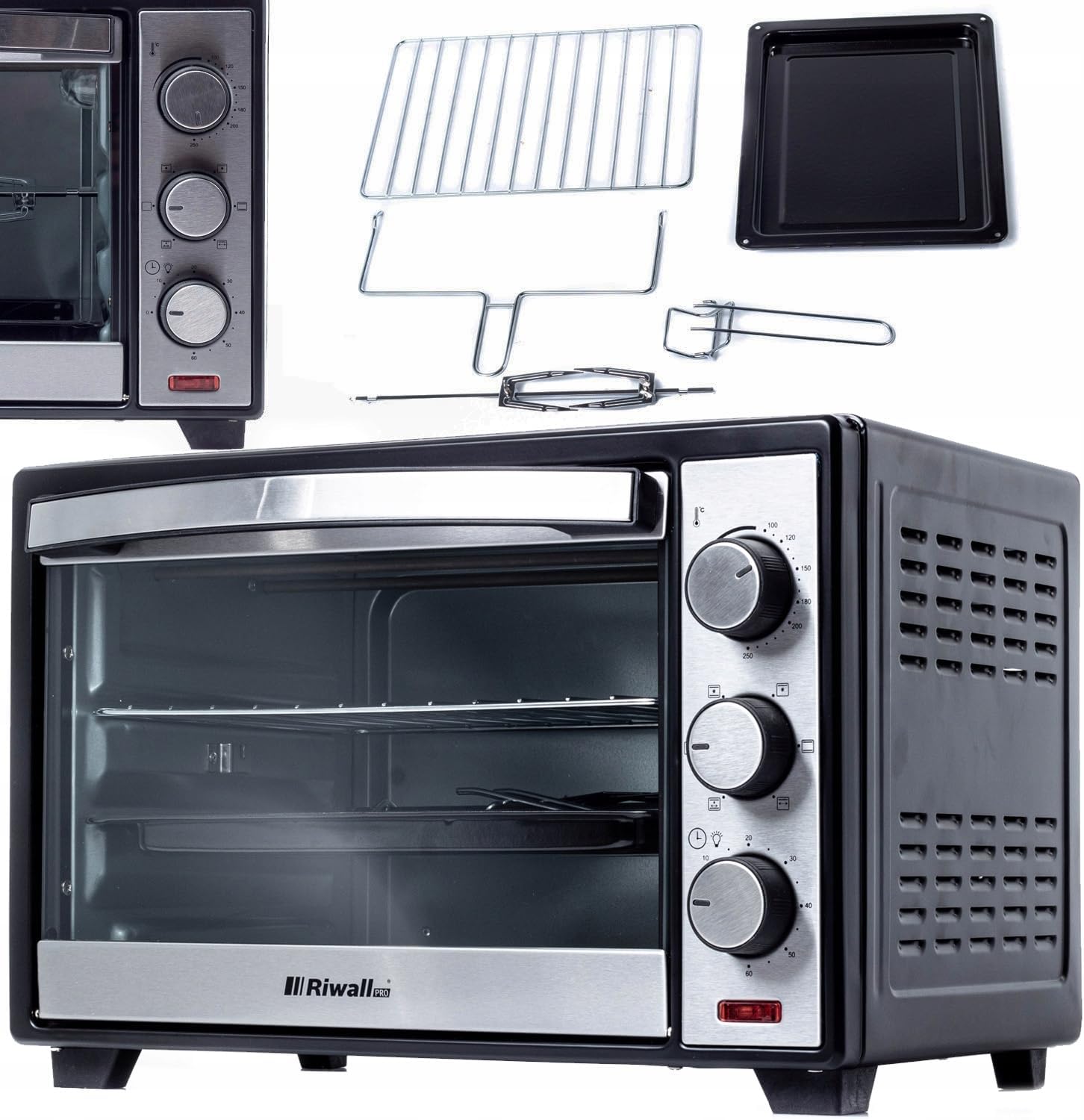
This image displays the RIWALL RPI-01 25L Electric Oven from a front-right angle, showcasing its black and silver exterior, glass door, and control knobs. Alongside the oven, its accessories are laid out: a rectangular baking tray, a wire rack, and a rotisserie spit with a handle. The control panel features three rotary knobs for temperature, function, and timer settings.
2.1 Components and Controls
- Oven Unit: Main body with tempered glass door.
- Temperature Control Knob: Adjusts cooking temperature (0-255°C).
- Function Control Knob: Selects cooking mode (e.g., convection, grill, rotisserie).
- Timer Control Knob: Sets cooking duration (0-60 minutes) with an end-of-cycle sound.
- Indicator Light: Illuminates when the oven is operating.
- Wire Rack: For baking and grilling.
- Baking Tray: For collecting drips or baking items.
- Rotisserie Spit: For roasting poultry or meat.
- Rotisserie Handle: For safe handling of the hot rotisserie spit.
3. Setup
3.1 Unpacking
- Carefully remove the oven and all accessories from the packaging.
- Remove any protective films, stickers, or packaging materials from the oven's interior and exterior.
- Retain packaging for future transport or disposal.
3.2 Placement
- Place the oven on a stable, flat, heat-resistant surface.
- Ensure there is adequate ventilation around the oven (at least 10-15 cm clearance on all sides and top) to prevent overheating.
- Do not place the oven near flammable materials such as curtains, drapes, or walls.
- Ensure the power cord can reach a suitable electrical outlet without being stretched or obstructed.
3.3 Initial Cleaning and First Use (Burn-off)
- Before first use, wipe the interior of the oven and all accessories with a damp cloth and mild detergent. Dry thoroughly.
- To eliminate any manufacturing odors, operate the oven empty for approximately 15 minutes.
- Plug the oven into a grounded electrical outlet.
- Set the temperature knob to 200°C and the function knob to the standard baking mode (usually top and bottom heating).
- Set the timer knob to 15 minutes.
- A slight odor or smoke may be present during this initial burn-off; this is normal. Ensure the area is well-ventilated.
- Once the timer finishes, allow the oven to cool completely before using it for cooking.
4. Operating Instructions
4.1 General Operation
- Place the food item on the appropriate accessory (wire rack, baking tray, or rotisserie spit).
- Insert the accessory into the desired rack position inside the oven.
- Close the oven door securely.
- Plug the oven into a grounded electrical outlet.
- Set the desired temperature using the Temperature Control Knob.
- Select the desired cooking function using the Function Control Knob.
- Set the cooking time using the Timer Control Knob. The oven will begin heating, and the indicator light will illuminate.
- When the set time elapses, the oven will automatically turn off, and a sound signal will indicate completion.
- Carefully remove the cooked food using oven mitts or the rotisserie handle if applicable.
- Unplug the oven after use.
4.2 Cooking Functions
- Baking (Top & Bottom Heating): Ideal for general baking, roasting, and casseroles. Set the temperature between 0-220°C.
- Convection Baking (with Fan): Activates the fan for even heat distribution, reducing cooking time and ensuring uniform browning. Set the temperature between 0-255°C.
- Grill: Uses the top heating element for grilling meats, vegetables, or toasting.
- Rotisserie: For roasting whole chickens or larger cuts of meat. Ensure the rotisserie spit is properly assembled and secured.
5. Maintenance and Cleaning
Regular cleaning ensures optimal performance and extends the life of your oven.
- Always unplug the oven and allow it to cool completely before cleaning.
- Exterior: Wipe the exterior surfaces with a soft, damp cloth. Do not use abrasive cleaners or scouring pads.
- Interior: Wipe the interior with a damp cloth and mild detergent. For stubborn stains, a non-abrasive oven cleaner designed for small appliances can be used, following the product instructions. Ensure all cleaner residue is removed.
- Accessories: The wire rack, baking tray, and rotisserie spit can be washed in warm, soapy water. Rinse thoroughly and dry completely before storing or reusing.
- Do not immerse the oven unit, cord, or plug in water or any other liquid.
- Ensure all parts are dry before plugging the oven back in.
6. Troubleshooting
If you encounter issues with your oven, refer to the following common problems and solutions:
| Problem | Possible Cause | Solution |
|---|---|---|
| Oven does not turn on. | Not plugged in; power outage; faulty outlet. | Ensure the oven is securely plugged in. Check the circuit breaker. Try a different outlet. |
| Oven not heating. | Temperature or timer knob not set correctly; heating elements failure. | Ensure both temperature and timer knobs are set to desired settings. If problem persists, contact customer support. |
| Food not cooking evenly. | Improper rack position; overcrowding; convection fan not working. | Adjust rack position. Avoid overcrowding the oven. Ensure convection function is selected if desired. |
| Timer not working. | Timer knob not wound sufficiently. | Ensure the timer knob is turned past the 10-minute mark and then back to the desired time. |
| Excessive smoke during cooking. | Food residue inside; fatty foods dripping. | Clean the oven interior thoroughly. Use the baking tray to catch drips from fatty foods. |
If the problem persists after attempting these solutions, please contact Riwall Pro customer support.
7. Specifications
| Feature | Specification |
|---|---|
| Model Number | RPI-01 |
| Brand | Riwall Pro |
| Power | 1600 W |
| Capacity | 25 Liters |
| Temperature Range (Convection) | 0-255°C |
| Temperature Range (Standard Baking) | 0-220°C |
| Timer | 0-60 minutes with end-of-cycle sound |
| Special Functions | Convection, Grill, Rotisserie, Indicator Light |
| Heating Elements | Stainless steel |
| Interior Material | Aluzinc |
| Exterior Material | Cold-rolled steel |
| Color | Black casing, silver front |
| Door Type | Tempered glass |
| External Dimensions (D x W x H) | 37 x 50 x 35 cm |
| Internal Dimensions (D x W x H) | 33 x 25 x 27.3 cm |
| Power Cord Length | 100 cm |
| Plug Type | E/F |
| Control Type | Rotary knobs |
8. Warranty and Support
For information regarding warranty coverage, terms, and conditions, please refer to the warranty card included with your product or visit the official Riwall Pro website. For technical support, spare parts, or service inquiries, please contact Riwall Pro customer service through their official channels.


