
1. Introduction
The Boytond AI Translation Earbuds Model YYK-Q71 are designed to facilitate global communication through real-time language translation. These wireless earbuds also function as standard Bluetooth headphones for music playback and calls. They feature an open-ear design for comfort and situational awareness, along with advanced AI capabilities for enhanced user interaction.
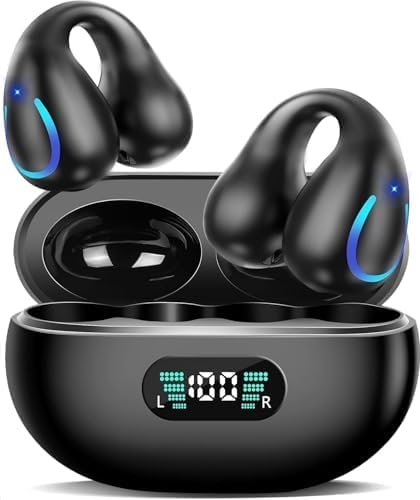
Image 1.1: Boytond AI Translation Earbuds YYK-Q71 in their charging case.

Image 1.2: Overview of key features including crystal-clear AAC sound, advanced air conduction technology, safe usage, open-ear comfort design, 60 hours total playtime, and IP68 waterproof protection.
2. What's in the Box
Please verify that all items are present upon unboxing:
- 2 x AI Translator Earbuds
- 1 x Charging Case
- 1 x USB-C Cable
- 1 x User Manual
3. Setup Instructions
Follow these steps to set up your Boytond AI Translation Earbuds YYK-Q71:
3.1. App Installation and Initial Setup
- Download the "NebulaBuds" app. You can find the QR code for the app in the charging case or the included user manual.
- Open the NebulaBuds app and grant necessary permissions (Location, Device connection, Bluetooth scan, Internet access) when prompted.
- Log in to the app. You can use your mobile account or email for registration and login.
3.2. Bluetooth Pairing
- Ensure your phone's Bluetooth is turned on.
- Open the charging case and take out the earbuds. They will automatically enter pairing mode.
- In your phone's Bluetooth settings, locate and select "YYK-Q71" from the list of available devices.
- Confirm the pairing request. The earbuds will connect for calls and audio.
3.3. Earbud Activation
To unlock full translation features, activate your earbuds within the NebulaBuds app:
- In the NebulaBuds app, navigate to the settings or profile section.
- Select "Bind New Device" or a similar option.
- Scan the activation code provided with your product (usually found in the packaging or manual). Alternatively, manually enter the activation code.
- Click "Connect" or "Activate". Once successful, your earbuds will be fully activated for all features.
Video 3.1: This video demonstrates the activation process for the Boytond AI Translation Earbuds, including app download, Bluetooth connection, and entering the activation code.

Image 3.1: Visual guide on connecting the AI Earbuds to the NebulaBuds app, showing app download, Bluetooth activation, permission prompts, and successful connection.
4. Operating Instructions
The Boytond AI Translation Earbuds offer various modes and features for diverse communication and audio needs.
4.1. Translation Modes
The earbuds support real-time two-way translation in 144 languages and 70 accents, with high accuracy. The NebulaBuds app provides several translation modes:
- Simultaneous Interpretation Mode: Ideal for conferences or conversations where continuous, real-time translation is required.
- Face-to-Face Translation (Earphones + Mobile Phone): Use one earbud and your phone for two-way voice translation in direct conversations.
- Face-to-Face Translation (Dual-Ear Mode): Share one earbud with another person for simultaneous two-way translation, allowing both parties to speak and hear translations in real-time.
- Video Call Translation: Translate conversations during video calls. The app generates an invitation link for seamless communication via a browser.
- Voice Call Translation: Translate conversations during voice calls.
- Live Recording: Record conversations and convert them to text for meeting notes or transcription.
- Free Talk Mode: Allows for natural, continuous conversation flow with real-time translation.
- Touch Mode: Activate translation by touching the earbud.
- Speaker Mode: Use your phone's speaker for translation output, suitable for group interactions.
- Photo Translation: Translate text from images.

Image 4.1: The earbuds utilize an AI chip for rapid and accurate translation, supporting a wide range of languages and accents.

Image 4.2: A comprehensive list of 74 languages and 70 accents currently supported by the translation feature.

Image 4.3: Illustration of the four primary translation modes: Simultaneous Interpretation, Dual Earbuds, Mobile + Headphones, and Video Call Mode.

Image 4.4: Examples of Live Recording, Simultaneous Interpretation, and Face-to-Face Translation in action.

Image 4.5: The real-time translation interface, highlighting Free Talk Mode, Touch mode, Speaker Mode, audio transcription, and photo translation.

Image 4.6: The simultaneous interpretation feature, designed for real-time voice translation during international conferences.

Image 4.7: The audio and video call translation feature, enabling online calls with real-time translation without requiring the other party to install an app.

Image 4.8: Face-to-Face Translation mode, where one earbud is used in conjunction with a mobile phone for two-way voice translation.

Image 4.9: Dual-Ear Face-to-Face Translation mode, enabling two individuals to share earbuds for simultaneous, real-time translated conversation.

Image 4.10: The Summary & Playback feature, providing AI-generated summaries and speaker identification for historical recordings.

Image 4.11: The Live Recording feature, which converts spoken content into text, useful for meeting notes and transcriptions.
4.2. AI Features
Beyond translation, the earbuds integrate with advanced AI functionalities:
- AI Assistant: Access over 200 AI small applications for various tasks.
- AI Chat: Engage in AI-powered conversations.
- AI Image Generation: Utilize AI to generate images.
- AI Voice Smart Dialogue: Interact with the AI using real-time voice commands and receive intelligent responses.

Image 4.12: The AI Voice Smart Dialogue feature, allowing real-time voice interaction with the AI for queries and assistance.

Image 4.13: The AI Assistant, providing access to over 200 AI applications, including AI Chat and AI Image Generation capabilities.
4.3. Audio Quality and Battery Life
The earbuds are equipped with a 14.2mm/15mm dynamic driver and 4 high-precision microphones, ensuring clear audio for music, calls, and translation.
- Battery Life: Up to 10 hours of continuous playtime on a single charge. The charging case provides an additional 50 hours, totaling 60 hours of use.
- Charging: Fast charging technology allows for approximately 1.5 hours for a full charge. A 5-minute charge can provide an hour of listening time.

Image 4.14: Detailed view of the earbud's internal structure, featuring a 15mm dynamic driver and precision directional sound design for an immersive audio experience.

Image 4.15: Visual representation of the earbuds' battery life, indicating 60 hours total playtime with the charging case and 1.5 hours fast charging via USB-C.
4.4. Usage Scenarios
The versatile design allows for multiple uses:
- Translation Earphone: For international travel, business meetings, or language learning.
- Sports Music Headphones: Secure fit and IPX7 waterproof rating make them suitable for workouts.
- Open Talking Headset: The open-ear design allows you to stay aware of your surroundings while listening to audio or taking calls.

Image 4.16: The earbuds can be used as translation earphones, sports music headphones, or an open talking headset.
5. Maintenance
To ensure the longevity and optimal performance of your earbuds, follow these maintenance guidelines:
- Cleaning: Regularly wipe the earbuds and charging case with a soft, dry cloth. Avoid using abrasive materials or harsh chemicals.
- Water Resistance: The earbuds are IPX7 waterproof, meaning they can withstand immersion in up to 1 meter of water for 30 minutes. However, the charging case is not waterproof. Ensure earbuds are dry before placing them back in the case.
- Storage: Store the earbuds in their charging case when not in use to protect them from dust and damage. Keep them in a cool, dry place away from direct sunlight and extreme temperatures.
- Charging: Use the provided USB-C cable for charging. Avoid using damaged cables or non-certified chargers.
6. Troubleshooting
If you encounter issues with your earbuds, refer to the following common solutions:
- Earbuds not pairing:
- Ensure Bluetooth is enabled on your device.
- Make sure the earbuds are charged and out of the charging case.
- Try forgetting the device in your phone's Bluetooth settings and re-pairing.
- Restart your phone and the earbuds.
- No sound or low volume:
- Check the volume levels on both your phone and the earbuds.
- Ensure the earbuds are properly seated in your ears.
- Verify that the earbuds are connected to your device.
- Translation not working:
- Ensure the NebulaBuds app is open and the earbuds are connected within the app.
- Check your internet connection, as translation features often require online access.
- Verify that the correct source and target languages are selected in the app.
- Confirm that the earbuds have been successfully activated.
- App issues:
- Ensure the app is updated to the latest version.
- Clear the app's cache or reinstall the app.
- Check if all necessary permissions are granted to the app.
7. Specifications
| Feature | Detail |
|---|---|
| Model Name | YYK-Q71 |
| Brand | Boytond |
| Connectivity Technology | Wireless (Bluetooth 5.3) |
| Translation Languages | 144 Languages, 70 Accents |
| Battery Life (Earbuds) | Up to 10 Hours |
| Total Playtime (with Case) | Up to 60 Hours |
| Charging Time | Approx. 1.5 Hours |
| Water Resistance Level | IPX7 (Earbuds only) |
| Audio Driver Type | Dynamic Driver (14.2mm/15mm) |
| Microphones | 4 High-Precision Microphones |
| Control Method | App |
| Material | Polycarbonate (PC), Silicone |
| Ear Placement | Open Ear |
| Item Weight | 4.6 ounces |
| UPC | 762304885942 |
8. Warranty and Support
For warranty information, technical support, or service inquiries, please refer to the official Boytond website or contact their customer service directly. Details can typically be found on the product packaging or within the NebulaBuds application under the 'Service Support' section.


