
1. Introduction
This manual provides detailed instructions for the safe and effective operation of your SHJ iradio UV-98Plus 10W Ham Radio. Please read this manual thoroughly before using the device to ensure proper functionality and to prevent damage. Keep this manual for future reference.
2. Product Overview
2.1 Key Features
- 10W High Power Output: Provides extended communication range.
- Wide Frequency Coverage: Operates across 18-1000MHz, compatible with HAM, GMRS, and commercial bands.
- APRS/GPS Tracking: Enables real-time location sharing and trajectory logging.
- Cross-Band Repeater Function: Extends communication range by acting as a portable signal booster.
- DTMF Remote Control: Allows secure remote operation for emergency alerts or device control.
- Tri-Watch & Spectrum Analyzer: Monitors three channels simultaneously and detects RF signals rapidly (0.1-3MHz/s scan speed).
- Built-in FM Radio & NOAA Weather Alerts: Provides entertainment and critical weather information.
- USB-C Fast Charging: 2600mAh battery fully charges in approximately 2.5 hours.
- IP67 Military-Grade Durability: Resistant to water, dust, and shock, suitable for harsh environments.
- 1.77-inch Color Screen: Clear display for operational information.
- One-Key Frequency Pairing: Simplifies frequency setup without requiring a computer.
- Aviation Frequency Band Reception: Capable of receiving aircraft and tower communication.
2.2 Package Contents
The standard package includes the SHJ iradio UV-98Plus radio unit and factory-configured accessories. Please check all components upon unboxing.
- SHJ iradio UV-98Plus Radio
- Lithium-Ion Battery (2600mAh)
- Antenna
- Belt Clip
- USB-C Charging Cable
- Desktop Charging Dock
- User Manual (this document)
2.3 Radio Components
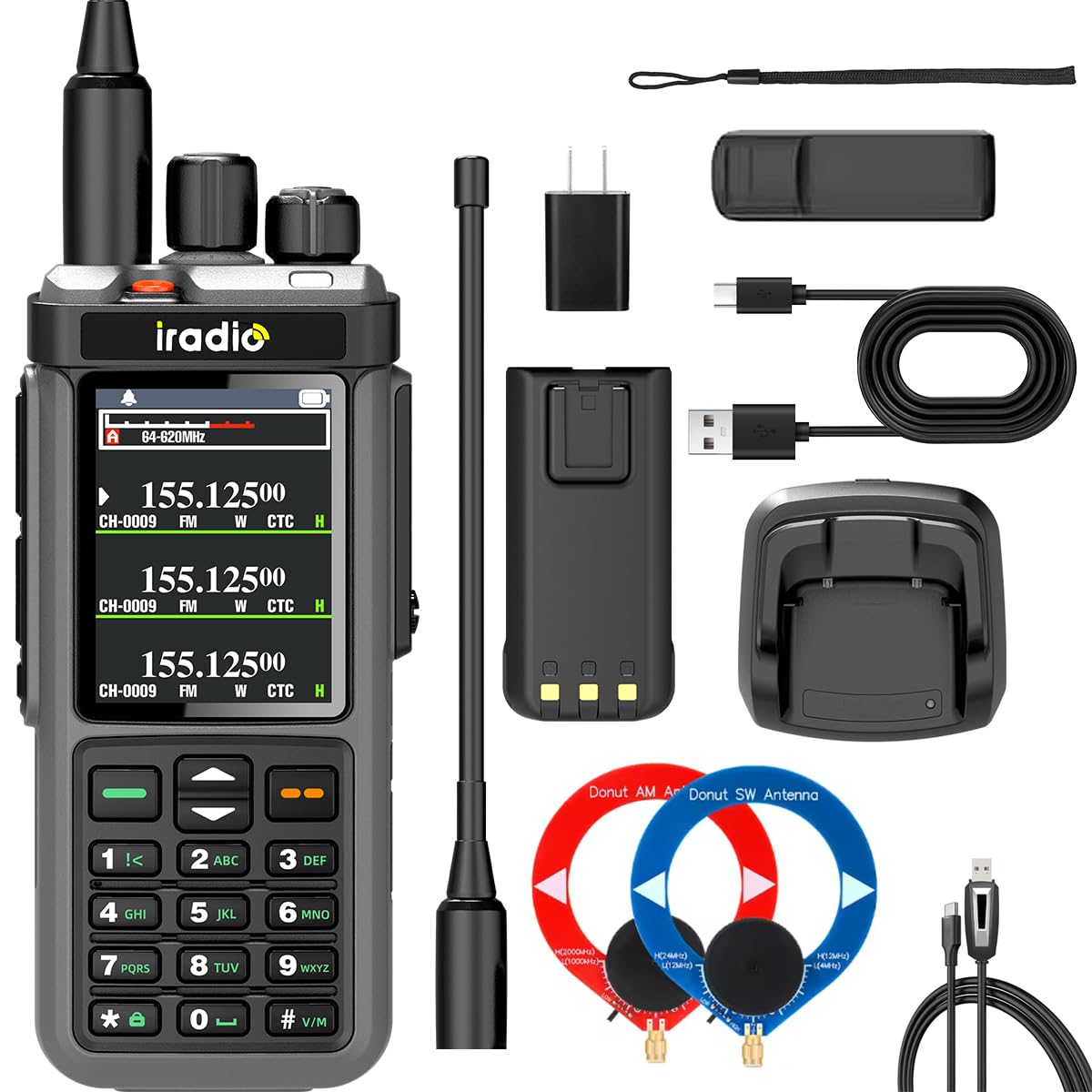
Image: Front view of the SHJ iradio UV-98Plus Ham Radio, showing the display, keypad, and control knobs.

Image: Four different views of the SHJ iradio UV-98Plus Ham Radio, including front, side, and back profiles, highlighting its compact design and antenna.
- Antenna: For transmitting and receiving signals.
- Power/Volume Knob: Turns the radio on/off and adjusts volume.
- Channel/Frequency Selector Knob: Navigates channels or adjusts frequency.
- LCD Display: Shows frequency, channel, battery status, and other operational information.
- PTT (Push-to-Talk) Button: Press to transmit, release to receive.
- Side Buttons (PF1/PF2): Programmable function buttons.
- Keypad: For direct frequency input, menu navigation, and DTMF tones.
- Microphone/Speaker: Integrated for audio input and output.
- USB-C Charging Port: For direct charging.
3. Setup
3.1 Battery Installation and Charging
- Install Battery: Align the battery pack with the grooves on the back of the radio and slide it into place until it clicks securely.
- Charge Battery:
- Using Desktop Charger: Place the radio (with battery installed) into the desktop charging dock. Ensure the charging indicator light illuminates.
- Using USB-C Cable: Connect the USB-C cable to the radio's USB-C port and to a compatible USB power source (e.g., wall adapter, power bank, computer).
- Charging Indicator: The charging indicator will typically show red during charging and turn green when fully charged. A full charge takes approximately 2.5 hours.

Image: Close-up of the SHJ iradio UV-98Plus showing the USB-C charging port with a cable connected, illustrating the charging method.
3.2 Antenna Attachment
Screw the antenna clockwise onto the antenna connector on top of the radio until it is finger-tight. Do not overtighten.
3.3 Powering On/Off
Rotate the Power/Volume knob clockwise to turn the radio on. Rotate it counter-clockwise until it clicks to turn the radio off.
4. Basic Operation
4.1 Adjusting Volume
After powering on, rotate the Power/Volume knob to adjust the listening volume to a comfortable level.
4.2 Selecting Frequency/Channel
The UV-98Plus supports both frequency mode (VFO) and channel mode (MR). Use the Channel/Frequency Selector knob or the keypad to input or select frequencies/channels.

Image: Two SHJ iradio UV-98Plus radios displaying different frequencies on their screens, illustrating the multi-frequency band capability.
- Frequency Mode (VFO): Allows direct input of frequencies using the keypad.
- Channel Mode (MR): Allows selection of pre-programmed channels using the Channel/Frequency Selector knob.
- Switching Modes: Refer to the radio's menu system for switching between VFO and MR modes.
4.3 Transmitting and Receiving
- Ensure you are on the desired frequency or channel.
- To transmit, press and hold the PTT button. Speak clearly into the microphone.
- Release the PTT button to stop transmitting and return to receive mode.
4.4 One-Key Frequency Pairing
The UV-98Plus features a one-key frequency pairing function, eliminating the need for computer programming for basic frequency setup.

Image: Two SHJ iradio UV-98Plus radios positioned together, illustrating the concept of "one-key frequency pairing" for easy setup without a computer.
Consult the radio's on-screen menu or a more detailed programming guide for specific steps on how to activate and use this feature.
5. Advanced Features
5.1 APRS/GPS Tracking
The integrated APRS/GPS chipset allows for real-time location sharing and logging of your trajectory. This feature is particularly useful for outdoor activities and emergency response.
- Activation: Access the APRS/GPS menu option to enable or disable tracking.
- Data Transmission: Configure the radio to transmit your location data at specified intervals.
- Viewing Data: Location data can typically be viewed on compatible APRS mapping services or devices.
5.2 Cross-Band Repeater
The UV-98Plus can function as a portable cross-band repeater, extending the communication range for other radios. This is achieved by receiving a signal on one band (e.g., UHF) and re-transmitting it on another band (e.g., VHF), or vice-versa.
- Setup: Configure the uplink and downlink frequencies in the repeater menu.
- Placement: For optimal performance, place the radio in a high, clear location.
5.3 DTMF Remote Control
DTMF (Dual-Tone Multi-Frequency) allows for remote control functions such as stun, kill, or reactivation of the radio, as well as sending emergency alerts.
- DTMF Codes: Specific DTMF codes must be programmed and used to activate these functions.
- Security: Ensure DTMF codes are kept secure to prevent unauthorized access.
5.4 Tri-Watch and Spectrum Analyzer
The Tri-Watch feature allows simultaneous monitoring of three different frequency bands (A/B/C). The integrated Spectrum Analyzer provides rapid RF signal detection (0.1-3MHz/s scan speed), useful for identifying active frequencies or for search and rescue operations.
- Activating Tri-Watch: Select the Tri-Watch option from the menu to enable multi-band monitoring.
- Spectrum Scan: Initiate a spectrum scan to visualize active frequencies within a specified range.
5.5 FM Radio and NOAA Weather Alerts
The radio includes a built-in FM radio for entertainment during downtime and can receive NOAA weather alerts to keep you informed of critical weather conditions.
- FM Radio: Access the FM radio function through the menu and scan for stations.
- NOAA Alerts: Enable NOAA weather alert reception in the settings to receive automatic warnings.
6. Maintenance
6.1 Cleaning
Wipe the radio's surface with a soft, damp cloth. Do not use harsh chemicals or abrasive cleaners. Ensure the USB-C port cover is closed when not charging to maintain IP67 rating.
6.2 Battery Care
- Avoid fully discharging the battery frequently.
- Store the radio and battery in a cool, dry place when not in use for extended periods.
- If the battery performance degrades significantly, replace it with an original SHJ battery.
6.3 Storage
When storing the radio for long periods, remove the battery and store both separately. Keep the radio away from extreme temperatures, direct sunlight, and moisture.
7. Troubleshooting
| Problem | Possible Cause | Solution |
|---|---|---|
| Radio does not power on. | Battery is dead or not installed correctly. | Charge the battery or re-install it correctly. |
| Cannot transmit or receive. | Incorrect frequency/channel, antenna not attached, low battery, or out of range. | Verify frequency/channel, ensure antenna is secure, charge battery, or move closer to other radios. |
| Poor audio quality. | Low signal strength, incorrect squelch setting, or speaker/microphone obstruction. | Adjust squelch level, move to an area with better signal, or check for obstructions. |
| Battery drains quickly. | High power transmission, frequent use of power-intensive features (GPS), or aging battery. | Reduce transmit power when possible, disable unnecessary features, or consider replacing the battery. |
8. Specifications
| Feature | Detail |
|---|---|
| Model Number | UV-98PLUS |
| Brand | SHJ |
| Frequency Range | 18-1000MHz |
| Output Power | 10W |
| Number of Channels | 1024 |
| Battery Type | Lithium Ion (2600mAh) |
| Charging Time | Approx. 2.5 hours (USB-C) |
| Water Resistance Level | IP67 (Waterproof, Dustproof, Shockproof) |
| Talking Range Maximum | 10 Kilometers (open areas) |
| Display | 1.77-inch Color Screen |
| Item Weight | 1.5 pounds |
| Package Dimensions | 8 x 6 x 3.5 inches |
| Compatible Devices | HAM, GMRS, Commercial two-way radios |
9. Warranty and Support
9.1 Warranty Information
The SHJ iradio UV-98Plus comes with a 2-year warranty from the date of purchase. This warranty covers manufacturing defects and malfunctions under normal use. It does not cover damage caused by misuse, accidents, unauthorized modifications, or natural disasters.
For warranty claims, please retain your proof of purchase and contact the retailer or SHJ customer support.
9.2 Customer Support
For technical assistance, troubleshooting, or general inquiries, please contact SHJ customer support. Refer to the product packaging or the official SHJ website for the most current contact information.


