
1. Product Overview
The BAOFENG UV-5R Mini is a compact, handheld two-way radio designed for reliable communication. It features wireless frequency programming via mobile applications, a large channel capacity, flexible charging options, and multi-band operation. This manual provides essential information for setting up, operating, and maintaining your device.

Image: BAOFENG UV-5R Mini Ham Radio (Orange-2PACK) showing its compact design and antenna.
Key Features:
- Wireless Frequency Programming: Configure frequencies, subtones, and power settings remotely using iOS/Android applications.
- 999 Channel Capacity: Store up to 999 unique presets with dedicated RX/TX frequencies, CTCSS/DCS codes, and power settings.
- Flexible Power & Charging: 7.4V lithium battery provides 8 hours of 5W transmission and 72-hour standby. Features Type-C charging compatibility.
- Multi-Band Operation: VHF/UHF tri-band transmission and AM/FM/VHF/UHF scanning capabilities.
- Intuitive Interface: Equipped with a 1.44” TFT screen, full keypad, and voice prompts for ease of use.
2. Setup Guide
2.1 Unpacking and Initial Inspection
Carefully unpack all components. Ensure the following items are present:
- BAOFENG UV-5R Mini Radio Unit
- Antenna
- Battery
- Belt Clip
- USB-C Charging Cable
Inspect the radio for any visible damage. If any components are missing or damaged, contact customer support.
2.2 Attaching the Antenna
Screw the antenna clockwise into the connector on the top of the radio until it is finger-tight. Do not overtighten.
2.3 Installing the Battery
Align the battery pack with the grooves on the back of the radio. Slide the battery upwards until it clicks into place. To remove, press the release latch and slide the battery downwards.
2.4 Charging the Battery
Before first use, fully charge the battery. Connect the USB-C charging cable to the port on the radio and to a compatible USB power source (e.g., computer, wall adapter, power bank, car charger). The LED indicator will show charging status.
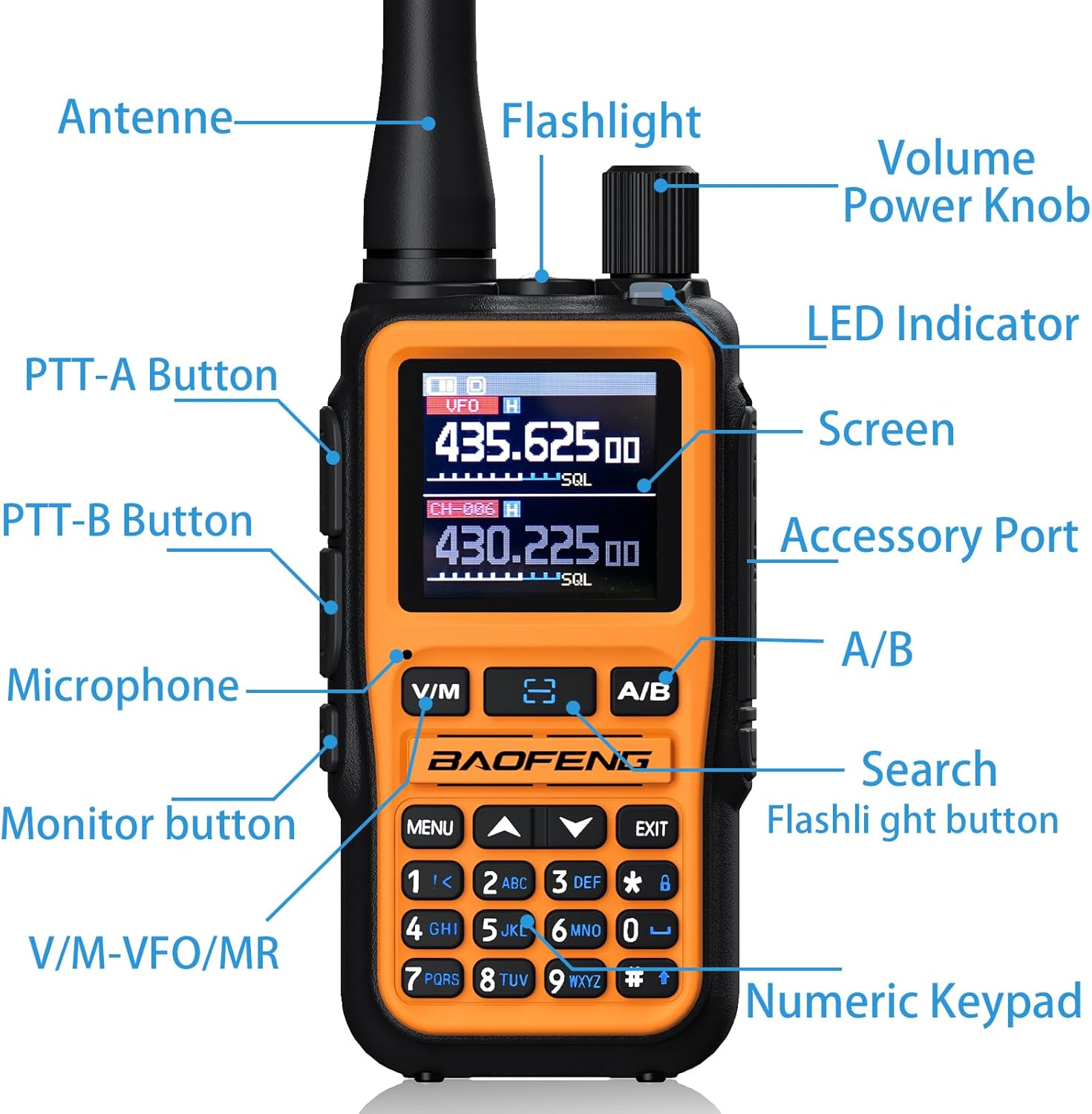
Image: The BAOFENG UV-5R Mini showing its Type-C charging port and various charging methods including computer, wall plug, power bank, and car charger.
3. Operating Instructions
3.1 Power On/Off and Volume Control
To power on the radio, rotate the Volume/Power Knob clockwise. To power off, rotate it counter-clockwise until it clicks. Adjust the volume by rotating the knob.

Image: Detailed view of the BAOFENG UV-5R Mini, highlighting the Volume/Power Knob, PTT-A and PTT-B buttons, screen, and numeric keypad.
3.2 Frequency Programming (App)
The UV-5R Mini supports wireless frequency programming via the 'Ola Radio' app (iOS/Android). Download the app and follow the in-app instructions to connect your radio via Bluetooth. This allows for remote configuration of frequencies, subtones, and power settings.

Image: The BAOFENG UV-5R Mini displaying "Wireless Cps" settings, alongside a smartphone screen showing the "Ola Radio" app interface for device parameters and frequency mode settings.
For detailed app usage, refer to the app's help section or the manufacturer's website.
3.3 Manual Frequency Entry and Channel Selection
- Frequency Mode (VFO): Press the V/M button to switch to Frequency Mode. Use the numeric keypad to enter the desired frequency.
- Channel Mode (MR): Press the V/M button to switch to Channel Mode. Use the up/down arrow keys or the numeric keypad to select a stored channel.
3.4 Transmitting and Receiving
To transmit, press and hold the PTT (Push-To-Talk) button on the side of the radio. Speak clearly into the microphone. Release the PTT button to receive. The radio supports dual-PTT keys for simultaneous monitoring/transmission across frequencies.
3.5 Dual-Standby Operation
The radio can monitor two different frequencies simultaneously. To activate, navigate to MENU > Radio Set > 15 Dual Watch > ON. This allows you to receive calls on either frequency.
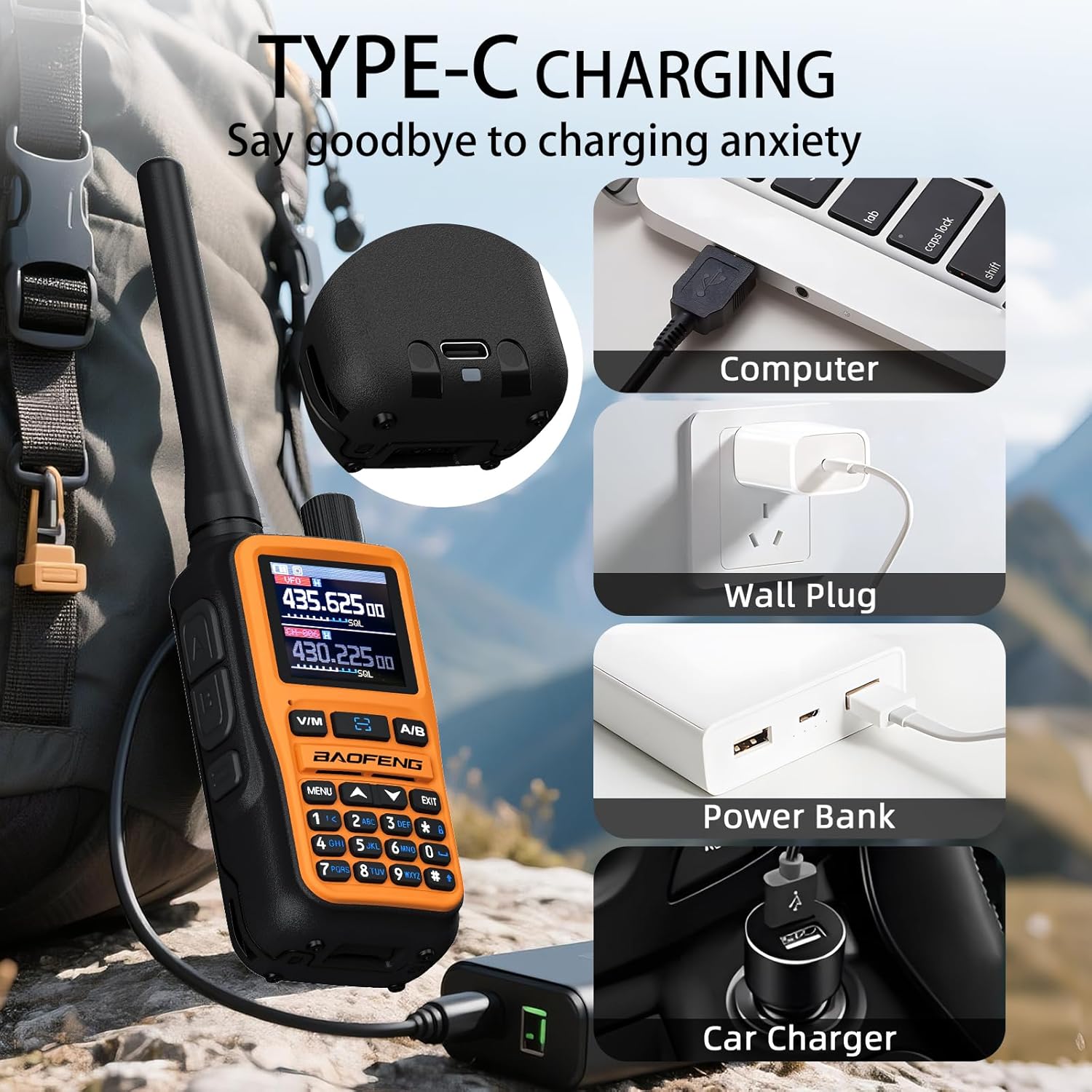
Image: The BAOFENG UV-5R Mini displaying two active frequencies (435.625.00 and 430.225.00) on its screen, illustrating the dual-frequency standby feature.
3.6 Special Features
- Flashlight: The radio includes a built-in flashlight. Refer to the menu for activation.
- VOX (Voice Operated Transmit): Enables hands-free transmission when voice is detected.
- NOAA Weather Receiver: Access NOAA weather alerts for emergency preparedness.
- One-Key Frequency Pairing: Press and hold the search button to quickly pair frequencies.
- Adjustable Power: Switch between 5W (High Power) and 2W (Low Power) output as needed.
4. Maintenance
4.1 Cleaning
Wipe the radio's exterior with a soft, damp cloth. Do not use harsh chemicals or abrasive cleaners. Ensure the charging port is free of dust and debris.
4.2 Battery Care
To prolong battery life, avoid fully discharging the battery frequently. Store the radio and battery in a cool, dry place when not in use for extended periods. Remove the battery if storing for several months.
4.3 Storage
Store the radio in a protective case to prevent scratches and damage. Keep it away from extreme temperatures, direct sunlight, and moisture.
5. Troubleshooting
| Problem | Possible Cause | Solution |
|---|---|---|
| Radio does not power on. | Battery is low or not installed correctly. | Charge the battery. Ensure the battery is securely attached. |
| Cannot transmit or receive. | Incorrect frequency/channel, antenna not attached, or out of range. | Verify frequency/channel settings. Ensure antenna is properly connected. Move closer to the other radio. |
| Poor audio quality. | Low battery, weak signal, or incorrect squelch setting. | Charge battery. Adjust squelch level. Ensure clear line of sight. |
| App programming issues. | Bluetooth not connected, app outdated, or radio not in programming mode. | Ensure Bluetooth is enabled and connected. Update the app. Check radio settings for wireless programming activation. |
If problems persist, contact BAOFENG customer support.
6. Specifications
- Brand: BAOFENG
- Model: UV-5R Mini
- Number of Channels: 999
- Frequency Range: 136-174MHz, 400-450MHz
- Talking Range Maximum: 5 Kilometers
- RF Output: 5W/2W (adjustable)
- Voltage: 12 Volts (DC)
- Water Resistance Level: Not Water Resistant
- Battery: 1 Nonstandard Battery required (7.4V Lithium)
- Charging: USB-C
- Display: 1.44" TFT Screen
- Special Features: APP programming (Ola Radio), Multi-band TX/RX, One-touch frequency sync, SK1 key shortcuts (radio/scan/VOX/flashlight/alarm)
- Included Components: Antenna, Battery, Belt Clip
7. Warranty and Support
7.1 Warranty Information
This product comes with a 1-year warranty from the date of purchase. The warranty covers manufacturing defects and malfunctions under normal use. It does not cover damage caused by misuse, accidents, unauthorized modifications, or natural disasters.
Optional protection plans are available for extended coverage:
- 2-Year Protection Plan
- 3-Year Protection Plan
7.2 Customer Support
For technical assistance, troubleshooting, or warranty claims, please visit the official BAOFENG website or contact their customer service department. Keep your purchase receipt and product model information handy when contacting support.
You can also visit the BAOFENG Store on Amazon for additional resources and product information.
8. Product Video
Video: An official product video from "The More Tech" showcasing the BAOFENG UV-5R Mini Ham Radio and its features.


