
Conyat X5S
Conyat X5S Open-Ear Wireless Headphones User Manual
Model: X5S
1. Introduction
Thank you for choosing the Conyat X5S Open-Ear Wireless Headphones. This manual provides detailed instructions for the proper use, setup, and maintenance of your new headphones. Please read this manual thoroughly before use to ensure optimal performance and longevity of the product.
2. What's in the Box
Carefully unpack your Conyat X5S Open-Ear Wireless Headphones and ensure all items are present:
- Headphones (Left/Right) x 2
- USB-C Charging Cable x 1
- Portable Charging Case x 1
- User Manual x 1

Image: The Conyat X5S product packaging displaying the headphones, charging case, USB-C cable, and user manual.
3. Product Overview
The Conyat X5S headphones feature an open-ear design for comfort and situational awareness, advanced Bluetooth 6.0 connectivity, and intuitive touch controls.
Key Features:
- Open-Ear Design: Ergonomically designed to contour your ears without obstructing the ear canal, providing comfort and awareness of surroundings.
- Bluetooth 6.0 Connectivity: Ensures quick pairing and a stable, low-latency connection.
- Immersive Sound: Equipped with 14.2mm dynamic drivers for clear audio.
- Clear Calls: Features an ENC noise-cancelling microphone to reduce background noise.
- Extended Playtime: Up to 8-10 hours per charge, with a total of 40 hours using the charging case.
- IP7 Water Resistance: Protects against sweat and rain.
- Smart Touch Control: Manage music, calls, and voice assistant with simple taps.
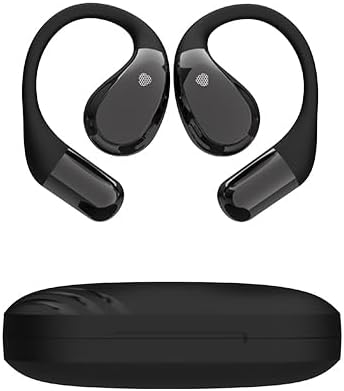
Image: The Conyat X5S open-ear headphones and their compact charging case.
4. Setup
4.1. Charging the Headphones and Case
Before first use, fully charge the headphones and the charging case.
- Place the headphones into the charging case.
- Connect the USB-C charging cable to the charging port on the case and to a power source.
- The LED display on the charging case will show the battery status. A full charge takes approximately 1.5 hours.

Image: The Conyat X5S headphones inside their charging case, illustrating the LED battery display and USB-C charging port.
4.2. Pairing with a Bluetooth Device
The headphones automatically enter pairing mode when removed from the charging case.
- Open the charging case and remove both headphones. They will automatically power on and enter pairing mode.
- On your device (smartphone, tablet, computer), enable Bluetooth.
- Search for available Bluetooth devices and select "X5S" from the list.
- Once connected, you will hear an audible confirmation, and the device will show "Connected".

Image: The Conyat X5S headphones in their charging case, with a smartphone screen showing the 'X5S' device connected via Bluetooth.
4.3. How to Wear the Headphones
For optimal comfort and sound, wear the headphones as follows:
- Hook the end of the earphone onto your ear bone.
- Rotate the earphone and slide it behind your ear.
- Adjust the ear hook and pull it down slightly for a secure and comfortable fit.

Image: A visual guide demonstrating the correct method for wearing the Conyat X5S open-ear headphones.
5. Operating Instructions
5.1. Power On/Off
- Power On: Remove the headphones from the charging case. They will power on automatically.
- Power Off: Place the headphones back into the charging case. They will power off automatically.
5.2. Touch Controls
The Conyat X5S headphones feature intuitive touch controls on each earbud:
| Action | Control |
|---|---|
| Play/Pause | Double-tap (L/R) |
| Answer/Hang up Call | Double-tap (L/R) |
| Refuse Incoming Call | Long tap 2s (L/R) |
| Volume Up | One-tap (R) |
| Volume Down | One-tap (L) |
| Previous Track | Long tap 2s (L) |
| Next Track | Long tap 2s (R) |
| Voice Assistant (Siri) | Triple-tap (L/R) |

Image: A visual representation of the touch control gestures and their corresponding functions for the Conyat X5S headphones.
6. Maintenance
6.1. Cleaning
Regular cleaning helps maintain the performance and hygiene of your headphones.
- Wipe the headphones and charging case with a soft, dry, lint-free cloth.
- Do not use abrasive cleaners, alcohol, or chemical solvents.
- Ensure charging contacts are clean and dry before placing headphones in the case.
6.2. Water Resistance (IP7)
The Conyat X5S headphones are IP7 water-resistant, meaning they are protected against temporary immersion in water up to 1 meter for 30 minutes. They are resistant to sweat and rain, making them suitable for workouts and outdoor activities.
- Do not intentionally submerge the headphones in water for extended periods.
- Ensure the headphones are completely dry before placing them back in the charging case to prevent damage to the charging contacts.

Image: The Conyat X5S headphones shown with water splashes, highlighting their IP7 waterproof and sweatproof capabilities.
7. Troubleshooting
If you encounter issues with your Conyat X5S headphones, refer to the following common solutions:
| Problem | Possible Solution |
|---|---|
| Headphones not pairing | Ensure headphones are charged. Turn off and on your device's Bluetooth. Forget "X5S" from your device's Bluetooth list and re-pair. |
| No sound or low volume | Check device volume and headphone volume. Ensure headphones are properly connected. Try re-pairing. |
| Headphones not charging | Ensure the charging cable is securely connected. Check if the charging case has power. Clean the charging contacts on both headphones and case. |
| Intermittent connection | Ensure no obstacles are between the headphones and your device. Stay within the Bluetooth range (typically 10 meters). Avoid strong electromagnetic interference. |
| Touch controls not responding | Ensure your fingers are clean and dry. Try restarting the headphones by placing them in the case and taking them out again. |
If the problem persists after trying these solutions, please contact customer support.
8. Specifications
| Feature | Detail |
|---|---|
| Model Name | X5S |
| Brand | Conyat |
| Connectivity Technology | Bluetooth |
| Bluetooth Version | 6.0 |
| Earpiece Shape | Open-Ear |
| Audio Driver Type | Dynamic Driver (14.2mm) |
| Battery Life (Single Charge) | 8-10 Hours |
| Total Playtime with Case | Up to 40 Hours |
| Charging Time | 1.5 Hours (USB-C) |
| Water Resistance Level | IP7 (Waterproof) |
| Control Method | Touch |
| Special Features | Open-Ear Design, ENC Noise-Cancelling Microphone |
| Material | Plastic |
| Item Weight | 3.84 ounces |
9. Warranty and Support
For warranty information or technical support, please refer to the contact details provided with your purchase or visit the official Conyat website. Keep your proof of purchase for warranty claims.
Related documentsX5S


Ask a question about this manual
Ask about setup, troubleshooting, compatibility, parts, safety, or missing instructions. Manuals+ will review the question and use this page’s manual context to help answer it.