
1. Introduction
Thank you for choosing the briidea LD-192 Wireless RV Auto Leveling System. This device is designed to simplify the leveling process for your RV, motorhome, travel trailer, camper, or 5th wheel using smart Bluetooth app control and real-time data feedback. This manual provides essential information for safe installation, operation, and maintenance of your leveling system.
2. Safety Information
Please read all safety instructions before installing or operating the device. Failure to follow these instructions may result in property damage or personal injury.
- Ensure the vehicle is parked on a stable, level surface before beginning installation or calibration.
- Disconnect the vehicle's 12V power supply before performing any wiring to prevent electrical shock.
- Do not expose the device to extreme temperatures, direct sunlight for prolonged periods, or excessive moisture.
- Keep the device away from strong magnetic fields, which may affect its accuracy.
- Only use the specified power input (12V DC) for the device.
- Do not attempt to open or repair the device yourself. Contact customer support for assistance.
3. Package Contents
Verify that all items are present in the package:
- briidea LD-192 Leveling Unit
- Mounting Screws and Wall Anchors (4 sets)
- Power Cable (for 12V connection)
- User Manual (this document)
4. Product Overview
4.1 Device Components
The briidea LD-192 unit features an LCD backlit screen, a 'SET' button, and a Bluetooth indicator. The screen displays real-time leveling data, battery status, and charging status.
4.2 Key Features
- Smart APP Control: Connects via Bluetooth to the "GeniLife" app for remote monitoring and control.
- Real-Time Data Feedback: LCD screen and app display angle and height suggestions from top, side, and rear views.
- 5 Custom Preset Modes: Save and recall up to five different leveling configurations for various terrains or setups.
- Dual Power Supply: Operates on a built-in rechargeable lithium battery and can be directly connected to the RV's 12V power supply for continuous operation and battery charging.

Image 1: The briidea LD-192 unit illustrating its dual power supply capability, showing connection to an RV battery and its internal battery.
5. Installation
5.1 Mounting the Unit
- Choose a suitable vertical surface inside your RV or vehicle where the unit will be easily visible and accessible. Ensure the mounting location is stable and free from excessive vibration.
- The unit must be mounted on a vertical surface with the arrows on the device pointing upwards for accurate readings.
- Use the provided mounting screws and wall anchors to securely attach the unit to the chosen surface. Avoid over-tightening the screws.
5.2 Wiring (12V Power Connection)
- Safety First: Disconnect the RV's main 12V power supply before proceeding with wiring.
- Connect the provided power cable to a stable 12V DC power source in your RV. Ensure proper polarity (red wire to positive, black wire to negative/ground).
- Route the cable safely, avoiding moving parts, sharp edges, or areas of high heat.
- Connect the other end of the power cable to the designated power input port on the briidea LD-192 unit.
- Once wiring is complete, reconnect the RV's 12V power supply. The unit should power on, and the charging indicator may illuminate if the internal battery requires charging.
6. App Setup & Calibration
6.1 Downloading the "GeniLife" App
Search for "GeniLife" in your smartphone's app store (Apple App Store for iOS or Google Play Store for Android) and download the application.
6.2 Pairing via Bluetooth
- Ensure Bluetooth is enabled on your smartphone.
- Power on the briidea LD-192 unit. The Bluetooth indicator on the unit will flash, indicating it's ready for pairing.
- Open the "GeniLife" app. The app should automatically detect nearby briidea devices.
- Select your device from the list to establish a connection. The Bluetooth indicator on the unit will become solid once connected.
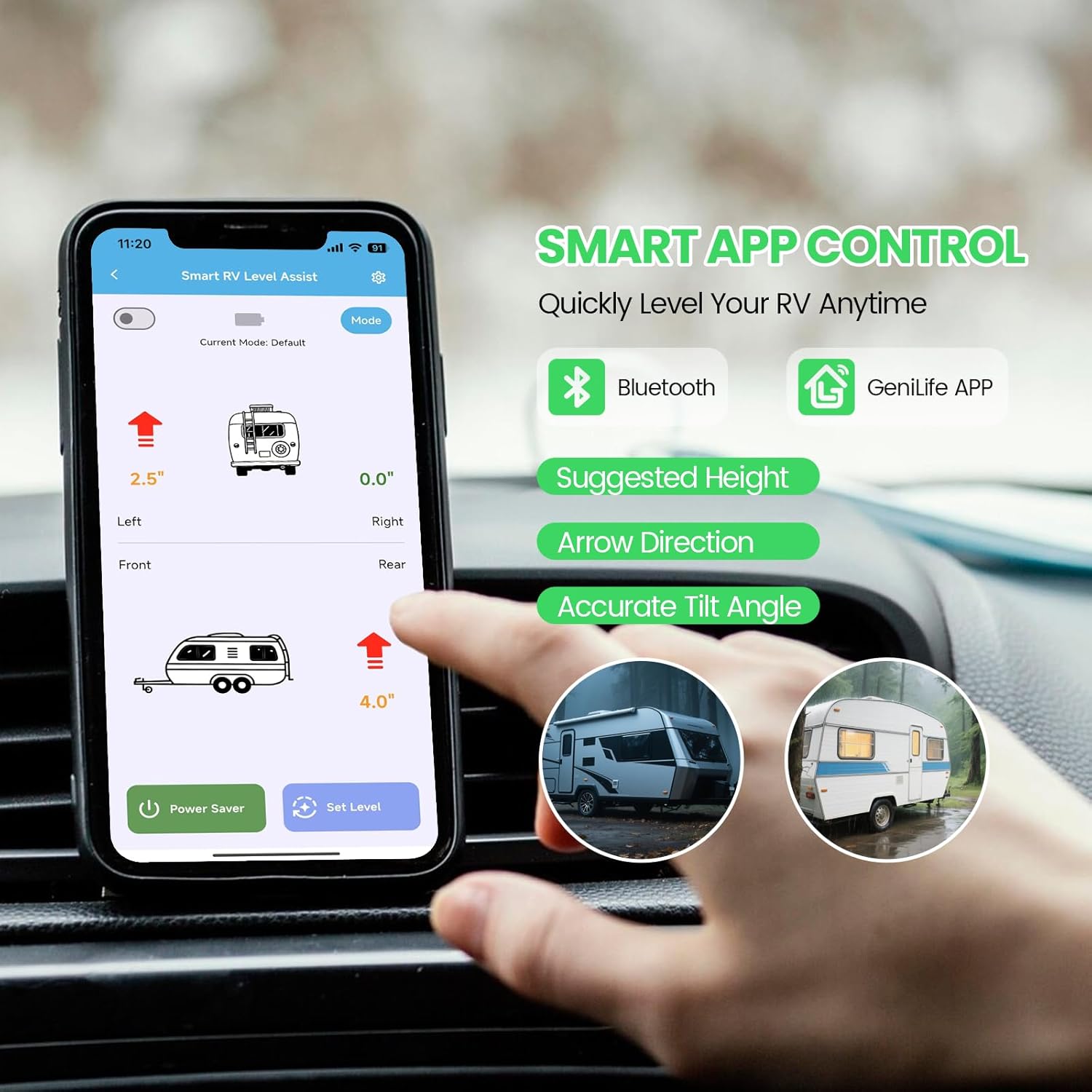
Image 2: Screenshot of the "GeniLife" app interface demonstrating smart app control for RV leveling, showing suggested heights and tilt angles.
6.3 Initial Calibration
For accurate readings, the unit must be calibrated after installation. Park your RV on a perfectly level surface (use a traditional spirit level to confirm). Follow the calibration instructions within the "GeniLife" app. This typically involves confirming the current level state as the zero reference point.
7. Operation
7.1 Understanding the Display and App Feedback
Both the device's LCD screen and the "GeniLife" app display real-time leveling data. This includes:
- Angle and Height Suggestions: Numerical values indicating how much each side (front, rear, left, right) needs to be adjusted.
- Directional Arrows: Visual cues indicating which direction to raise or lower.
- Multiple Views: The app supports top view, side view, and rear view to help visualize the vehicle's orientation.
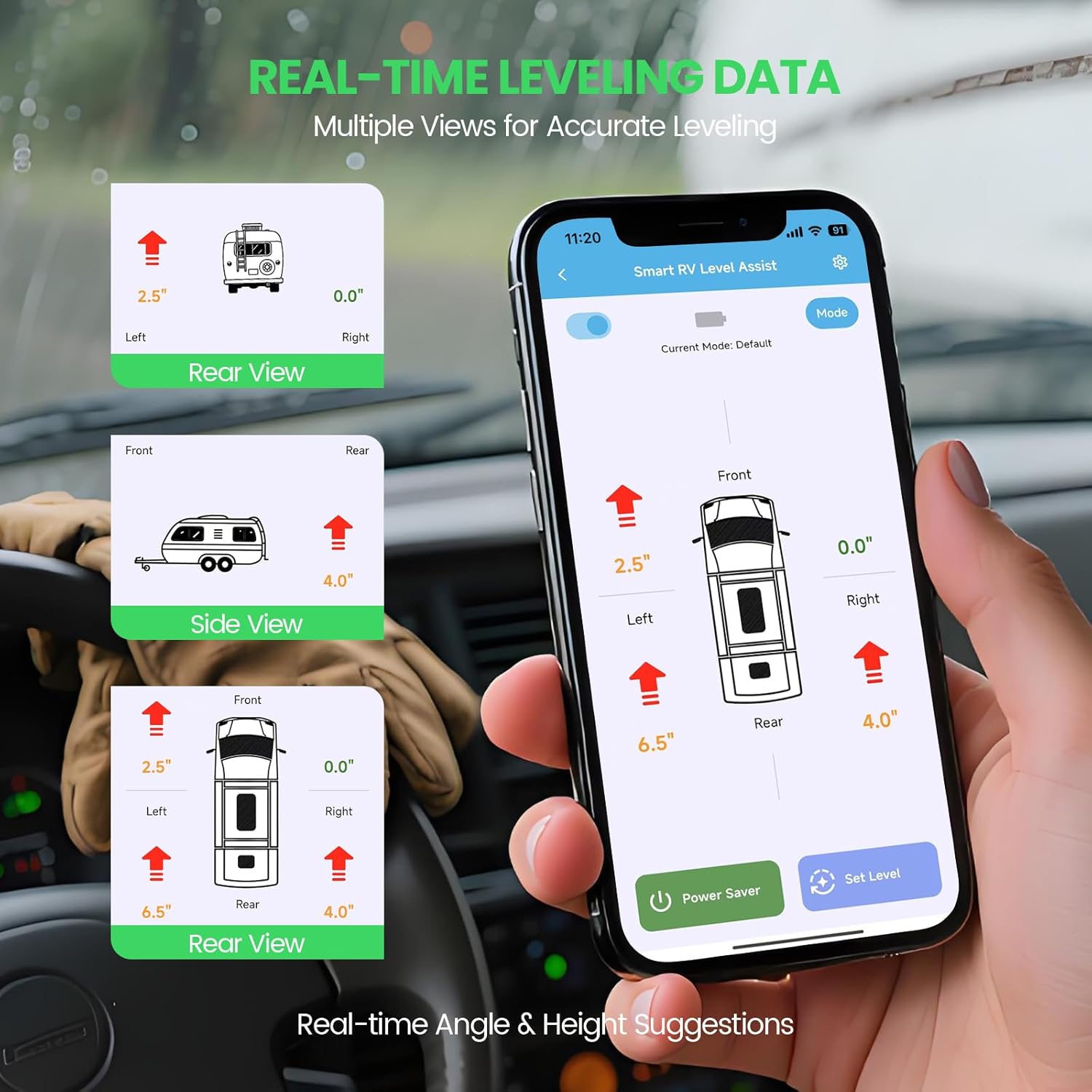
Image 3: The "GeniLife" app displaying real-time leveling data with multiple views (rear, side, and top) for precise adjustments.
7.2 Leveling Your RV
- Park your RV in the desired location.
- Power on the briidea LD-192 unit and open the "GeniLife" app on your smartphone.
- Observe the real-time data on the screen or app. Identify which areas of your RV need adjustment (e.g., front, rear, left, right).
- Use your RV's leveling jacks or leveling blocks according to the suggestions provided by the system until all indicators show "0.0" or are within an acceptable tolerance.
- Confirm the RV is level before extending slide-outs or using appliances that require a level surface.
7.3 Saving and Recalling Preset Modes
The system allows you to save up to 5 custom leveling profiles. This is useful for frequently visited campsites or different vehicle configurations (e.g., with slide-outs extended or retracted).
- Once your RV is perfectly level in a specific configuration, navigate to the "Set Level" or "Modes" section within the "GeniLife" app.
- Select an empty preset slot (Mode 1-5) and choose to save the current leveling data. You can name these presets for easy identification.
- To recall a preset, simply select the desired mode from the app. The system will then guide you to achieve that saved level.

Image 4: The "GeniLife" app interface showing the option to save and manage 5 different leveling profiles for various terrains or setups.
7.4 Power Management
The briidea LD-192 features a dual power supply system:
- Internal Battery: A built-in rechargeable lithium battery provides portable power. It has a standby time of 3-5 months and continuous screen-on use of 10-20 hours.
- 12V Vehicle Power: Connecting to your RV's 12V power supply ensures continuous operation and automatically charges the internal battery. The battery fully charges in approximately 1 hour when connected to vehicle power.
- The unit is equipped with automatic screen-off and standby modes to conserve battery life.
8. Maintenance
8.1 Cleaning
Wipe the device with a soft, dry, or slightly damp cloth. Do not use abrasive cleaners, solvents, or harsh chemicals, as these can damage the casing and screen.
8.2 Battery Care
To prolong battery life, avoid fully discharging the internal battery frequently. If storing the unit for an extended period, ensure the battery is partially charged (around 50-70%) and store it in a cool, dry place.
9. Troubleshooting
| Problem | Possible Cause | Solution |
|---|---|---|
| Device does not power on. | No 12V power, internal battery depleted, or power cable issue. | Check 12V connection and vehicle power. Charge internal battery by connecting to 12V. Ensure power cable is securely connected. |
| Cannot connect via Bluetooth. | Bluetooth off on phone, device not in pairing mode, or interference. | Ensure phone Bluetooth is on. Restart device and app. Move closer to the device. Check for other Bluetooth devices causing interference. |
| Inaccurate leveling readings. | Device not properly calibrated, mounted incorrectly, or on an unstable surface. | Recalibrate the device on a known level surface. Ensure the unit is mounted vertically with arrows pointing up. Check mounting stability. |
| App not displaying data. | App not connected to device, or app glitch. | Verify Bluetooth connection. Close and reopen the app. Restart your smartphone. |
10. Specifications
| Model | LD-192 |
| Brand | briidea |
| Dimensions | 10.41 x 2.03 x 6.6 cm (4.1 x 0.8 x 2.6 inches) |
| Weight | 109 g (0.24 lbs) |
| Power Input | 12V DC |
| Battery Type | Rechargeable Lithium Battery |
| Connectivity | Bluetooth |
| App Compatibility | "GeniLife" (iOS & Android) |

Image 5: Visual representation of the briidea LD-192 unit's dimensions, showing its compact size.
11. Warranty Information
briidea products are manufactured to high-quality standards. This product comes with a limited warranty against defects in materials and workmanship. Please refer to the warranty card included with your purchase or visit the official briidea website for detailed warranty terms and conditions. This warranty does not cover damage caused by improper installation, misuse, accidents, or unauthorized modifications.
12. Customer Support
If you have any questions, require technical assistance, or encounter issues with your briidea LD-192 Wireless RV Auto Leveling System, please contact our customer support team. You can find contact information on the official briidea website or through your purchase platform. Please have your model number (LD-192) and purchase details ready when contacting support.