
VEKOOTO VK7Pro
VEKOOTO VK7Pro Magnetic Solar Wireless Backup Camera System User Manual
Model: VK7Pro (2 Cameras Kit)
Introduction
This manual provides detailed instructions for the installation, operation, and maintenance of your VEKOOTO VK7Pro Magnetic Solar Wireless Backup Camera System. This system features a 7-inch IPS touchscreen monitor and two magnetic, solar-rechargeable cameras, designed for vehicles such as trucks, RVs, trailers, and campers. Please read this manual thoroughly before using the product to ensure proper function and safety.

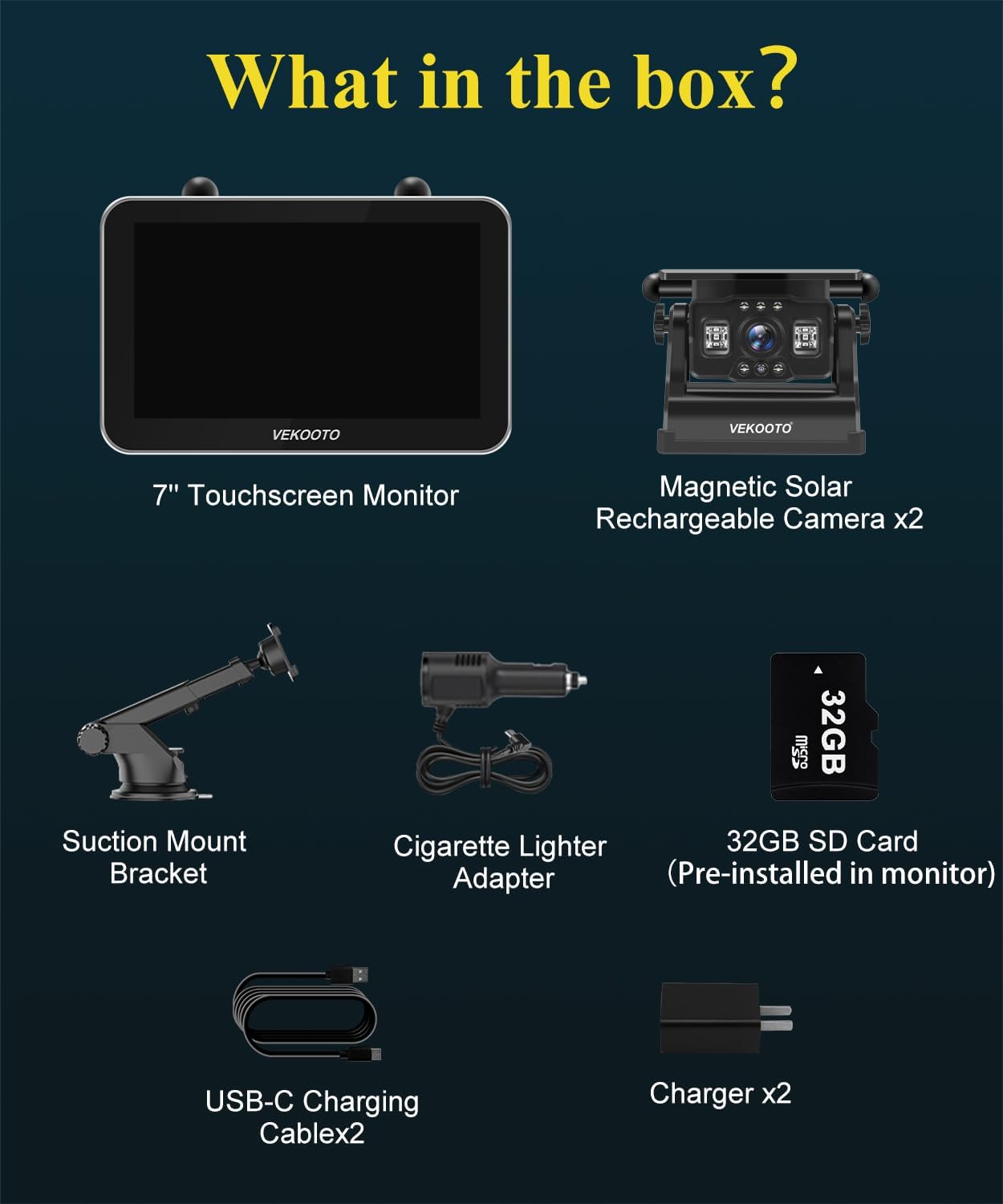
What's in the Box
Verify that all components are present in your package:
- 1x 7'' Touchscreen Monitor
- 1x Cigarette Lighter Adapter
- 1x Suction Mount Bracket
- 2x Magnetic Solar Rechargeable Camera (15,800mAh battery)
- 2x USB-C Charging Cable
- 2x Charger
- 1x 32GB TF Card (pre-installed in monitor)

Setup Instructions
The VEKOOTO VK7Pro system is designed for quick and easy installation without complex wiring.
1. Initial Camera Charging
Before first use, fully charge both magnetic cameras using the provided USB-C charging cables and chargers. A full charge typically takes 6-7 hours. While the cameras feature solar charging, initial full charging via cable is recommended for optimal performance.
2. Mounting the Camera(s)
The cameras feature strong magnets for attachment to any metal surface on your vehicle. No drilling or additional tools are typically required.
- For Metal Surfaces: Simply snap the magnetic camera onto a suitable metal surface at the rear or side of your vehicle.
- For Aluminum or Fiberglass Vehicles: If your vehicle has an aluminum or fiberglass body, contact VEKOOTO customer service to receive a free metal plate accessory for secure mounting.


3. Mounting and Powering the Monitor
Attach the 7-inch IPS touchscreen monitor to your dashboard or windshield using the provided suction mount bracket. Power the monitor using either the Type-C cable or the cigarette lighter adapter. The system is plug-and-play, meaning it will automatically connect once powered.
Video: This video demonstrates the quick and easy installation of the VEKOOTO VK7Pro Magnetic Camera System, highlighting the magnetic mount and simple monitor setup.
Operating Instructions
1. Power On/Off and Auto Sync
The cameras are designed to automatically sync with the monitor. When the monitor is powered on, the cameras will activate. When the monitor is powered off, the cameras will power down to conserve battery.
2. Using the 7'' Touchscreen Monitor
The HD IPS touchscreen (1024*600 resolution) allows for intuitive control:
- View Switching: Touch the screen to switch between camera views (full screen, 2-split, quad-split).
- Zoom Function: Easily zoom in or out on the displayed image to view details.
- Video Playback: Access recorded videos directly from the monitor.
- Settings: Adjust various settings for the camera system via the touchscreen interface.

3. Loop Recording
The monitor supports loop recording, which is enabled by default. Footage is continuously saved to the included 32GB TF card (supports up to 128GB TF cards), automatically overwriting the oldest files when storage is full. This ensures continuous video evidence is available.
4. Multi-Camera Support
The system supports up to four cameras, allowing for comprehensive coverage around your vehicle. You can view multiple camera feeds simultaneously on the monitor in split-screen or quad-split modes.


Video: This video provides an overview of the VEKOOTO VK7Pro camera system, demonstrating its features and multi-camera capabilities.
Key Features
Magnetic Mount & Wireless Design
The cameras attach securely to metal surfaces using powerful magnets, eliminating the need for drilling or complex wiring. The system communicates wirelessly via a 2.4GHz digital signal, ensuring a clean installation.
Integrated Spherical Antenna & Stable Signal
Both the monitor and cameras feature integrated spherical antennas, providing enhanced signal bandwidth, improved interference resistance, and lower latency. This results in a stable wireless signal with a transmission range of up to 500ft in open spaces.


15,800mAh Battery & True Solar Charging
Each camera is equipped with a powerful 15,800mAh rechargeable battery and an integrated high-efficiency monocrystalline solar panel. The solar panel can provide up to 400mA of current, keeping the battery charged during daylight hours. A full charge offers up to 30 hours of continuous operation. Cameras also support fast Type-C charging.


IP69 Waterproof & IR Night Vision
The cameras are engineered with an IP69 waterproof rating, ensuring durability against heavy rain and harsh weather conditions. The infrared night vision feature provides a clear view up to 30 feet in complete darkness, enhancing safety during nighttime operations. A 150° viewing angle reduces blind spots.


Video: This video highlights the VEKOOTO VK7Pro's features, including its magnetic mount, multi-camera support, and infrared night vision for clear visibility in the dark.
Specifications
| Feature | Detail |
|---|---|
| Brand | VEKOOTO |
| Model | VK7Pro |
| Screen Size | 7 Inches |
| Product Dimensions (Monitor) | 7.4"L x 0.9"W x 5"H |
| Installation Type | Magnetic Hitch Camera + Monitor Plug & Play |
| Voltage | 5 Volts (DC) |
| Optical Sensor Technology | CMOS |
| Lens Type | Wide Angle |
| Real Angle of View | 150 Degrees |
| Connector Type | Type-C, Wireless (2.4GHz Digital Signal) |
| Video Capture Resolution | 1080p |
| Camera Battery Capacity | 15,800mAh |
| Waterproof Rating | IP69 |
| Night Vision Range | Up to 30 feet (Infrared) |
| Storage | 32GB TF Card included (supports up to 128GB) |
| Wireless Transmission Range | Up to 500ft (open spaces) |
Maintenance
- Cleaning: Regularly clean the camera lens and solar panel with a soft, damp cloth to ensure clear vision and efficient solar charging.
- Battery Care: While solar charging helps maintain the battery, for prolonged periods of non-use or low light conditions, charge the cameras fully using the USB-C cable.
- Storage: If storing the system for an extended period, ensure cameras are fully charged and store them in a cool, dry place.
Troubleshooting
If you encounter any issues with your VEKOOTO VK7Pro system, please refer to the following common solutions:
- No Signal on Monitor:
- Ensure both the monitor and cameras are powered on.
- Check that cameras are sufficiently charged.
- Verify that the cameras are within the wireless transmission range (up to 500ft in open spaces).
- Reduce potential interference by moving away from other 2.4GHz devices if possible.
- Poor Image Quality:
- Clean the camera lens.
- Ensure there are no obstructions between the camera and the monitor.
- Check for strong electromagnetic interference in the area.
- Camera Not Charging via Solar:
- Ensure the solar panel is clean and exposed to direct sunlight.
- Solar charging is supplementary; use the USB-C cable for faster or full charging when needed.
For further assistance, please contact VEKOOTO customer support.
Warranty and Support
Your VEKOOTO VK7Pro system is covered by a 2-Year Warranty. VEKOOTO is committed to providing reliable support and guarantees a worry-free experience.
If you find the product damaged, missing parts, or require any assistance, please contact VEKOOTO customer service at VEKOOTO@outlook.com. They offer round-the-clock support and immediate replacement of faulty components.
Related documentsVK7Pro


Ask a question about this manual
Ask about setup, troubleshooting, compatibility, parts, safety, or missing instructions. Manuals+ will review the question and use this page’s manual context to help answer it.