
1. Introduction
This manual provides essential information for the safe and efficient use of your DOOGEE U13 Android 16 Tablet. Please read this manual thoroughly before operating the device and retain it for future reference.
The DOOGEE U13 is a high-performance tablet designed for various tasks, from productivity to entertainment, featuring a large display, powerful processor, and extended battery life.

Image 1.1: DOOGEE U13 Tablet highlighting its main features.
2. Package Contents
Upon opening the package, please verify that all items are present and in good condition:
- DOOGEE U13 Tablet
- USB-C Charging Cable
- Power Adapter
- SIM Eject Tool (if applicable)
- Quick Start Guide
- Warranty Card
3. Device Layout
Familiarize yourself with the physical components of your DOOGEE U13 tablet.

Image 3.1: Overview of DOOGEE U13 Tablet features and design.
3.1 Ports and Buttons
- Power Button: Located on the side, used to power on/off or wake/sleep the device.
- Volume Buttons: Adjust media and notification volume.
- USB-C Port: For charging and data transfer.
- 3.5mm Headphone Jack: For wired audio output.
- MicroSD Card Slot: For expandable storage (up to 2TB).
3.2 Cameras
- Rear Camera: 13MP main camera for capturing photos and videos.
- Front Camera: 5MP camera for video calls and selfies.
4. Setup
4.1 Initial Power On
- Press and hold the Power Button until the DOOGEE logo appears.
- Follow the on-screen prompts to select your language, region, and connect to a Wi-Fi network.
- Sign in with your Google account or create a new one to access the Google Play Store and other services.
4.2 Charging the Battery
Before first use, fully charge the tablet. Connect the USB-C cable to the tablet's charging port and the power adapter to a wall outlet. The charging indicator will show the battery status.

Image 4.1: Battery specifications and charging capabilities.
4.3 Inserting a MicroSD Card
- Locate the card slot on the side of the tablet.
- Use the provided SIM eject tool to open the tray.
- Place the MicroSD card into the designated slot on the tray.
- Carefully reinsert the tray into the tablet.
5. Operating Instructions
5.1 Basic Navigation
- Touch: Tap an icon to open an app or select an item.
- Swipe: Move your finger across the screen to scroll through content or switch screens.
- Pinch-to-Zoom: Use two fingers to zoom in or out on images and web pages.
5.2 Display Settings
Your tablet features a 13-inch FHD+ 90Hz display for a smooth visual experience.
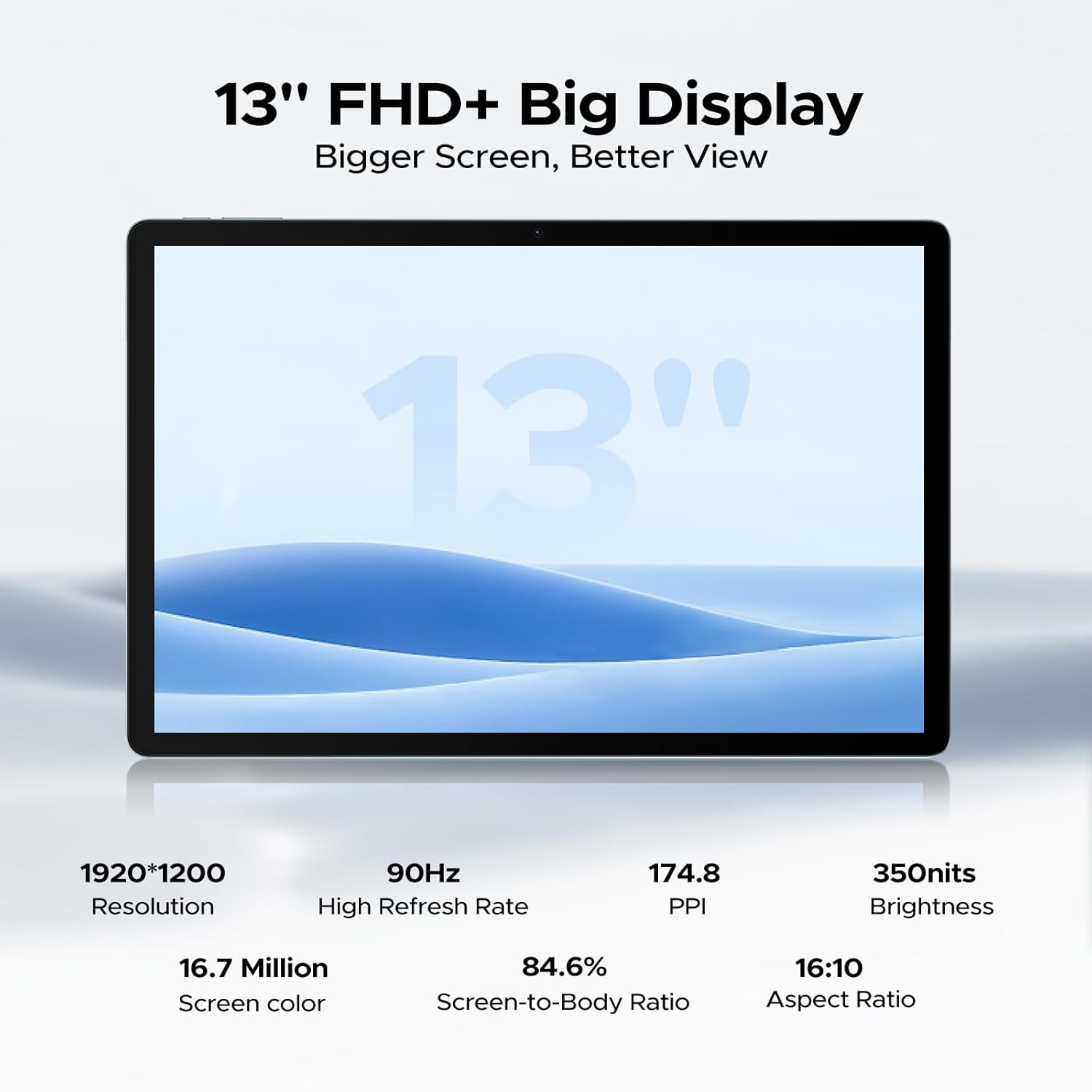
Image 5.1: Detailed specifications of the tablet's display.
Access display settings via Settings > Display to adjust brightness, dark mode, eye comfort mode, and refresh rate.
5.3 Audio
The tablet is equipped with quad speakers for immersive sound and supports a 3.5mm headphone jack.
5.4 Camera Usage
Open the Camera app to capture photos and videos. The 13MP main camera offers various modes, while the 5MP front camera is ideal for video calls.

Image 5.2: Features of the 13MP main camera.

Image 5.3: The 5MP front camera in use for video calls.
5.5 Android 16 and Gemini AI
The DOOGEE U13 runs on Android 16, offering enhanced features and security. It integrates Gemini AI for intelligent task optimization and improved performance.

Image 5.4: Android 16 OS interface.

Image 5.5: Diverse Android 16 OS functions.

Image 5.6: Gemini AI capabilities.
6. Battery Management
The DOOGEE U13 is equipped with an 11000mAh battery. To maximize battery life:
- Adjust screen brightness to a comfortable level.
- Close unused applications running in the background.
- Turn off Wi-Fi, Bluetooth, and GPS when not in use.
- Utilize battery saver modes available in Android settings.
The tablet supports 18W fast charging and 5W reverse charging.
7. Storage Management
Your tablet comes with 256GB of internal storage and 32GB of RAM (6GB base + 26GB expansion). Storage can be expanded up to 2TB using a MicroSD card (purchased separately).

Image 7.1: RAM and ROM specifications.
To manage storage, go to Settings > Storage. Here you can view storage usage, free up space, and format your MicroSD card.
8. Connectivity
8.1 Wi-Fi
The tablet supports 2.4G/5G dual-band Wi-Fi for fast and stable internet connections. To connect, go to Settings > Network & internet > Wi-Fi, select your network, and enter the password.
8.2 Bluetooth
Enable Bluetooth in Settings > Connected devices > Bluetooth to pair with wireless headphones, speakers, or other Bluetooth accessories.
8.3 Screen Mirroring
Use the wireless screen mirroring feature to cast your tablet's display to compatible larger screens. This option is typically found in Settings > Connected devices > Connection preferences > Cast.
9. Security Features
9.1 Face Unlock
The DOOGEE U13 supports face unlock for quick and secure access to your device. Set up face unlock in Settings > Security & privacy > Device unlock > Face unlock.

Image 9.1: Security and connectivity features.
10. Maintenance
10.1 Cleaning
Use a soft, lint-free cloth to clean the screen and body of the tablet. Avoid using harsh chemicals or abrasive materials.
10.2 Software Updates
Regularly check for and install software updates to ensure your tablet has the latest features, security patches, and performance improvements. Go to Settings > System > System update.
11. Troubleshooting
- Tablet not turning on: Ensure the battery is charged. Connect to the charger for at least 30 minutes before attempting to power on again.
- Screen unresponsive: Try restarting the tablet by holding the Power Button for about 10-15 seconds.
- Wi-Fi connection issues: Restart your Wi-Fi router and the tablet. Forget the network in Wi-Fi settings and reconnect.
- Apps crashing: Clear the cache of the problematic app (Settings > Apps > [App Name] > Storage & cache > Clear cache). If the issue persists, reinstall the app.
- Slow performance: Close unnecessary background apps, clear cache, and ensure sufficient storage space. Consider a factory reset as a last resort (back up your data first).
12. Specifications
Below are the key technical specifications for the DOOGEE U13 Tablet:
| Feature | Specification |
|---|---|
| Model | U13 |
| Operating System | Android 16 |
| Processor | UNISOC T7280 Octa-Core (up to 2.2GHz) |
| GPU | Mali-G57 |
| RAM | 32GB (6GB physical + 26GB virtual) |
| Internal Storage | 256GB |
| Expandable Storage | Up to 2TB via MicroSD card |
| Display Size | 13 inches |
| Display Type | FHD+ IPS |
| Resolution | 1920 x 1200 pixels |
| Refresh Rate | 90Hz |
| Brightness | 350 nits |
| Rear Camera | 13MP |
| Front Camera | 5MP |
| Battery Capacity | 11000mAh |
| Charging | 18W USB-PD Fast Charging, 5W Reverse Charging |
| Connectivity | Wi-Fi 5 (802.11ac), Bluetooth 5.0 |
| Navigation | A-GPS, GPS, BeiDou, GLONASS, Galileo |
| Dimensions | 11.88 x 7.76 x 0.29 inches (7.5mm ultra-thin) |
| Weight | 1.48 pounds (670g) |

Image 12.1: DOOGEE U-series tablet comparison, highlighting U13 specifications.
13. Warranty and Support
Your DOOGEE U13 Tablet comes with a standard warranty. Please refer to the included warranty card for specific terms and conditions.
For technical support, troubleshooting assistance, or warranty claims, please contact DOOGEE customer service through their official website or the contact information provided in your product packaging.

Image 13.1: DOOGEE customer service and warranty information.


