
1. Introduction
Thank you for choosing the Vidapool Robotic Pool Vacuum Cleaner VRPC01. This manual provides essential information for the safe and efficient operation, maintenance, and troubleshooting of your new pool cleaner. Please read this manual thoroughly before first use and retain it for future reference.
The Vidapool VRPC01 is designed for autonomous cleaning of swimming pools, offering a cordless solution for hassle-free maintenance. It features self-parking technology, an LED indicator, and is ideal for flat above-ground and in-ground pools up to 860 sq.ft (80m²).
2. Safety Instructions
- Always ensure the charging port is dry and clean before charging.
- Do not operate the cleaner if the power cord or charger is damaged.
- Keep children and pets away from the pool area when the cleaner is in operation.
- Only use the original charger provided with the device.
- Do not attempt to disassemble or repair the cleaner yourself. Contact customer support for assistance.
- Ensure the cleaner is fully submerged in water before activating. Operating it out of water can cause damage.
- Remove the cleaner from the pool immediately after the cleaning cycle is complete or when the battery is low.
3. Package Contents
Verify that all items are present in the package:
- Cordless Robotic Pool Cleaner x 1
- Brushes x 2
- Retrieval Hook x 1
- Charger x 1
- User Manual x 1

Figure 3.1: Contents of the Vidapool VRPC01 package, including the cleaner, brushes, retrieval hook, charger, and user manual.
4. Product Overview
Familiarize yourself with the components of your Vidapool VRPC01 Robotic Pool Cleaner.

Figure 4.1: Top view of the Vidapool VRPC01 Robotic Pool Cleaner, showing the power button and LED indicator.

Figure 4.2: The cleaner operating underwater, illustrating its dual-motor and dual-brush design for efficient cleaning.
5. Setup
5.1 Initial Charging
Before first use, fully charge the robotic pool cleaner. The cleaner fully charges in approximately 2.5 hours, providing over 90 minutes of continuous cleaning power.
- Ensure the charging port on the cleaner is dry and free of debris.
- Connect the charger to the cleaner's charging port.
- Plug the charger into a standard electrical outlet.
- The LED indicator will show charging status (refer to Section 6.1 for LED indicator details).
- Once fully charged, disconnect the charger and seal the charging port cover securely.

Figure 5.1: The Vidapool VRPC01 connected to its charger, indicating the fast charging capability.
5.2 Pool Compatibility
The Vidapool VRPC01 is designed for specific pool types to ensure optimal performance:
- Supported Pools: Flat-bottomed above-ground pools and in-ground pools without slopes or steps, up to 860 sq.ft (80m²).
- Unsupported Pools: Pools with sloped floors, steps, bottom drain covers, or tiles with large gaps.

Figure 5.2: Visual guide for pool compatibility, indicating the types of pools suitable and unsuitable for the VRPC01 cleaner.
6. Operating Instructions
6.1 Starting the Cleaner
The VRPC01 features one-touch operation for ease of use.
- Ensure the cleaner is fully charged and the charging port cover is securely closed.
- Press the power button located on the top of the cleaner. The LED indicator will illuminate.
- Gently submerge the cleaner into the pool. It will begin its cleaning cycle automatically once fully underwater.
LED Indicator Status:
- Solid Blue: Operating / Fully Charged
- Flashing Blue: Charging
- Solid Red: Low Battery
- Flashing Red: Error / Stuck
6.2 Cleaning Cycle and Self-Parking
The cleaner operates for approximately 90 minutes on a full charge. It navigates the pool bottom, cleaning debris with its dual-motor and dual-brush system.

Figure 6.1: The VRPC01 operating in a pool, demonstrating its capacity to clean up to 860 sq. ft with a 90-minute runtime.
When the cleaning cycle is complete or the battery level is low, the cleaner will automatically move to the edge of the pool and stop. This self-parking feature simplifies retrieval.
6.3 Retrieving the Cleaner
Use the included retrieval hook to safely remove the cleaner from the pool.
- Attach the retrieval hook to a standard pool pole (not included).
- Hook the cleaner's handle and lift it out of the water.
- The cleaner will automatically power off within 5 seconds of being lifted from the pool.

Figure 6.2: A hand lifting the VRPC01 from the pool, illustrating the easy retrieval process after the cleaning cycle.
7. Maintenance
7.1 Cleaning the Filter
Regularly clean the filter to maintain optimal cleaning performance.
- After each use, remove the cleaner from the pool.
- Open the filter compartment (refer to product diagram for location).
- Remove the filter basket.
- Rinse the filter basket thoroughly with a garden hose to remove all debris.
- Ensure the filter is completely clean before reinserting it into the cleaner.
- Close the filter compartment securely.
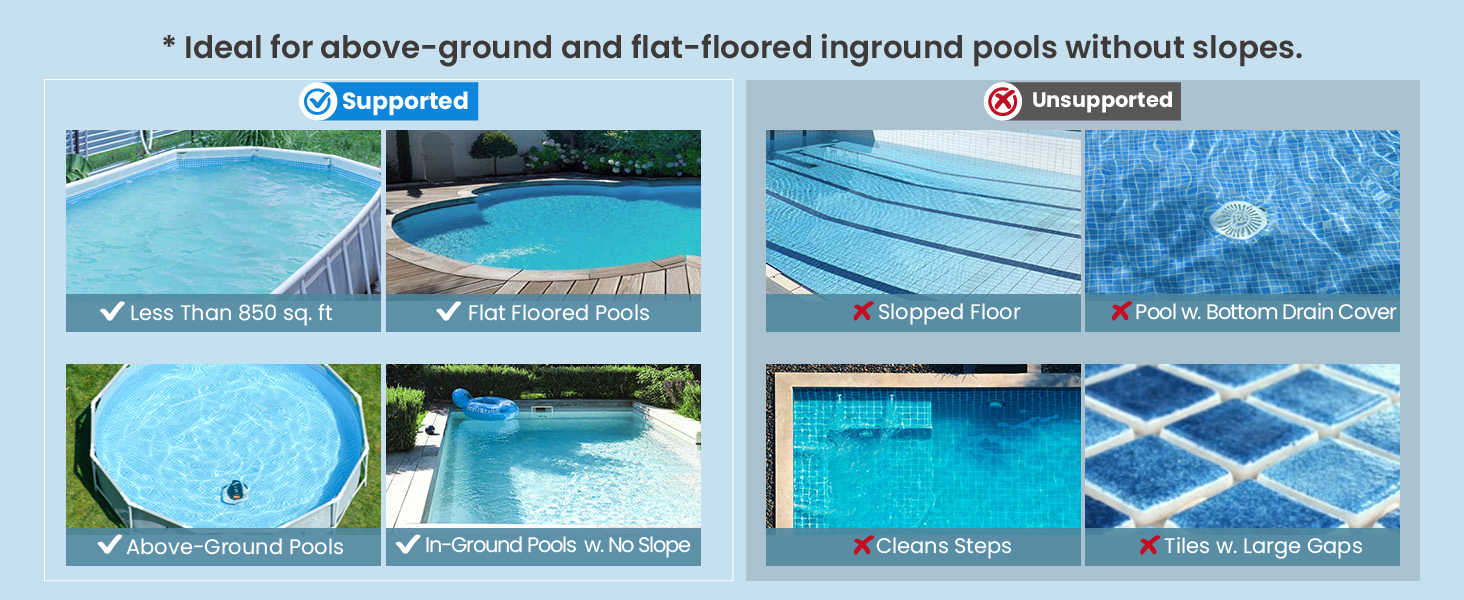
Figure 7.1: A user cleaning the precision filtration system of the VRPC01 with a hose, demonstrating routine maintenance.
7.2 Storage
When not in use for extended periods, store the cleaner in a cool, dry place, away from direct sunlight and extreme temperatures. Ensure the battery is partially charged (around 50%) before storage to prolong battery life.
8. Troubleshooting
| Problem | Possible Cause | Solution |
|---|---|---|
| Cleaner does not start | Low battery; Power button not pressed; Not fully submerged | Charge the cleaner; Press power button firmly; Ensure full submersion |
| Cleaner moves slowly or gets stuck | Filter clogged; Obstruction; Pool surface uneven | Clean the filter; Remove obstructions; Verify pool compatibility (flat bottom) |
| Short operating time | Battery not fully charged; Aging battery | Ensure full charge (2.5 hours); Contact customer support if battery life significantly degrades |
| Cleaner does not self-park | Obstruction preventing movement to edge; Sensor issue | Clear pool area of large obstructions; Manually retrieve and restart; Contact customer support |
If you encounter issues not listed here or if the suggested solutions do not resolve the problem, please contact Vidapool customer support.
9. Specifications
| Feature | Detail |
|---|---|
| Model Name | VRPC01 |
| Brand | Vidapool |
| Product Dimensions | 13 x 10 x 12 inches (33 x 25.4 x 30.5 cm) |
| Item Weight | 10.73 pounds (4.87 kg) |
| Material | Plastic |
| Color | Gray |
| Battery Type | Lithium-ion |
| Lithium Battery Voltage | 12 Volts |
| Lithium Battery Energy Content | 40 Watt Hours |
| Charging Time | Approx. 2.5 hours |
| Runtime | Over 90 minutes |
| Max. Working Area | 860 sq.ft (80m²) |
| Special Features | Fast Charge, Portable, Self Parking |
10. Warranty and Customer Support
Vidapool is committed to providing high-quality products and excellent after-sales service. Your VRPC01 Robotic Pool Cleaner comes with a 2-YEAR warranty.
For any questions, assistance, or warranty claims, please contact our customer support team. We offer round-the-clock (24/7) customer support and a lifetime after-sales commitment.
Please refer to the contact information provided on the product packaging or the official Vidapool website for the most current support details.