
Introduction
Thank you for choosing Rumoon BT9944 Over Ear Bluetooth Headphones. These headphones are designed to deliver high-fidelity audio for studio monitoring, DJ mixing, and general music enjoyment. They offer both wireless Bluetooth 5.4 connectivity and versatile wired options with 3.5mm and 6.35mm jacks. This manual provides essential information for setup, operation, maintenance, and troubleshooting to ensure optimal performance and longevity of your headphones.
Product Features
- High-Fidelity Sound: Equipped with 50mm neodymium drivers for deep bass and clear stereo sound, offering a frequency range of 20Hz to 20kHz.
- Wireless Connectivity: Features Bluetooth 5.4 for quick pairing and a stable connection up to 33 feet (10 meters).
- Extended Playtime: Built-in 800mAh battery provides up to 100 hours of continuous playtime on a single charge.
- Wired Options: Includes detachable 6.35mm and 3.5mm plugs with a 9.8 ft coiled cord for broad compatibility with various audio devices.
- Comfortable Design: Soft memory foam ear cushions wrapped in skin-friendly protein leather, adjustable headband, and lightweight design (260g) for extended wear.
- 90° Swivel Ear Cups: Allows for single-ear monitoring, ideal for DJs and studio use.
- Built-in Microphone: Integrated microphone for hands-free calls and remote conversations in wireless mode.
- Foldable Design: Easily foldable for convenient storage and portability.
Package Contents
- Rumoon BT9944 Over Ear Bluetooth Headphones
- 3.5mm Audio Cable
- 6.35mm Adapter (often integrated with 3.5mm cable or as a separate screw-on adapter)
- USB Charging Cable
- User Manual
Setup
1. Charging the Headphones
Before first use, fully charge the headphones. Connect the provided USB charging cable to the charging port on the headphones and the other end to a USB power source (e.g., computer USB port, wall adapter). The LED indicator will show charging status and turn off or change color when fully charged.
2. Bluetooth Pairing
- Ensure the headphones are turned off.
- Press and hold the Power button for approximately 3-5 seconds until the LED indicator flashes blue and red alternately, indicating pairing mode.
- On your device (smartphone, tablet, computer), enable Bluetooth and search for available devices.
- Select "Rumoon BT9944" from the list of found devices.
- Once connected, the LED indicator will flash blue slowly or remain solid blue.
Note: The headphones feature Bluetooth 5.4 for quick pairing, typically within 1-3 seconds after turning on.
3. Wired Connection
The headphones can be used in wired mode, which is useful when the battery is depleted or for devices without Bluetooth. This mode also supports self-monitoring during recordings.
- 3.5mm Jack: Insert the 3.5mm end of the audio cable into the headphone's 3.5mm port and the other end into your audio source (e.g., smartphone, laptop, PC, Xbox, Cellphone).
- 6.35mm Jack: For devices requiring a 6.35mm connection (e.g., guitar amplifier, mixer, piano, stereo), attach the 6.35mm adapter to the 3.5mm audio cable and then connect it to your audio source.
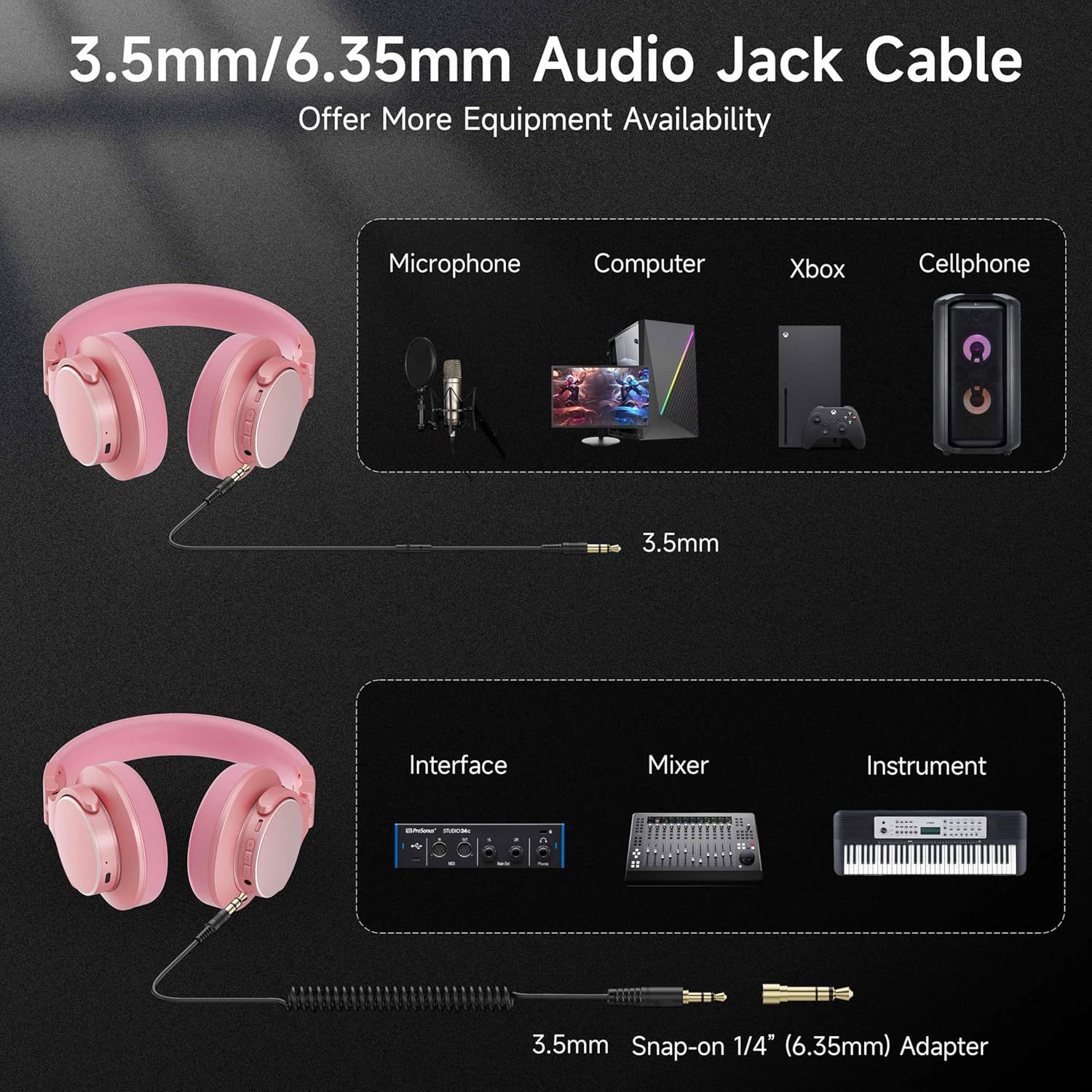
Image: Wired connection options for various devices using 3.5mm and 6.35mm audio jacks.
Operating Instructions
1. Power On/Off
- Power On: Press and hold the Power button until the LED indicator lights up.
- Power Off: Press and hold the Power button until the LED indicator turns off.
2. Volume Control
- Increase Volume: Press the Volume Up button.
- Decrease Volume: Press the Volume Down button.
3. Music Playback
- Play/Pause: Press the Multi-function button (often the Power button or a dedicated play/pause button) once.
- Next Track: Press and hold the Volume Up button or double-press the Multi-function button (functionality may vary).
- Previous Track: Press and hold the Volume Down button or triple-press the Multi-function button (functionality may vary).
4. Call Management (in Bluetooth mode)
- Answer/End Call: Press the Multi-function button once.
- Reject Call: Press and hold the Multi-function button for 2 seconds.

Image: The built-in microphone allows for clear communication during calls or online meetings.
5. Single-Ear Monitoring
The 90° swiveling ear cups allow you to easily pivot one earcup away from your ear for single-ear monitoring, which is particularly useful for DJs or in studio environments where you need to hear both your audio and external sounds.

Image: Adjustable headband and 90° rotatable earcups for comfort and flexible monitoring.
Maintenance
- Cleaning: Use a soft, dry cloth to clean the headphones. Do not use harsh chemicals or abrasive materials.
- Storage: When not in use, store the headphones in a cool, dry place. The foldable design allows for compact storage. Avoid exposing them to extreme temperatures or humidity.
- Battery Care: To prolong battery life, avoid fully discharging the headphones frequently. Charge them regularly, even if not in constant use.

Image: Soft padded earcups and foldable design for comfort and easy storage.
Troubleshooting
| Problem | Possible Cause | Solution |
|---|---|---|
| Headphones do not power on. | Low battery. | Charge the headphones fully. |
| Cannot pair via Bluetooth. | Headphones not in pairing mode; device Bluetooth off; too far from device. | Ensure headphones are in pairing mode (flashing blue/red). Turn on device Bluetooth. Move headphones closer to device (within 33ft/10m). |
| No sound in Bluetooth mode. | Volume too low; not connected; incorrect audio output selected on device. | Increase headphone and device volume. Re-pair headphones. Check device audio settings. |
| No sound in wired mode. | Cable not fully inserted; faulty cable; incorrect input on audio source. | Ensure audio cable is fully inserted into both headphone and audio source. Try a different cable. Check audio source input settings. |
| Poor sound quality. | Low battery; interference (Bluetooth); low-quality audio source. | Charge headphones. Move away from other wireless devices. Use a high-quality audio source. |
Specifications
- Brand: Rumoon
- Model Number: BT9944
- Connectivity: Bluetooth 5.4, Wired (3.5mm, 6.35mm)
- Driver Size: 50mm Neodymium
- Frequency Range: 20 Hz - 20,000 Hz
- Battery Capacity: 800mAh
- Playtime: Up to 100 hours
- Wireless Range: Up to 33 feet (10 meters)
- Weight: 260g (0.57lb)
- Ear Cushion Material: Memory Foam, Protein Leather
- Control Method: Push Button, Remote
- Special Features: 90° Swivel Ear Cups, Built-in Microphone, Foldable Design

Image: The Rumoon BT9944 headphones offer up to 100 hours of battery life for extended listening.
Warranty Information
Please refer to the manufacturer's website or the product packaging for detailed warranty information. Keep your purchase receipt for warranty claims.
Support
For further assistance, technical support, or inquiries, please contact Rumoon customer support through their official website or the contact information provided on your product packaging.