
1. Introduction
Thank you for choosing the WALI Full Motion TV Wall Mount. This manual provides essential information for the safe and proper installation, operation, and maintenance of your new TV mount. Please read all instructions carefully before beginning installation to ensure optimal performance and safety.
Product Overview
The WALI FTM-2/IT is a full motion articulating TV wall mount designed to securely hold most 32-70 inch flat and curved televisions. It offers extensive adjustability for an optimal viewing experience, including tilt, swivel, and extension capabilities.

Image: The WALI Full Motion TV Wall Mount, showcasing its articulating arms and TV mounting plate.
Key Features
- Compatibility: Fits most flat and curved 32-70 inch TVs weighing up to 88 lbs (40 kg). Supports VESA mounting patterns from 100x100mm to 400x400mm.
- Full Adjustment: Offers +3°/-15° tilt, +60°/-60° swivel, and +3°/-3° leveling for flexible viewing angles.
- Extension: Extends from 2.6 inches (6.6 cm) to 14 inches (35.6 cm) from the wall.
- Robust Construction: Made from high-grade steel for solid and stable support.
- Wall Types: Can be mounted on vertical wood studs (12-16 inches apart), brick, or concrete walls. DO NOT mount on drywall alone.
2. Safety Information
Please read and understand all instructions before installation. If you have any questions, contact WALI customer support. Improper installation may cause property damage, serious injury, or death.
- This product is intended for indoor use only.
- Ensure the mounting surface can safely support the combined weight of the mount and the TV.
- Do not exceed the maximum weight capacity of 88 lbs (40 kg).
- Always use a stud finder to locate wood studs. If mounting to brick or concrete, use appropriate anchors (included).
- Never mount to drywall alone.
- Use caution when handling heavy equipment. It is recommended to have at least two people for installation.
- Tighten all screws firmly but do not overtighten.
- Keep children and pets away during installation.
- Check all connections periodically to ensure they remain secure.
3. Package Contents
Verify that all components are present and undamaged before installation. If any parts are missing or defective, contact WALI customer support for assistance.
- WALI TV Wall Mount Bracket (Black) x 1
- Mounting Hardware Kit (various screws, washers, spacers, anchors)
- User Manual x 1
4. Specifications
| Specification | Detail |
|---|---|
| Model Number | FTM-2/IT |
| TV Size Compatibility | 32-70 inches (flat and curved) |
| Weight Capacity | Up to 88 lbs (40 kg) |
| VESA Compatibility | 100x100mm, 100x150mm, 100x200mm, 150x150mm, 150x200mm, 200x100mm, 200x200mm, 300x200mm, 300x300mm, 400x200mm, 400x300mm, 400x400mm |
| Tilt Angle | +3° / -15° |
| Swivel Angle | +60° / -60° |
| Leveling Adjustment | +3° / -3° |
| Extension from Wall | 2.6 inches (6.6 cm) to 14 inches (35.6 cm) |
| Material | High-grade Steel |
| Color | Black |
| Item Weight | 7.59 pounds (3.44 kg) |
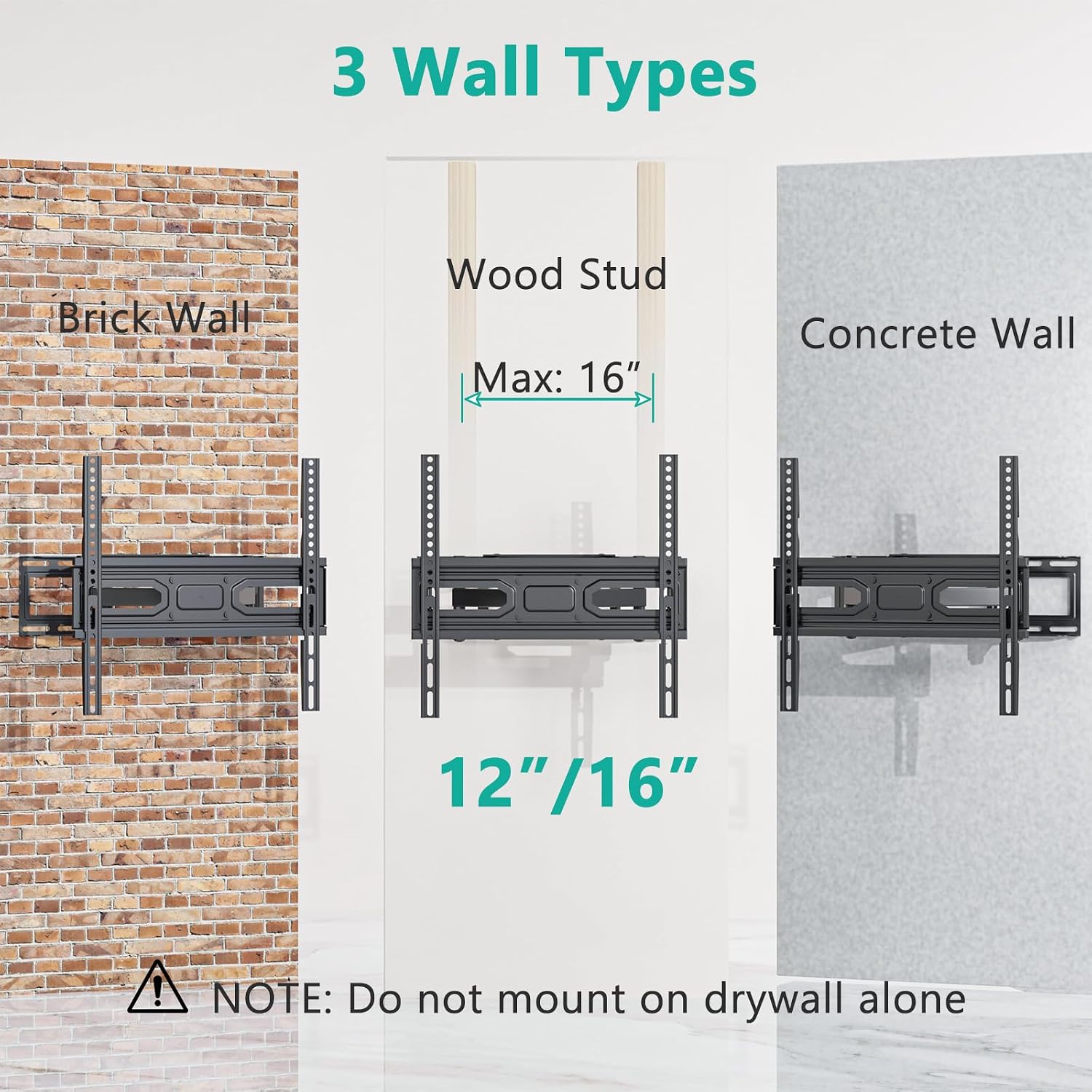
Image: Diagram illustrating TV size compatibility (32-70 inches) and various VESA mounting patterns supported by the mount.

Image: Diagram showing the maximum weight capacity of the mount, 40kg or 88lbs.
5. Installation Guide
Follow these steps carefully for a secure installation. It is highly recommended to have two people for this process.
5.1 Tools Required (Not Included)
- Pencil
- Phillips Head Screwdriver
- Drill
- Stud Finder (for wood stud installation)
- Level
- Tape Measure
- Hammer (for concrete/brick anchors)
5.2 Wall Preparation
Determine your wall type and mark the drilling locations.

Image: Illustration of the three compatible wall types: Brick Wall, Wood Stud (12-16 inches), and Concrete Wall. A warning states: Do NOT mount on drywall alone.
- For Wood Stud Walls: Use a stud finder to locate the edges of two adjacent wood studs. Mark the center of the studs at your desired mounting height. The studs must be between 12 and 16 inches apart.
- For Brick or Concrete Walls: Mark the desired mounting height. Ensure there are no hidden electrical wires or plumbing in the drilling path.
- Position the wall plate against the wall at the marked height and use a level to ensure it is straight. Mark the drilling points through the holes on the wall plate.
- Drill pilot holes at the marked locations. The drill bit size and depth will depend on your wall type and the specific lag bolts/anchors used. Refer to the hardware kit instructions for precise details.
5.3 Mount Assembly and Wall Attachment
- Attach the wall plate to the wall using the provided lag bolts and washers. For concrete/brick, insert the concrete anchors into the drilled holes before securing the lag bolts. Tighten all bolts firmly with a wrench, ensuring the mount is level and secure.
- Assemble the articulating arms to the wall plate if they are not pre-assembled. Follow the diagrams in the included paper manual for correct orientation and secure all connections.
5.4 TV Bracket Attachment
- Carefully place your TV face down on a soft, clean surface to prevent scratches.
- Identify the VESA mounting holes on the back of your TV.
- Select the appropriate screws (M4, M6, M8), washers, and spacers from the hardware kit that fit your TV's VESA holes. Ensure the screws are long enough to securely engage the TV threads but not so long that they damage internal components.
- Attach the two vertical TV brackets to the back of your TV, aligning them with the VESA holes. Ensure the hooks on the brackets are facing upwards and the same direction. Tighten the screws securely.
5.5 Mounting the TV to the Wall Plate
- With assistance, carefully lift the TV with the attached brackets.
- Hook the TV brackets onto the horizontal bar of the wall mount. Ensure both brackets are securely seated on the bar.
- Locate the safety screws or locking mechanisms on the bottom of the TV brackets. Tighten these screws to secure the TV to the mount and prevent accidental dislodgement.

Image: Three-panel illustration showing the installation process: 1. Attaching the wall plate to the wall. 2. Attaching the TV brackets to the back of the TV. 3. Hanging the TV onto the wall mount and securing it.
6. Operating Instructions (Adjustments)
Your WALI Full Motion TV Wall Mount allows for various adjustments to achieve the perfect viewing angle.
6.1 Tilt Adjustment
The mount allows for a tilt range of +3° (upwards) to -15° (downwards). Loosen the tilt knobs or bolts on the TV brackets, adjust the TV to the desired angle, and then re-tighten the knobs/bolts to secure the position.

Image: Diagram showing the mount's extension capability from 2.5 to 14 inches and the tilt range of +3° to -15°.
6.2 Swivel Adjustment
The articulating arms allow the TV to swivel +60° to -60° horizontally. Gently push or pull the TV to the left or right to achieve your desired viewing angle. The friction joints will hold the TV in place.

Image: Illustration demonstrating the swivel range of +60° to -60° and the rotation range of +3° to -3° for comfortable viewing.
6.3 Extension and Retraction
The mount can extend up to 14 inches (35.6 cm) from the wall and retract to a minimum of 2.6 inches (6.6 cm). Gently pull the TV away from the wall or push it back to adjust the distance as needed.
6.4 Leveling Adjustment
If your TV is slightly unlevel after installation, you can adjust the rotation by +3° to -3°. Loosen the leveling screws on the TV brackets, adjust the TV until it is level, and then re-tighten the screws.
7. Maintenance
Regular maintenance ensures the longevity and safe operation of your TV wall mount.
- Cleaning: Wipe the mount with a soft, dry cloth to remove dust. Do not use abrasive cleaners or solvents.
- Periodic Checks: Every few months, check all screws and bolts to ensure they are still tight and secure. Re-tighten if necessary.
- Movement Check: Periodically test the tilt, swivel, and extension movements to ensure they operate smoothly. If any stiffness is noted, ensure no debris is obstructing the joints.
8. Troubleshooting
If you encounter issues during or after installation, refer to the following common problems and solutions.
| Problem | Possible Cause | Solution |
|---|---|---|
| TV is not level | Wall plate not level or leveling screws loose. | Use the +3°/-3° leveling adjustment. Loosen leveling screws, adjust TV, then re-tighten. If the wall plate is significantly off, you may need to re-install. |
| Mount feels unstable | Lag bolts not fully tightened or incorrect wall type. | Ensure all lag bolts are securely tightened. Verify that the mount is installed on appropriate wood studs, brick, or concrete, not drywall alone. |
| TV cannot be tilted/swiveled | Tilt/swivel knobs/bolts are too tight. | Loosen the tilt knobs or bolts slightly to allow movement. Do not loosen excessively to maintain stability. |
| Missing parts from hardware kit | Packaging error. | Contact WALI customer support immediately for replacement parts. |
| Screws for TV do not fit | Incorrect screw size selected. | Refer to your TV's manual for correct VESA screw size. Use the appropriate screws from the provided hardware kit. If none fit, you may need to purchase specific screws. |
9. Warranty & Customer Support
WALI products come with a limited warranty. Please refer to the warranty information provided with your purchase or visit the official WALI website for details.
For technical assistance, missing parts, or any questions regarding your WALI TV Wall Mount, please contact our experienced and friendly US-based customer support team. They are available to assist 7 days a week.
WALI Customer Support:
Website: www.walielectric.com
Email: support@walielectric.com
Phone: (Specific phone number not provided, please check product packaging or website)


