
BLKMTY LShapedComputerDeskBLACK
BLKMTY L Shaped Gaming Desk User Manual
Model: LShapedComputerDeskBLACK
Product Overview
The BLKMTY L Shaped Gaming Desk is designed for versatility and stability, suitable for gaming, home office, study, or bedroom use. Its L-shaped design efficiently utilizes corner space, providing ample room for multiple monitors and accessories. The desk features a durable carbon fiber surface and a robust metal steel frame.

Figure 1: BLKMTY L Shaped Gaming Desk in a typical setup.
Key Features:
- Scientific Z-Type Structure: Engineered for uniform force distribution and enhanced stability.
- Special Monitor Stand: An elevated stand designed to promote ergonomic posture and reduce eye strain.
- Adjustable Leg Pads: Ensures desk stability on uneven surfaces and protects flooring.
- High-Quality P2 Grade Particleboard: 15mm thick, providing excellent load-bearing capacity and structural integrity.
- Carbon Fiber Surface: Anti-scratch, waterproof, and easy to clean.
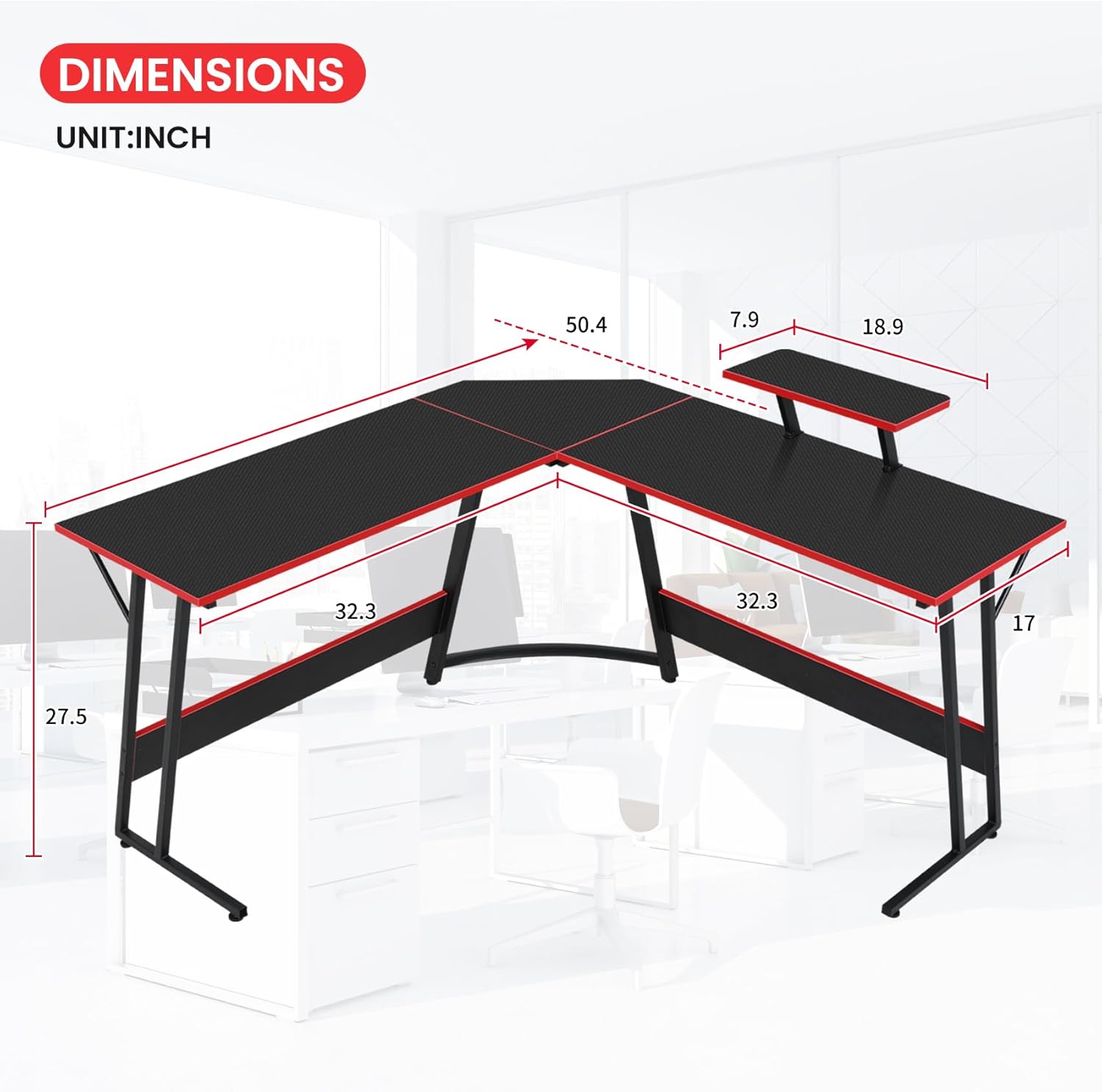
Figure 2: Desk dimensions for planning your space.

Figure 3: Detachable monitor stand for ergonomic viewing.

Figure 4: Stability features including Z-shaped legs and adjustable foot pads.
Setup and Assembly
Your BLKMTY L Shaped Gaming Desk is designed for straightforward assembly. The package includes all necessary detailed instructions, installation tools, and individually labeled parts to ensure a quick and direct setup process.
Assembly Steps:
- Unpack Components: Carefully unbox all parts and verify against the included parts list in the instruction manual. Ensure no components are missing or damaged.
- Assemble Frame: Begin by connecting the metal steel frame components according to the numbered labels. Use the provided tools to securely fasten all screws.
- Attach Desktop Panels: Once the frame is stable, carefully place and secure the P2 grade particleboard desktop panels onto the frame. Pay attention to the orientation for the L-shape configuration.
- Install Monitor Stand: Attach the detachable monitor stand to your preferred position on the desktop. It can be fixed on any table edge, including the corner part, as per your ergonomic needs.
- Adjust Leg Pads: After assembly, adjust the leg pads at the bottom of the desk legs to ensure the desk is level and stable on your floor. This also helps protect your flooring.

Figure 5: Easy assembly process.

Figure 6: Frame assembly illustration.

Figure 7: Desktop attachment illustration.
Operating Instructions
The BLKMTY L Shaped Gaming Desk is designed for versatile use across various scenarios, providing a comfortable and efficient workspace.
Optimal Use:
- Ergonomic Monitor Placement: Utilize the special monitor stand to raise your computer monitor to an ergonomic height, aligning with your eye level to prevent neck and eye strain.
- Space Utilization: The L-shaped design maximizes corner space, allowing for multi-monitor setups, gaming peripherals, and office supplies without clutter.
- Stability Check: Periodically check the adjustable leg pads to ensure the desk remains level and stable, especially if relocating the desk.

Figure 8: High-quality desktop surface for durability and ease of use.

Figure 9: Ample space provided by the L-shaped design.
Maintenance
Proper maintenance ensures the longevity and appearance of your BLKMTY L Shaped Gaming Desk.
Cleaning and Care:
- Regular Cleaning: Wipe the carbon fiber surface with a soft, damp cloth to remove dust and spills. Avoid abrasive cleaners or harsh chemicals that could damage the finish.
- Spill Management: The desktop is waterproof, but it is recommended to wipe up spills promptly to prevent any potential long-term damage or staining.
- Scratch Resistance: While the surface is scratch-resistant, avoid dragging sharp or heavy objects across it to maintain its pristine condition.
- Frame Care: The metal steel frame can be cleaned with a damp cloth. Ensure it is dried thoroughly to prevent rust.
Troubleshooting
This section addresses common issues you might encounter with your BLKMTY L Shaped Gaming Desk.
Common Issues and Solutions:
| Problem | Possible Cause | Solution |
|---|---|---|
| Desk is wobbly or uneven. | Uneven floor surface; loose connections. | Adjust the leg pads at the bottom of the desk until it is stable. Check and tighten all screws. |
| Monitor stand feels loose. | Improper installation; loose fasteners. | Ensure the monitor stand is correctly attached and its fasteners are tightened securely. |
| Missing parts during assembly. | Packaging error. | Contact customer support immediately with your purchase details and a list of missing parts. |
| Desktop surface appears scratched or damaged. | Heavy impact or sharp objects. | While the surface is scratch-resistant, severe impacts can cause damage. For minor marks, a gentle polish may help. For significant damage, contact support. |
Specifications
Detailed specifications for the BLKMTY L Shaped Gaming Desk.
| Attribute | Detail |
|---|---|
| Brand | BLKMTY |
| Model Number | LShapedComputerDeskBLACK |
| Product Dimensions | 17"D x 50.4"W x 27.5"H |
| Color | Black |
| Style | Modern |
| Base Material | Metal Steel |
| Top Material Type | Engineered Wood (P2 Grade Particleboard) |
| Finish Type | Wood (Carbon Fiber Surface) |
| Special Feature | L shaped computer desk, Detachable Monitor Stand, Adjustable Leg Pads |
| Item Weight | 46 Pounds |
| Required Assembly | Yes |
Warranty and Support
BLKMTY is committed to providing quality products and customer satisfaction.
Warranty Information:
Specific warranty details are not provided in this manual. Please refer to your purchase documentation or contact customer support for information regarding product warranty.
Customer Support:
For any questions, concerns, or assistance with assembly, missing parts, or product issues, please contact our professional after-sales team. We aim to reply to your message within 24 hours.
Please have your product model number (LShapedComputerDeskBLACK) and purchase information ready when contacting support to facilitate a quicker resolution.
You can typically find contact information for the seller or manufacturer through your original point of purchase (e.g., Amazon order history).
Related Documents - LShapedComputerDeskBLACK
 |
Assembly Instructions for LIFEZEAL L-Shaped Space-Saving Desk Comprehensive assembly instructions for the LIFEZEAL L-shaped space-saving desk in white, featuring a drawer and four compartments. This modern desk is suitable for offices, studies, and bedrooms, with a maximum weight capacity of 145kg. |
 |
Klaxon L Shape Study Table Assembly Instructions Assembly instructions for the Klaxon L Shape Study Table, a modern computer desk for home and office use. |
 |
L Shaped Computer Desk D-L01-49IN Assembly Instructions Assembly instructions for the L Shaped Computer Desk, model D-L01-49IN. Includes parts list, step-by-step assembly guide, and contact information for technical support. |
 |
DEVAISE ABGZ513 L-Shaped Desk - Assembly Instructions Official assembly instructions and safety guidelines for the DEVAISE ABGZ513 L-Shaped Desk. Learn how to assemble your home office furniture safely and efficiently. |
 |
COSTWAY Corner Desk User Manual and Assembly Instructions This document provides the user manual and assembly instructions for the COSTWAY Corner Desk, detailing parts, hardware, and step-by-step guidance for assembly. It ensures a clear and efficient setup process for the product. |
 |
Assembly Instructions: L-Shaped Corner Desk with Storage Detailed assembly instructions and hardware list for an L-shaped corner desk with integrated storage, drawers, and bookshelf. Includes step-by-step guidance for building the study table/writing desk. |
Ask a question about this manual
Ask about setup, troubleshooting, compatibility, parts, safety, or missing instructions. Manuals+ will review the question and use this page’s manual context to help answer it.