
1. Introduction and Safety Information
Thank you for choosing the Bonsaii S125-A Paper Shredder. This manual provides important instructions for safe operation, setup, use, maintenance, and troubleshooting of your shredder. Please read this manual thoroughly before using the product and retain it for future reference.
Important Safety Instructions:
- Keep out of reach of children and pets.
- Keep loose clothing, jewelry, hair, and fingers away from the paper entry slot.
- Do not spray any flammable products or lubricants into the shredder.
- Do not shred adhesive labels, wet paper, or plastic film as this may cause jams.
- Always unplug the shredder when not in use or before cleaning.
- Do not attempt to repair the shredder yourself. Contact customer service for assistance.
2. Package Contents
Please check the box for the following items:
- Bonsaii S125-A Paper Shredder
- Instruction Manual
3. Product Overview
The Bonsaii S125-A is a compact strip-cut paper shredder designed for home and small office use. It features an adjustable arm to fit various waste bins and can shred up to 6 sheets of paper or one credit card at a time.
Key Components:
- Paper Entry Slot: For inserting paper and credit cards.
- Control Switch: Selects operating mode (AUTO, OFF, REV).
- Adjustable Arm: Extends to fit different waste bin widths.
- Power/Overheat Indicator: Blue for power on, Red for overheating.

Image: The control panel of the Bonsaii S125-A shredder, showing the power switch with AUTO, OFF, and REV settings, and indicator lights for Power (blue) and Overheat (red).
4. Setup Instructions
Follow these steps to set up your shredder:
- Unpack: Carefully remove the shredder from its packaging.
- Position: Place the shredder securely on top of a suitable waste bin. The adjustable arm can extend from 31.5 cm to 39.5 cm to fit various bin sizes.
- Connect Power: Plug the power cord into a standard electrical outlet.
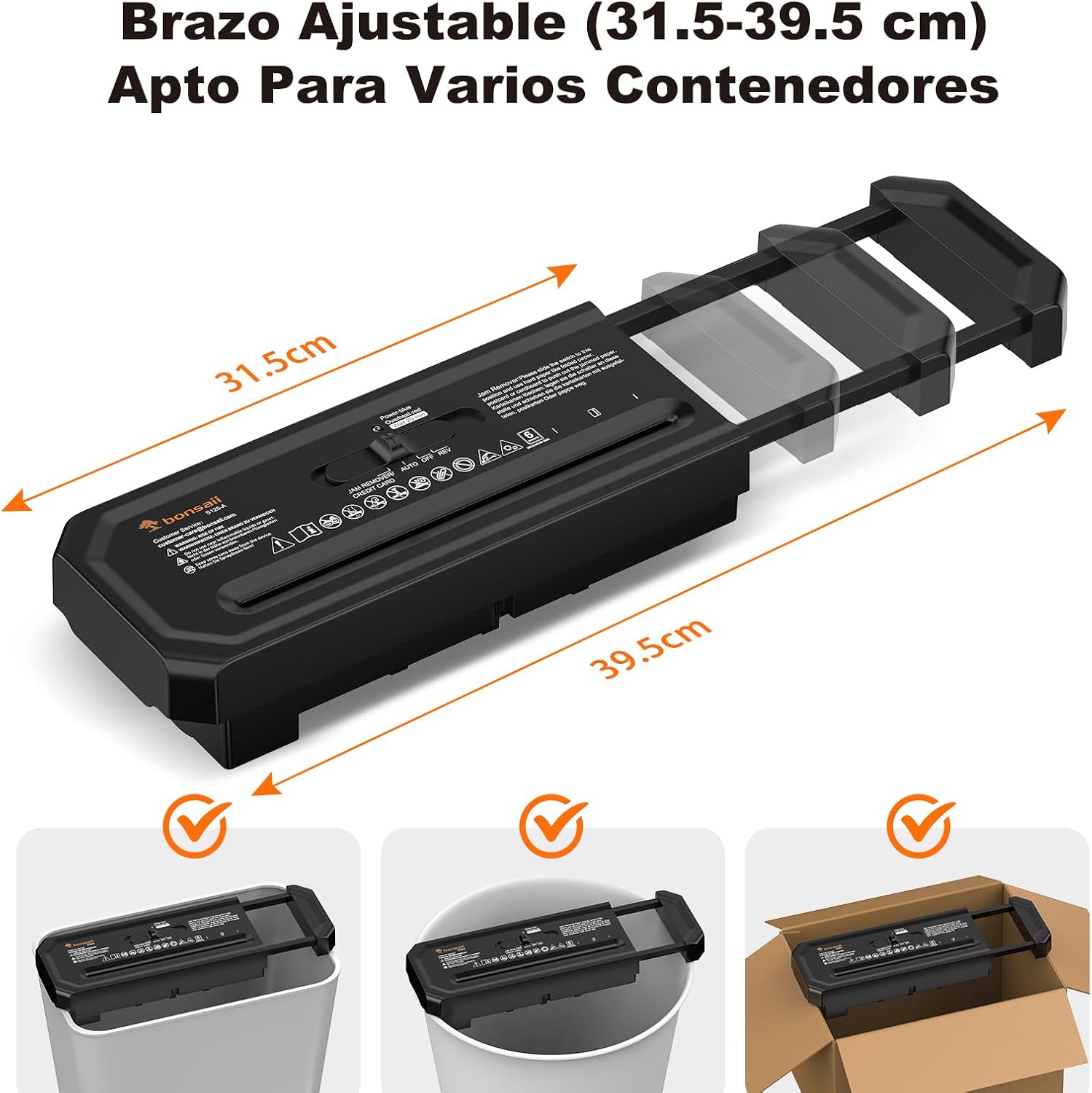
Image: The Bonsaii S125-A paper shredder demonstrating its adjustable arm, extending to fit different waste bin widths, shown with measurements from 31.5 cm to 39.5 cm.
5. Operating Instructions
Powering On/Off:
- To turn on, slide the control switch to the AUTO position. The blue power indicator will illuminate.
- To turn off, slide the control switch to the OFF position.
Shredding Paper:
- Ensure the shredder is in AUTO mode.
- Insert up to 6 sheets of paper (A4, 70gsm) straight into the paper entry slot. The shredder will automatically start and stop once the paper has passed through.
- Avoid exceeding the maximum sheet capacity to prevent jams and overheating.
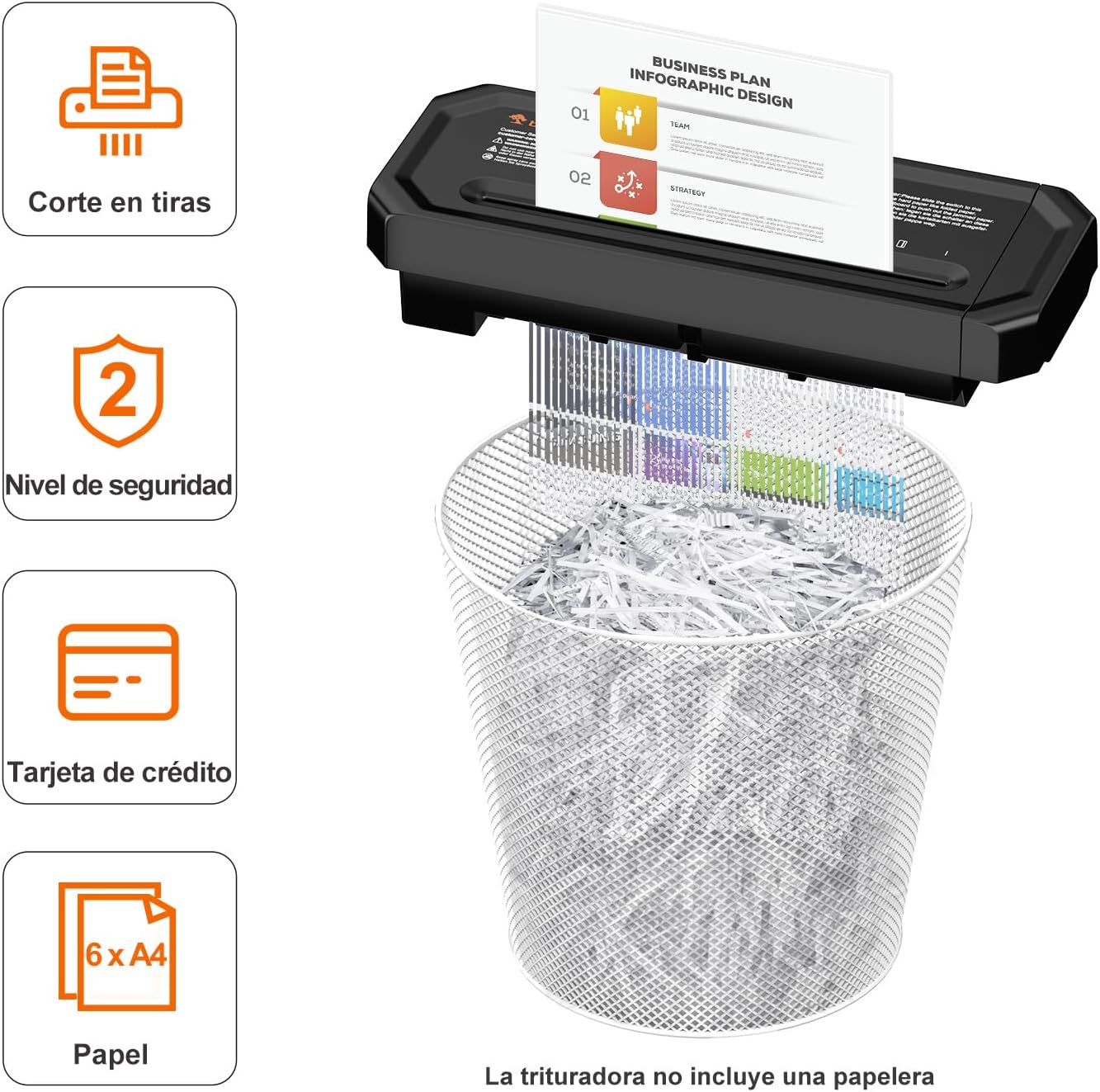
Image: The Bonsaii S125-A shredder processing paper, demonstrating its strip-cut mechanism and the resulting shredded paper in a mesh waste bin. It indicates a 6-sheet capacity.
Shredding Credit Cards:
- Ensure the shredder is in AUTO mode.
- Insert one credit card at a time into the designated credit card slot. The shredder will automatically start and stop.

Image: The Bonsaii S125-A shredder demonstrating the shredding of a credit card, showing the card being fed into the slot and the resulting shredded pieces.
Continuous Operation and Cool-down:
The shredder is designed for intermittent use. It can operate continuously for up to 2 minutes. After this period, the red overheat indicator will light up, and the shredder will automatically shut off to prevent damage. Allow the shredder to cool down for approximately 20 minutes before resuming operation. This helps prolong the life of the device.

Image: A diagram illustrating the shredder's operational cycle, showing a 2-minute run time followed by a recommended 20-minute cool-down period to prevent overheating.
6. Maintenance
Emptying the Waste Bin:
Regularly empty the waste bin to prevent shredded paper from backing up into the cutting mechanism, which can cause jams.
Cleaning the Shredder:
- Always unplug the shredder before cleaning.
- Wipe the exterior of the shredder with a soft, dry cloth. Do not use abrasive cleaners or solvents.
- Do not use water or any liquids near the paper entry slot or electrical components.
7. Troubleshooting
| Problem | Possible Cause | Solution |
|---|---|---|
| Shredder does not start. | Not plugged in; switch in OFF position; overheated. | Ensure power cord is securely plugged in; slide switch to AUTO; allow 20 minutes for cool-down if red indicator is on. |
| Paper jam. | Too much paper inserted; paper inserted incorrectly. | Slide switch to REV to clear the jam. If unsuccessful, unplug, carefully remove paper manually, then plug in and try REV again. Do not force paper. |
| Shredder stops during operation, red light on. | Overheating due to continuous use. | This is a normal safety feature. Allow the shredder to cool down for approximately 20 minutes until the red indicator turns off. |
8. Specifications
| Feature | Detail |
|---|---|
| Model | S125-A |
| Shred Type | Strip Cut |
| Shred Size | 6 mm strips |
| Sheet Capacity | 6 sheets (A4, 70gsm) |
| Credit Card Capacity | 1 card |
| Continuous Run Time | 2 minutes |
| Cool-down Time | 20 minutes |
| Noise Level | 70 Decibels |
| Product Dimensions (L x W x H) | 32.1 x 7 x 12 cm |
| Adjustable Arm Length | 31.5 – 39.5 cm |
| Product Weight | 1 kg |
| Origin | China |

Image: A detailed diagram showing the dimensions of the Bonsaii S125-A paper shredder, including its length, width, and height, with measurements in centimeters.

Image: An illustration demonstrating the 6 mm strip cut size produced by the Bonsaii S125-A paper shredder, showing shredded paper strips.
9. Warranty and Support
Product Warranty:
This Bonsaii S125-A Paper Shredder comes with a 2-year warranty from the date of purchase. This warranty covers manufacturing defects under normal use. It does not cover damage caused by misuse, accident, unauthorized modification, or failure to follow the instructions in this manual.
Customer Support:
For any questions, technical support, or warranty claims, please contact Bonsaii customer service. Refer to your purchase documentation for contact details or visit the official Bonsaii website.


