1. Introduction
Thank you for choosing the Desobry 18.5-inch Portable TV. This manual provides essential information for setting up, operating, and maintaining your device. Please read it thoroughly before use to ensure proper functionality and to maximize your viewing experience.
2. What's in the Box
Carefully unpack your Desobry Portable TV and ensure all items are present:
- 18.5" TV x 1
- Antenna x 1
- AV cable x 1
- AC adapter x 1
- Remote control x 1
- User manual x 1

Figure 2.1: Included Accessories
3. Product Overview
Familiarize yourself with the various parts and interfaces of your portable TV.
3.1 Front Panel Controls

Figure 3.1: Front View of the TV
- Display Screen: 18.5-inch Full HD 1080P display.
- Control Buttons: Volume up/down, Menu, Channel up/down, OK, Source.
- Stereo Speakers: Built-in dual speakers for clear audio.
- Remote Control Reception Window: For infrared signals from the remote.
3.2 Side and Rear Panel Interfaces
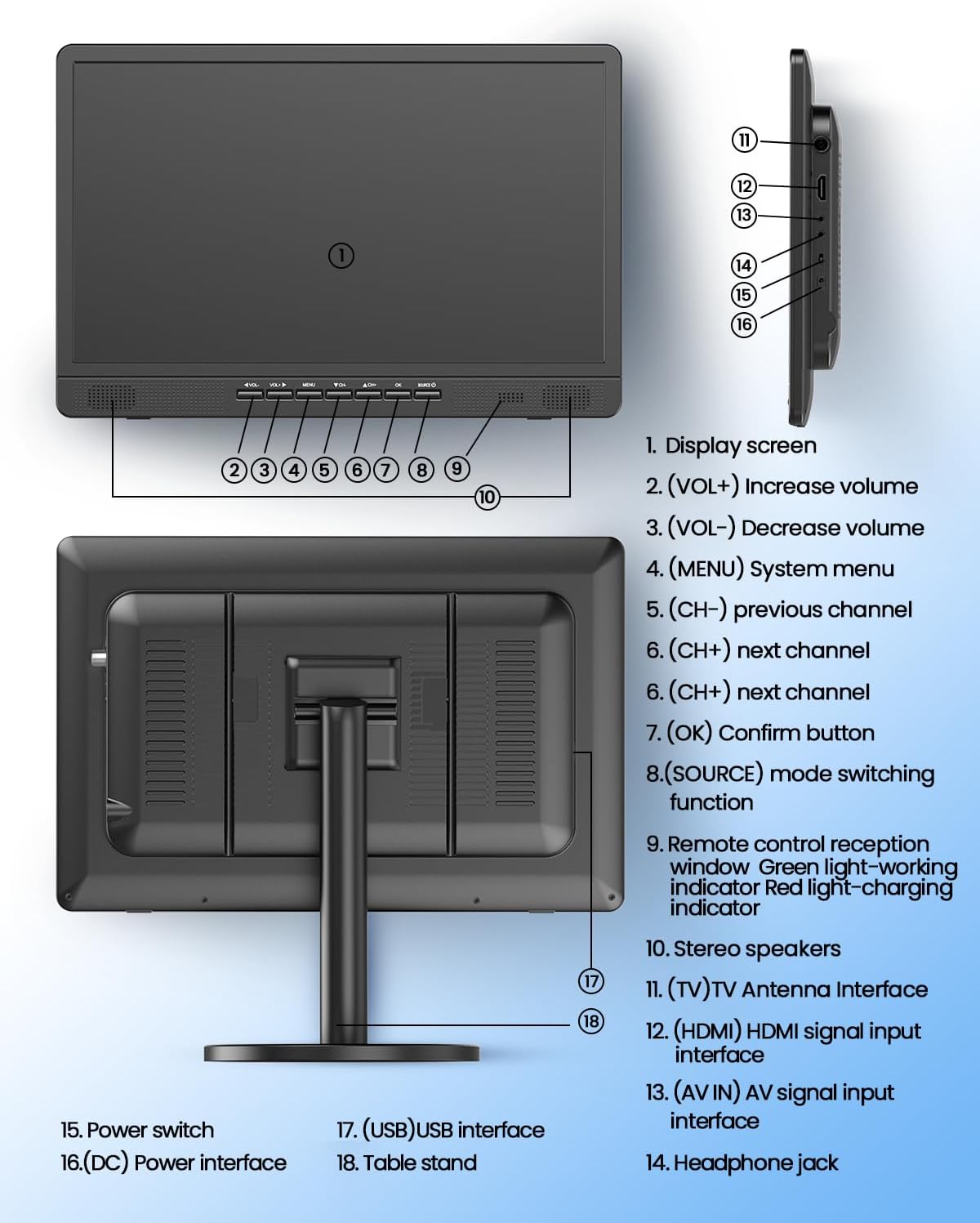
Figure 3.2: TV Interface Diagram
- Power Switch: To turn the TV on/off.
- DC Power Interface: For connecting the AC adapter.
- USB Interface: For media playback from USB drives.
- Headphone Jack: For private listening.
- AV Input/Output: For connecting external AV devices.
- HDMI Input: For connecting high-definition devices.
- TV Antenna Interface: For connecting the included antenna.
- Table Stand: Detachable and adjustable for optimal viewing angles.
4. Setup
4.1 Installing the Stand
The portable TV comes with a detachable stand. To install:
- Align the stand base with the mounting points on the back of the TV.
- Secure the stand using the provided screws.
- Adjust the stand to your desired viewing angle (up to 30 degrees).

Figure 4.1: Adjustable Stand
4.2 Connecting the Antenna
To receive free local channels, connect the included antenna:
- Connect the antenna cable to the TV Antenna Interface on the TV's rear panel.
- Place the antenna near an open area, such as a window, for optimal signal reception.

Figure 4.2: Antenna Connection for Free Local Channels
4.3 Powering the TV
Your TV can be powered via the AC adapter or its built-in battery.
- AC Power: Connect the AC adapter to the DC Power Interface on the TV and plug it into a wall outlet.
- Battery Power: The TV has a built-in 6500mAh rechargeable battery for portable use. Ensure it is charged before outdoor use.

Figure 4.3: Charging the Built-in Battery
5. Operating Instructions
5.1 Power On/Off
Press the Power Switch on the TV or the power button on the remote control to turn the TV on or off.
5.2 Initial Channel Scan
After connecting the antenna and powering on the TV for the first time, you will need to perform a channel scan:
- Press the MENU button on the remote.
- Navigate to the CHANNEL menu.
- Select Air/Cable (choose 'Air' for antenna).
- Select Auto Scan and confirm to start searching for channels. This process may take several minutes.
5.3 Input Source Selection
To switch between different input sources (Antenna TV, HDMI, AV, USB):
- Press the SOURCE button on the TV or remote control.
- Use the arrow buttons to select the desired input source (ATSC, AV, HDMI, USB).
- Press OK to confirm your selection.
5.4 Media Playback via USB
The TV supports various media formats (video, audio, image, text) from a USB drive:
- Insert your USB drive into the USB Interface on the TV.
- Select USB as the input source.
- Navigate through the folders and files using the remote control.
- Select the desired media file and press OK to play.

Figure 5.1: Supported Media Formats
5.5 Sleep Timer Function
The TV features a sleep timer to automatically turn off the device after a set period. Refer to the full user manual for detailed instructions on setting the sleep timer.
6. Connectivity
The Desobry Portable TV offers versatile connectivity options:
- HDMI Input: Connect external devices such as phones, computers, TV sticks, gaming consoles (Raspberry Pi, Xbox, PlayStation, Switch), Kindle Fire, or Firestick for Full HD 1080P video display. (HDMI cable not included).
- AV Input: Connect legacy devices like DVD players or projectors using the included AV cable.
- USB Input: Play various multimedia files directly from a USB storage device.
- Headphone Jack: For private audio listening, simply plug in your headphones.

Figure 6.1: Wide Compatibility Ports
7. Power and Battery
The Desobry Portable TV is designed for both indoor and outdoor use with flexible power options:
- Built-in 6500mAh Rechargeable Battery: Provides continuous playback for outdoor use without a power outlet.
- AC Adapter: Use the included AC adapter to power the TV and charge the battery when watching at home or in an RV.
8. Maintenance
To ensure the longevity and optimal performance of your TV:
- Cleaning: Use a soft, dry cloth to clean the screen and exterior. Avoid abrasive cleaners or solvents.
- Storage: When not in use for extended periods, store the TV in a cool, dry place away from direct sunlight and extreme temperatures.
- Battery Care: For best battery life, avoid fully discharging the battery frequently. Charge it regularly, even if not in use.
9. Troubleshooting
If you encounter any issues with your Desobry Portable TV, please refer to the following common solutions:
- No Power: Ensure the AC adapter is securely connected and plugged into a working outlet, or that the built-in battery is charged.
- No Signal: Check antenna connection and placement. Perform an auto channel scan. For external devices, ensure the correct input source is selected.
- Poor Picture Quality: Adjust antenna position. Ensure external devices are connected with appropriate cables (e.g., HDMI for 1080P).
- No Sound: Check volume levels on the TV and any connected external devices. Ensure headphones are not plugged in if you want sound from speakers.
For more detailed troubleshooting, please consult the full user manual or contact customer support.
10. Specifications
| Feature | Detail |
|---|---|
| Brand | Desobry |
| Screen Size | 18.5 Inches |
| Display Technology | LCD |
| Resolution | 1080p |
| Refresh Rate | 60 Hz |
| Special Features | Built-In Speaker, Flat, Portable, Sleep Timer |
| Connectivity Technology | AV, Antenna, HDMI, USB |
| Aspect Ratio | 16:9 |
| Product Dimensions | 1.38"D x 16.14"W x 10.63"H |
| Item Weight | 2 Grams |
| Battery | 1 Lithium Polymer (6500mAh) (included) |
11. Warranty and Support
Desobry stands behind its product. We provide troubleshooting assistance and replacement services. For any concerns or support needs, please refer to the contact information provided in your product packaging or visit the official Desobry website.
12. Official Product Video
Watch this video for a visual guide on setting up and using your Desobry 18.5-inch Portable TV.
Video 12.1: Desobry 18.5-inch Portable TV with Antenna for Indoor Outdoor


