
1. Introduction
This user manual provides essential information for the safe and efficient operation of your Scoothop G2 Pro Off-Road Electric Scooter. Please read this manual thoroughly before your first ride to ensure proper assembly, usage, and maintenance. The G2 Pro is designed for adults, featuring dual 1000W motors, 10-inch off-road tires, dual brakes, and a robust suspension system for versatile riding conditions.
2. Safety Information
- Always wear a helmet and appropriate protective gear (knee pads, elbow pads) when riding.
- Familiarize yourself with local laws and regulations regarding electric scooter use.
- Do not exceed the maximum weight limit of 331 pounds.
- Perform a pre-ride inspection: check tire pressure, brake function, and ensure all fasteners are secure.
- Avoid riding in wet conditions, heavy rain, or on slippery surfaces.
- Maintain a safe speed and distance from other vehicles and pedestrians.
- Do not attempt stunts or aggressive maneuvers.
- Keep both hands on the handlebars while riding.
- Charge the scooter only with the provided charger and in a well-ventilated area.
3. Package Contents
Upon opening the package, verify that all items are present and undamaged:
- Scoothop G2 Pro Electric Scooter (partially assembled)
- User Manual
- Multi-tool Wrench
- Reflectors
- Battery Charger
Video: Assembly for Electric Scooter G2 Pro. This video demonstrates the unboxing and initial assembly steps for the Scoothop G2 Pro electric scooter, including unpacking the scooter and its accessories.
4. Setup and Assembly
- Unpack the Scooter: Carefully remove the scooter and all accessories from the packaging. Remove any protective foam or ties.
- Unfold the Stem: Lift the main stem of the scooter. Locate the folding mechanism knob near the base of the stem. Pull the knob to release the stem and raise it to the vertical position until it clicks into place. Tighten the knob securely to prevent movement during operation.
- Attach Handlebars: The handlebars are typically pre-attached but may require adjustment. Use the provided M6 wrench to tighten the screws on the handlebar clamp, ensuring the handlebars are centered and firmly secured.
- Adjust Headlight Angle: The headlight can be adjusted vertically to optimize illumination for night riding.
- Initial Charge: Before your first ride, fully charge the scooter's battery. Connect the charger to the charging port and a power outlet. The indicator light on the charger will change when fully charged.
5. Components Overview

Image: Scoothop G2 Pro Electric Scooter. A full view of the assembled Scoothop G2 Pro electric scooter, showcasing its robust design and off-road tires.
- Smart HD Digital Display: Located on the handlebars, this display shows speed, battery level, riding mode (ECO, D, S), light status, cruise control, and warning codes.
- Handlebar Controls: Buttons for power, speed mode selection, single/dual motor drive, turn signals, and horn are conveniently located on the handlebars.
- Dual 1000W Brushless Motors: Provides powerful acceleration and hill-climbing capability.
- 10-inch Off-Road Tires: Designed for enhanced traction and stability on various terrains.
- Dual Disc Brakes: Hydraulic disc brakes on both front and rear wheels for reliable stopping power.
- Dual Suspension System: Front and rear alloy-steel suspension for a smooth and comfortable ride over uneven surfaces.
- Full-Body Lighting System: Includes a bright LED headlight, taillight, ambient/side lights, and turn signals for visibility.
- Folding Design: Allows for easy storage and transport.

Image: Smart HD Digital Display. Close-up of the scooter's digital display showing various indicators like riding mode, battery level, speed, and light status.

Image: Dual Powerful 1000W Brushless Motors. An illustration highlighting the dual motors integrated into the scooter's wheels, emphasizing their power and efficiency.
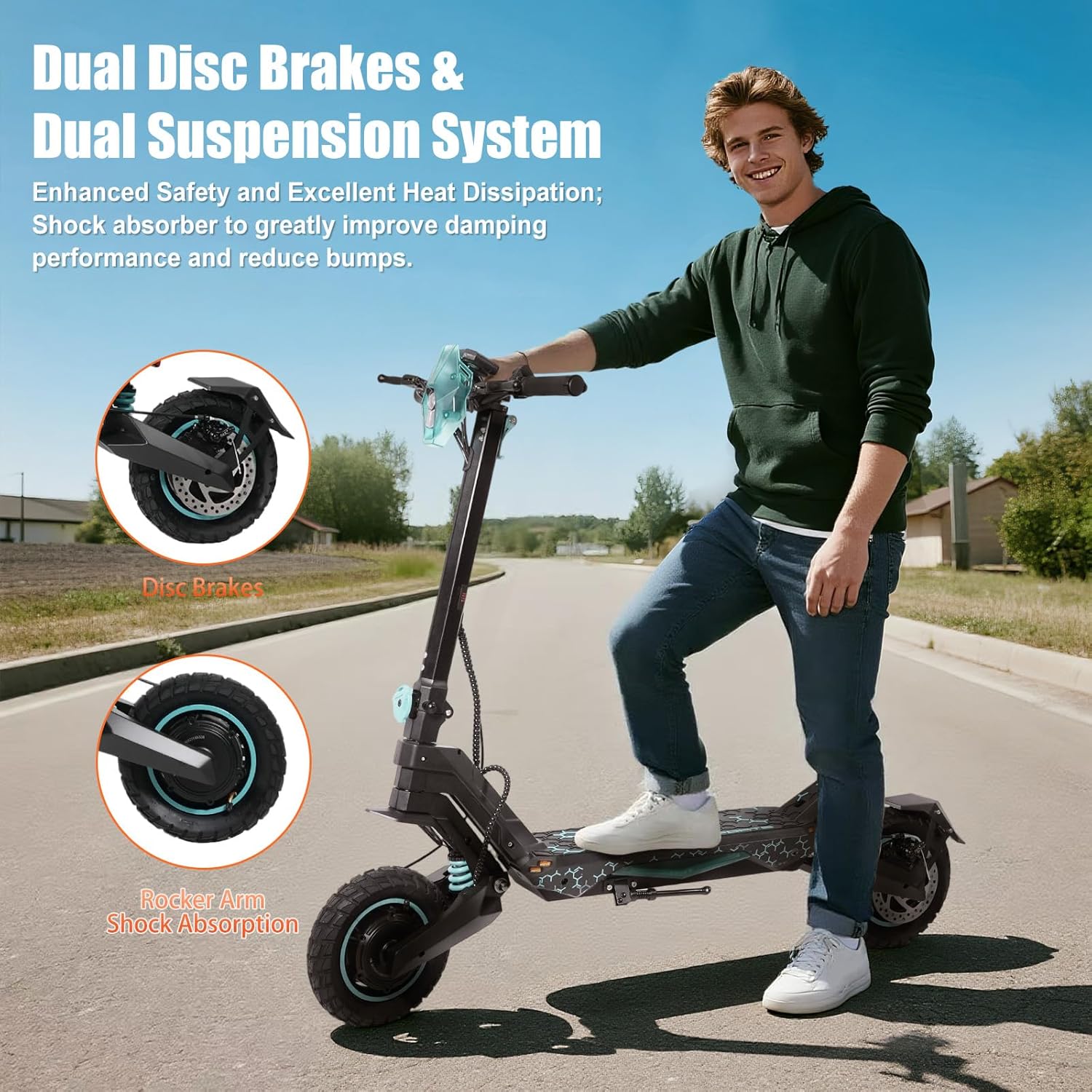
Image: Dual Disc Brakes & Dual Suspension System. Shows close-ups of the disc brakes and rocker arm shock absorption, illustrating the scooter's safety and comfort features.

Image: Full-Body Lighting System. An image of the scooter at night, highlighting the headlight, stem lights, ambient/side lights, and turn signals for enhanced visibility.

Image: Scooter Dimensions. Diagrams showing the scooter's dimensions in both unfolded and folded states, illustrating its compact design for storage.
6. Operating Instructions
- Power On/Off: Press and hold the power button on the handlebar control panel to turn the scooter on or off.
- Select Riding Mode: Use the 'M' button on the control panel to cycle through different speed modes (ECO, D, S) and single-wheel drive (1WD) or dual-wheel drive (2WD) options.
- Headlight and Turn Signals: Press the light button to activate the headlight. Use the left/right arrow buttons for turn signals. Hold the plus button to turn on the headlight.
- Horn: Press the horn button to alert others.
- Starting the Ride: Place one foot on the deck and push off with the other foot to gain initial momentum. Once moving, gently press the throttle lever to accelerate.
- Braking: Use the brake levers on the handlebars to slow down or stop. Apply both brakes smoothly for optimal control.
- Charging: The 48V 20Ah lithium battery provides 31-35 miles of range and takes 8-10 hours to fully charge. Always use the provided charger.
Video: G2 Pro Cycling Experience. This video showcases the Scoothop G2 Pro in action, demonstrating its performance and handling during a ride.
Video: Off Road E Scooter - Riding Experience. A demonstration of the scooter's capabilities on off-road terrain, highlighting its suspension and tire performance.
Video: Super Riding Experience with Off Road Electric Scooter (Preview). A short preview video demonstrating the scooter's riding experience, particularly its off-road capabilities.
7. Maintenance
- Tire Pressure: Regularly check and maintain the recommended tire pressure for optimal performance and safety.
- Brake System: Inspect brake levers, cables, and disc pads for wear and proper function. Adjust or replace components as needed.
- Cleaning: Clean the scooter with a damp cloth. Avoid using high-pressure water jets directly on electrical components.
- Battery Care: Store the scooter in a cool, dry place. If storing for extended periods, charge the battery to approximately 50-70% and recharge every 30-60 days to prevent deep discharge.
- Fasteners: Periodically check all screws and bolts to ensure they are tight and secure.
8. Troubleshooting
| Problem | Possible Cause | Solution |
|---|---|---|
| Scooter does not power on | Low battery; loose connections; power button malfunction | Charge battery; check all cable connections; contact support if issue persists. |
| Reduced range or speed | Low tire pressure; heavy load; riding uphill; cold weather; battery degradation | Inflate tires to recommended pressure; reduce load; ride on flatter terrain; ensure battery is fully charged. |
| Brakes feel weak | Worn brake pads; loose brake cable; air in hydraulic system | Inspect and replace brake pads; adjust brake cable tension; consult a professional for hydraulic system issues. |
| Unusual noises during operation | Loose components; debris in wheels; motor issue | Check for loose parts and tighten; inspect wheels for obstructions; contact support if motor noise persists. |
9. Specifications
| Feature | Detail |
|---|---|
| Brand | Scoothop |
| Model Name | G2-A |
| Part Number | G2 Pro |
| Age Range (Description) | Adult |
| Weight Limit | 331 Pounds |
| Product Dimensions (LxWxH) | 20.08"L x 9.06"W x 50.39"H |
| Number of Wheels | 2 |
| Wheel Material | Rubber |
| Frame Material | Alloy Steel |
| Wheel Size | 10 Inches |
| Wheel Type | Solid (Off-Road Tread) |
| Suspension Type | Dual Suspension |
| Brake Style | Dual Hydraulic Disc Brakes with E-cut-off |
| Charging Time | 8-10 Hours |
| Maximum Distance Range | 31-35 Miles |
| Top Speed | Up to 35 MPH |
| Motor Power | Dual 1000W Brushless Motors |
| Battery | 48V 20Ah Lithium-ion |
| Included Components | Manual, Wrench, Reflectors, Charger |
10. Warranty and Support
The Scoothop G2 Pro Electric Scooter comes with a 1-Year Manufacturer Warranty. This warranty covers defects in materials and workmanship under normal use. For warranty claims, technical assistance, or any product-related inquiries, please contact Scoothop customer support through the retailer where the product was purchased or visit the official Scoothop website for contact information.
Please retain your proof of purchase for warranty validation.
