
Introduction
This manual provides essential instructions for the safe operation, maintenance, and troubleshooting of your PowerSmart 4400W Dual Fuel Portable Inverter Generator. Please read this manual thoroughly before operating the generator to ensure proper use and to prevent injury or damage.

Figure 1: PowerSmart 4400W Dual Fuel Portable Inverter Generator. This image displays the generator from an angled front view, highlighting its red and black frame, control panel, and engine components.
Safety Information
Always follow basic safety precautions to reduce the risk of fire, electric shock, and personal injury. Keep this manual for future reference.
- Carbon Monoxide Hazard: Generators produce carbon monoxide, a colorless, odorless gas. Operate outdoors only, far from windows, doors, and vents.
- Electrical Shock Hazard: Do not operate in wet conditions. Ensure all connections are dry and secure.
- Fire Hazard: Fuel is highly flammable. Refuel in a well-ventilated area with the engine off and cool. Do not smoke while refueling.
- Hot Surfaces: The generator engine and muffler become very hot during operation and remain hot for a period after shutdown. Avoid contact.
- Read the entire manual before attempting to set up or operate the generator.
Product Features and Control Panel
Familiarize yourself with the generator's components and control panel for safe and effective operation.
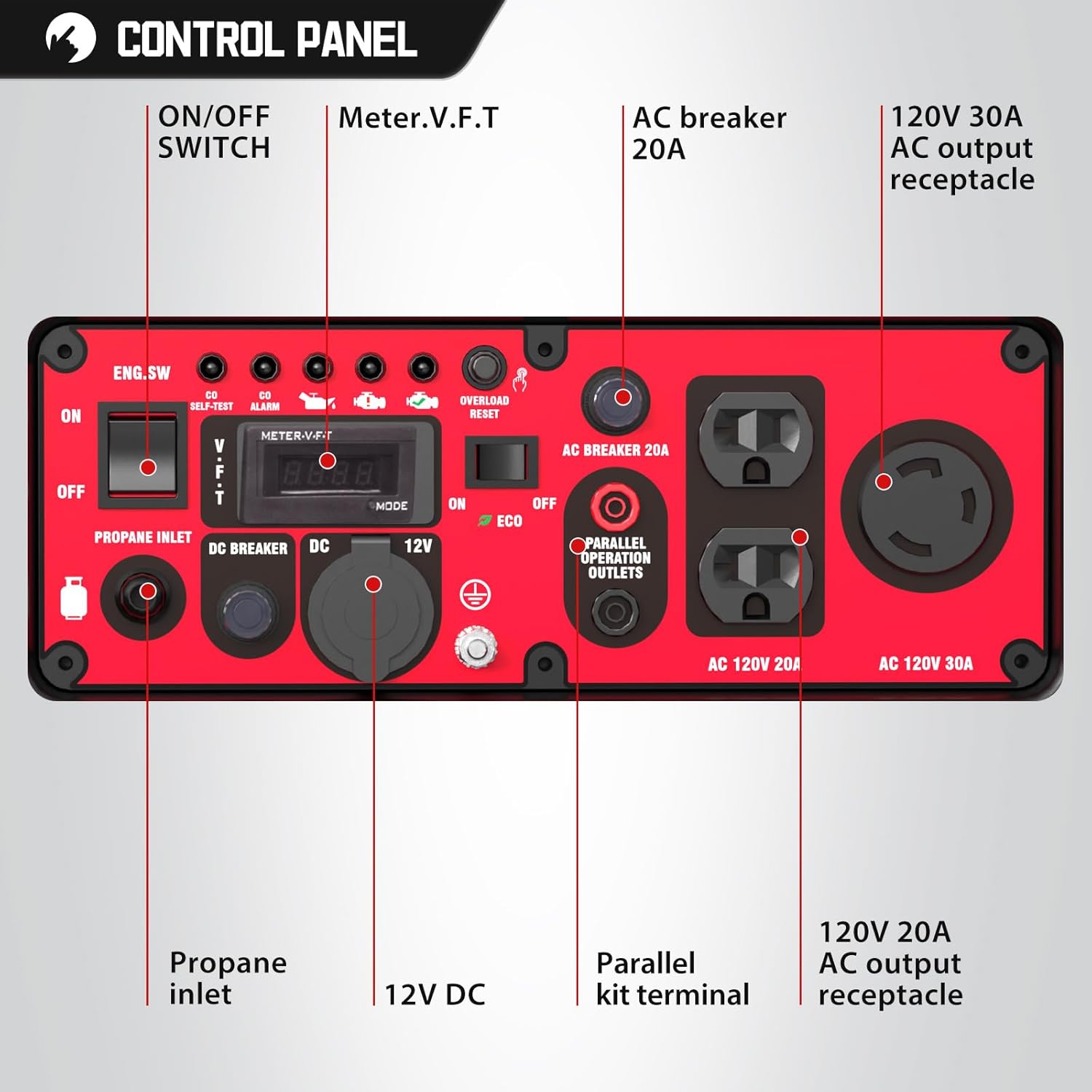
Figure 2: Detailed view of the PowerSmart 4400W Generator Control Panel. This image labels key components such as the ON/OFF switch, Meter.V.F.T display, AC breaker, 120V 30A AC output receptacle, 120V 20A AC output receptacles, Propane inlet, DC breaker, 12V DC outlet, and Parallel kit terminal.
- ON/OFF Switch (ENG.SW): Controls engine power.
- Meter.V.F.T: Displays voltage, frequency, and run time.
- AC Breaker 20A: Protects 120V 20A outlets from overload.
- 120V 30A AC Output Receptacle: For higher power demands.
- 120V 20A AC Output Receptacles (x2): Standard household outlets.
- Propane Inlet: Connection point for propane fuel source.
- DC Breaker: Protects the 12V DC outlet.
- 12V DC Outlet: For charging 12V batteries.
- Parallel Kit Terminal: Allows connection of two compatible generators for increased power output.
- ECO Mode Switch: Reduces engine speed to conserve fuel and lower noise when load is low.
- CO Protect: Carbon Monoxide Auto Shutdown feature for safety.
- Low Oil Shutdown: Automatically shuts off the engine if oil level is too low.
- Overload Reset: Button to reset the generator after an overload condition.
Setup
1. Unpacking and Inspection
- Carefully remove the generator from its packaging.
- Inspect for any shipping damage. Contact customer support immediately if damage is found.
- Ensure all included components (e.g., wrench) are present.
2. Adding Engine Oil
The generator is shipped without engine oil. It is crucial to add the correct type and amount of oil before first use.
- Place the generator on a level surface.
- Locate the oil fill cap/dipstick.
- Remove the dipstick and wipe it clean.
- Add 10W-30 4-stroke engine oil (not included) to the engine crankcase until the oil level reaches the upper mark on the dipstick. Do not overfill.
- Securely replace the oil fill cap/dipstick.
Note: The generator features a Low Oil Shutdown system. It will not start or will shut off if the oil level is insufficient.
3. Adding Fuel (Gasoline or Propane)
This generator operates on dual fuel: gasoline or propane.

Figure 3: Graphic illustrating the dual fuel capability of the PowerSmart generator, showing icons for gasoline and propane with an arrow indicating conversion.
For Gasoline Operation:
- Ensure the generator is off and cool.
- Use fresh, unleaded gasoline with an octane rating of 87 or higher. Avoid using old or contaminated fuel.
- Fill the fuel tank slowly to prevent spills. Do not fill above the red indicator in the tank.
- Securely close the fuel cap.
Important: Some users have reported better performance with high-octane fuel. If experiencing issues, consider using premium unleaded gasoline.
For Propane Operation:
- Ensure the generator is off and cool.
- Connect a standard propane tank (not included) to the propane inlet on the control panel using a suitable hose and regulator (not included).
- Ensure all connections are tight to prevent leaks.
Warning: Never attempt to refuel with gasoline while the engine is running or hot. Always operate in a well-ventilated outdoor area.
Operating Instructions
1. Starting the Generator
- Place the generator on a level, outdoor surface, away from combustible materials and at least 20 feet from any building openings.
- Ensure the engine oil and fuel levels are adequate.
- Turn the fuel valve to the "ON" position (for gasoline). For propane, open the valve on the propane tank.
- Set the engine switch (ENG.SW) to "ON".
- If cold starting, apply choke as needed.
- Pull the recoil starter handle firmly and smoothly until the engine starts.
- Once started, gradually push the choke back to the "OFF" position.
Note: The generator is designed for easy starting, often on the first pull when properly prepared.
2. Connecting Electrical Devices
- Allow the generator to run for a few minutes to stabilize.
- Plug in your electrical devices to the appropriate AC 120V 20A or 120V 30A receptacles.
- Monitor the power meter on the control panel to ensure the total load does not exceed the running wattage (3600W for gasoline, 3300W for propane).
- For 12V DC charging, connect your device to the 12V DC outlet.

Figure 4: Illustration of the PowerSmart 4400W generator's capacity to power multiple household items simultaneously or individually, including a blender, fan, radio, modem/router, coffee maker, drill, paint sprayer, and microwave. The image also shows the generator connected to a propane tank and powering a grill.
3. Using ECO Mode
The ECO mode switch, when engaged, automatically adjusts engine speed to match the electrical load. This reduces fuel consumption and operating noise during periods of low power demand.
- Toggle the ECO switch to "ON" for fuel efficiency and quieter operation when running light loads.
- Toggle the ECO switch to "OFF" when maximum power is required or when connecting sensitive electronics that require stable RPMs.
4. Shutting Down the Generator
- Disconnect all electrical devices from the generator.
- Allow the generator to run for a few minutes without load to cool down.
- Turn the engine switch (ENG.SW) to "OFF".
- For gasoline, turn the fuel valve to the "OFF" position. For propane, close the valve on the propane tank.
Maintenance
Regular maintenance is essential for the longevity and reliable operation of your generator.
1. Engine Oil Change
Change the engine oil after the first 20 hours of operation, and then every 50-100 hours or annually, whichever comes first.
- Run the engine for a few minutes to warm the oil, then shut it off.
- Place a drain pan beneath the oil drain plug.
- Remove the oil drain plug and the oil fill cap/dipstick to allow the oil to drain completely.
- Replace the drain plug and refill with fresh 10W-30 4-stroke engine oil to the proper level.
- Dispose of used oil responsibly.
Tip: Some users perform multiple oil changes during the initial break-in period (e.g., after 1 hour, then 3 hours) to remove manufacturing debris, which can contribute to engine longevity.
2. Air Filter Inspection and Cleaning
Inspect the air filter every 50 hours or every 3 months. Clean or replace if dirty.
- Remove the air filter cover.
- Remove the foam filter element.
- Wash the element in warm, soapy water, rinse thoroughly, and allow to air dry completely.
- Lightly oil the foam element with clean engine oil, then squeeze out excess oil.
- Reinstall the filter element and cover.
3. Spark Plug Inspection
Inspect the spark plug annually or every 100 hours. Clean or replace as needed.
- Remove the spark plug cap and then the spark plug using a spark plug wrench.
- Check for carbon deposits or wear. Clean with a wire brush or replace if necessary.
- Ensure the spark plug gap is correct (refer to specifications).
- Reinstall the spark plug and cap.
4. Fuel System Maintenance (for Gasoline)
If storing the generator for more than 30 days, drain the fuel tank and carburetor or use a fuel stabilizer to prevent fuel degradation.
Troubleshooting
| Problem | Possible Cause | Solution |
|---|---|---|
| Engine will not start |
|
|
| Engine starts then stops |
|
|
| No power output |
|
|
| Engine runs rough or stalls |
|
|
Specifications
| Feature | Detail |
|---|---|
| Brand | PowerSmart |
| Model | 4400W Dual Fuel |
| Starting Wattage (Gasoline) | 4400 watts |
| Running Wattage (Gasoline) | 3600 watts |
| Starting Wattage (Propane) | 4000 watts |
| Running Wattage (Propane) | 3300 watts |
| Fuel Type | Gasoline / Propane |
| Voltage | 120 Volts |
| Run Time (50% load, Gasoline) | Approximately 5.1 hours |
| Noise Level (25% load, 23ft) | 59 dBA |
| Noise Level (Full load, 23ft) | 76 dBA |
| Outlets | Two 120V 15A, One 120V 30A, One 12V DC |
| Special Features | Inverter Technology (<3% THD), CO Protect, Eco Mode, Low Oil Shutdown, Overload Reset, Parallel Ports |
| Item Weight | 50 Pounds |
| Product Dimensions (L x W x H) | 19.3" x 16.9" x 16.5" |

Figure 5: Overview of key specifications for the PowerSmart 4400W Inverter Generator, including running watts (4400), rated watts (3600), run time (5.5 hours at 50% load), dual fuel capability, and outlet types (AC 120V x3, DC 12V x1).
Warranty Information
The PowerSmart 4400W Dual Fuel Portable Inverter Generator comes with a 2-Year Warranty. This warranty covers defects in materials and workmanship under normal use. Please retain your proof of purchase for warranty claims.
For detailed warranty terms and conditions, please refer to the warranty card included with your product or contact PowerSmart customer support.
Customer Support
If you have any questions, require technical assistance, or need to make a warranty claim, please contact PowerSmart customer support.
- Manufacturer: Amerisun Inc.
- Contact Information: Please refer to the contact details provided in your product packaging or visit the official PowerSmart website for the most current support information.
