
1. Introduction and Overview
The XEITIN Waterless Essential Oil Diffuser utilizes cold air diffusion technology to disperse essential oils without water, avoiding humidity and residue. It is designed for large spaces, offering up to 3,000 sq.ft of coverage, and features smart control via Bluetooth or an on-board panel. Its quiet operation makes it suitable for various environments, including homes, offices, and spas.
This diffuser can be placed freestanding or mounted on a wall, providing flexibility in placement. It is designed to be child and pet-friendly.

Image: The diffuser effectively covers large areas up to 3000 sq.ft, ideal for spacious homes and offices.
2. What's in the Box
Your XEITIN Waterless Essential Oil Diffuser package includes the following components:
- XEITIN Waterless Essential Oil Diffuser Unit
- Power Adapter
- Empty Essential Oil Bottle (400ml capacity)
- Wall Mount Accessories
- User Manual

Image: All components included in the diffuser package, including the diffuser unit, power adapter, oil bottle, and wall mount accessories.
3. Safety Information
Please read and adhere to the following safety guidelines:
- Avoid direct skin contact with undiluted essential oils.
- Keep the diffuser and essential oils out of reach of children and pets.
- Ensure proper ventilation in the area where the diffuser is used.
- Do not add water to the essential oil bottle. This diffuser is designed for waterless operation only.
4. Setup
Follow these steps to set up your XEITIN Waterless Essential Oil Diffuser:
- Press the top button on the diffuser to open the cover.
- Gently pull out the atomizer head along with the attached essential oil bottle.
- Unscrew and remove the empty essential oil bottle from the atomizer head.
- Carefully add your desired essential oil into the bottle. Do not add water.
- Reattach the atomizer head securely to the filled essential oil bottle.
- Place the assembled atomizer head and bottle back into the diffuser device.
- Close the diffuser cover until it clicks into place.
- Connect the power adapter to the diffuser and plug it into a power outlet.

Image: Visual instructions for installing the essential oil bottle into the diffuser unit.
Bluetooth Connection
To unlock full customization, connect your diffuser to the 'Scent Lab' app via Bluetooth:
- Turn on the diffuser.
- Download and open the 'Scent Lab' app on your smartphone. You can scan the QR code on the device or in the manual, or search for it in your app store. Download App Here
- Register your account for first login and tap the '+' icon to add a device.
- Choose 'Bluetooth Mode' and connect to your device.
- Once connected, you can set the fan and working modes.
- Set your desired diffuser intensity.
Note: One diffuser can only connect to one mobile device at a time. If the diffuser has been previously connected to another phone, please remove it from the old phone's Bluetooth list and restore the app before connecting with a new device.
Video: A demonstration of how to connect the XEITIN diffuser to the Scent Lab app via Bluetooth for smart control.

Image: Step-by-step visual guide for connecting the diffuser to the Scent Lab app via Bluetooth.
5. Operation
The XEITIN diffuser offers flexible operation through its smart app control and on-board panel. All settings, including diffusion schedules, intensity, and frequency, are managed via the 'Scent Lab' app.
App Control Features:
- Scheduling: Customize diffusing times and intervals for each day of the week. The diffuser will only operate during the scheduled periods.
- Intensity Adjustment: Control the fragrance intensity to suit your preference.
- Fan Boost: Activate the fan option within the app for enhanced scent distribution, especially in larger spaces. A slight fan sound during operation is normal. You may turn off the fan if quiet operation is preferred, for example, during sleep.
- Dual Mist Modes: Switch between normal mist and enhanced mist for faster, stronger scent diffusion.
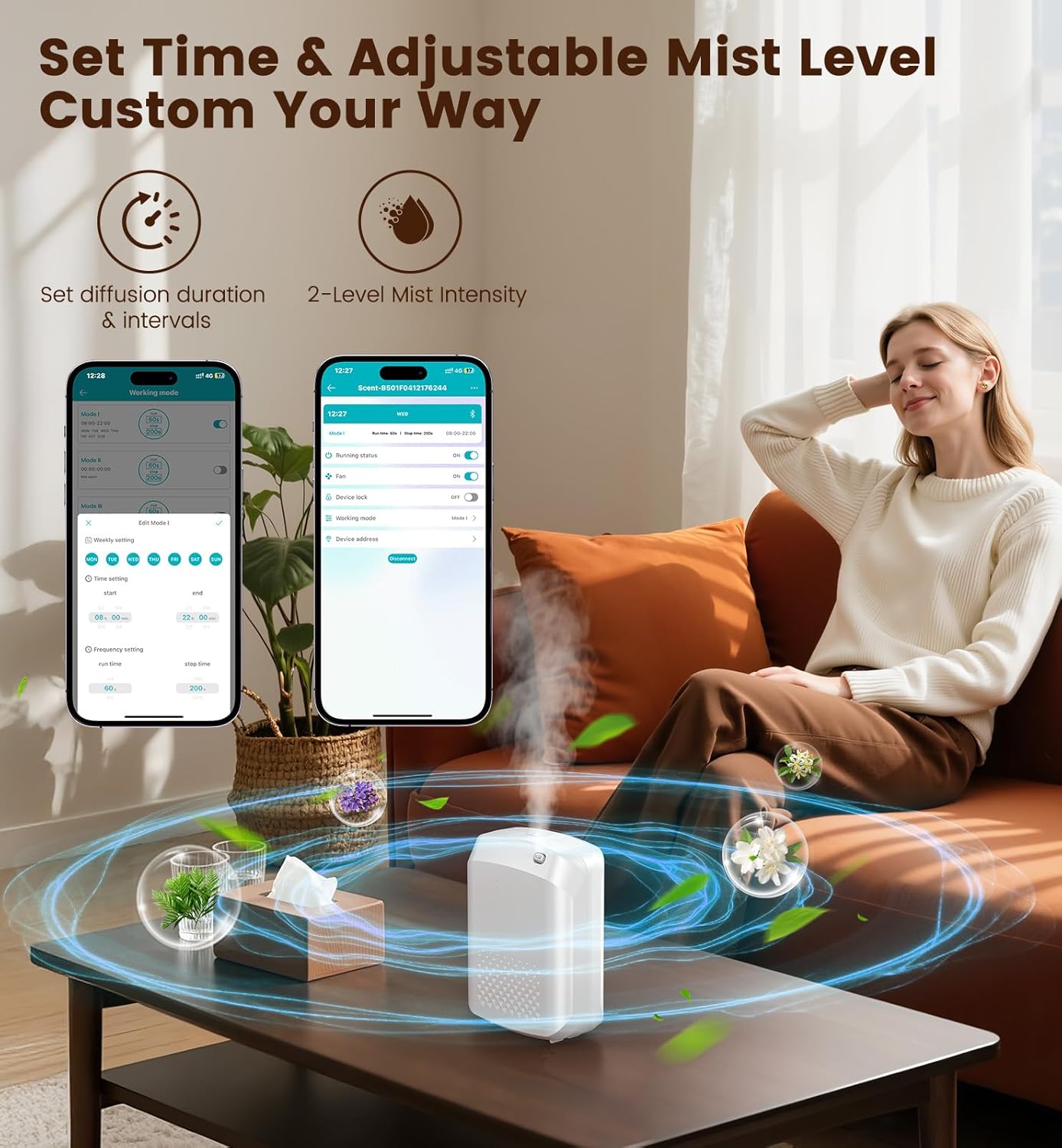
Image: The Scent Lab app interface showing options for setting diffusion duration and mist intensity.

Image: Smart app control via Bluetooth allows easy adjustment of working time, fragrance intensity, and schedules.

Image: Customizable timer modes allow setting shorter intervals for light scent during rest and longer intervals for stronger scent during active hours.
6. Maintenance
To ensure optimal performance and longevity of your diffuser, regular maintenance is recommended:
- Nozzle and Bottle Cleaning: If the scent becomes weak after several months of use, it may be due to oil buildup or a partially clogged nozzle. Regularly clean the nozzle and the essential oil bottle.
- Replacement Bottle: If cleaning does not resolve the issue, a replacement bottle may be needed. Contact customer support via Amazon for assistance.
7. Troubleshooting
If you encounter any issues with your diffuser, refer to the following common problems and solutions:
-
Problem: No fragrance is diffused even though the unit is running.
Solution: Check the following:
- Ensure the essential oil bottle is installed correctly and securely.
- Verify that the app settings have the diffuser set to 'ON'.
- Confirm that the current time falls within the scheduled working period set in the app.
-
Problem: The scent becomes weak after several months of use.
Solution: This is typically caused by oil buildup or a partially clogged nozzle. Clean the nozzle and the essential oil bottle regularly. If the problem persists, contact customer support for a replacement bottle.
For any other issues or further assistance, please contact XEITIN customer support via Amazon. Most issues can be resolved with proper guidance.
8. Specifications
| Feature | Detail |
|---|---|
| Brand | XEITIN |
| Model Name | GAS-501F |
| Color | White |
| Scent | Unscented (diffuser only) |
| Recommended Uses | Home, Hotel, Office, Commercial Spaces, Large Home up to 3000 sq.ft |
| Material | Plastic (BPA Free) |
| Item Weight | 1.8 pounds |
| Power Source | Corded Electric |
| Wattage | 8 watt-hours |
| Mounting Type | Wall Mount & Stand |
| Capacity | 400 ml |
| Coverage Area | Up to 3000 sq.ft |
| Item Dimensions (L x W x H) | 8.3"L x 6.2"W x 8.3"H |
| Additional Features | Liquidless, Long Lasting Aroma, Custom Schedules via App, Adjustable Diffusion Time and Interval |
| UPC | 674519133704 |
9. Warranty and Support
The XEITIN Waterless Essential Oil Diffuser comes with a 1-year free replacement warranty from the manufacturer.
For any product-related inquiries, technical support, or warranty claims, please contact XEITIN customer support directly through Amazon. The manufacturer is committed to resolving any issues you may encounter.
