
1. Introduction
The Ajblg Android Air Tracker F08 is a Bluetooth item finder designed to help you locate personal belongings such as keys, wallets, luggage, and vehicles. This device integrates with the Google Find My Device app (Android 9 and above) to provide location tracking and alerts. It is not compatible with iOS devices.

Image: The Ajblg Android Air Tracker F08 shown with various Android phone brands (Samsung, Google, OPPO, Xiaomi, VIVO, Others), indicating its broad compatibility with Android devices.

Image: The Ajblg Android Air Tracker F08 shown attached to various items like keys, a backpack, a handbag, and luggage, demonstrating its versatility for different personal belongings.
2. Package Contents
Before you begin, please ensure all items are present in the package:
- Smart Tag x 4
- Silicone Protector x 4
- Lanyard x 4
- Spare CR2032 Battery x 1 (Each tracker features a built-in CR2032 battery. One additional spare CR2032 battery is included in the package.)

Image: An illustration of the package contents for the 4-pack, showing four smart tags, four silicone protectors, four lanyards, and one spare CR2032 battery.
3. Setup Instructions
Follow these steps to set up your Ajblg Android Air Tracker:
- Download the Google Find Hub App: On your Android device (Android 9 or above), download and install the "Google Find Hub" app from the Google Play Store.
- Activate the Tracker: Ensure Bluetooth is enabled on your Android phone. Turn on the Android Air Tracker Tag. If the battery is not pre-installed, open the tracker (refer to the Maintenance section for battery replacement) and insert a CR2032 battery.
- Pairing: Place the tracker near your Android phone. The system should automatically prompt you to connect. If not, open the Google Find Hub app and follow the on-screen instructions to add a new device. You may need to press the device's power button once to enter pairing mode.
- Connection Confirmation: Once the connection page appears, confirm the pairing. The app will indicate when the connection is complete, and your tracker is ready for use.

Image: A visual guide showing the four steps for setting up the tracker: downloading the Google Find Hub app, pressing the tracker's button, confirming connection, and successful pairing.
4. Operating Instructions
Utilize the Google Find Hub app to manage and locate your Ajblg Android Air Tracker.
4.1 Locating Items Nearby
When an item is within Bluetooth range (up to 120 feet), use the "Play Sound" feature in the Google Find Hub app. The tracker's built-in speaker will emit an 80-100 dB alarm, helping you pinpoint its exact location, even in cluttered environments.
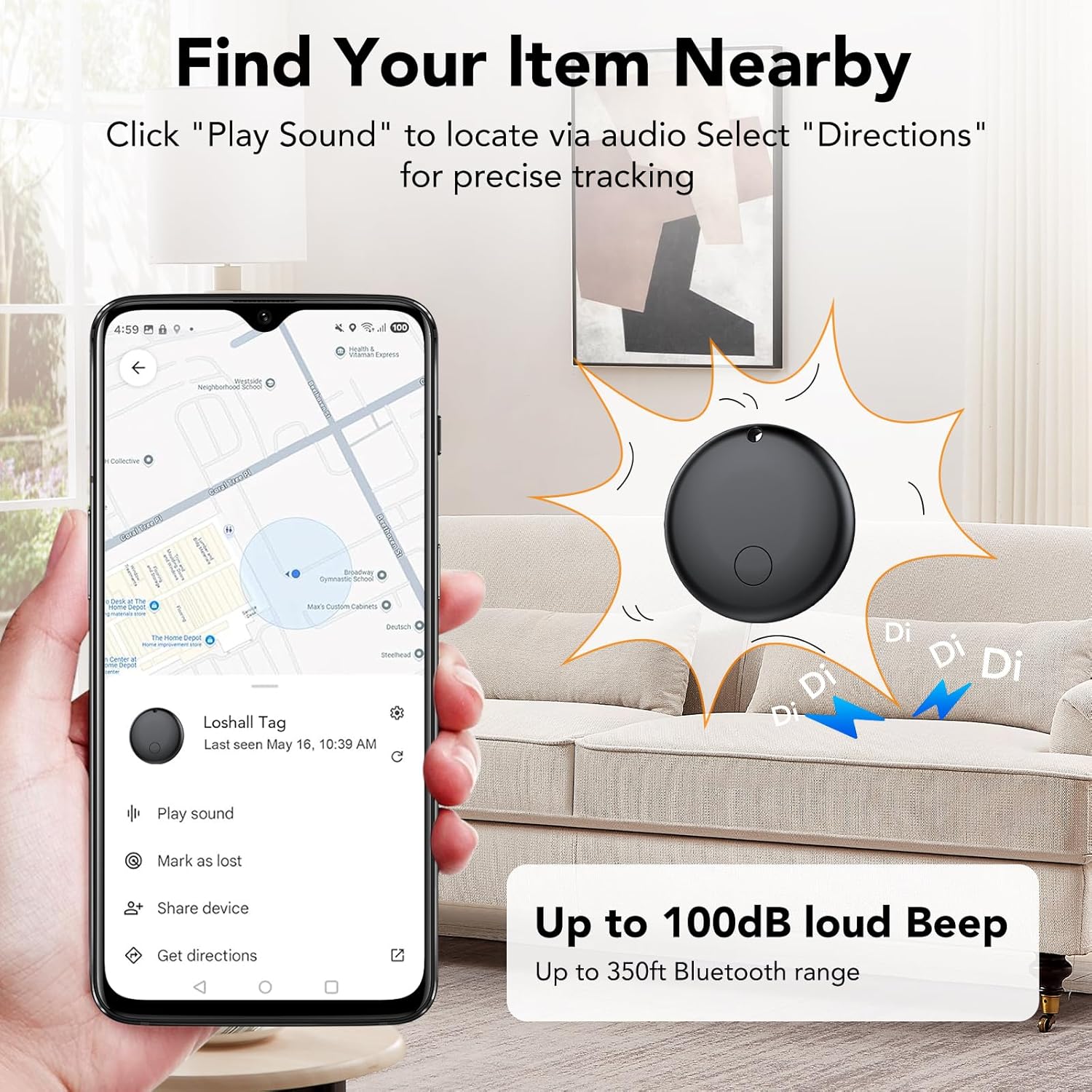
Image: The Google Find Hub app interface displaying the "Play Sound" option, with a visual representation of the tracker emitting a loud beep to help locate it, for example, under a couch cushion.
4.2 Global Tracking
For items outside Bluetooth range, the Google Find My Device network, composed of millions of Android devices, helps locate your tracker. The app will display the last known location on a map, and you can get directions to it.

Image: A world map illustrating the global tracking capabilities of the Android Air Tracker, showing how it leverages the Google Find My Device network to locate items worldwide.
4.3 Left-Behind Reminders
Receive notifications on your Android phone if you leave an item with an attached tracker behind. The app will alert you when the item is no longer detected near you and show its last known location.

Image: A phone screen displaying a "Key left behind" notification, illustrating the tracker's ability to remind users when they've forgotten an item.
4.4 Sharing Devices
You can share access to your Android tracker tags with other users through the Google Find My Device app. This allows multiple individuals to view the item's location on a map.

Image: A graphic depicting the "Share Tag With Family" feature, showing multiple user icons on a map, indicating shared access to a tracker's location.
4.5 Privacy Protection
The Google Find My Device app utilizes encrypted and anonymous networks to protect your data. Location data and history are not stored, and Google cannot access them, ensuring your privacy.

Image: A visual representation of privacy and security, highlighting that user information is protected by Google's encrypted network.
5. Maintenance
5.1 Battery Replacement
The Ajblg Android Air Tracker uses a replaceable CR2032 coin cell battery, which can last up to 1 year depending on usage and environmental factors. To replace the battery:
- Carefully open the tracker casing. This may require a small tool or firm twisting.
- Remove the old CR2032 battery.
- Insert a new CR2032 battery with the positive (+) side facing up.
- Close the tracker casing securely to maintain its IP68 waterproof rating.

Image: A graphic illustrating the tracker's replaceable CR2032 battery, emphasizing its one-year battery life, and its IP68 waterproof capability.
5.2 Waterproof Rating
The tracker is IP68 certified, meaning it is resistant to dust and can withstand immersion in water up to 1.5 meters for up to 30 minutes. Ensure the casing is properly sealed after battery replacement to maintain this rating.
6. Troubleshooting
- Tracker not connecting or pairing:
- Ensure Bluetooth is enabled on your Android device.
- Verify the tracker has a fresh CR2032 battery and is powered on.
- Make sure your Android device is running Android 9 or above.
- Place the tracker close to your phone during pairing.
- Try restarting your phone and the tracker.
- Reinstall the Google Find Hub app.
- Sound alert is not loud enough:
- The tracker's speaker emits 80-100 dB. Ensure there are no obstructions muffling the sound.
- In noisy environments, the sound may be harder to hear. Try to reduce ambient noise if possible.
- Location updates are infrequent or inaccurate:
- Location accuracy depends on the density of Android devices in the Google Find My Device network. In areas with fewer Android devices, updates may be less frequent.
- Ensure your phone's location services are enabled and the Google Find Hub app has necessary permissions.
- Bluetooth range for direct connection is up to 120 feet. Beyond this, it relies on the network.
- Silicone protector does not fit:
- Ensure you are using the correct silicone protector for your tracker model.
- Gently stretch the silicone protector to fit the tracker. If it's consistently too loose or tight, contact customer support.
7. Specifications
| Model Number | F08 |
| Dimensions | 29mm x 29mm x 7.8mm (1.14 x 1.14 x 0.31 inches) |
| Item Weight | 2.08 ounces (per tracker) |
| Connectivity | Bluetooth |
| Compatible Devices | Android devices (version 9 and above) |
| Battery Type | CR2032 (1 required per tracker) |
| Battery Life | Up to 1 year (varies with usage) |
| Waterproof Rating | IP68 |
| Material | Plastic, Polycarbonate (PC) |
| Manufacturer | Ajblg |

Image: A detailed diagram illustrating the physical dimensions of the Ajblg Android Air Tracker and a list of included package contents.
8. Warranty and Support
For product support, please contact Ajblg customer service. Information regarding specific warranty periods may be available on the product packaging or the official Ajblg website. Please retain your proof of purchase for warranty claims.
Return Policy: This product is typically eligible for returns or replacements within 30 days of purchase, subject to the retailer's return policy.