
1. Introduction
Thank you for choosing the MANSCAPED® Weed Whacker® 3.0 PRO. This electric trimmer is designed for precise and comfortable grooming of nose, ear, and eyebrow hair. Featuring SkinSafe® Technology, a dual-head system, and an LED spotlight, it offers an efficient and safe trimming experience. Please read this manual thoroughly before first use to ensure optimal performance and safety.
2. Product Overview
The MANSCAPED® Weed Whacker® 3.0 PRO is engineered with advanced features for superior grooming.

Figure 2.1: The MANSCAPED® Weed Whacker® 3.0 PRO with its retail packaging.
Key Features:
- SkinSafe® Dual-Head System: Includes interchangeable rotary and eyebrow blades designed to minimize nicks and cuts.
- Built-in LED Spotlight: Illuminates hard-to-see areas for precise trimming.
- Waterproof Design (IPX7): Allows for easy cleaning under running water. Rated to protect against immersion in up to one meter of fresh water for up to 30 minutes.
- Rechargeable Li-ion Battery: Provides up to 60 minutes of runtime on a full charge.
- Travel Lock: Prevents accidental activation during transport.
- Ergonomic Design: Ensures comfortable grip and improved control.
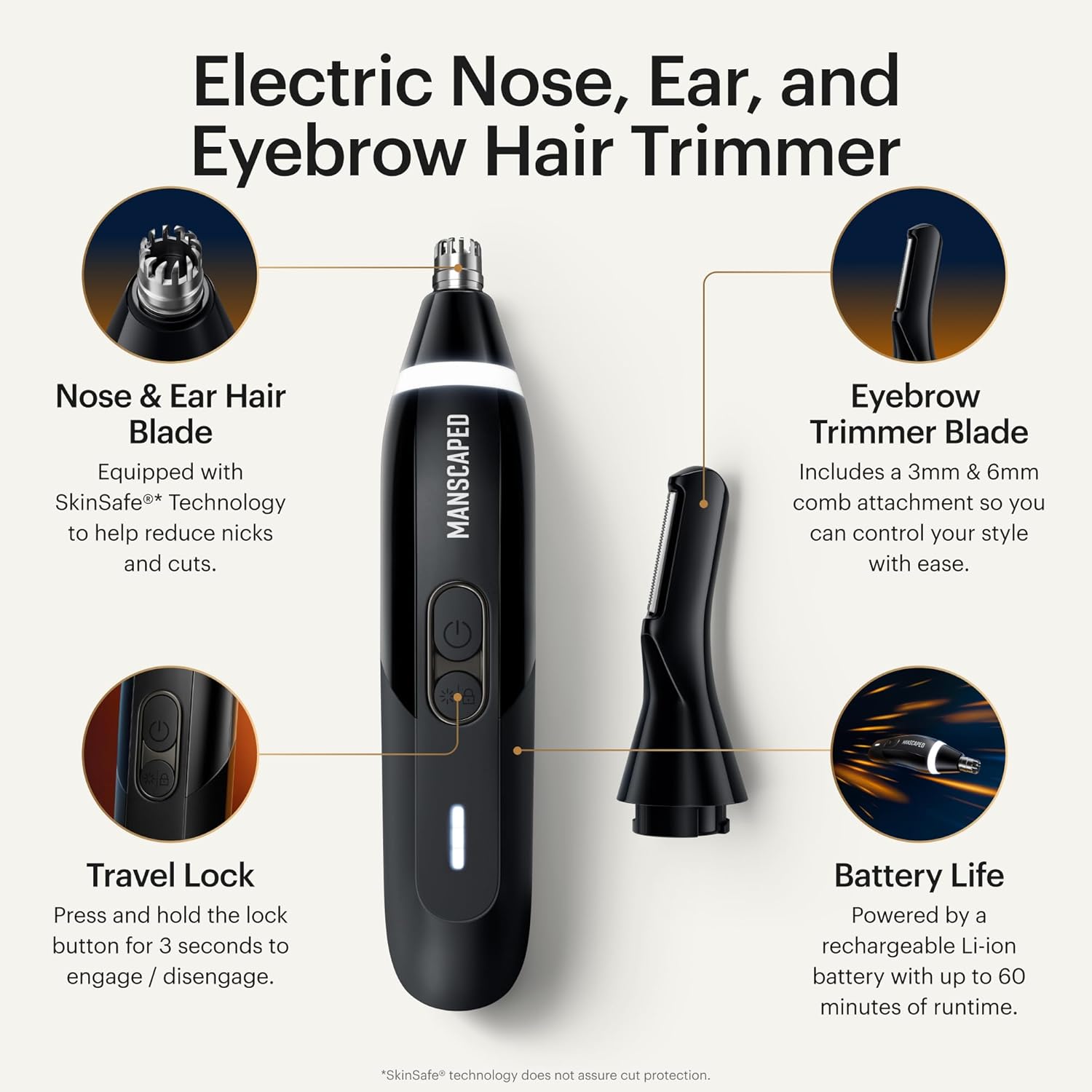
Figure 2.2: Overview of the Weed Whacker 3.0 PRO's main features.
What's in the Box:

Figure 2.3: Included components: Weed Whacker 3.0 PRO, eyebrow comb attachments, and USB-C charging cable.
- MANSCAPED® Weed Whacker® 3.0 PRO Trimmer
- Rotary Nose & Ear Hair Blade (pre-installed)
- Eyebrow Trimmer Blade
- 3mm Eyebrow Comb Attachment
- 6mm Eyebrow Comb Attachment
- USB-C Charging Cable
3. Setup and Charging
Initial Charge:
Before first use, fully charge your Weed Whacker® 3.0 PRO. Connect the provided USB-C charging cable to the port at the bottom of the device and plug the other end into a compatible USB power adapter (not included). The LED indicator will blink while charging and remain solid when fully charged. A full charge takes less than 60 minutes.
Video 3.1: Official MANSCAPED® video demonstrating the Weed Whacker® 3.0 PRO, including charging and usage.
Power On/Off:
Press the power button once to turn the device on. Press it again to turn it off.
4. Operating Instructions
Nose and Ear Hair Trimming:
- Ensure the rotary nose & ear hair blade is securely attached.
- Turn on the device.
- Gently insert the trimmer tip into your nostril or ear canal.
- Move the trimmer slowly and carefully to trim unwanted hair. Avoid inserting too deeply or pressing firmly against the skin to prevent discomfort. The built-in LED spotlight will help illuminate the area.
- After trimming, turn off the device.

Figure 4.1: Proper technique for trimming nose hair with the rotary blade.

Figure 4.2: Using the trimmer to carefully remove ear hair.
Eyebrow Trimming:
- To switch to the eyebrow trimmer, turn the device off. Twist the rotary blade counter-clockwise and pull it off.
- Align the eyebrow trimmer blade with the device and twist clockwise until it clicks into place.
- Select the desired eyebrow comb attachment (3mm or 6mm) and slide it onto the eyebrow blade.
- Turn on the device. Lay the linear blade and comb flat on your eyebrow.
- Gently move the trimmer back and forth to trim eyebrows to your preferred length. The comb lifts the hair and guides it into the blade for an even trim.
- After trimming, turn off the device.

Figure 4.3: Using the eyebrow trimmer with a comb attachment for precise eyebrow grooming.
5. Maintenance
Cleaning:
The Weed Whacker® 3.0 PRO is IPX7 waterproof, making cleaning simple:
- Ensure the device is turned off.
- Remove the blade by twisting it counter-clockwise and pulling it off.
- Rinse the blade head under running water to remove hair and debris.
- Rinse the main body of the trimmer under running water, ensuring the charging port cover is securely closed.
- Shake off excess water and allow all components to air dry completely before reattaching the blade or charging.

Figure 5.1: Removing and replacing the trimmer blade for cleaning or changing attachments.
Blade Replacement:
For optimal performance and hygiene, it is recommended to replace the blades every 3 months. Replacement blades can be purchased separately from MANSCAPED®.
6. Travel Lock
The Weed Whacker® 3.0 PRO features a travel lock to prevent accidental activation during travel or storage.
- To Activate: With the device off, press and hold the power button for 3 seconds. The LED indicator will flash to confirm the travel lock is engaged.
- To Deactivate: Press and hold the power button for 3 seconds. The LED indicator will flash, and the device will turn on, indicating the travel lock is disengaged.
7. Safety Information
- SkinSafe® Technology does not guarantee cut protection. Always use the device with care.
- Do not charge the device when it is wet. Ensure the charging port is dry and securely closed before connecting the charging cable.
- Keep out of reach of children.
- Do not disassemble or attempt to repair the device yourself. Contact customer support for assistance.
- Avoid using the trimmer on irritated or broken skin.
8. Specifications
| Specification | Detail |
|---|---|
| Model Number | 30-00062-NA |
| Brand | MANSCAPED® |
| Recommended Uses | Nose, Ear, Eyebrow Hair |
| Power Source | Battery Powered (Rechargeable Li-ion) |
| Battery Life | Up to 60 minutes runtime |
| Waterproof Rating | IPX7 (up to 1 meter for 30 minutes) |
| Color | Black |
| Item Weight | 0.16 Kilograms (approx. 5.61 ounces) |
| Package Dimensions | 6.38 x 3.5 x 1.85 inches |
| Manufacturer | MANSCAPED |
9. Troubleshooting
Device Not Turning On:
- Ensure the device is fully charged. Connect it to the charger and check the LED indicator.
- Check if the travel lock is activated. Press and hold the power button for 3 seconds to deactivate it.
Poor Trimming Performance:
- Clean the blade thoroughly to remove any accumulated hair or debris.
- Ensure the blade is correctly attached and not damaged.
- Consider replacing the blade if it has been in use for more than 3 months or if performance has significantly decreased.
Device Not Charging:
- Verify that the USB-C cable is securely connected to both the device and the power adapter.
- Ensure the charging port on the device is dry and free of debris.
- Try using a different USB power adapter or outlet.
10. Warranty and Support
For warranty information, product support, or to purchase replacement parts, please visit the official MANSCAPED® website or contact their customer service directly. Protection plans are also available for extended coverage.
