1. Product Overview
The HABOTEST HT3500E is a professional battery tester designed to assess the health status of 12V and 24V lead-acid storage batteries. It provides quick and accurate measurements of battery voltage, state of charge (SOC), internal resistance (I.R), state of health (SOH), and cold cranking amps (CCA). This device assists users in determining if a battery requires replacement or maintenance.

Image 1.1: Front view of the HABOTEST HT3500E Battery Tester, showing its display and control buttons.
Key Features:
- Measuring Range: 0 - 24V for comprehensive battery analysis.
- Accuracy: ±1% for reliable measurements.
- Display: Clear Digital LCD Display for easy reading.
- Test Standards: Supports multiple international standards including EN, IEC, SAE, DIN, CCA, and AH.
- Measurable Content: Provides readings for Voltage (VOLT), Power (SOC), Internal Resistance (I.R), Life (SOH), and Cold Start Current (CCA).
- Detectable Battery Types: Compatible with STD (Standard Lead Acid Battery), EFB (Enhanced Flooded Battery), AGM (Absorbed Glass Mat Battery), and Gel (Gel Battery).
- Safety Features: Includes Overload Protection Voltage (36V), Buzzer Alert, Overload Protection, Reverse Connection Protection, and Poor Contact Indication.
2. Safety Information
Please read and understand all safety instructions before operating the HABOTEST HT3500E Battery Tester. Failure to follow these instructions may result in injury or damage to the device or battery.
- Always wear appropriate eye protection and gloves when working with batteries.
- Ensure proper ventilation in the work area, as batteries can emit explosive gases.
- Avoid short-circuiting the battery terminals with tools or other conductive materials.
- Connect the tester clamps correctly: red clamp to the positive (+) terminal and black clamp to the negative (-) terminal. The device features Reverse Connection Protection to prevent damage from incorrect polarity.
- Do not expose the tester to excessive moisture or extreme temperatures.
- The device has Overload Protection Voltage (36V). Do not attempt to test batteries exceeding this voltage.
- Keep the device clean and free from dirt and debris.
- If the device emits a Buzzer Alert, refer to the troubleshooting section or disconnect the device immediately.
3. Product Components and Panel Functions
Familiarize yourself with the components and controls of your HT3500E Battery Tester.

Image 3.1: Diagram illustrating the display screen, parameter adjustment keys, battery type selection, test key, test standard selection key, and return key on the HT3500E.
- Display Screen: Shows measurement results, battery type, test standard, and other relevant information.
- TYPE Button: Used to select the type of battery being tested (STD, EFB, AGM, GEL).
- D-STD Button: Used to select the desired test standard (EN, IEC, SAE, DIN, CCA, AH).
- ▲ / ▼ (Parameter Adjustment Keys): Used to navigate menus or adjust values, such as AH rating.
- TEST Button: Initiates the battery test.
- ESC Button: Used to return to the previous menu or exit a function.
- Test Clamps: Red clamp for positive (+) battery terminal, black clamp for negative (-) battery terminal.
4. Setup and Connection
Follow these steps to properly connect the HT3500E Battery Tester to a battery.

Image 4.1: The HT3500E Battery Tester connected to a vehicle battery using its red and black clamps.
- Ensure the battery terminals are clean and free from corrosion for accurate readings.
- Connect the red clamp of the tester to the positive (+) terminal of the battery.
- Connect the black clamp of the tester to the negative (-) terminal of the battery.
- The tester will power on automatically once connected. If the connection is incorrect, the device's Reverse Connection Protection will activate, and a warning may be displayed or sounded.
5. Operating Instructions
5.1. Selecting Battery Type
The HT3500E supports various battery types. It is crucial to select the correct type for accurate testing.

Image 5.1: The HT3500E display indicating the selection of different battery types: STD, EFB, AGM, and GEL.
- After connecting the tester, press the TYPE button repeatedly to cycle through the available battery types:
- STD: Standard Lead Acid Battery
- EFB: Enhanced Flooded Battery
- AGM: Absorbed Glass Mat Battery
- GEL: Gel Battery
- Select the type that matches your battery.
5.2. Selecting Test Standard
The tester allows you to choose the standard by which the battery's cold cranking amps (CCA) or ampere-hour (AH) will be measured.
- Press the D-STD button repeatedly to cycle through the available test standards:
- EN: European Standards
- IEC: International Electrotechnical Commission
- SAE: Society of Automotive Engineers
- DIN: German Industrial Standard
- CCA: Cold Cranking Amps
- AH: Ampere-Hour
- Use the ▲ / ▼ buttons to adjust the CCA or AH value to match your battery's rating.
5.3. Performing a Test
Once the battery type and test standard are selected, you can initiate the test.
- Ensure all connections are secure and the correct battery type and standard are set.
- Press the TEST button. The tester will perform a rapid analysis of the battery.
- The results will be displayed on the screen within a few seconds.
5.4. Interpreting Results
The display provides several key metrics to evaluate battery health.

Image 5.2: The HT3500E display showing battery life rating categories (Excellent, Good, Poor, Recommended Replacement) based on State of Health (SOH) percentage.
- VOLT (Voltage): The current voltage of the battery.
- SOC (State of Charge): Indicates the current charge level of the battery as a percentage.
- I.R (Internal Resistance): A lower internal resistance generally indicates a healthier battery. High internal resistance can impede current flow.
- SOH (State of Health): Represents the overall health and capacity of the battery relative to its original specifications.
- CCA (Cold Cranking Amps): The amount of current a battery can deliver at 0°F (-18°C) for 30 seconds while maintaining at least 7.2 volts. This is crucial for engine starting ability.
The tester also provides a visual indication of battery life rating:
| SOH Percentage | Battery Condition |
|---|---|
| ≥ 80% | Excellent Battery Condition |
| ≥ 60% | Battery in Good Condition |
| ≥ 45% | Battery Condition is Poor, Need to Pay Attention |
| < 45% | Recommended Replacement |
Note: If the current voltage of the measured battery is too low, the tester may indicate that charging detection is required before a full test can be performed.
6. Maintenance
Proper maintenance ensures the longevity and accuracy of your HT3500E Battery Tester.
- Cleaning: Wipe the device with a soft, dry cloth. Do not use abrasive cleaners or solvents.
- Storage: Store the tester in a cool, dry place away from direct sunlight and extreme temperatures.
- Cable Care: Inspect the test cables and clamps regularly for any signs of damage. Replace if necessary.
- Battery Care: Ensure the battery being tested is handled according to its manufacturer's guidelines.
7. Troubleshooting
If you encounter issues with your HT3500E Battery Tester, refer to the following common problems and solutions.
- No Display After Connection:
- Check if the clamps are securely connected to the battery terminals.
- Ensure the battery has sufficient voltage to power the tester (minimum operating voltage).
- Verify correct polarity (red to positive, black to negative).
- Inaccurate Readings:
- Ensure battery terminals are clean and free of corrosion.
- Confirm that the correct battery type (STD, EFB, AGM, GEL) and test standard (CCA, AH, etc.) are selected.
- Check for Poor Contact Indication on the display or a buzzer alert, and re-secure the clamps.
- Buzzer Alert Sounds:
- This may indicate Overload Protection or Reverse Connection Protection has been triggered. Disconnect the tester, verify connections and battery voltage, then reconnect.
- Refer to the display for specific error messages if available.
- Tester Not Responding to Button Presses:
- Disconnect and reconnect the tester to reset it.
- Ensure the battery has adequate charge.
8. Specifications
Detailed technical specifications for the HABOTEST HT3500E Battery Tester.
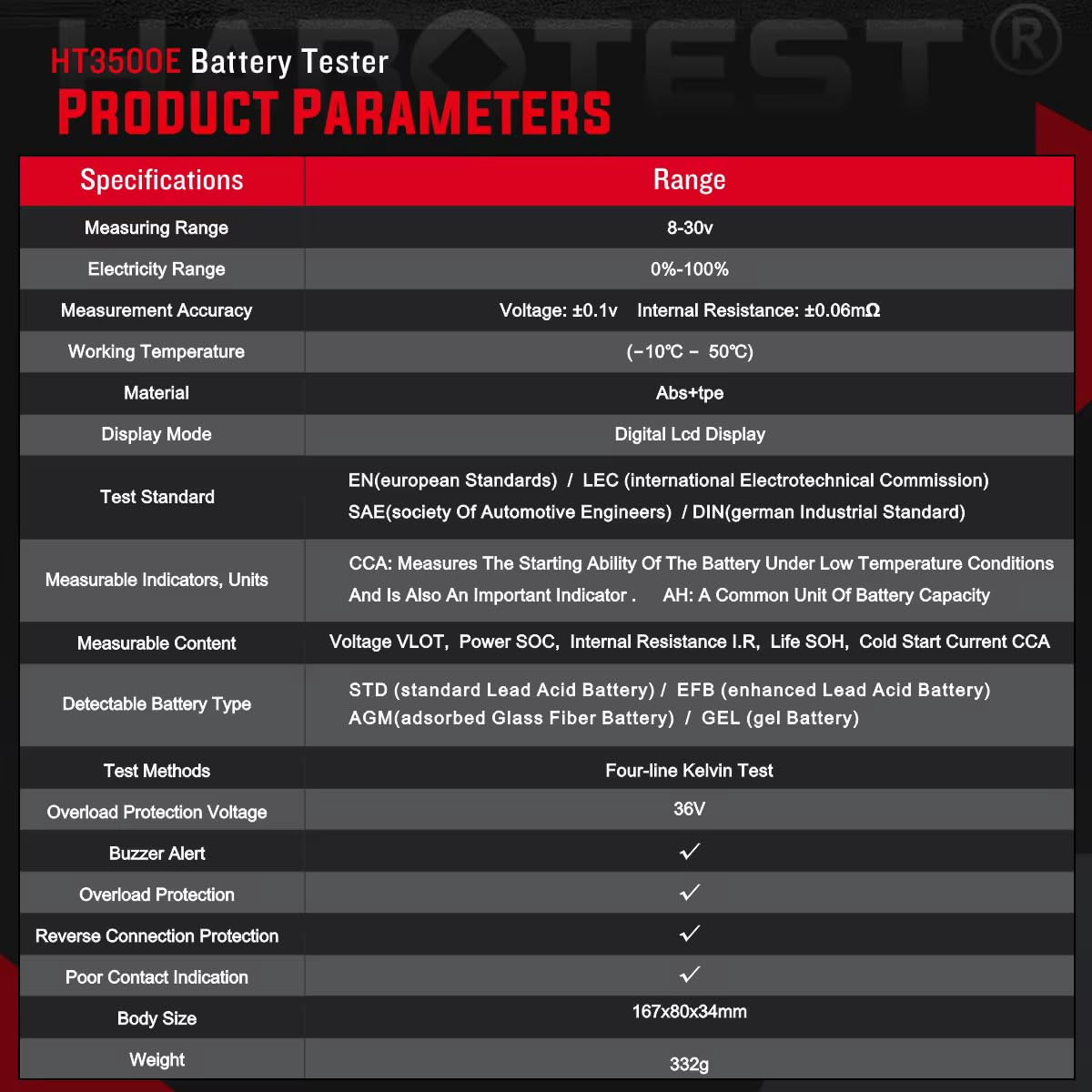
Image 8.1: Table displaying the detailed product parameters and specifications of the HT3500E Battery Tester.
| Specification | Value |
|---|---|
| Brand | HABOTEST |
| Model Number | HT3500E |
| Measuring Range | 0 - 24V (8-30V for operation) |
| Accuracy | ±1% (Voltage: ±0.1V, Internal Resistance: ±0.06mΩ) |
| Display | Digital LCD Display |
| Working Temperature | -10°C ~ 50°C |
| Test Standards | EN, IEC, SAE, DIN, CCA, AH |
| Measurable Content | Voltage (VOLT), Power (SOC), Internal Resistance (I.R), Life (SOH), Cold Start Current (CCA) |
| Detectable Battery Types | STD, EFB, AGM, GEL |
| Overload Protection Voltage | 36V |
| Dimensions (L x W x H) | 16.7 x 8 x 3.4 cm |
| Item Weight | 332 Grams |
| Included Components | 1 Battery Tester, 1 User Manual |
9. Warranty and Support
This HABOTEST HT3500E Battery Tester is designed for reliability and performance. For warranty information, please refer to the terms provided at the point of purchase or contact your retailer.
Contact Information for Support:
For technical support or inquiries, please contact the importer/packer:
MDS Automech Solutions
Address: Q-106, Phase 3, Shivalik Nagar, BHEL, Haridwar, Uttarakhand-249403
Contact: +91-9870694636
Email: mohit@mdsautomech.in