
Arecovas AR-EH002
Arecovas Wall Heater with ALCI Plug (Model AR-EH002) - User Manual
Your guide to safe and efficient operation.
1. Important Safety Information
Please read all instructions carefully before using this appliance. Failure to follow these instructions may result in electric shock, fire, or serious injury.
- ALCI Plug: This heater is equipped with an Appliance Leakage Current Interrupter (ALCI) plug for enhanced safety, especially in areas where water may be present. Do not bypass or tamper with the ALCI plug. Test the ALCI plug monthly.
- Overheat Protection: The heater features an automatic overheat protection system. If the internal temperature exceeds a safe limit, the heater will automatically shut off. Unplug the unit and allow it to cool before restarting.
- Tip-Over Protection: For models used with the stand, a built-in tip-over switch will automatically shut off the heater if it is accidentally knocked over.
- Flame Retardant Materials: Constructed with V-0 flame retardant materials for added safety.
- Placement: Always place the heater on a stable, level surface or mount securely to a wall. Maintain a minimum distance of 3 feet (0.9 meters) from combustible materials such as furniture, pillows, bedding, papers, clothes, and curtains.
- Indoor Use Only: This appliance is designed for indoor use only. Do not use outdoors.
- Children and Pets: Keep the heater out of reach of children and pets. Supervise children when they are near the appliance.
- Power Cord: Do not run the power cord under carpeting or cover with throw rugs, runners, or similar coverings. Arrange the cord away from traffic areas where it will not be tripped over.
- Ventilation: Do not block air intakes or exhaust openings. Ensure proper ventilation to prevent overheating.
2. Product Overview
The Arecovas Wall Heater (Model AR-EH002) is a versatile heating solution designed for various indoor spaces. It offers both wall-mounted and desktop placement options, along with multiple heating modes and safety features.
Key Features:
- PTC Fast Heating: Utilizes advanced PTC ceramic heating technology for rapid heat generation, reaching desired temperatures quickly.
- Adjustable Thermostat: Allows precise temperature control from 41°F to 95°F (5°C to 35°C).
- 30° Oscillation: Manual oscillation feature to distribute warmth evenly across the room.
- 24-Hour Timer: Programmable timer for automatic shut-off, enhancing convenience and energy saving.
- Dual Control: Operates via an intuitive touch screen panel on the unit or a convenient remote control.
- Low Noise Operation: Designed to operate quietly at approximately 30 dB, suitable for bedrooms and offices.
- Versatile Placement: Can be wall-mounted to save floor space or used as a desktop unit with the included stand.
- Towel Rack Functionality: When wall-mounted, the stand can be used as a towel rack, allowing the heater to warm or dry towels.
- Safety Certifications: ETL Listed, V-0 Flame Retardant, Overheat Protection, and Tip-Over Safety Switch.
Product Components:
- Main Heater Unit
- Detachable Stand / Towel Rack
- Wall Mounting Bracket
- Remote Control
- Mounting Screws and Wall Anchors
- User Manual (this document)
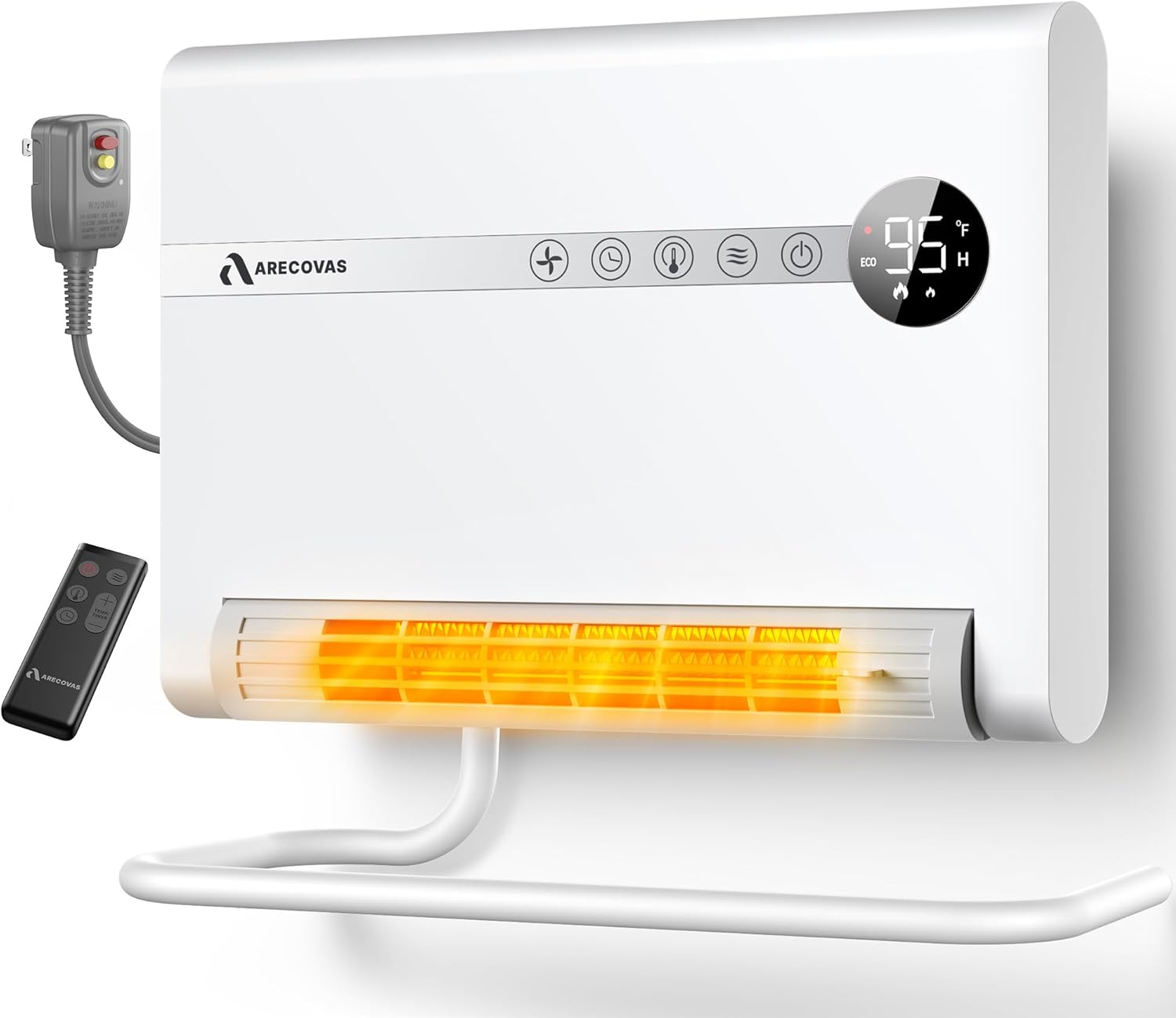
Figure 2.1: Front view of the Arecovas Wall Heater, showing the digital display, control panel, ALCI plug, and remote control.

Figure 2.2: Dimensions of the Arecovas Wall Heater: 10.41" Height, 14.09" Width, 5.73" Depth.
3. Setup and Installation
The Arecovas Wall Heater offers flexible installation options: wall-mounted or desktop use.
3.1 Wall Mounting Installation
- Choose Location: Select a suitable wall location, ensuring it is a minimum of 3 feet (0.9 meters) away from any combustible materials. Ensure the wall is sturdy enough to support the heater's weight.
- Mark Drill Points: Use the provided wall mounting bracket as a template. Hold the bracket against the wall at the desired height and mark the two screw hole positions with a pencil.
- Drill Holes: Drill two holes at the marked positions. Insert the included wall anchors into the drilled holes.
- Secure Bracket: Screw the mounting screws into the wall anchors, leaving a small gap for the bracket to hang.
- Attach Heater: Align the slots on the back of the heater with the screws on the wall bracket. Slide the heater down to secure it in place.
- Install Towel Rack (Optional): If desired, attach the stand to the bottom of the heater using the provided screws. This converts the stand into a towel rack.
Video 3.1: Official Arecovas guide on how to install the wall-mounted heater. This video demonstrates marking the wall, drilling, securing the bracket, and attaching the heater.

Figure 3.1: Wall-mounted heater with the stand functioning as a towel rack. Dimensions shown are 12.99" (heater width), 14.17" (towel rack length), and 5.73" (towel rack depth).
3.2 Desktop Placement
For desktop use, simply attach the stand to the bottom of the heater using the provided screws. Ensure the heater is placed on a stable, flat surface.

Figure 3.2: Arecovas Wall Heater placed on a table, highlighting safety features such as ETL Listing, 24H Auto Off, V-0 Flame Retardant, Overheating Protection, and 45° Tip-over Safety Switch.
4. Operating Instructions
The heater can be operated using the touch control panel on the unit or the included remote control.
4.1 Control Panel Overview
Figure 4.1: Close-up of the Arecovas Wall Heater's control panel and digital display.
- Power Button (rightmost): Turns the heater ON/OFF.
- Mode Button (next to power): Cycles through heating modes (High, Low, ECO/Thermostat, Fan Only).
- Temperature/Timer Adjustment (+/- buttons): Adjusts the target temperature in ECO mode or sets the timer duration.
- Timer Button (clock icon): Activates and sets the auto-off timer.
- Oscillation Button (fan icon): Activates or deactivates the 30° manual oscillation.
- Digital Display: Shows current temperature, selected mode, and timer settings.
4.2 Remote Control
The remote control provides convenient access to all functions from a distance.

Figure 4.2: The remote control for the Arecovas Wall Heater, showing buttons for power, mode, temperature/timer adjustment, and oscillation.
4.3 Operating Modes
- High Heat (HI): Provides maximum heating power (1500W) for rapid warming.
- Low Heat (LO): Provides reduced heating power (900W) for sustained warmth.
- ECO Mode (Thermostat): Maintains a set temperature. The heater will cycle ON/OFF to keep the room at your desired temperature (41°F - 95°F).
- Fan Only (FA): Circulates room air without heating, useful for general air movement.
Video 4.1: An overview of the Arecovas Wall Heater's features, including different modes and heating capabilities.
4.4 Timer Function
Press the Timer button (clock icon) to activate the timer. Use the +/- buttons to set the desired operating duration from 1 to 24 hours. The heater will automatically shut off once the set time expires.
4.5 Adjustable Airflow
The front vent of the heater can be manually adjusted to direct the airflow. Gently slide the vent cover left or right to change the direction of the warm air.

Figure 4.3: The heater demonstrating its 30-degree manual oscillation feature, directing warm air across the room.
5. Maintenance
Regular maintenance ensures optimal performance and longevity of your Arecovas Wall Heater.
- Cleaning: Always unplug the heater and allow it to cool completely before cleaning. Use a soft, damp cloth to wipe the exterior surfaces. Do not use abrasive cleaners or solvents.
- Air Filter: Periodically check the air intake filter (located on the back or side, refer to diagram in full manual if available) for dust and debris. Clean the filter gently with a soft brush or vacuum cleaner. Ensure the filter is completely dry before re-installing.
- Storage: If storing the heater for an extended period, clean it thoroughly and store it in a cool, dry place, preferably in its original packaging.
6. Troubleshooting
If you experience issues with your heater, refer to the following common problems and solutions:
| Problem | Possible Cause | Solution |
|---|---|---|
| Heater does not turn on. | No power, ALCI tripped, Overheat protection activated, Tip-over switch activated. | Check power outlet. Reset ALCI plug. Unplug and allow to cool for 30 minutes. Ensure heater is on a stable surface. |
| Heater stops unexpectedly. | Overheat protection activated, Tip-over switch activated, Timer expired. | Unplug and allow to cool. Ensure stable placement. Check timer settings. |
| Insufficient heat output. | Incorrect mode selected, Thermostat set too low, Room size too large. | Select High heat mode. Increase target temperature. Consider heater's recommended coverage area (up to 150 sq.ft as main heat, up to 750 sq.ft as supplement). |
| Unusual noise. | Dust/debris in fan, Loose component. | Clean air filter and fan blades. If noise persists, contact customer support. |
7. Specifications
| Feature | Specification |
|---|---|
| Brand | Arecovas |
| Model Number | AR-EH002 |
| Power | 1500W (High), 900W (Low) |
| Voltage | 120 Volts (AC) |
| Amperage | 12.5 Amps |
| Heating Element | PTC Ceramic |
| Temperature Range | 41°F - 95°F (5°C - 35°C) |
| Oscillation | 30° Manual |
| Timer | Up to 24 Hours |
| Noise Level | Approx. 30 dB |
| Product Dimensions | 5.42"D x 12.99"W x 14.17"H |
| Item Weight | 5.51 Pounds |
| Safety Features | ALCI Plug, Overheat Protection, Tip-Over Protection, V-0 Flame Retardant |
| Certifications | ETL Listed |
8. Warranty and Support
For warranty information or technical support, please refer to the contact details provided on the product packaging or visit the official Arecovas website. Keep your purchase receipt as proof of purchase for any warranty claims.