
1. Introduction
This manual provides detailed instructions for the assembly, installation, and proper use of your SoBuy Bathroom Cabinet Wall Mount, model FRG231-T-W. This wall-mounted cabinet is designed to offer efficient storage in various spaces such as bathrooms, laundry rooms, or kitchens, featuring adjustable shelves and a durable MDF construction.
Please read this manual thoroughly before beginning assembly or installation to ensure safe and correct usage. Keep this manual for future reference.
2. Safety Information
Important: Failure to follow these safety instructions may result in injury or damage to the product.
- Ensure proper wall mounting to prevent the cabinet from falling. Use appropriate hardware for your wall type (e.g., drywall anchors, wood studs).
- Do not exceed the maximum load limit of 10.5 kilograms (23.1 pounds) for the entire cabinet, and distribute weight evenly.
- Be cautious of pinch points when opening and closing the cabinet doors.
- Follow all installation instructions carefully to avoid accidents and ensure stability.
- Keep small parts and hardware out of reach of children during assembly.
- If any parts are missing or damaged, do not proceed with assembly. Contact customer support immediately.
3. Components List
Before starting assembly, verify that all components and hardware are present. Refer to the included parts diagram in your packaging for specific identification.
Included Components:
- Cabinet panels (top, bottom, sides, back, doors)
- Adjustable shelf(es)
- Metal handles
- Hinges
- Mounting hardware (screws, wall anchors, etc.)
- Assembly instructions

Image: Close-up view of the adjustable shelf pins, metal handles, and hinge hardware.
4. Setup & Installation
The SoBuy Bathroom Cabinet is designed for quick DIY assembly and wall-mounted installation. Two people are recommended for safe installation.
4.1. Assembly Instructions
- Unpack and Inspect: Carefully unpack all components and check against the parts list. Ensure no parts are damaged.
- Assemble Cabinet Frame: Follow the detailed step-by-step instructions provided in the separate assembly guide included in your packaging to construct the main cabinet frame. This typically involves attaching side panels to the top and bottom panels using the provided fasteners.
- Attach Back Panel: Secure the back panel to the assembled frame.
- Install Hinges: Attach the hinges to the cabinet doors and then to the cabinet frame according to the instructions.
- Attach Handles: Secure the metal handles to the cabinet doors.
- Insert Adjustable Shelf Pins: Place the shelf support pins into the desired holes inside the cabinet.

Image: Detail showing the pre-drilled holes for adjustable shelves.

Image: Close-up of the silver metal handles on the cabinet doors.
4.2. Wall Mounting
- Choose Location: Select a suitable wall location, ensuring it is free from electrical wires or plumbing. Consider the cabinet's dimensions (7.9"D x 21.7"W x 23.6"H) and desired height.
- Mark Drilling Points: Hold the assembled cabinet against the wall at the desired height and use a pencil to mark the drilling points for the mounting screws. Ensure the marks are level.
- Drill Pilot Holes: Drill pilot holes at the marked locations. Use a drill bit appropriate for your wall type and the provided wall anchors/screws. If mounting into wood studs, pre-drilling is still recommended.
- Insert Wall Anchors (if necessary): If drilling into drywall without studs, insert the appropriate wall anchors into the pilot holes.
- Mount Cabinet: With assistance, lift the cabinet and align the mounting holes on the cabinet with the drilled holes/anchors on the wall. Insert and tighten the mounting screws securely. Do not overtighten.
- Verify Stability: Gently pull on the cabinet to ensure it is firmly attached to the wall and does not wobble.

Image: The SoBuy wall cabinet installed above a washing machine in a laundry room.

Image: Diagram highlighting the mounting screw locations on the top panel of the cabinet.
5. Operation
The SoBuy Bathroom Cabinet is designed for straightforward use to organize your items.
5.1. Using the Doors
- Grasp the metal handles to open and close the two cabinet doors.
- Ensure doors close completely to keep contents secure and dust-free.
5.2. Adjusting Shelves
The cabinet features one adjustable shelf with three height options, allowing you to customize storage space for various items.
- Empty the Shelf: Remove all items from the shelf you wish to adjust.
- Remove Shelf: Carefully lift the shelf and remove it from the support pins.
- Relocate Pins: Remove the four shelf support pins and reinsert them into the desired set of holes at the new height. Ensure all four pins are at the same level.
- Reinsert Shelf: Place the shelf back onto the support pins, ensuring it sits securely and level.
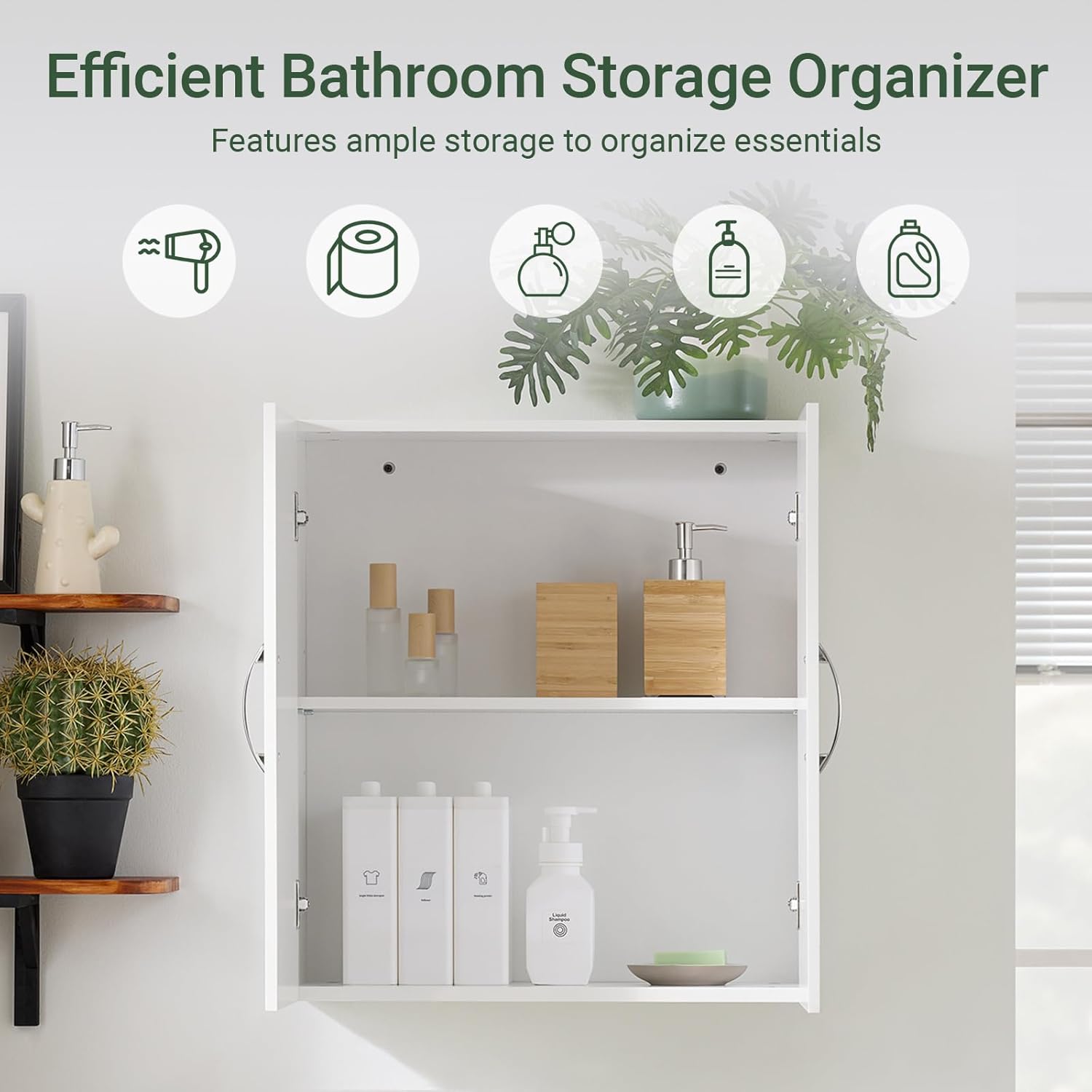
Image: The cabinet with doors open, showing an adjustable shelf holding toiletries and other items.
6. Maintenance
Regular maintenance will help preserve the appearance and functionality of your cabinet.
- Cleaning: Wipe the cabinet surfaces with a soft, damp cloth. Avoid abrasive cleaners or harsh chemicals, as these can damage the painted finish.
- Moisture: While the MDF construction is moisture-resistant, avoid prolonged exposure to excessive moisture. Wipe up spills immediately.
- Hardware: Periodically check all screws and fasteners to ensure they remain tight. Retighten if necessary, but do not overtighten.
- Load Limit: Do not overload the cabinet or individual shelves. Adhere to the maximum load limit of 10.5 kg (23.1 lbs).
7. Troubleshooting
If you encounter issues with your SoBuy Bathroom Cabinet, refer to the following common problems and solutions:
| Problem | Possible Cause | Solution |
|---|---|---|
| Cabinet feels unstable or wobbly. | Mounting screws are loose or not properly secured to the wall. | Ensure mounting screws are fully tightened. Verify that appropriate wall anchors were used for your wall type. If possible, mount into wall studs. |
| Doors do not align or close properly. | Hinges are not adjusted correctly or are loose. | Adjust the hinge screws to align the doors. Refer to the hinge adjustment section in your detailed assembly instructions. Ensure the cabinet itself is level. |
| Shelf is not level or falls out. | Shelf support pins are not fully inserted or are at different heights. | Ensure all four shelf support pins are fully inserted into the corresponding holes and are at the same height. Do not overload the shelf. |
| Missing parts or damaged components. | Packaging error or shipping damage. | Do not proceed with assembly. Contact SoBuy customer support with your purchase details. |
8. Specifications
| Feature | Detail |
|---|---|
| Model Number | FRG231-T-W |
| Brand | SoBuy |
| Product Dimensions | 7.9"D x 21.7"W x 23.6"H (20cm D x 55cm W x 60cm H) |
| Material | Engineered Wood (MDF) |
| Color | White |
| Mounting Type | Wall Mount |
| Number of Doors | 2 |
| Number of Shelves | 1 (Adjustable) |
| Item Weight | 21.3 pounds (9.66 kg) |
| Maximum Load Capacity | Approximately 10.5 kg (23.1 lbs) |
| Assembly Required | Yes |
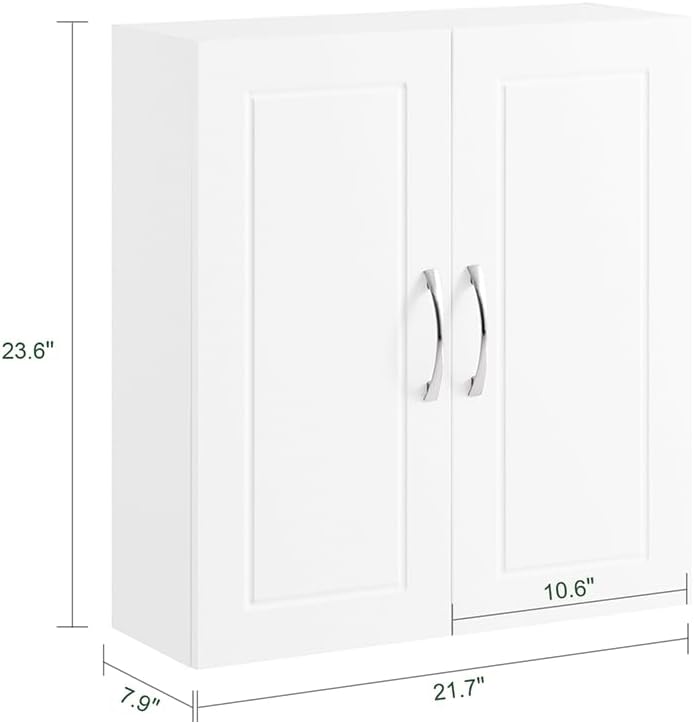
Image: Dimensional drawing of the cabinet, showing height (23.6"), width (21.7"), and depth (7.9").
9. Warranty & Support
9.1. Warranty Information
SoBuy products are manufactured to high-quality standards. For specific warranty details regarding your FRG231-T-W cabinet, please refer to the warranty card included with your purchase or visit the official SoBuy website. Typically, warranties cover manufacturing defects under normal use.
9.2. Customer Support
If you have any questions, require assistance with assembly, or need to report missing/damaged parts, please contact SoBuy customer support. Have your model number (FRG231-T-W) and purchase information ready when contacting support.
- Website: Visit the SoBuy Store on Amazon (for general product information)
- Contact: Refer to your product packaging or the SoBuy official website for direct customer service contact methods (email, phone).