
1. Introduction
This manual provides instructions for the safe and effective use of your ETENWOLF L1 Rechargeable LED Flashlight. Please read this manual thoroughly before operating the device and retain it for future reference.
The ETENWOLF L1 is designed for versatility, featuring multiple light modes, adjustable brightness, and a durable, water-resistant construction. It is equipped with a rechargeable battery for convenience.
2. Product Overview
2.1 Package Contents
- ETENWOLF L1 Flashlight (2 units if 2-pack purchased)
- USB Charging Cable
- Decorative Stickers
2.2 Flashlight Features
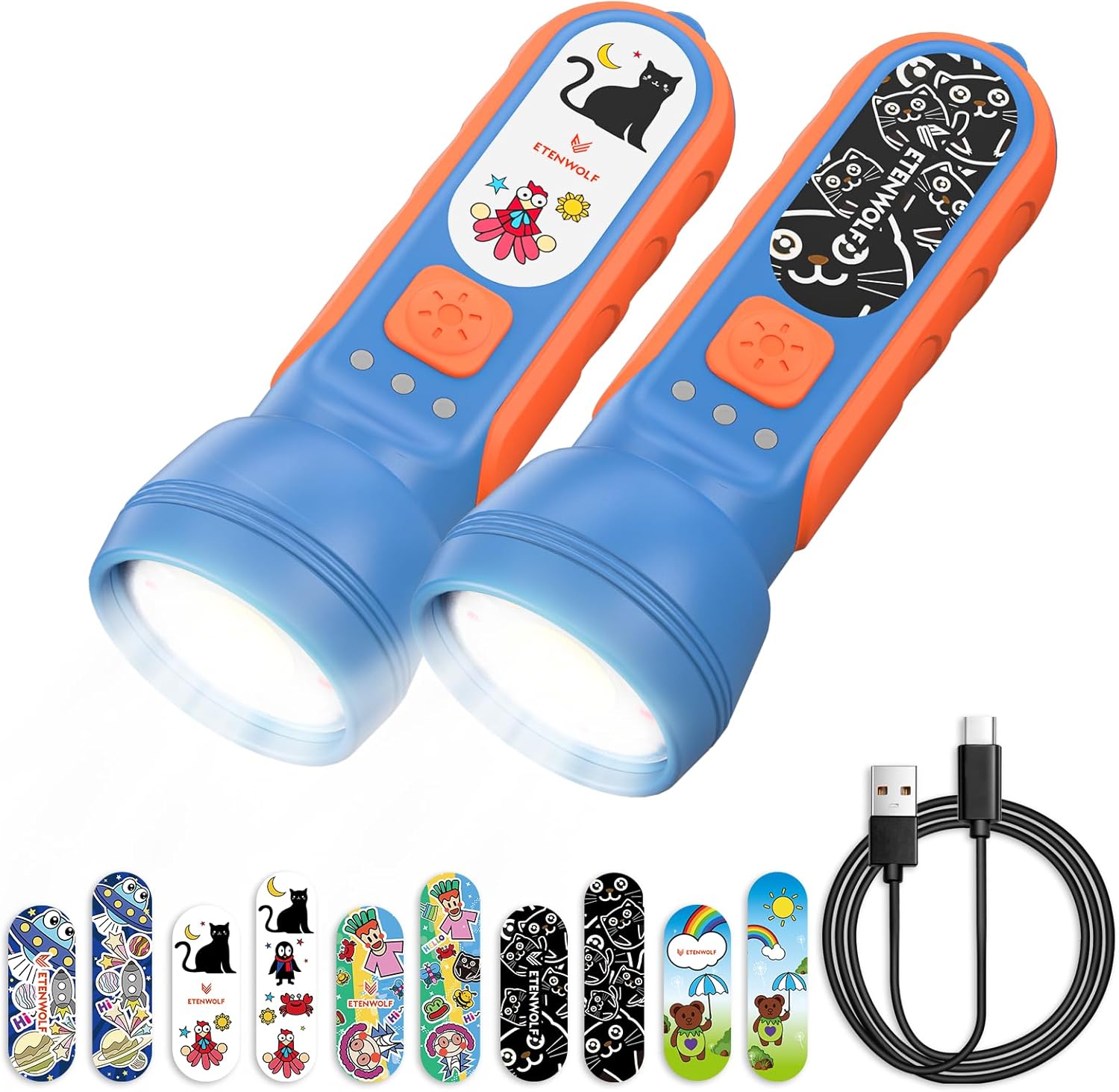
Image: ETENWOLF L1 Flashlight, USB-C cable, and included decorative stickers.
- Soft Silicone Handle: Provides a comfortable and secure grip.
- Durable Construction: Designed for wear resistance.
- IPX5 Water Resistance: Protects against splashes and water jets.
- 6 Light Modes: High, Soft, Focused, Red, Green, and SOS.
- Stepless Brightness Adjustment: Allows fine-tuning of light intensity in all modes.
- USB-C Rechargeable: Built-in 1500mAh battery.
- Battery Indicator Light: Displays remaining power.
- Portable Lanyard: For easy carrying.
3. Setup
- Unpack: Carefully remove the flashlight and all accessories from the packaging.
- Inspect: Check the flashlight and accessories for any signs of damage. If any damage is found, do not use the product and contact customer support.
- Initial Charge: For optimal performance, fully charge the flashlight before its first use. Refer to Section 4 for charging instructions.
4. Charging
4.1 Charging Procedure

Image: The flashlight being charged via its USB-C port.
- Locate the USB-C charging port on the flashlight.
- Connect the provided USB charging cable to the flashlight's USB-C port.
- Plug the other end of the USB cable into a compatible USB power source (e.g., wall adapter, computer USB port, power bank).
- The battery indicator lights will show the charging status. When fully charged, the indicator will typically show a solid light or turn off, depending on the model.
- A full charge provides approximately 4 hours of bright light or up to 20 hours on dim settings.
4.2 Battery Indicator
The flashlight is equipped with an indicator light to display the battery's charge level. Refer to the product's specific indicator behavior for details (e.g., blinking while charging, solid when full, different colors for charge levels).

Image: Illustration of the flashlight's battery runtime, showing 20 hours on dim and 4 hours on bright settings.
5. Operation
5.1 Power On/Off
Press and hold the power button for approximately 1-2 seconds to turn the flashlight ON or OFF.
5.2 Changing Light Modes

Image: Visual representation of the six distinct light modes available on the flashlight.
With the flashlight ON, short press the power button to cycle through the 6 available light modes:
- High: Maximum brightness for general illumination.
- Soft: A gentler light for close-range tasks or reading.
- Focused: A concentrated beam for distance.
- Red: Preserves night vision.
- Green: Useful for specific outdoor activities or signaling.
- SOS: Flashing signal for emergency situations.
5.3 Adjustable Brightness (Stepless Dimming)

Image: The flashlight's stepless dimming capability, showing a range from minimum to maximum brightness.
In any light mode, press and hold the power button (after the initial power-on press) to adjust the brightness continuously. Release the button when the desired brightness level is reached. The flashlight will remember the last brightness setting for each mode.
6. Customization with Stickers

Image: Examples of the flashlight customized with various decorative stickers.
The ETENWOLF L1 flashlight includes a set of decorative stickers for personalization. To apply:
- Ensure the flashlight surface is clean and dry.
- Carefully peel a sticker from its backing.
- Align the sticker with the designated area on the flashlight's body.
- Press firmly to ensure proper adhesion.
- Stickers can be removed and reapplied if desired, though repeated removal may reduce adhesion.
7. Maintenance
7.1 Cleaning
Wipe the flashlight with a soft, damp cloth. Do not use abrasive cleaners or solvents, as these may damage the surface or internal components. Ensure the charging port cover is securely closed before cleaning to maintain water resistance.
7.2 Storage
Store the flashlight in a cool, dry place away from direct sunlight and extreme temperatures. If storing for an extended period, charge the battery to approximately 50% every 3-6 months to prolong battery life.
7.3 Water Resistance

Image: The flashlight enduring water splashes, highlighting its IPX5 water-resistant design.
The flashlight has an IPX5 water resistance rating, meaning it is protected against low-pressure water jets from any direction. It is not designed for submersion in water. Ensure the USB-C port cover is fully sealed to maintain water resistance.
8. Troubleshooting
| Problem | Possible Cause | Solution |
|---|---|---|
| Flashlight does not turn on. | Battery is depleted. | Charge the flashlight using the provided USB cable. |
| Flashlight does not charge. | Charging cable or power source is faulty. | Try a different USB cable or power adapter. Ensure the cable is fully inserted. |
| Light output is dim or inconsistent. | Low battery or incorrect brightness setting. | Charge the flashlight. Adjust brightness using the stepless dimming feature. |
| Flashlight turns off unexpectedly. | Battery is low. | Recharge the flashlight. |
If you encounter issues not listed here, or if the problem persists after attempting the solutions, please contact ETENWOLF customer support.
9. Specifications
| Model Number | L1 |
| Light Source Type | LED |
| White Brightness | Up to 360 Lumens |
| Battery Capacity | 1500mAh Lithium Ion |
| Runtime | 4 hours (bright) to 20 hours (dim) |
| Charging Port | USB-C |
| Water Resistance | IPX5 |
| Material | Plastic, Silicone |
| Dimensions (D x W x H) | 1.73" x 1.73" x 4.92" |
| Weight | 0.22 Kilograms (7.8 ounces) |
10. Safety Information
- Do not look directly into the LED light when it is on, as this may cause temporary vision impairment.
- Keep the flashlight away from extreme heat sources or open flames.
- Do not attempt to disassemble or modify the flashlight. This will void the warranty and may cause damage or injury.
- Use only the provided USB cable or a certified equivalent for charging.
- Keep out of reach of very young children without adult supervision, especially during charging.
- Dispose of the product and its battery responsibly according to local regulations.
11. Warranty and Support
ETENWOLF provides a two-year quality after-sales service for this product. If you have any questions, concerns, or require assistance with your ETENWOLF L1 Flashlight, please contact our customer support team. Our professional team is available to assist you promptly.
For support, please refer to the contact information provided with your purchase or visit the official ETENWOLF website.