
HAIZHIHUI FG2001B-A-WHITE
Fitdays Smart Body Fat Scale User Manual
Model: FG2001B-A-WHITE
Brand: HAIZHIHUI
1. Introduction
This manual provides essential information for the proper use and maintenance of your Fitdays Smart Body Fat Scale (Model FG2001B-A-WHITE). Please read this manual thoroughly before using the device to ensure accurate measurements and safe operation. This scale utilizes advanced 8-electrode Bioelectrical Impedance Analysis (BIA) technology to provide comprehensive body composition data.
2. Product Overview
2.1 Key Features
- Advanced 8-Electrode BIA Technology: Measures body composition in five segments (limbs and torso) for enhanced precision compared to 4-electrode scales.
- Full-Color LED Display: A large 4.1x2.46-inch display on the retractable handle shows weight and 6 essential body composition metrics directly on the screen.
- Comprehensive Body Metrics: Provides over 20 body composition metrics, including BMI, body fat percentage, muscle mass, bone mass, body water, and more.
- Smart App Integration: Connects via Bluetooth to the Starfit app (compatible with Apple Health, Google Fit, and Fitbit) for detailed tracking, analysis, and professional reports.
- Multi-User Support: Supports up to 24 user profiles, automatically recognizing individuals.
- Eco-Friendly Charging: Features a Type-C charging method, eliminating the need for disposable batteries. A 2-hour charge provides approximately 3 months of use.
- Durable Design: Constructed with a durable tempered glass platform, stable base cover, and large silicone anti-slip feet for safety and longevity.
2.2 What's in the Box
- 1 x Fitdays 8-Electrode Electronic Scale
- 1 x Instruction Manual
2.3 Product Components

Image: The Fitdays Smart Body Fat Scale, featuring its main unit, retractable handle with display, and examples of its companion app on a smartphone and data display on a smartwatch.

Image: Detailed views highlighting the scale's LED backlight display, durable tempered glass platform, stable base cover, and large silicone anti-slip feet.
3. Setup
3.1 Initial Charging
- Locate the Type-C charging port on the scale.
- Connect the scale to a power source using a standard Type-C charging cable (not included).
- Allow the scale to charge for approximately 2 hours for a full charge. The display may indicate charging status.
3.2 App Installation and Pairing
- Download the "Starfit" app from your smartphone's app store (Apple App Store or Google Play Store).
- Ensure Bluetooth is enabled on your smartphone.
- Open the Starfit app and follow the on-screen instructions to create a user profile.
- Step onto the scale briefly to activate it. The scale's display should light up.
- Within the app, search for and select your Fitdays scale to pair. Once paired, your measurements will automatically sync to the app.
4. Operating Instructions
4.1 Measurement Procedure

Image: A visual guide demonstrating the four steps for accurate body composition measurement using the scale.
- Place the scale on a hard, flat surface. Avoid carpets or uneven flooring.
- Step onto the scale with dry, bare feet, ensuring your feet are positioned on the four electrode pads.
- Grasp the retractable handle with your thumbs on the thumb electrodes and other fingers on the four-finger electrodes. Keep your arms at a 30-45 degree angle to your legs, away from your body. Maintain a stable posture.
- Wait for the measurement to complete. Your weight and other key metrics will display on the handle's screen. After measurement, place the handle back into its designated slot on the scale. Open the app to sync data.
4.2 Proper Measuring Posture
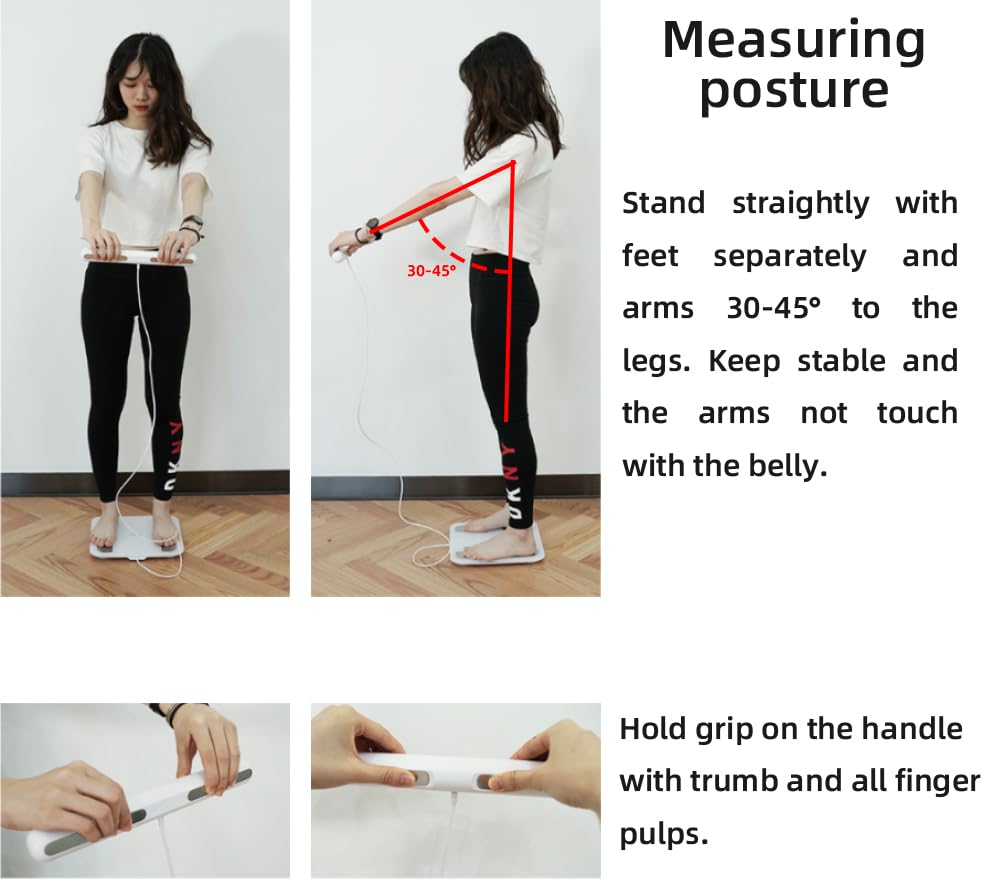
Image: Visual instructions for maintaining the correct posture during measurement, including foot placement and arm angle (30-45 degrees) while holding the handle.
For accurate results, stand straight with your feet slightly apart and your arms held at a 30-45 degree angle from your body. Ensure the handle does not touch your belly. Hold the grip firmly with your thumbs and all finger pulps on the electrodes.
4.3 Understanding the Display

Image: The scale's display showing real-time body data such as Body Fat Percentage, BMI, Skeletal Muscle Percentage, and Visceral Fat Index, along with trend indicators.
The full-color LED display on the handle provides immediate feedback on your weight and up to 6 essential body composition metrics. These typically include weight, body fat percentage, BMI, and others, allowing for quick assessment without needing to open the app immediately.
5. App Integration and Data Tracking
5.1 Starfit App Features

Image: A user standing on the scale, with a smartphone showing the Starfit app's detailed body analysis report, including options to share or download the report.
- Detailed Metrics: View all 20+ body composition metrics in detail.
- Progress Tracking: Monitor data changes over day, week, month, and year with intuitive graphs.
- Professional Reports: Generate printable professional body composition analysis reports.
- Data Synchronization: Seamlessly sync data with Apple Health, Google Fit, and Fitbit.
- Family Sharing: Manage up to 24 user profiles within the app.

Image: The Fitdays app interface displaying comprehensive body reports and its compatibility with various popular fitness tracking platforms.
5.2 Segmental Analysis

Image: A visual representation of the scale's precise segmental analysis, detailing body composition for specific parts like the left arm, left leg, right arm, and trunk.
The 8-electrode technology allows for precise segmental analysis, providing detailed insights into the body composition of individual limbs and the torso. This feature helps in understanding muscle distribution and fat accumulation across different body parts.
6. Maintenance
6.1 Cleaning
- Wipe the scale surface with a soft, damp cloth.
- Do not use abrasive cleaners or immerse the scale in water.
- Keep the electrode pads clean and dry for accurate measurements.
6.2 Storage
- Store the scale in a cool, dry place.
- Avoid placing heavy objects on the scale when not in use.
7. Troubleshooting
7.1 Inaccurate Readings
- Ensure the scale is placed on a hard, flat surface. Carpets or uneven floors can affect accuracy.
- Make sure your feet are bare, dry, and making full contact with all electrode pads.
- Verify that the handle is held correctly, with thumbs and fingers on the electrodes, and arms are not touching the body.
- Check if the scale needs recharging. Low battery can sometimes affect performance.
- Recalibrate the scale by stepping on it briefly, then stepping off, and waiting for it to display '0.0' before taking a measurement.
7.2 Scale Not Turning On
- Ensure the scale is charged. Connect it to a Type-C charger for at least 30 minutes.
- Step firmly on the scale to activate it.
7.3 App Connectivity Issues
- Ensure Bluetooth is enabled on your smartphone and the scale is within range.
- Restart the Starfit app and try pairing again.
- Check if the app is updated to the latest version.
- If issues persist, try unpairing and re-pairing the scale in the app's settings.
8. Specifications
| Feature | Detail |
|---|---|
| Model Number | FG2001B-A-WHITE |
| Brand | HAIZHIHUI |
| Weight Limit | 400 Pounds (approx. 181 kg) |
| Display Type | Full-Color LED on Retractable Handle |
| Electrodes | 8 (4 foot, 4 hand) |
| Power Source | Rechargeable (Type-C) |
| Battery Life | Approx. 3 months on a 2-hour charge |
| Connectivity | Bluetooth |
| App Compatibility | Starfit App (Apple Health, Google Fit, Fitbit) |
| Recommended Uses | Adults |
| Package Dimensions | 16.5 x 13.58 x 2.13 inches |
| Item Weight | 4.98 Pounds |
9. Safety Information
- Do not use this device if you have a pacemaker or other implanted medical device.
- Pregnant women should consult their doctor before using this scale, as BIA measurements may not be accurate.
- The scale's surface can be slippery when wet. Ensure the surface is dry before stepping on.
- Do not jump on the scale or use it for purposes other than body composition measurement.
- Keep out of reach of children.
- This scale is intended for household use only and should not be used for medical diagnosis or treatment.
10. Warranty and Support
For warranty information and customer support, please refer to the documentation included with your product packaging or visit the official HAIZHIHUI website. Typically, warranty details cover manufacturing defects for a specified period from the date of purchase.
If you encounter any issues not covered in this manual, please contact HAIZHIHUI customer service for assistance.
Ask a question about this manual
Ask about setup, troubleshooting, compatibility, parts, safety, or missing instructions. Manuals+ will review the question and use this page’s manual context to help answer it.